
dstack is an open-source orchestration engine for running AI workloads on any cloud or on-premises.


Project description




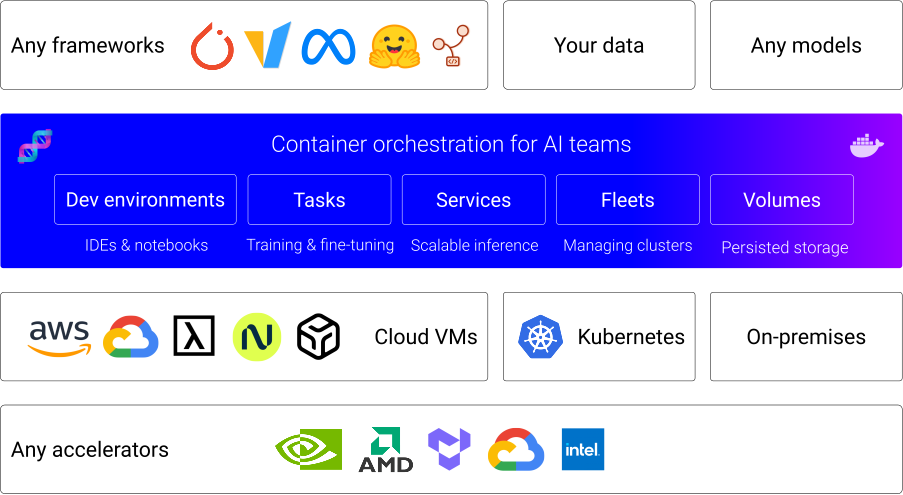
dstack is a unified control plane for GPU provisioning and orchestration that works with any GPU cloud, Kubernetes, or on-prem clusters.
It streamlines development, training, and inference, and is compatible with any hardware, open-source tools, and frameworks.
Accelerators
dstack supports NVIDIA, AMD, Google TPU, and Tenstorrent accelerators out of the box.
Latest news ✨
- [2026/04] dstack 0.20.17: PD disaggregation, Kubernetes volumes
- [2026/04] dstack 0.20.16: Performance, SSH proxy
- [2026/03] dstack 0.20.13: Exports, Templates
- [2026/02] dstack 0.20.12: Crusoe
- [2026/02] dstack 0.20.8: Skills
- [2025/12] dstack 0.20.0: Fleet-first UX, Events, and more
How does it work?
Launch the server
Before using
dstackthrough CLI or API, set up adstackserver. If you already have a runningdstackserver, you only need to install the CLI.
To orchestrate compute across GPU clouds or Kubernetes clusters, you need to configure backends.
When using
dstackwith on-prem servers, backend configuration isn’t required. Simply create SSH fleets once the server is up.
The server can be installed on Linux, macOS, and Windows (via WSL 2). It requires Git and OpenSSH.
$ uv tool install "dstack[all]" -U
$ dstack server

Applying ~/.dstack/server/config.yml...

The admin token is "bbae0f28-d3dd-4820-bf61-8f4bb40815da"
The server is running at http://127.0.0.1:3000/
For more details on server configuration options, see the Server deployment guide.
Install the CLI
If the CLI is not installed with the server
Once the server is up, you can access it via the dstack CLI.
The CLI can be installed on Linux, macOS, and Windows. It requires Git and OpenSSH.
$ uv tool install dstack -U
To point the CLI to the dstack server, configure it
with the server address, user token, and project name:
$ dstack project add \
    --name main \
    --url http://127.0.0.1:3000 \
    --token bbae0f28-d3dd-4820-bf61-8f4bb40815da

Configuration is updated at ~/.dstack/config.yml
Install agent skills
Install dstack skills to help AI agents use the CLI and edit configuration files.
$ npx skills add dstackai/dstack
AI agents like Claude, Codex, and Cursor can now create and manage fleets and submit workloads on your behalf.
Define configurations
dstack supports the following configurations:
- Fleets — for managing cloud and on-prem clusters
- Dev environments — for interactive development using a desktop IDE
- Tasks — for scheduling jobs (incl. distributed jobs) or running web apps
- Services — for deployment of models and web apps (with auto-scaling and authorization)
- Volumes — for managing persisted volumes
Configuration can be defined as YAML files within your repo.
Apply configurations
Apply the configuration via the dstack apply CLI command, a programmatic API, or through AI agent skills.
dstack automatically manages provisioning, job queuing, auto-scaling, networking, volumes, run failures,
out-of-capacity errors, port-forwarding, and more — across clouds and on-prem clusters.
Useful links
For additional information, see the following links:
Contributing
You're very welcome to contribute to dstack.
Learn more about how to contribute to the project at CONTRIBUTING.md.
License
Release history Release notifications | RSS feed


Download files
Download the file for your platform. If you're not sure which to choose, learn more about installing packages.
Source Distribution
Built Distribution
Filter files by name, interpreter, ABI, and platform.
If you're not sure about the file name format, learn more about wheel file names.
Copy a direct link to the current filters
File details
Details for the file dstack-0.20.21.tar.gz.
File metadata
- Download URL: dstack-0.20.21.tar.gz
- Upload date:
- Size: 47.5 MB
- Tags: Source
- Uploaded using Trusted Publishing? No
- Uploaded via: uv/0.11.15 {"installer":{"name":"uv","version":"0.11.15","subcommand":["publish"]},"python":null,"implementation":{"name":null,"version":null},"distro":{"name":"Ubuntu","version":"24.04","id":"noble","libc":null},"system":{"name":null,"release":null},"cpu":null,"openssl_version":null,"setuptools_version":null,"rustc_version":null,"ci":true}
File hashes
| Algorithm | Hash digest | |
|---|---|---|
| SHA256 |
918ed717b2dbbd1767a1c2502d42349ae9b7ee82cea451df232eac0469a62bba
|
|
| MD5 |
66784d81a6cf78ac7fa022066712d438
|
|
| BLAKE2b-256 |
a0bd97d6e99f5d4ecf343db1970816892a7ee970d7e3ca74bdb2b46ab826dccf
|
File details
Details for the file dstack-0.20.21-py3-none-any.whl.
File metadata
- Download URL: dstack-0.20.21-py3-none-any.whl
- Upload date:
- Size: 16.4 MB
- Tags: Python 3
- Uploaded using Trusted Publishing? No
- Uploaded via: uv/0.11.15 {"installer":{"name":"uv","version":"0.11.15","subcommand":["publish"]},"python":null,"implementation":{"name":null,"version":null},"distro":{"name":"Ubuntu","version":"24.04","id":"noble","libc":null},"system":{"name":null,"release":null},"cpu":null,"openssl_version":null,"setuptools_version":null,"rustc_version":null,"ci":true}
File hashes
| Algorithm | Hash digest | |
|---|---|---|
| SHA256 |
3589c9642004a23dbcdc9c3da97a56e3a3eb6ed4f5ed02bd4deb2fa9ae0da74e
|
|
| MD5 |
bfd19f5c59fb977bfae495d8ca0ba199
|
|
| BLAKE2b-256 |
cf94e76cd4f0e766dee2d2ce8b8a9b0a822bd0271fdca286798ef68d7c16b612
|






