
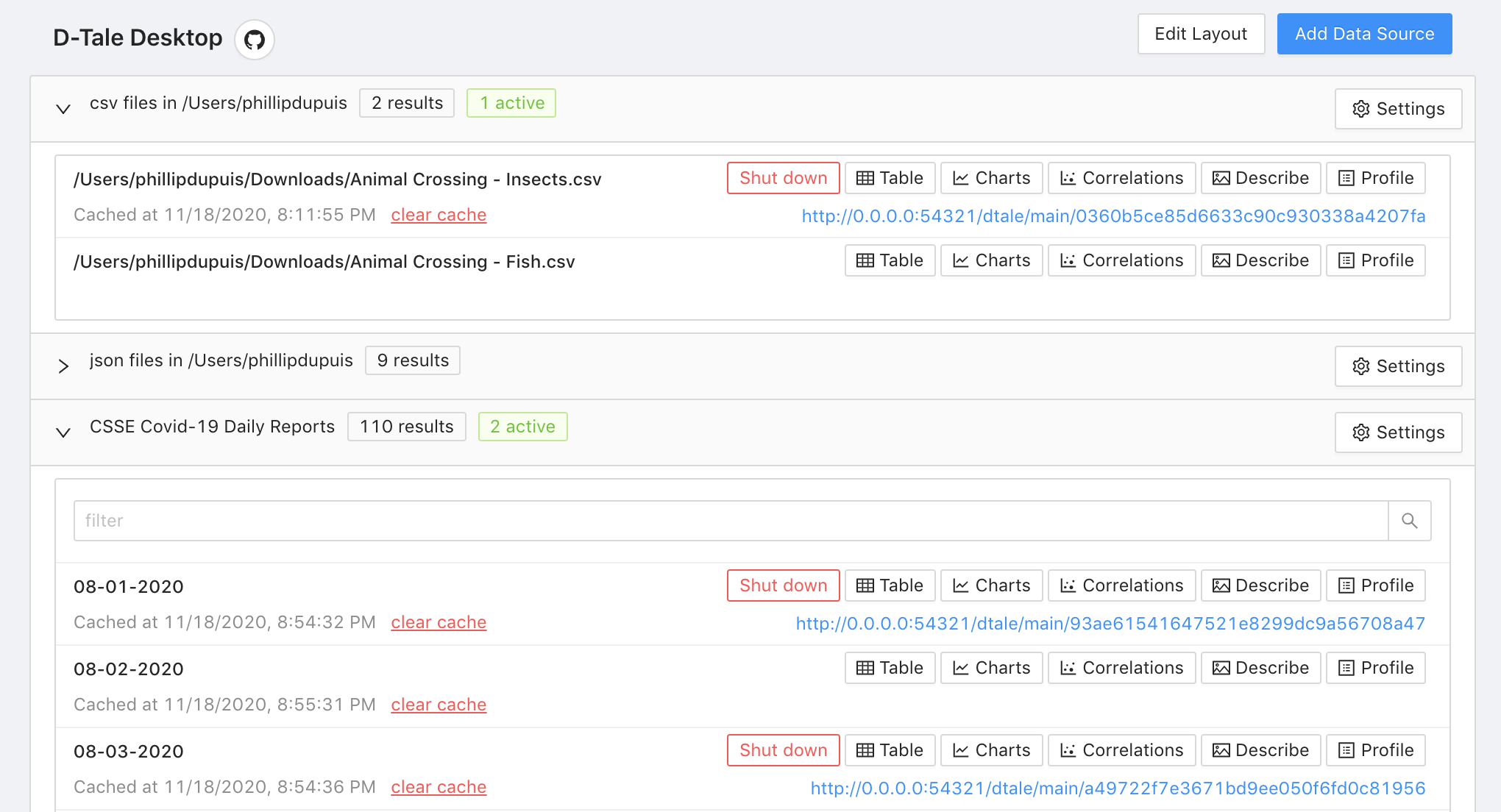
An interface for saving python scripts as permanent D-Tale launch points.


Getting started
Installation
$ pip install dtaledesktop
Running it from the command line:
$ dtaledesktop
Running it from a python script:
import dtale_desktop

dtale_desktop.run()
Motivation
dtaledesktop simplifies the process of fetching data, cleaning/transforming it, and then performing exploratory data analysis. With dtaledesktop, that entire process is condensed into a single click.
It does this by providing a dashboard GUI, and any python code which returns a pandas DataFrame can be saved to the dashboard as a widget. Users can then execute that code and explore the DataFrame in dtale or pandas-profiling by simply clicking one of the widget buttons. The code associated with that widget can also be edited directly from the dashboard, and upon doing so the dashboard is updated in real-time.
Here's a simple example of using this workflow:
- launch
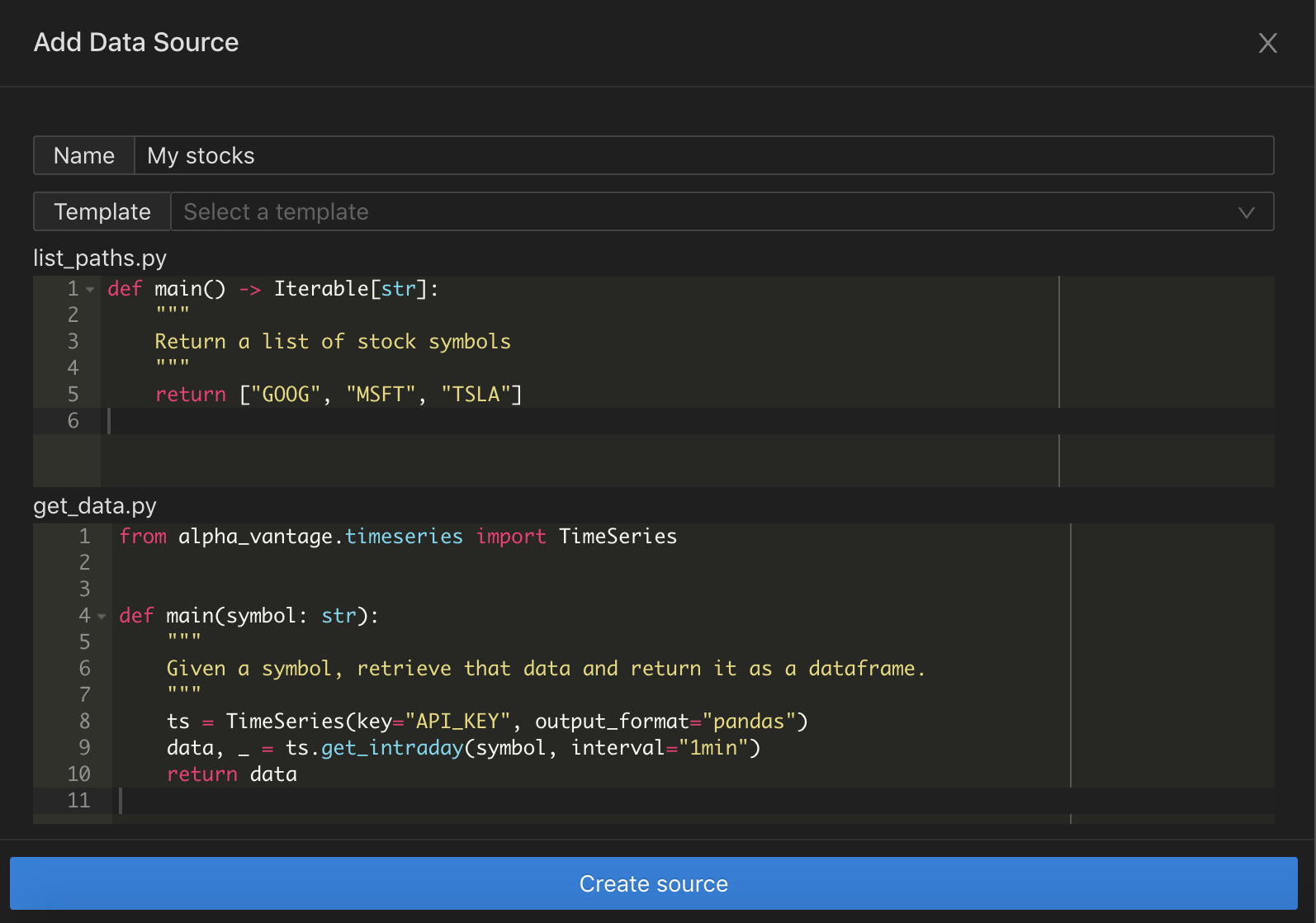
dtaledesktopfrom a terminal. The dashboard automatically opens up in your web browser. - click the 'Add Data Source' button, fill out the form like so, and click save:
- and bam! You now have a new 'Stocks' section on your dashboard. It will be there every time you launch dtaledesktop, and the python code can be edited directly from the dashboard:
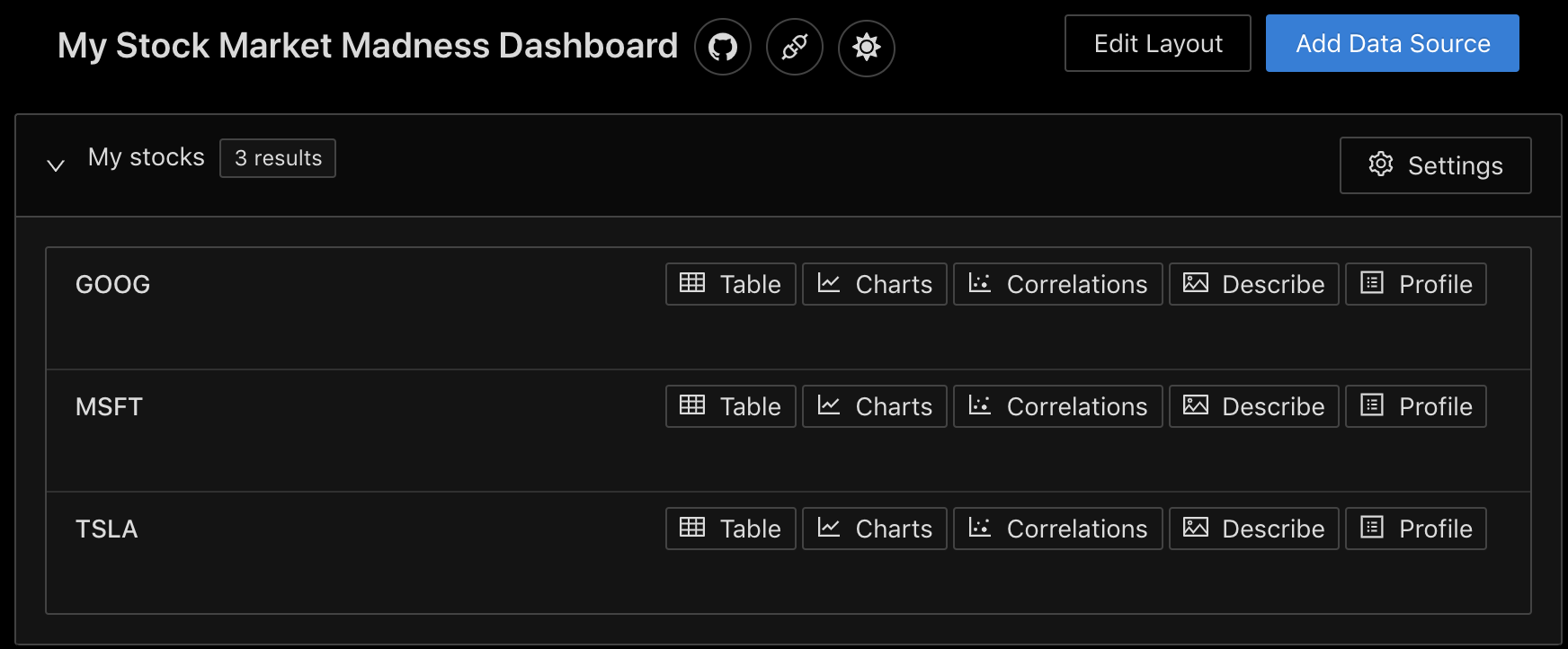
If at some point you decide you want to watch Apple too, all you need to do is click the "Settings" button and add "AAPL" to the list of stock symbols. It will immediately appear in the dashboard below TSLA.
How it works
The front end is written with react, using a mixture of ant-design and styled-components.
The back end is written in python, and it actually consists of TWO apps which listen on separate ports. The main one is an asynchronous FastAPI application, and it responsible for communicating with the dashboard, interacting with the file system, and executing user-defined code for fetching/transforming data. It is able to do this by saving the submitted code as persistent files and then using importlib.util to build and then import the resulting modules. The second app is for running dtale instances, and it is a synchronous flask application.
Developers/Contributing
First, you'll want to clone the repo and install the python dependencies:
$ git clone https://github.com/phillipdupuis/dtale-desktop.git
$ cd dtale-desktop
$ python setup.py develop
Then you'll need to install the javascript dependencies and build the react app:
$ cd dtale_desktop/frontend
$ npm install
$ npm run build
And now you should be able to launch it like so:
$ python dtale_desktop/app.py
If you want to modify the front-end, do the following:
- Launch the python app in the normal way
- Change the "proxy" setting in
frontend/package.jsonto point at the host/port the python app is running on. npm startto launch the react app. It will run on a different port, but will proxy unknown requests to the python app.
Settings
Disabling features:
| Environment Variable | Description |
|---|---|
| DTALEDESKTOP_DISABLE_ADD_DATA_SOURCES | "true" if the "Add Data Source" button should not be shown. |
| DTALEDESKTOP_DISABLE_EDIT_DATA_SOURCES | "true" if editing existing data sources should not be allowed. |
| DTALEDESKTOP_DISABLE_EDIT_LAYOUT | "true" if users should not be allowed to edit what sources are visible or what order they're in. |
| DTALEDESKTOP_DISABLE_PROFILE_REPORTS | "true" if the "Profile" option (which builds a pandas_profiling report) should not be shown. This is resource-intensive and currently a bit buggy. |
| DTALEDESKTOP_DISABLE_OPEN_BROWSER | "true" if browser should not open upon startup |
| DTALEDESKTOP_DISABLE_DTALE_CELL_EDITS | "true" if editing cells in dtale should be disabled. |
Routing requests:
| Environment Variable | Description |
|---|---|
| DTALEDESKTOP_HOST | host it will run on |
| DTALEDESKTOP_PORT | port the main application will use |
| DTALEDESKTOP_DTALE_PORT | port the dtale application will use |
| DTALEDESKTOP_ROOT_URL | allows you to override how urls are built, which can be useful if you're running it as a service (ie not locally) |
| DTALEDESKTOP_DTALE_ROOT_URL | added in order to support running dtaledesktop in k8s - by using different domain names for the main app and the dtale app, the ingress controller can use that (domain name) to determine which port requests should be sent to. |
| DTALEDESKTOP_ENABLE_WEBSOCKET_CONNECTIONS | "true" if real-time updates should be pushed to clients via websocket connection. This is only useful/necessary if you are running it as a service and multiple users can access it simultaneously. |
Loaders/file storage:
| Environment Variable | Description |
|---|---|
| DTALEDESKTOP_ROOT_DIR | the location where all persistent data (loaders, cached data, etc.) will be stored. By default this is ~/.dtaledesktop |
| DTALEDESKTOP_ADDITIONAL_LOADERS_DIRS | comma-separated list of directory paths that should be scanned for data sources upon startup |
| DTALEDESKTOP_EXCLUDE_DEFAULT_LOADERS | "true" if the default loaders should not be included in the list of data sources. These are the loaders which look for json, csv, and excel files in your home directory. |
1 maintainer

Metadata
1 maintainer
Release files for dtaledesktop 0.1.3
For a detailed explanation of source distributions (sdists) and built distributions (wheels), please see the package formats documentation.
Source distribution (sdist)
| File | Size | Uploaded | Provenance | Actions |
|---|---|---|---|---|
| dtaledesktop-0.1.3.tar.gz | 2.3 MB | Without provenance | Details for dtaledesktop-0.1.3.tar.gz |
Built distributions (wheels)
| File | Interpreter | ABI | Platform | Actions Reset |
|---|---|---|---|---|
| dtaledesktop-0.1.3-py3.8.egg | Legacy Egg format | - | - | Details for dtaledesktop-0.1.3-py3.8.egg |
| dtaledesktop-0.1.3-py3-none-any.whl | Python 3 | none | any | Details for dtaledesktop-0.1.3-py3-none-any.whl |
Total release size: 7.1 MB
Release files / dtaledesktop-0.1.3.tar.gz
| Download URL | dtaledesktop-0.1.3.tar.gz |
|---|---|
| Size | 2.3 MB |
| Tags | Source |
|
SHA-256 checksum How to use checksums |
ef42faf1c1209be012c6ca6e13ac4d8a875423a92538668e692bff289da4a7e9
|
|
BLAKE2b-256 checksum How to use checksums |
85053ea07a3231f083086986c03dca523e6eebe3c7657e11e35191d9a1bfa985
|
| Upload date | |
|
Uploaded using Trusted Publishing? What is trusted publishing? |
No |
| Uploaded via |
twine/3.2.0 pkginfo/1.6.0 requests/2.24.0 setuptools/50.3.2 requests-toolbelt/0.9.1 tqdm/4.50.2 CPython/3.8.6
|
Release files / dtaledesktop-0.1.3-py3.8.egg
| Download URL | dtaledesktop-0.1.3-py3.8.egg |
|---|---|
| Size | 2.4 MB |
| Tags | Egg |
|
SHA-256 checksum How to use checksums |
ba7d6a906ac72ecb72c6e811e9790ed223c342304f28b79b6f734a1bdb1a1d3c
|
|
BLAKE2b-256 checksum How to use checksums |
cdbaa1a9636e21cf171603c4a7a22ed94160611f67ea1ddea9b0d6e66dc4d238
|
| Upload date | |
|
Uploaded using Trusted Publishing? What is trusted publishing? |
No |
| Uploaded via |
twine/3.2.0 pkginfo/1.6.0 requests/2.24.0 setuptools/50.3.2 requests-toolbelt/0.9.1 tqdm/4.50.2 CPython/3.8.6
|
Release files / dtaledesktop-0.1.3-py3-none-any.whl
| Download URL | dtaledesktop-0.1.3-py3-none-any.whl |
|---|---|
| Size | 2.4 MB |
| Tags | Python 3 |
|
SHA-256 checksum How to use checksums |
cb8d37466060b7d95a3101bf4d62a91723733c99753fb28745e7650987a357c7
|
|
BLAKE2b-256 checksum How to use checksums |
54319a5987216b2f5edef746d74b470364c72b683311baabf288a5d5c6e34d88
|
| Upload date | |
|
Uploaded using Trusted Publishing? What is trusted publishing? |
No |
| Uploaded via |
twine/3.2.0 pkginfo/1.6.0 requests/2.24.0 setuptools/50.3.2 requests-toolbelt/0.9.1 tqdm/4.50.2 CPython/3.8.6
|
Security for dtaledesktop 0.1.3
Provenance
Provenance describes where a file came from. On PyPI, provenance is shared via attestations, which provide a verifiable record of the build or publishing details. View details, limitations and caveats.
No provenance found
None of the files in this release were uploaded with provenance metadata.
A note on package security
PyPI is a repository for distributing packages, not a service for auditing them. While third-party security researchers and our staff do their best to detect and remove malicious packages, PyPI cannot guarantee the quality, security or suitability of any given package.
To learn more about protecting yourself from malicious actors, visit our package security documentation.














