
dtxWiki
Give your AI the knowledge you've already built.
Website · Documentation · PyPI · 한국어
dtxWiki connects your notes, source materials, and decisions in a knowledge base that you and your AI tools can use together. Keep your reasoning and references within reach, and build on them when the next task begins.
Write and connect Markdown pages in Context, organize reference materials in Library, and connect supported AI apps through MCP (Model Context Protocol). They can find, read, and update the same knowledge you work with, within the access you grant.
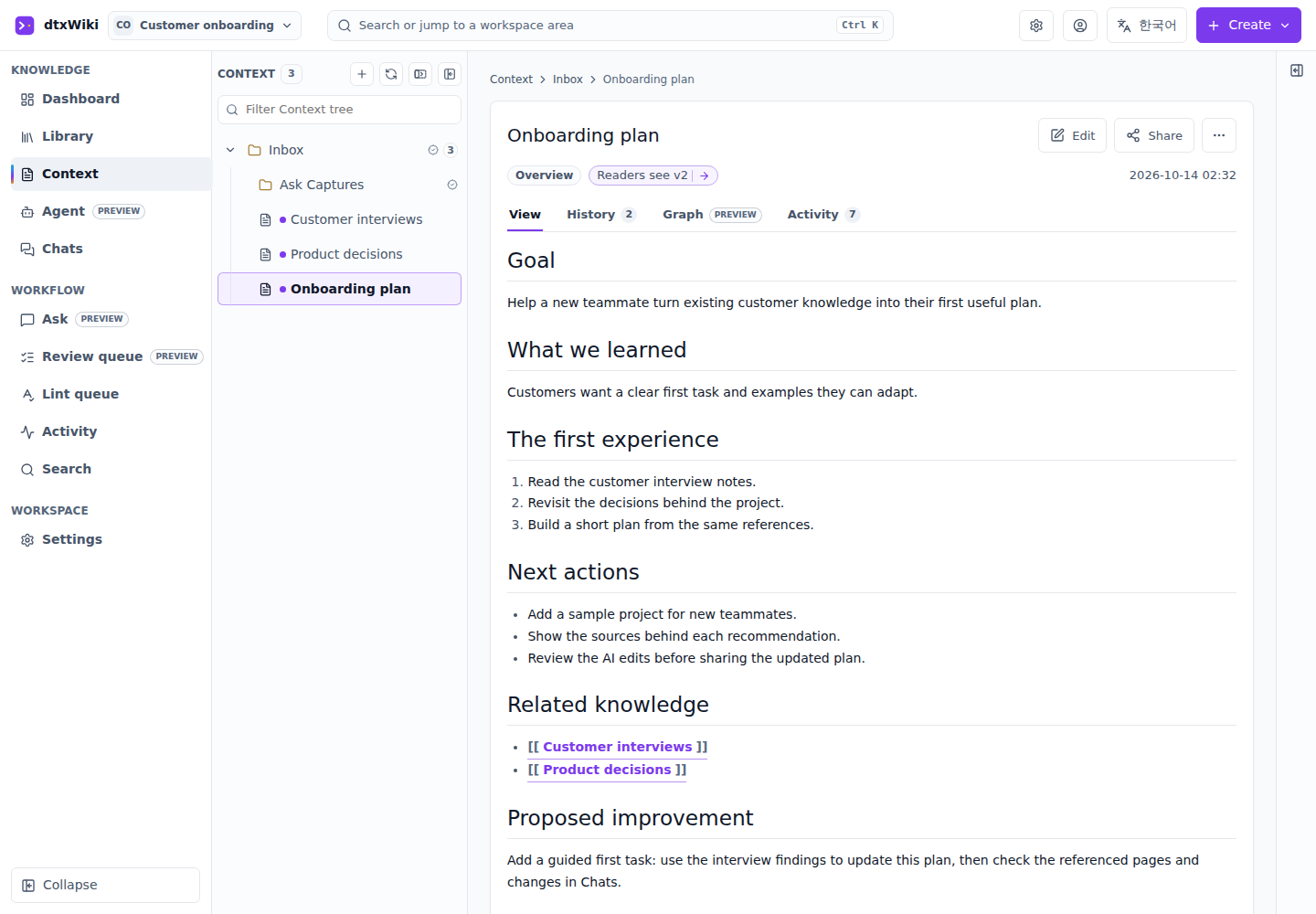
Context preview: an actual dtxWiki screen with sample project content.
Less explaining, more building
- Reuse the background you've already prepared. Keep research, requirements, and earlier decisions available across tasks. Ask your connected AI tool to find the relevant context before helping with the next step.
- Keep the reasoning with the result. Connect a plan to the interviews, notes, and decisions behind it. When you return to a project, you can understand how it got there as well as what needs to happen next.
- See what your AI did. Chats shows the searches, reads, and updates performed through dtxWiki's MCP tools. Follow the materials consulted and inspect changes in document history. Chats records tool actions, not full conversations from your AI app.
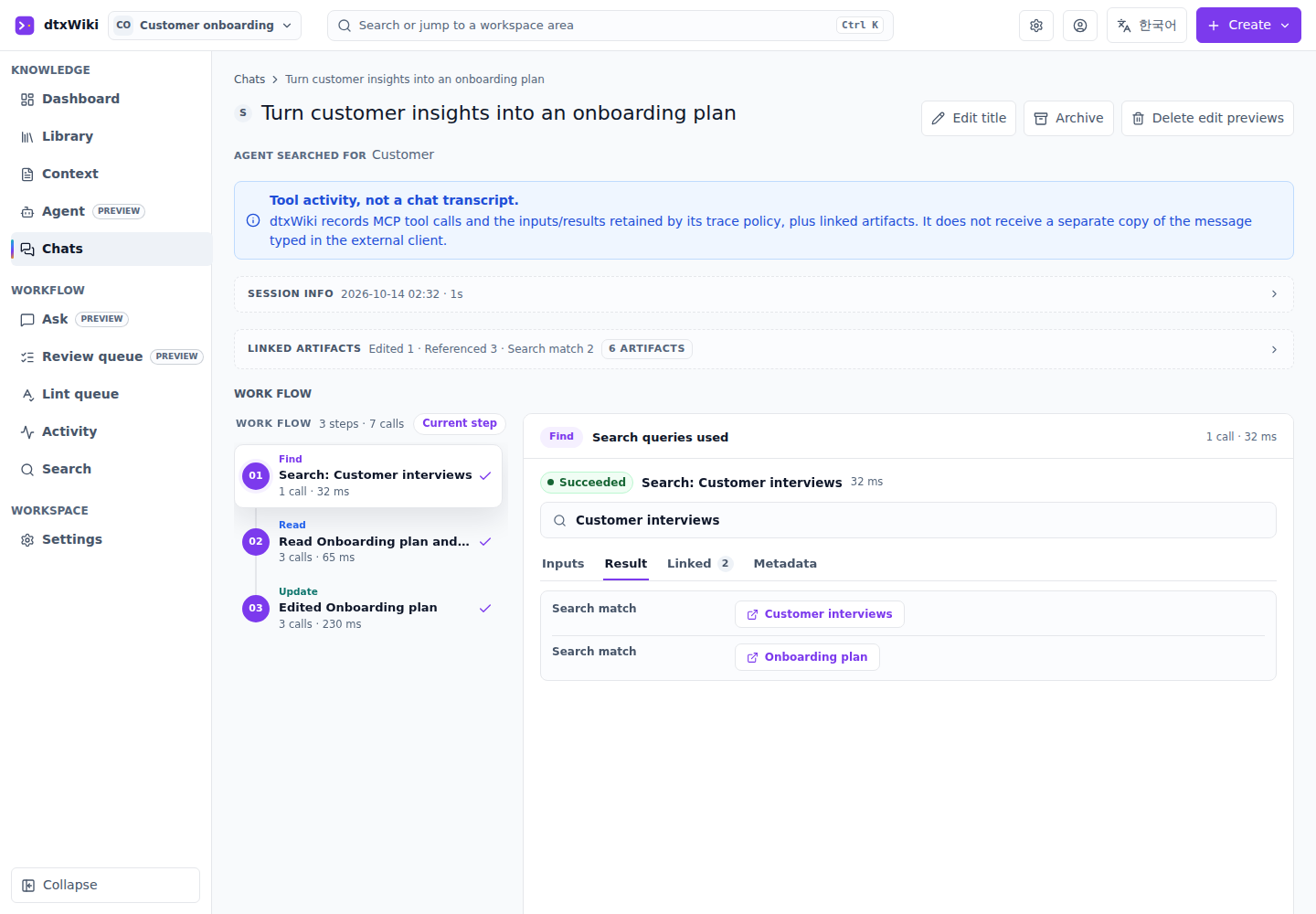
Chats preview: recorded tool activity from a sample MCP session.
Run dtxWiki on your own computer or a server you manage. Share a workspace with teammates and choose what people and connected AI tools can access. You can also write, organize, and search without an AI account or API key.
A practical example: update a product plan
- Keep the background together. Record customer interviews and past decisions, then link them to your product plan.
- Use it in the next task. Ask a connected AI tool to find the relevant feedback and help revise the plan.
- Check the work. Review the tool activity in Chats and the changes in document history. The updated plan and its background stay available for the next iteration.
The same approach works for research reports, team handbooks, course materials, and creative projects.
Get started
You need Python 3.12 or newer and pipx or uv.
Install and start with pipx:
pipx install dtxwiki
dtxwiki
Or with uv:
uv tool install dtxwiki
dtxwiki
Open http://127.0.0.1:21080/ if your browser does not open automatically.
Create an account on your first visit. Keep the command running while using
dtxWiki; press Ctrl+C to stop it.
If you prefer npm, run npx @dtxsuite/dtxwiki. This requires Node.js 22 or newer
and uv or pipx; with pipx, Python 3.12 or newer must also be installed.
Start with one Context page about your current project. Link the background, then connect an AI tool through Settings > Integrations when you want help.
Open the documentation → for installation details, AI connections, team setup, updates, and everyday workflows.
Get involved
Share a use case, suggest an improvement, or report a problem on GitHub. For code and documentation contributions, see the contribution guide.
License
dtxWiki is available under your choice of AGPL-3.0-only OR Elastic-2.0. See LICENSE for the terms, third-party notices, and commercial licensing options.
1 maintainer

Metadata
1 maintainer
Release files for dtxwiki 0.1.2
For a detailed explanation of source distributions (sdists) and built distributions (wheels), please see the package formats documentation.
Source distribution (sdist)
| File | Size | Uploaded | Provenance | |
|---|---|---|---|---|
| dtxwiki-0.1.2.tar.gz | 5.1 MB | With provenance | Details |
Built distribution (wheel)
| File | Interpreter | ABI | Platform | Reset |
|---|---|---|---|---|
| dtxwiki-0.1.2-py3-none-any.whl | Python 3 | none | any | Details |
Total release size: 10.6 MB
Release files / dtxwiki-0.1.2.tar.gz
| Download URL | dtxwiki-0.1.2.tar.gz |
|---|---|
| Size | 5.1 MB |
| Tags | Source |
|
SHA-256 checksum How to use checksums |
3b9e9b68ce33271cd38391e0e1656e2fd3704f97b10d77fc2783570417d68609
|
|
BLAKE2b-256 checksum How to use checksums |
1f5bcc804d492e4a6c4fdc844c3100c9040d9d8b8e894583b5af49d5b2f93201
|
| Upload date | |
|
Uploaded using Trusted Publishing? What is trusted publishing? |
Yes |
| Uploaded via |
twine/7.0.0 CPython/3.13.14
|
Provenance
Provenance describes where a file came from. On PyPI, provenance is shared via attestations, which provide a verifiable record of the build or publishing details. View details, limitations and caveats.


PyPI Publish Attestation
PyPI verified that this artifact, at this checksum, originated from the publisher listed below.
Signed by GitHub Actions, verified by PyPI on Oct 13, 2026.
Transparency logRelease files / dtxwiki-0.1.2-py3-none-any.whl
| Download URL | dtxwiki-0.1.2-py3-none-any.whl |
|---|---|
| Size | 5.5 MB |
| Tags | Python 3 |
|
SHA-256 checksum How to use checksums |
a08780c3f897a7670631e1577516c10060ca974f803fb63ec4378fd9e37575e1
|
|
BLAKE2b-256 checksum How to use checksums |
f1c68ea0c0907ec7b51375459a6c231567734f94e01d46da942b5b3e1c401b4c
|
| Upload date | |
|
Uploaded using Trusted Publishing? What is trusted publishing? |
Yes |
| Uploaded via |
twine/7.0.0 CPython/3.13.14
|
Provenance
Provenance describes where a file came from. On PyPI, provenance is shared via attestations, which provide a verifiable record of the build or publishing details. View details, limitations and caveats.
PyPI Publish Attestation
PyPI verified that this artifact, at this checksum, originated from the publisher listed below.
Signed by GitHub Actions, verified by PyPI on Oct 13, 2026.
Transparency logSecurity for dtxwiki 0.1.2
Provenance
Provenance describes where a file came from. On PyPI, provenance is shared via attestations, which provide a verifiable record of the build or publishing details. View details, limitations and caveats.
Full provenance
All 2 files in this release have been uploaded with provenance metadata.
Attestation for dtxwiki-0.1.2.tar.gz
PyPI Publish Attestation
PyPI verified that this artifact, at this checksum, originated from the publisher listed below.
Signed by GitHub Actions, verified by PyPI on Oct 13, 2026.
Transparency logA note on package security
PyPI is a repository for distributing packages, not a service for auditing them. While third-party security researchers and our staff do their best to detect and remove malicious packages, PyPI cannot guarantee the quality, security or suitability of any given package.













