
Local-first ETL/ELT pipelines that run on DuckDB. CLI, Python API, and MCP server for AI agents.
Verified details
These details have been verified by PyPIProject links
GitHub Statistics
Maintainers

Project description
Duckle
Local-first ETL/ELT pipelines that run on DuckDB. Python builds the plan, DuckDB moves the rows. Your data never leaves the machine.



Build your first pipeline
Paste this into Claude Code, Cursor, or Codex. The agent does the rest.
Run
uvx duckle quickstartto build my first pipeline and run it
Nothing to install first. The agent fetches Duckle and the DuckDB engine on demand, runs a real pipeline, and shows you the rows.
Prefer to drive it yourself:
uvx duckle quickstart      # no install
pip install duckle         # or install it
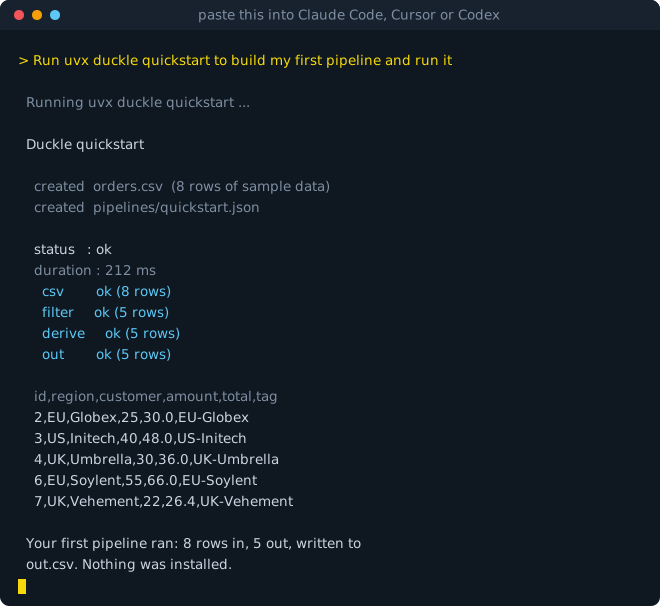
quickstart scaffolds sample data and a pipeline, runs it, and shows you the rows. One command from nothing to a result, because the engine comes with it: a ~20 MB native binary plus the DuckDB CLI. No JVM, no Docker, no server, no account.
Or install it
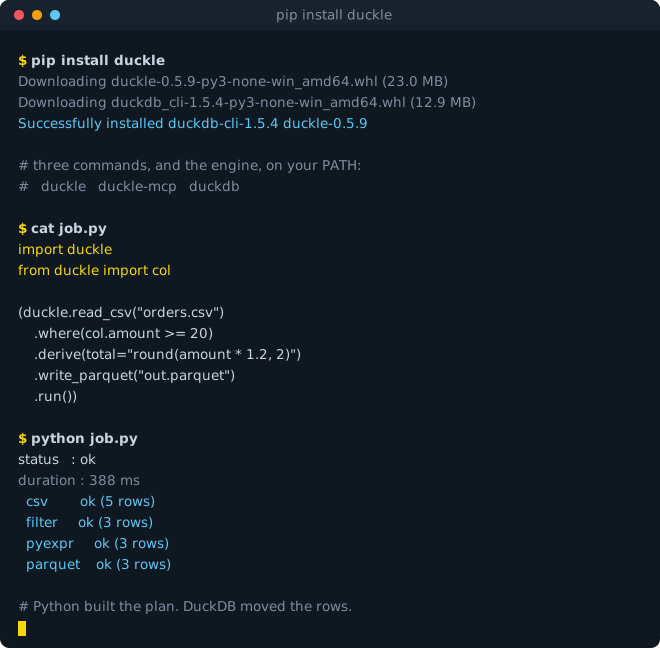
Where uvx is for trying it, pip is for keeping it: a persistent duckle command, duckle-mcp for agents, and import duckle in Python.
No data passes through Python
Every method appends a node to a pipeline graph. Nothing executes until .run(), and then the whole graph is handed to the engine, compiled to SQL, and executed inside DuckDB.
That is the difference from a dataframe library: a billion-row job costs what the SQL costs, because it is SQL. There is no interpreter in the data path, and no to_pandas() escape hatch quietly pulling rows into memory.
import duckle
from duckle import col

(duckle.read_csv("orders.csv")
    .where(col.amount >= 20)
    .derive(total="round(amount * 1.2, 2)", tag="f'{region}-{id}'")
    .write_parquet("out.parquet")
    .run())
Python expressions, compiled to SQL
amount * 1.2, f'{a}-{b}', x if c else y, name.strip().upper() and email is None are translated to vectorized DuckDB SQL at plan time:
.derive(band="'high' if amount > 50 else 'low'")
# CASE WHEN ("amount" > 50) THEN 'high' ELSE 'low' END
An expression with no exact SQL equivalent is rejected with the construct named, never quietly executed somewhere slower. Comprehensions, lambda, indexing and eval are refused by name.
Prefer editor completion over strings? col builds the same tree with real operators, and fragments are reusable:
eu_only = col.region.isin(["EU", "UK"])
p.where(eu_only & (col.amount >= 20))
See exactly what will run, before it runs:
p.explain() # prints the compiled SQL, one block per stage
359 components, not 10 file formats
Component ids map onto attribute paths, so anything in the catalog is reachable:
duckle.src.salesforce(object="Account", authMode="clientCredentials")
duckle.xf.geo.reproject(geomColumn="geom", targetCrs="EPSG:3857")
duckle.snk.salesforce.bulk(operation="upsert", externalIdField="Ext__c")
104 sources, 66 sinks and 138 transforms: Postgres, MySQL, Oracle, SQL Server, Snowflake, Databricks, Teradata, SAP OData, Salesforce (including Bulk API 2.0), Kafka, WebSocket, S3, SFTP, IMAP, LanceDB and more.
duckle.component_ids(contains="salesforce")
duckle.describe("snk.salesforce.bulk")   # settings, and which ones the engine ignores
A CI gate that needs no engine
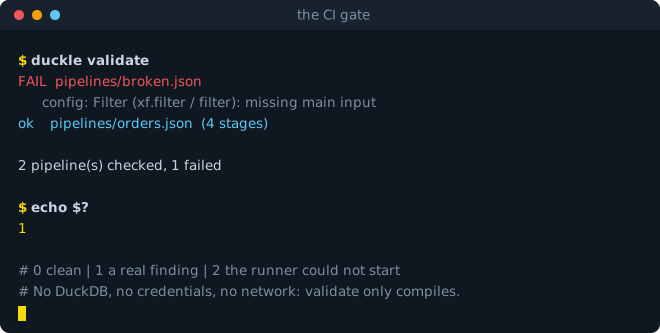
duckle validate compiles every pipeline without opening a source or writing a sink, so it needs no DuckDB, no credentials and no network. Exit codes are stable and safe to gate on:
| code | meaning |
|---|---|
0 |
clean |
1 |
a real finding: a pipeline failed, or did not compile |
2 |
the runner could not start: bad usage, missing engine |
duckle validate --json          # machine-readable, for a build step
duckle --pipeline my.json       # run one
Note: validate does not yet catch every missing required property, so a clean validate is not proof that a run will succeed.
Agent-ready, with nothing installed
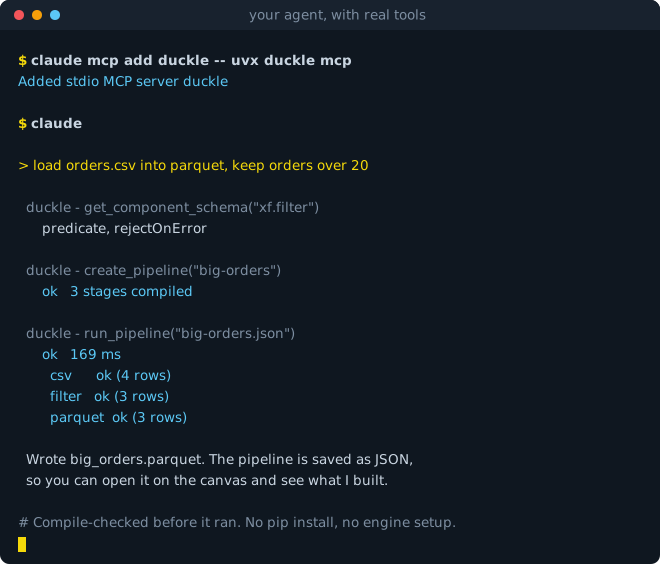
The same package is an MCP server, so an AI agent gets a governed way to work with data instead of a shell. Point Claude Code, Claude Desktop or Cursor at it:
{ "mcpServers": { "duckle": { "command": "uvx", "args": ["duckle", "mcp"] } } }
Or in Claude Code:
claude mcp add duckle -- uvx duckle mcp
That is the whole setup. No pip install, no PATH, no engine to configure: uv fetches the package and the DuckDB engine into a throwaway environment and the server finds it there. If you did pip install duckle, "command": "duckle", "args": ["mcp"] works the same way.
19 tools, including list_components, get_component_schema, create_pipeline, validate_pipeline, run_pipeline, pipeline_lineage, trust_report and schema_drift.
What that buys over letting an agent write a script: it can discover a real connector rather than guess one, compile-check a pipeline before anything executes, run it, and get column-level lineage back. validate_pipeline opens no source and writes no sink, so an agent can check its work without touching your data. The pipeline it produces is the same JSON your desktop canvas opens, so you can inspect what it built.
Code and canvas are the same file
Pipelines are the same JSON the Duckle desktop studio reads. A pipeline written in Python opens on the canvas, and one drawn on the canvas runs from Python:
p.save("pipelines/orders.json")          # opens in the studio
duckle.from_json("pipelines/orders.json").run()
Install notes
duckle depends on duckdb-cli, published by the DuckDB Foundation, so the engine arrives with the install and works offline. To pin your own build instead, set DUCKLE_DUCKDB_BIN.
Wheels ship for Linux, macOS and Windows on x86-64 and arm64. The wheel carries a compiled Rust binary and is Python-version independent (py3-none-<platform>).
Apache-2.0 · GitHub · duckle.org · Issues
Project details
Verified details
These details have been verified by PyPIProject links
GitHub Statistics
Maintainers


Download files
Download the file for your platform. If you're not sure which to choose, learn more about installing packages.
Source Distributions
Built Distributions
Filter files by name, interpreter, ABI, and platform.
If you're not sure about the file name format, learn more about wheel file names.
Copy a direct link to the current filters
File details
Details for the file duckle-0.5.10-py3-none-win_arm64.whl.
File metadata
- Download URL: duckle-0.5.10-py3-none-win_arm64.whl
- Upload date:
- Size: 21.9 MB
- Tags: Python 3, Windows ARM64
- Uploaded using Trusted Publishing? Yes
- Uploaded via: twine/6.1.0 CPython/3.13.14
File hashes
| Algorithm | Hash digest | |
|---|---|---|
| SHA256 |
72957ceb950406a02e44e9b50c0da3bea10faa0f69b8f9517b642ea886d1d0e7
|
|
| MD5 |
de6671c51773a6e25d49a2272592262f
|
|
| BLAKE2b-256 |
f6e7751a6768508e22c039d33cd415e8c41ffc9b79a2bb776d0866d1ec8dcdac
|
Provenance
The following attestation bundles were made for duckle-0.5.10-py3-none-win_arm64.whl:
Publisher:
pypi.yml on slothflowlabs/duckle
-
Statement:
-
Statement type:
https://in-toto.io/Statement/v1 -
Predicate type:
https://docs.pypi.org/attestations/publish/v1 -
Subject name:
duckle-0.5.10-py3-none-win_arm64.whl -
Subject digest:
72957ceb950406a02e44e9b50c0da3bea10faa0f69b8f9517b642ea886d1d0e7 - Sigstore transparency entry: 2217998635
- Sigstore integration time:
-
Permalink:
slothflowlabs/duckle@fb4459e8359d5893264323067f9a3df12d686415 -
Branch / Tag:
refs/heads/main - Owner: https://github.com/slothflowlabs
-
Access:
public
-
Token Issuer:
https://token.actions.githubusercontent.com -
Runner Environment:
github-hosted -
Publication workflow:
pypi.yml@fb4459e8359d5893264323067f9a3df12d686415 -
Trigger Event:
workflow_dispatch
-
Statement type:
File details
Details for the file duckle-0.5.10-py3-none-win_amd64.whl.
File metadata
- Download URL: duckle-0.5.10-py3-none-win_amd64.whl
- Upload date:
- Size: 23.0 MB
- Tags: Python 3, Windows x86-64
- Uploaded using Trusted Publishing? Yes
- Uploaded via: twine/6.1.0 CPython/3.13.14
File hashes
| Algorithm | Hash digest | |
|---|---|---|
| SHA256 |
659565ba11a9e30b0736a07a1260b18b2894e1b0947cea7d220eb662dc27e943
|
|
| MD5 |
47d0e87436639a46bbc05e8369649e60
|
|
| BLAKE2b-256 |
7918eaf02f653cfcd79e0b9a6af6d7cb1e31365401b6a1754896ea4f1dd20355
|
Provenance
The following attestation bundles were made for duckle-0.5.10-py3-none-win_amd64.whl:
Publisher:
pypi.yml on slothflowlabs/duckle
-
Statement:
-
Statement type:
https://in-toto.io/Statement/v1 -
Predicate type:
https://docs.pypi.org/attestations/publish/v1 -
Subject name:
duckle-0.5.10-py3-none-win_amd64.whl -
Subject digest:
659565ba11a9e30b0736a07a1260b18b2894e1b0947cea7d220eb662dc27e943 - Sigstore transparency entry: 2217998733
- Sigstore integration time:
-
Permalink:
slothflowlabs/duckle@fb4459e8359d5893264323067f9a3df12d686415 -
Branch / Tag:
refs/heads/main - Owner: https://github.com/slothflowlabs
-
Access:
public
-
Token Issuer:
https://token.actions.githubusercontent.com -
Runner Environment:
github-hosted -
Publication workflow:
pypi.yml@fb4459e8359d5893264323067f9a3df12d686415 -
Trigger Event:
workflow_dispatch
-
Statement type:
File details
Details for the file duckle-0.5.10-py3-none-manylinux2014_x86_64.manylinux_2_17_x86_64.whl.
File metadata
- Download URL: duckle-0.5.10-py3-none-manylinux2014_x86_64.manylinux_2_17_x86_64.whl
- Upload date:
- Size: 23.2 MB
- Tags: Python 3, manylinux: glibc 2.17+ x86-64
- Uploaded using Trusted Publishing? Yes
- Uploaded via: twine/6.1.0 CPython/3.13.14
File hashes
| Algorithm | Hash digest | |
|---|---|---|
| SHA256 |
7494d60ba0880c43df10994d67e21f736496cc92618b610dced267d5e1dd333f
|
|
| MD5 |
b7d36b93dac16bec20c46a4e39a5913a
|
|
| BLAKE2b-256 |
0645ee3ef23c57263a62f35e87d2e5456b833a95acb7eefd5f53269e3eeec99c
|
Provenance
The following attestation bundles were made for duckle-0.5.10-py3-none-manylinux2014_x86_64.manylinux_2_17_x86_64.whl:
Publisher:
pypi.yml on slothflowlabs/duckle
-
Statement:
-
Statement type:
https://in-toto.io/Statement/v1 -
Predicate type:
https://docs.pypi.org/attestations/publish/v1 -
Subject name:
duckle-0.5.10-py3-none-manylinux2014_x86_64.manylinux_2_17_x86_64.whl -
Subject digest:
7494d60ba0880c43df10994d67e21f736496cc92618b610dced267d5e1dd333f - Sigstore transparency entry: 2217998961
- Sigstore integration time:
-
Permalink:
slothflowlabs/duckle@fb4459e8359d5893264323067f9a3df12d686415 -
Branch / Tag:
refs/heads/main - Owner: https://github.com/slothflowlabs
-
Access:
public
-
Token Issuer:
https://token.actions.githubusercontent.com -
Runner Environment:
github-hosted -
Publication workflow:
pypi.yml@fb4459e8359d5893264323067f9a3df12d686415 -
Trigger Event:
workflow_dispatch
-
Statement type:
File details
Details for the file duckle-0.5.10-py3-none-manylinux2014_aarch64.manylinux_2_17_aarch64.whl.
File metadata
- Download URL: duckle-0.5.10-py3-none-manylinux2014_aarch64.manylinux_2_17_aarch64.whl
- Upload date:
- Size: 22.3 MB
- Tags: Python 3, manylinux: glibc 2.17+ ARM64
- Uploaded using Trusted Publishing? Yes
- Uploaded via: twine/6.1.0 CPython/3.13.14
File hashes
| Algorithm | Hash digest | |
|---|---|---|
| SHA256 |
731a42493f7704797447dc0e9e0054ee866a79c4736ea8560ef8bad00ce52c70
|
|
| MD5 |
2d456f79c461890bc4ceb9c7bc8e5c30
|
|
| BLAKE2b-256 |
df9a60e92c829412cf052667ff81c6baf008111e1165035e50692980b2152fc7
|
Provenance
The following attestation bundles were made for duckle-0.5.10-py3-none-manylinux2014_aarch64.manylinux_2_17_aarch64.whl:
Publisher:
pypi.yml on slothflowlabs/duckle
-
Statement:
-
Statement type:
https://in-toto.io/Statement/v1 -
Predicate type:
https://docs.pypi.org/attestations/publish/v1 -
Subject name:
duckle-0.5.10-py3-none-manylinux2014_aarch64.manylinux_2_17_aarch64.whl -
Subject digest:
731a42493f7704797447dc0e9e0054ee866a79c4736ea8560ef8bad00ce52c70 - Sigstore transparency entry: 2217998882
- Sigstore integration time:
-
Permalink:
slothflowlabs/duckle@fb4459e8359d5893264323067f9a3df12d686415 -
Branch / Tag:
refs/heads/main - Owner: https://github.com/slothflowlabs
-
Access:
public
-
Token Issuer:
https://token.actions.githubusercontent.com -
Runner Environment:
github-hosted -
Publication workflow:
pypi.yml@fb4459e8359d5893264323067f9a3df12d686415 -
Trigger Event:
workflow_dispatch
-
Statement type:
File details
Details for the file duckle-0.5.10-py3-none-macosx_11_0_x86_64.whl.
File metadata
- Download URL: duckle-0.5.10-py3-none-macosx_11_0_x86_64.whl
- Upload date:
- Size: 21.3 MB
- Tags: Python 3, macOS 11.0+ x86-64
- Uploaded using Trusted Publishing? Yes
- Uploaded via: twine/6.1.0 CPython/3.13.14
File hashes
| Algorithm | Hash digest | |
|---|---|---|
| SHA256 |
36d114656e37cf3e2d38ff06899d3175efee18e8bba58befa07648e901139c4d
|
|
| MD5 |
1815aa6476b0b12643e0e647887154cc
|
|
| BLAKE2b-256 |
6a49037de7eb7c272d84b6579db87959ad8e8e246bf6a21564218aa7be652877
|
Provenance
The following attestation bundles were made for duckle-0.5.10-py3-none-macosx_11_0_x86_64.whl:
Publisher:
pypi.yml on slothflowlabs/duckle
-
Statement:
-
Statement type:
https://in-toto.io/Statement/v1 -
Predicate type:
https://docs.pypi.org/attestations/publish/v1 -
Subject name:
duckle-0.5.10-py3-none-macosx_11_0_x86_64.whl -
Subject digest:
36d114656e37cf3e2d38ff06899d3175efee18e8bba58befa07648e901139c4d - Sigstore transparency entry: 2217998800
- Sigstore integration time:
-
Permalink:
slothflowlabs/duckle@fb4459e8359d5893264323067f9a3df12d686415 -
Branch / Tag:
refs/heads/main - Owner: https://github.com/slothflowlabs
-
Access:
public
-
Token Issuer:
https://token.actions.githubusercontent.com -
Runner Environment:
github-hosted -
Publication workflow:
pypi.yml@fb4459e8359d5893264323067f9a3df12d686415 -
Trigger Event:
workflow_dispatch
-
Statement type:
File details
Details for the file duckle-0.5.10-py3-none-macosx_11_0_arm64.whl.
File metadata
- Download URL: duckle-0.5.10-py3-none-macosx_11_0_arm64.whl
- Upload date:
- Size: 20.5 MB
- Tags: Python 3, macOS 11.0+ ARM64
- Uploaded using Trusted Publishing? Yes
- Uploaded via: twine/6.1.0 CPython/3.13.14
File hashes
| Algorithm | Hash digest | |
|---|---|---|
| SHA256 |
d8ddcf6837e9580e645aa573cd458542920c73df139b91203a5f3a033eff3855
|
|
| MD5 |
fae51f3e5f8f1895a98dd29af06b6581
|
|
| BLAKE2b-256 |
e6b5fab43f99ee4cf28da5dedc5c200d2b5e770775e1783006478e08dd3cc2db
|
Provenance
The following attestation bundles were made for duckle-0.5.10-py3-none-macosx_11_0_arm64.whl:
Publisher:
pypi.yml on slothflowlabs/duckle
-
Statement:
-
Statement type:
https://in-toto.io/Statement/v1 -
Predicate type:
https://docs.pypi.org/attestations/publish/v1 -
Subject name:
duckle-0.5.10-py3-none-macosx_11_0_arm64.whl -
Subject digest:
d8ddcf6837e9580e645aa573cd458542920c73df139b91203a5f3a033eff3855 - Sigstore transparency entry: 2217999051
- Sigstore integration time:
-
Permalink:
slothflowlabs/duckle@fb4459e8359d5893264323067f9a3df12d686415 -
Branch / Tag:
refs/heads/main - Owner: https://github.com/slothflowlabs
-
Access:
public
-
Token Issuer:
https://token.actions.githubusercontent.com -
Runner Environment:
github-hosted -
Publication workflow:
pypi.yml@fb4459e8359d5893264323067f9a3df12d686415 -
Trigger Event:
workflow_dispatch
-
Statement type:






