
A dbt adapter that runs SQL in DuckDB and materializes to Delta Lake (delta_rs).
Verified details
These details have been verified by PyPIProject links
GitHub Statistics
Maintainers

Project description





Disclaimer: This is a personal project, built and maintained in my own time. It is not affiliated with, endorsed by, or supported by any employer or vendor. No warranty — use it at your own risk.
duckrun runs SQL in DuckDB and reads/writes Delta Lake via delta-rs — locally or on OneLake / S3 / GCS / ADLS. It's just glue: DuckDB executes · delta-rs materializes · Arrow bridges · dbt orchestrates. Two ways to use it:
connect()— a notebook helper to query and write Delta straight from SQL (this page);- a dbt adapter that materializes models as Delta tables.
Concurrent writers are first-class: every write is snapshot-pinned and fails loud rather than silently interleaving.
Install
pip install duckrun
In a Microsoft Fabric notebook, upgrade and restart the kernel (duckrun needs duckdb ≥ 1.5.4,
which is newer than the bundled stable build; it fails loud at connect() otherwise):
!pip install duckrun --upgrade
notebookutils.session.restartPython()
Quickstart — OneLake in a notebook
import duckrun

# Read-only by default — explore a lakehouse safely, no chance of an accidental write.
# Use the workspace + lakehouse GUIDs (friendly names hit an upstream OneLake read bug for now).
conn = duckrun.connect("abfss://<workspace_id>@onelake.dfs.fabric.microsoft.com/<lakehouse_id>/Tables/dbo")

conn.sql("SHOW TABLES").show()
conn.sql("select status, count(*) from orders group by status").show()
df = conn.table("orders").toPandas()          # or .toArrow() for a streaming RecordBatchReader

# Time travel: list the versions, then read one
from duckrun import DeltaTable
DeltaTable.forName(conn, "orders").history()   # newest-first commits: version, timestamp, operation, …
conn.read.format("delta").option("versionAsOf", 0).load(".../Tables/dbo/orders").show()
Need to write? Opt in with read_only=False:
conn = duckrun.connect("abfss://…/Tables/dbo", read_only=False)

# write Delta straight from SQL
conn.sql("select * from orders where amount > 0") \
    .write.mode("overwrite").saveAsTable("clean_orders")

# raw DML routes to delta-rs (insert / update / delete / create table as / alter / drop)
conn.sql("delete from clean_orders where amount = 0")

# upsert — snapshot-pinned automatically, nothing extra to pass
from duckrun import DeltaTable
src = conn.sql("select * from updates")
DeltaTable.forName(conn, "clean_orders").merge(src, "target.id = source.id") \
    .whenMatchedUpdateAll().whenNotMatchedInsertAll().execute()

conn.stop()
Multiple catalogs — attach more lakehouses and read/join across them by three-part name. In
Fabric a Warehouse is just a write-locked Lakehouse, so attach it read_only=True next to a writable
one:
conn.attach("abfss://…/warehouse.Warehouse/Tables", name="warehouse", read_only=True)
conn.attach("/data/reference", name="local")
conn.sql("select * from warehouse.mart.facts f join local.dbo.lookup l on l.id = f.id").show()
Works the same against a local path, s3://, gs://, or az://. Full method map:
Connection API · Spark/Delta coverage ·
live multi-catalog demo.
dbt adapter
duckrun is also a dbt adapter — a thin wrapper around
dbt-duckdb that adds Delta-backed table / incremental
materializations (everything else dbt-duckdb gives you is inherited). Point a profile at a lakehouse
and dbt run:
# ~/.dbt/profiles.yml
my_project:
  outputs:
    dev:
      type: duckrun
      root_path: "abfss://<workspace_id>@onelake.dfs.fabric.microsoft.com/<lakehouse_id>/Tables"
Profiles, materializations, incremental strategies (incl. append_if_unchanged), sources, and
automatic compaction/vacuum are all in docs/dbt-adapter.md.
Building with an AI assistant
duckrun ships a guide so AI coding assistants get the adapter's defaults right (several differ from other dbt adapters). For Claude Code:
/plugin marketplace add djouallah/duckrun
/plugin install duckrun-projects@duckrun
Other assistants read the AGENTS.md at the repo root, which points to the full guide.
None of this is required to use duckrun.
How it works
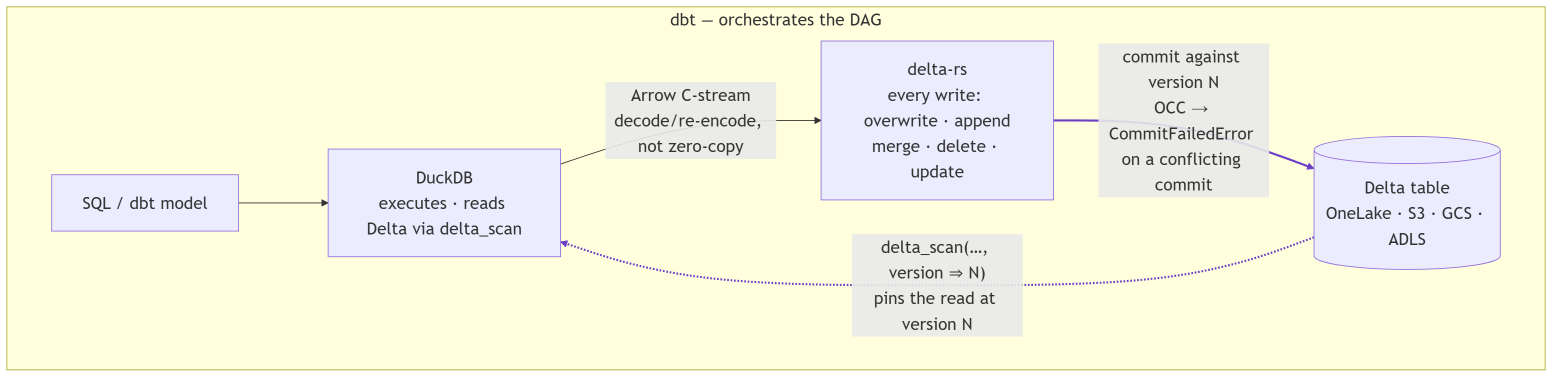
Two engines, split cleanly: DuckDB runs every query and reads Delta through delta_scan views,
delta-rs handles every write, an Arrow C-stream bridges them, and dbt orchestrates on top.
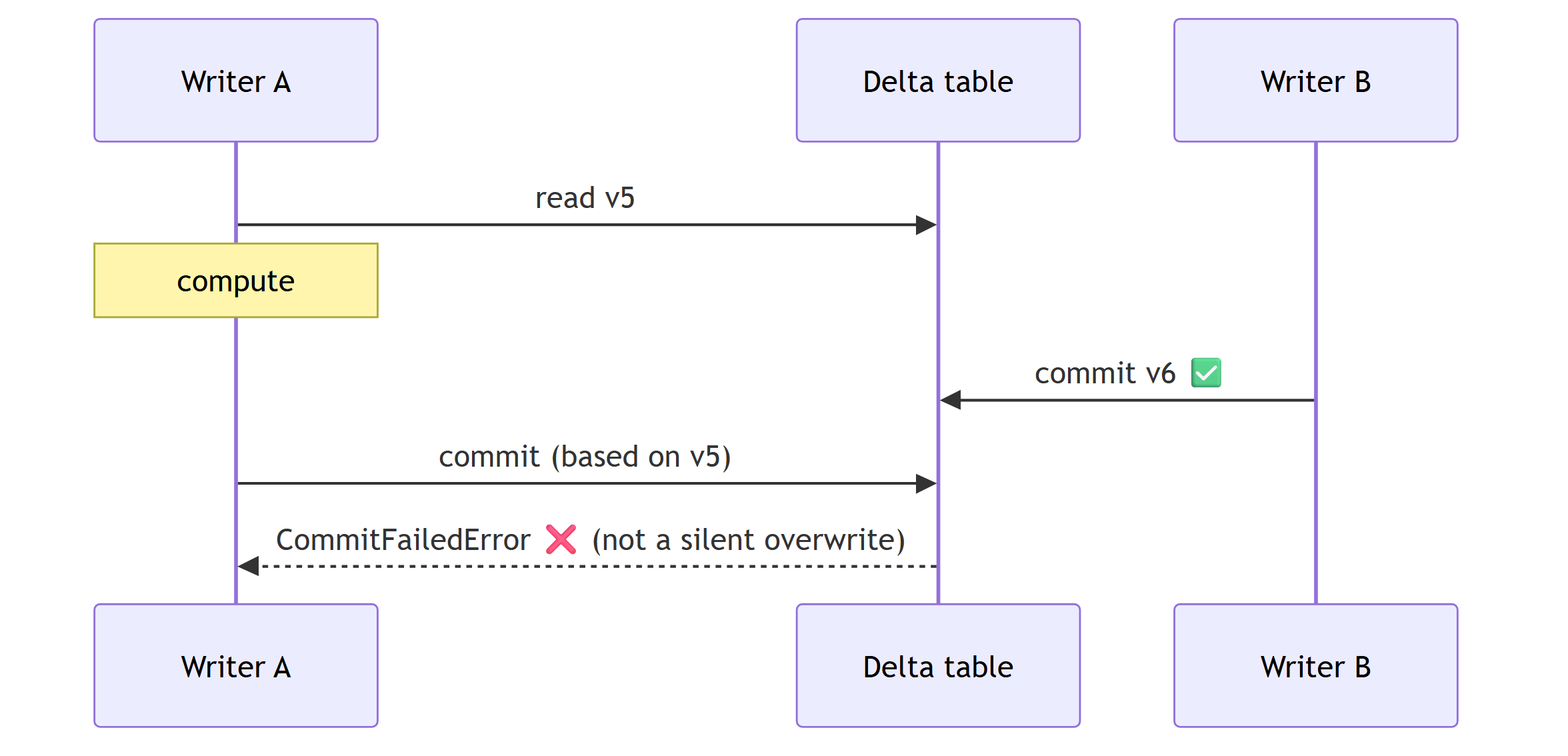
Writes are snapshot-pinned: the read is fixed at delta_scan(…, version => N) and the write commits
against N, so a concurrent commit is rejected with CommitFailedError instead of silently
overwriting a lost update.
More on the design: Design document · Snapshot isolation.
Docs
| Doc | What's in it |
|---|---|
| Connection API | The duckrun.connect() notebook API + the live per-method scorecard. |
| Spark / Delta coverage | What the connect() surface maps to in PySpark / Delta. |
| dbt adapter | Profiles, materializations, incremental strategies, sources, maintenance, limitations. |
| Design document | Why delta-rs (not DuckDB's native Delta writer), why Delta (not Iceberg), why a separate adapter. |
| Snapshot isolation | How a read-modify-write is fenced to the version you read, and how it compares to delta-rs/Spark/SQL Server. |
| dbt adapter conformance | Official dbt-tests-adapter results, regenerated on every push to main. |
| Incremental MERGE benchmark | ~60M-row TPCH merge / append / overwrite scorecard — the release gate. |
License
MIT
Project details
Verified details
These details have been verified by PyPIProject links
GitHub Statistics
Maintainers
Release history Release notifications | RSS feed


Download files
Download the file for your platform. If you're not sure which to choose, learn more about installing packages.
Source Distribution
Built Distribution
Filter files by name, interpreter, ABI, and platform.
If you're not sure about the file name format, learn more about wheel file names.
Copy a direct link to the current filters
File details
Details for the file duckrun-0.3.24.tar.gz.
File metadata
- Download URL: duckrun-0.3.24.tar.gz
- Upload date:
- Size: 99.1 kB
- Tags: Source
- Uploaded using Trusted Publishing? Yes
- Uploaded via: twine/6.1.0 CPython/3.13.12
File hashes
| Algorithm | Hash digest | |
|---|---|---|
| SHA256 |
df946b89b335978b90808042ca80154713c864a2c1239ce5d310bce1f49da37b
|
|
| MD5 |
d8c4a4c2c4b1b2eb83088843850aef58
|
|
| BLAKE2b-256 |
5a2bab069a018891d7aac11bdbdac2cff26a5fdf61904b86fe138f49e4855562
|
Provenance
The following attestation bundles were made for duckrun-0.3.24.tar.gz:
Publisher:
publish.yml on djouallah/duckrun
-
Statement:
-
Statement type:
https://in-toto.io/Statement/v1 -
Predicate type:
https://docs.pypi.org/attestations/publish/v1 -
Subject name:
duckrun-0.3.24.tar.gz -
Subject digest:
df946b89b335978b90808042ca80154713c864a2c1239ce5d310bce1f49da37b - Sigstore transparency entry: 1923027818
- Sigstore integration time:
-
Permalink:
djouallah/duckrun@431e546baab70d73da429dde9c6e1dada70fb1af -
Branch / Tag:
refs/tags/v0.3.24 - Owner: https://github.com/djouallah
-
Access:
public
-
Token Issuer:
https://token.actions.githubusercontent.com -
Runner Environment:
github-hosted -
Publication workflow:
publish.yml@431e546baab70d73da429dde9c6e1dada70fb1af -
Trigger Event:
push
-
Statement type:
File details
Details for the file duckrun-0.3.24-py3-none-any.whl.
File metadata
- Download URL: duckrun-0.3.24-py3-none-any.whl
- Upload date:
- Size: 104.6 kB
- Tags: Python 3
- Uploaded using Trusted Publishing? Yes
- Uploaded via: twine/6.1.0 CPython/3.13.12
File hashes
| Algorithm | Hash digest | |
|---|---|---|
| SHA256 |
9fc463878f3ecac3f67e76b273b1fb8c070a86cc5cbb778a7d40984457f43e89
|
|
| MD5 |
d868f506c3ea8bf8d8adc2e450a7045b
|
|
| BLAKE2b-256 |
d9cec5d5cd9c34d98cd0ccd742cf88362b514737249bf39441a3b5667dbcb462
|
Provenance
The following attestation bundles were made for duckrun-0.3.24-py3-none-any.whl:
Publisher:
publish.yml on djouallah/duckrun
-
Statement:
-
Statement type:
https://in-toto.io/Statement/v1 -
Predicate type:
https://docs.pypi.org/attestations/publish/v1 -
Subject name:
duckrun-0.3.24-py3-none-any.whl -
Subject digest:
9fc463878f3ecac3f67e76b273b1fb8c070a86cc5cbb778a7d40984457f43e89 - Sigstore transparency entry: 1923028183
- Sigstore integration time:
-
Permalink:
djouallah/duckrun@431e546baab70d73da429dde9c6e1dada70fb1af -
Branch / Tag:
refs/tags/v0.3.24 - Owner: https://github.com/djouallah
-
Access:
public
-
Token Issuer:
https://token.actions.githubusercontent.com -
Runner Environment:
github-hosted -
Publication workflow:
publish.yml@431e546baab70d73da429dde9c6e1dada70fb1af -
Trigger Event:
push
-
Statement type:






