
Control Claude Code and Codex CLI from Telegram. Live streaming, sessions, cron jobs, webhooks, Docker sandboxing.
Verified details
These details have been verified by PyPIProject links
GitHub Statistics
Maintainers

Project description

Claude Code, Codex CLI, and Gemini CLI as your Telegram assistant.
Persistent memory. Scheduled tasks. Live streaming. Docker sandboxing.
Uses only official CLIs. Nothing spoofed, nothing proxied.



Quick start · Why ductor? · Features · Prerequisites · How it works · Commands · Docs · Contributing
ductor runs on your machine, uses your existing CLI authentication, and keeps state in plain JSON/Markdown under ~/.ductor/.
You can:
- chat from Telegram with Claude/Codex/Gemini,
- stream responses live into edited Telegram messages,
- run cron jobs and webhooks,
- let heartbeat checks proactively notify you,
- isolate runtime with Docker.
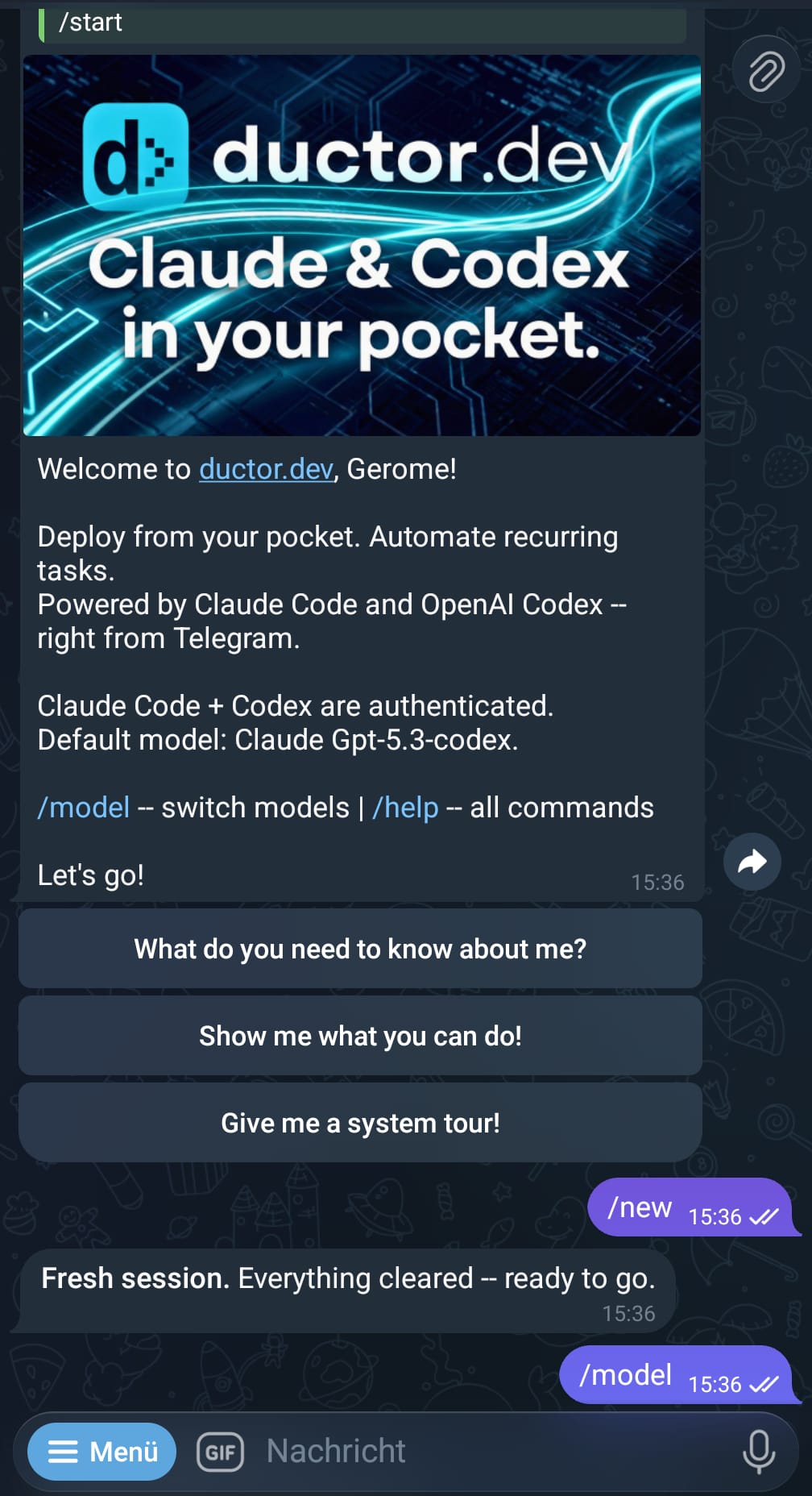
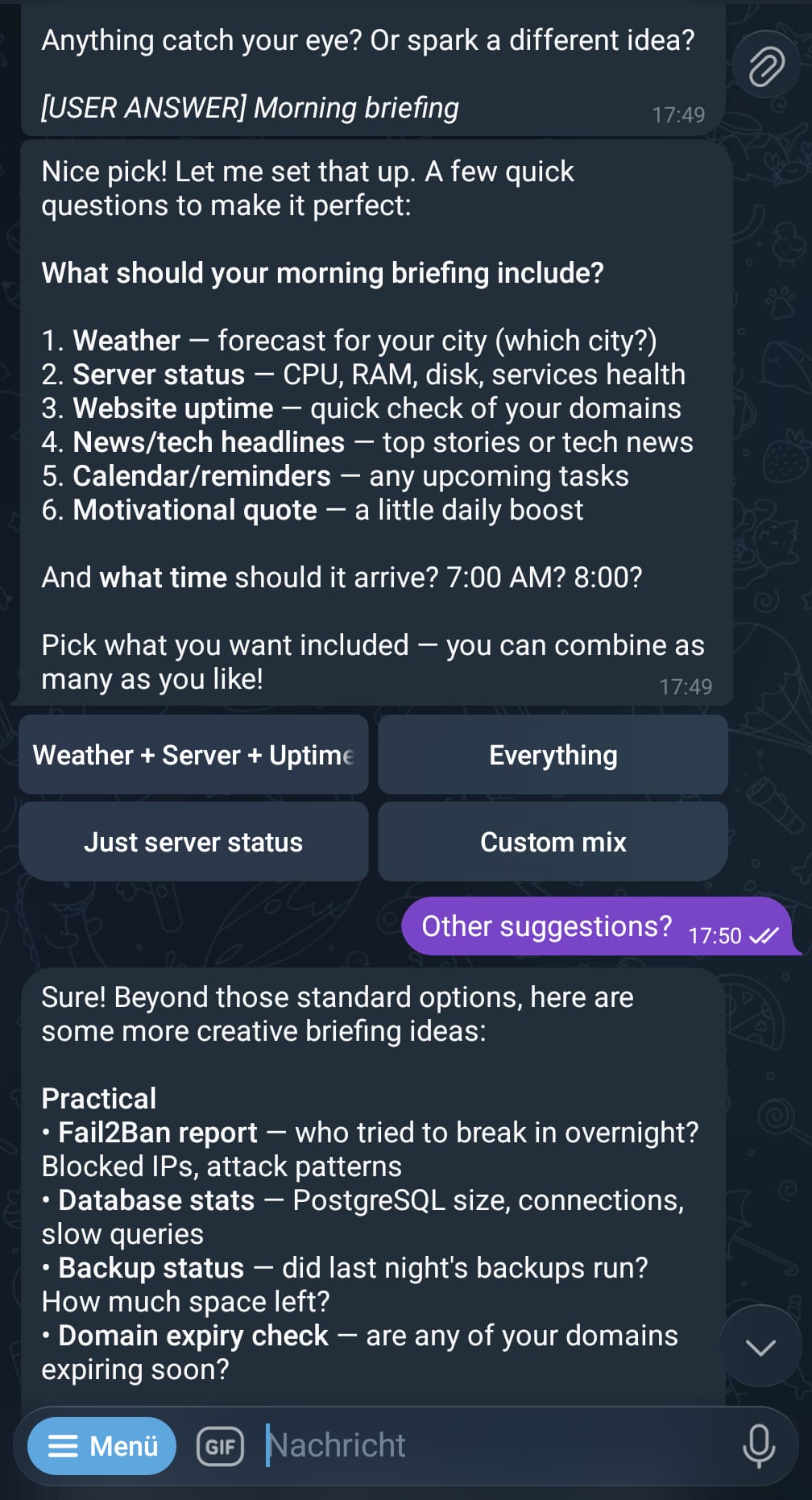
Left: /start screen, right: quick action callbacks
Quick start
pipx install ductor
ductor
The onboarding wizard handles CLI checks, Telegram setup, timezone, optional Docker, and optional background service install.
Why ductor?
ductor executes the real provider CLIs as subprocesses. It does not proxy or spoof provider API calls.
- Official CLIs only (
claude,codex,gemini) - Rule files are plain Markdown (
CLAUDE.md,AGENTS.md,GEMINI.md) - Memory is one Markdown file (
workspace/memory_system/MAINMEMORY.md) - Automation state is JSON (
cron_jobs.json,webhooks.json)
Features
Core
- Real-time streaming with live Telegram edits
- Provider/model switching with
/model(provider sessions are preserved per chat) @modeldirective support (Claude + Gemini IDs/aliases)- Media-aware input flow (text/media handling in Telegram layer)
- Inline callback buttons (
[button:Label]) - Queue tracking with per-message cancel while lock is held
- Telegram forum topic support (
message_thread_idpropagation)
Automation
- Cron jobs: in-process scheduler with timezone support, per-job overrides, quiet hours, dependency queue
- Webhooks:
wake(inject into active chat) andcron_task(isolated task run) modes - Heartbeat: proactive checks in active sessions with cooldown + quiet hours
- Cleanup: daily retention cleanup for
telegram_files/andoutput_to_user/
Infrastructure
- Built-in service manager:
- Linux:
systemd --user - macOS:
launchdLaunch Agent - Windows: Task Scheduler task
- Linux:
- Docker sidecar sandbox support (
Dockerfile.sandbox) - Restart protocol (
EXIT_RESTART = 42) + sentinel-based user notifications - Version/update flow with Telegram
/upgradecallback path
Developer UX
- Auto-onboarding on first run
- Deep-merge config upgrades (new keys auto-added)
- Rich diagnostics (
/diagnose,/status) - Interactive
/cron,/model,/showfilesflows - Cross-tool skill sync (
~/.ductor/workspace/skills,~/.claude/skills,~/.codex/skills,~/.gemini/skills)
Prerequisites
| Requirement | Details |
|---|---|
| Python 3.11+ | python3 --version |
| pipx (recommended) or pip | pip install pipx |
| At least one CLI installed + authenticated | Claude, Codex, or Gemini |
| Telegram Bot Token | from @BotFather |
| Telegram User ID | from @userinfobot |
| Docker (optional) | recommended for sandboxing |
Docker Support Info:
Docker has been thoroughly tested on Linux. I have not yet had the opportunity to thoroughly test the implementation on Windows.
CLI references:
- Claude Code CLI: https://docs.anthropic.com/en/docs/claude-code
- Codex CLI: https://github.com/openai/codex
- Gemini CLI: https://github.com/google-gemini/gemini-cli
Detailed installation: docs/installation.md
Run as a background service
ductor service install
ductor service status
ductor service start
ductor service stop
ductor service logs
ductor service uninstall
Platform details:
- Linux:
~/.config/systemd/user/ductor.service, logs viajournalctl --user -u ductor -f - macOS:
~/Library/LaunchAgents/dev.ductor.plist, log files at~/.ductor/logs/service.log+service.err,ductor service logstails recent lines fromagent.log(fallback newest*.log) - Windows: Task Scheduler task
ductor(10s logon delay), preferspythonw.exe -m ductor_bot,ductor service logstails recent lines fromagent.log(fallback newest*.log)
How it works
You (Telegram)
  -> aiogram (AuthMiddleware + SequentialMiddleware)
  -> TelegramBot handlers
  -> Orchestrator (commands/directives/flows)
  -> CLIService
  -> claude/codex/gemini subprocess
  -> streamed or non-streamed response back to Telegram
Background observers run in the same process:
CronObserverHeartbeatObserverWebhookObserverCleanupObserverCodexCacheObserverGeminiCacheObserverUpdateObserver(only for upgradeable installs:pipx/pip)- rule sync watcher (
CLAUDE.md/AGENTS.md/GEMINI.md) - skill sync watcher
Session behavior (important):
- sessions are chat-scoped,
- provider sessions are isolated per provider bucket,
/newresets only the active provider bucket,- switching back to another provider can resume that provider’s previous session.
Workspace layout
~/.ductor/
  config/config.json
  sessions.json
  cron_jobs.json
  webhooks.json
  CLAUDE.md
  AGENTS.md
  GEMINI.md
  logs/agent.log
  workspace/
    memory_system/MAINMEMORY.md
    cron_tasks/
    skills/
    tools/
      cron_tools/
      webhook_tools/
      telegram_tools/
      user_tools/
    telegram_files/
    output_to_user/
Configuration
Config file: ~/.ductor/config/config.json
Core keys:
| Key | Purpose |
|---|---|
provider / model |
default runtime target |
telegram_token, allowed_user_ids |
Telegram auth + allowlist |
cli_timeout, permission_mode, file_access |
runtime execution behavior |
reasoning_effort |
default Codex reasoning level |
gemini_api_key |
config fallback key for Gemini API-key mode |
docker.* |
sandbox settings |
heartbeat.* |
proactive check settings |
cleanup.* |
daily cleanup settings |
webhooks.* |
webhook server settings |
cli_parameters.claude/codex/gemini |
provider-specific extra args |
Full schema: docs/config.md
Telegram bot commands
| Command | Description |
|---|---|
/start |
Welcome screen with quick actions |
/new |
Reset active provider session for this chat |
/stop |
Abort active run and drain queued messages |
/model |
Interactive model/provider selector |
/status |
Session/provider/auth status |
/memory |
Show persistent memory file |
/cron |
Interactive cron management |
/showfiles |
Browse ~/.ductor/ |
/diagnose |
Runtime diagnostics + cache/log info |
/upgrade |
Check/apply update flow |
/restart |
Restart bot |
/info |
Version + links |
/help |
Command reference |
CLI commands
| Command | Description |
|---|---|
ductor |
Start bot (auto-onboarding if needed) |
ductor onboarding |
Run setup wizard (smart reset if configured) |
ductor reset |
Alias for onboarding |
ductor status |
Runtime status panel |
ductor stop |
Stop bot + optional Docker container |
ductor restart |
Stop and re-exec bot |
ductor upgrade |
Upgrade package and restart (non-dev mode) |
ductor uninstall |
Remove bot data + uninstall package |
ductor service ... |
Service management (install/status/start/stop/logs/uninstall) |
ductor help |
Help + status |
Documentation
docs/README.mddocs/developer_quickstart.mddocs/architecture.mddocs/config.mddocs/automation.mddocs/modules/
Disclaimer
ductor runs official provider CLIs and does not impersonate provider clients. Terms and policies can change; validate your own compliance requirements before unattended automation.
Provider policy links:
- Anthropic: https://www.anthropic.com/policies/terms
- OpenAI: https://openai.com/policies/terms-of-use
- Google: https://policies.google.com/terms
Contributing
git clone https://github.com/PleasePrompto/ductor.git
cd ductor
python -m venv .venv && source .venv/bin/activate
pip install -e ".[dev]"
pytest
ruff format .
ruff check .
mypy ductor_bot
Target quality bar: zero warnings, zero errors.
License
Project details
Verified details
These details have been verified by PyPIProject links
GitHub Statistics
Maintainers
Release history Release notifications | RSS feed


Download files
Download the file for your platform. If you're not sure which to choose, learn more about installing packages.
Source Distribution
Built Distribution
Filter files by name, interpreter, ABI, and platform.
If you're not sure about the file name format, learn more about wheel file names.
Copy a direct link to the current filters
File details
Details for the file ductor-0.5.3.tar.gz.
File metadata
- Download URL: ductor-0.5.3.tar.gz
- Upload date:
- Size: 820.2 kB
- Tags: Source
- Uploaded using Trusted Publishing? Yes
- Uploaded via: twine/6.1.0 CPython/3.13.7
File hashes
| Algorithm | Hash digest | |
|---|---|---|
| SHA256 |
60492ba316b54c690422724c78ee29378dcb53aea180a70a101a9787fb89ab94
|
|
| MD5 |
052855a7cdc75f5b1ba6adcbf4885909
|
|
| BLAKE2b-256 |
adaedbfa6b50503e4b144af20a8ac5e0205e66b98cf325e29c0f292a08bce663
|
Provenance
The following attestation bundles were made for ductor-0.5.3.tar.gz:
Publisher:
publish.yml on PleasePrompto/ductor
-
Statement:
-
Statement type:
https://in-toto.io/Statement/v1 -
Predicate type:
https://docs.pypi.org/attestations/publish/v1 -
Subject name:
ductor-0.5.3.tar.gz -
Subject digest:
60492ba316b54c690422724c78ee29378dcb53aea180a70a101a9787fb89ab94 - Sigstore transparency entry: 983163012
- Sigstore integration time:
-
Permalink:
PleasePrompto/ductor@0ba53c93e104940b49e971d7149528135fbe6924 -
Branch / Tag:
refs/tags/v0.5.3 - Owner: https://github.com/PleasePrompto
-
Access:
public
-
Token Issuer:
https://token.actions.githubusercontent.com -
Runner Environment:
github-hosted -
Publication workflow:
publish.yml@0ba53c93e104940b49e971d7149528135fbe6924 -
Trigger Event:
push
-
Statement type:
File details
Details for the file ductor-0.5.3-py3-none-any.whl.
File metadata
- Download URL: ductor-0.5.3-py3-none-any.whl
- Upload date:
- Size: 915.5 kB
- Tags: Python 3
- Uploaded using Trusted Publishing? Yes
- Uploaded via: twine/6.1.0 CPython/3.13.7
File hashes
| Algorithm | Hash digest | |
|---|---|---|
| SHA256 |
03dbd3f9220beafacac244d95fadb9be6734194f8c60880139311e90b3611353
|
|
| MD5 |
19a148aabc58b011aa492d3f4d4712c9
|
|
| BLAKE2b-256 |
dcce6eaad02f39bd446cb61b273f51eec1c7251daad7d006966061a721d39878
|
Provenance
The following attestation bundles were made for ductor-0.5.3-py3-none-any.whl:
Publisher:
publish.yml on PleasePrompto/ductor
-
Statement:
-
Statement type:
https://in-toto.io/Statement/v1 -
Predicate type:
https://docs.pypi.org/attestations/publish/v1 -
Subject name:
ductor-0.5.3-py3-none-any.whl -
Subject digest:
03dbd3f9220beafacac244d95fadb9be6734194f8c60880139311e90b3611353 - Sigstore transparency entry: 983163047
- Sigstore integration time:
-
Permalink:
PleasePrompto/ductor@0ba53c93e104940b49e971d7149528135fbe6924 -
Branch / Tag:
refs/tags/v0.5.3 - Owner: https://github.com/PleasePrompto
-
Access:
public
-
Token Issuer:
https://token.actions.githubusercontent.com -
Runner Environment:
github-hosted -
Publication workflow:
publish.yml@0ba53c93e104940b49e971d7149528135fbe6924 -
Trigger Event:
push
-
Statement type:






