
dum-dum-irc



A handcrafted implementation of an internet relay chat without following any conventions or RFC standards.
Changelog | Contributing Guide
Usage
With Python 3.11+ installed, you can get the current stable version on PyPI:
pip install dum-dum-irc
Or if you have Git, you can install the latest in-development version:
pip install git+https://github.com/thegamecracks/dum-dum-irc
Once installed, you can use the dumdum and dumdum-server commands.
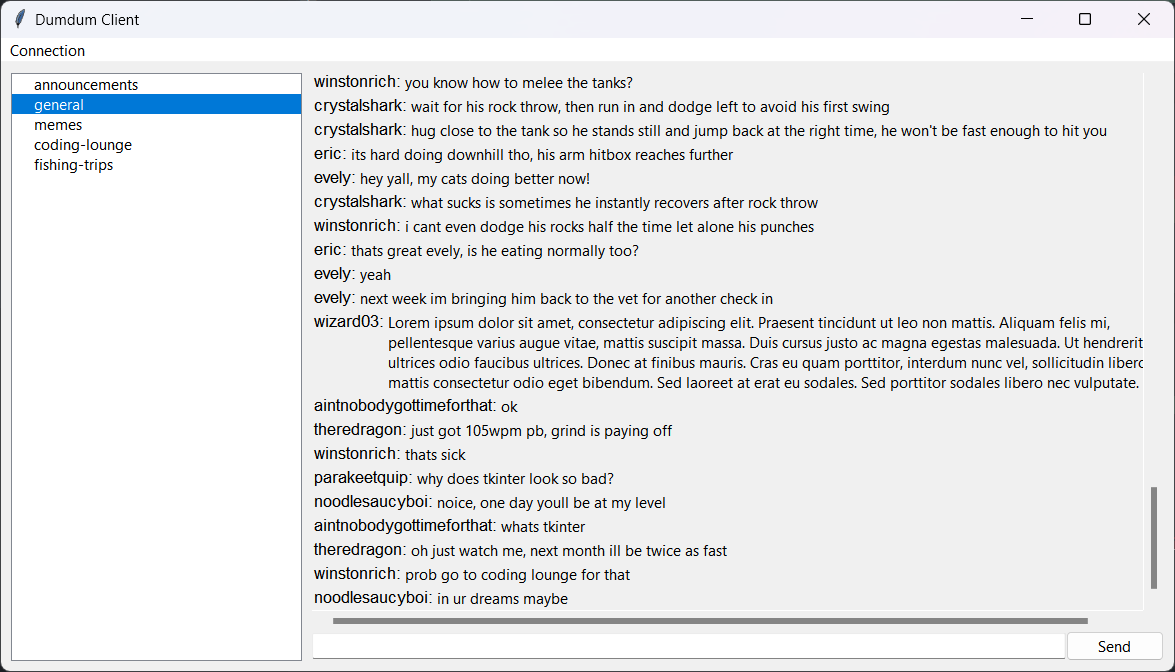
Running dumdum starts a graphical client which you can use to join
Dumdum servers, while dumdum-server is used to host servers of your own.
Both support the -h/--help option if you want to see more details:
usage: dumdum [-h] [-v] {appdirs} ...

Start the client interface for connecting to dumdum servers.

positional arguments:
  {appdirs}

options:
  -h, --help     show this help message and exit
  -v, --verbose  Increase logging verbosity
usage: dumdum-server [-h] [-v] [-c CHANNELS [CHANNELS ...]] [--host HOST] [--port PORT] [--cert CERT] [--max-messages MAX_MESSAGES]

Host a dumdum server.

To use TLS encryption, you must provide a certificate and private key.
This can be specified as either:
1. A single file containing both the private key and certificate:
     --cert hello.pem
2. A pair of certificate and private key files, separated with a colon:
     --cert hello.crt:hello.key

options:
  -h, --help            show this help message and exit
  -v, --verbose         Increase logging verbosity
  -c CHANNELS [CHANNELS ...], --channels CHANNELS [CHANNELS ...]
                        A list of channels
  --host HOST           The address to host on, or all interfaces when not supplied
  --port PORT           The port number to host on (default: 6667)
  --cert CERT           The SSL certificate and private key to use
  --max-messages MAX_MESSAGES
                        The maximum number of messages cached per channel (default: 1000)
Implementation
Dumdum consists of two parts:
- The Sans-IO protocol, defined in dumdum.protocol
- The asyncio wrapper, defined in dumdum.client and dumdum.server
The Sans-IO protocol is responsible for handling the generation and consumption of byte streams, along with producing events from received messages, while the asyncio wrapper is responsible for the actual network communication between the server and its clients.
Protocol
Clients are able to send the following messages:
- HELLO:
0x00 | 1-byte version - AUTHENTICATE:
0x02 | varchar nickname (32) - SEND_MESSAGE:
0x03 | varchar channel name (32) | varchar content (1024) - LIST_CHANNELS:
0x04 - LIST_MESSAGES:
0x05 | 8-byte before snowflake or 0 | 8-byte after snowflake or 0
Servers are able to send the following messages:
- HELLO:
0x00 | 0 or 1 using SSL - INCOMPATIBLE_VERSION:
0x01 | 1-byte version - ACKNOWLEDGE_AUTHENTICATION:
0x02 | 0 or 1 success - SEND_MESSAGE:
0x03 | 8-byte snowflake | varchar channel name (32) | varchar nickname (32) | varchar content (1024) - LIST_CHANNELS:
0x04 | 2-byte length | varchar channel name (32) | ... - LIST_MESSAGES:
0x05 | 3-byte length | same fields after SEND_MESSAGE | ...
Clients must send a HELLO command and wait for the server to respond with HELLO. Afterwards the client must send an AUTHENTICATE command and wait for a successful ACKNOWLEDGE_AUTHENTICATION before they can begin chat communications.
When the client disconnects and reconnects, they MUST re-send hello and re-authenticate with the server.
If the server supports SSL, they can set using SSL in HELLO to indicate
that the client should upgrade the connection to SSL.
At this point, the protocol should not receive any data until after the
SSL handshake is complete.
As this protocol has been intentionally designed to be simple (no timeouts or keep alives), I/O wrappers do not need a significant amount of work to implement it.
TLS Encryption
dumdum-server can use SSL certificates to encrypt connections.
For example, if you want to use a self-signed certificate and private key,
you can install OpenSSL and run the following command:
openssl req -new -x509 -days 365 -noenc -out dumdum.crt -keyout dumdum.key
After filling out (or skipping) the certificate signing request prompts,
you can then run the server with the resulting dumdum.crt and dumdum.key
files:
dumdum-server --cert dumdum.crt:dumdum.key
As for the dumdum client, SSL can be enabled by the user before connecting
to a server. If the server uses a self-signed certificate, the user will need
to download the server's certificate (.crt) and select it.
1 maintainer

Metadata
1 maintainer
Release files for dum-dum-irc 0.5.0
For a detailed explanation of source distributions (sdists) and built distributions (wheels), please see the package formats documentation.
Source distribution (sdist)
| File | Size | Uploaded | |
|---|---|---|---|
| dum_dum_irc-0.5.0.tar.gz | 89.1 kB | Details |
Built distribution (wheel)
| File | Interpreter | ABI | Platform | Reset |
|---|---|---|---|---|
| dum_dum_irc-0.5.0-py3-none-any.whl | Python 3 | none | any | Details |
Total release size: 130.1 kB
Release files / dum_dum_irc-0.5.0.tar.gz
| Download URL | dum_dum_irc-0.5.0.tar.gz |
|---|---|
| Size | 89.1 kB |
| Tags | Source |
|
SHA-256 checksum How to use checksums |
01b09a3a04cb12727bb83defd4587baacf9ec1387b4178941642c265b0bff0be
|
|
BLAKE2b-256 checksum How to use checksums |
7ac030f2f4a778943d56ab67258694b12ffb4ca9e3d4abd5d8a142d4226897ff
|
| Upload date | |
|
Uploaded using Trusted Publishing? What is trusted publishing? |
Yes |
| Uploaded via |
twine/6.1.0 CPython/3.12.8
|
Provenance
Provenance describes where a file came from. On PyPI, provenance is shared via attestations, which provide a verifiable record of the build or publishing details. View details, limitations and caveats.


PyPI Publish Attestation
PyPI verified that this artifact, at this checksum, originated from the publisher listed below.
Signed by GitHub Actions, verified by PyPI on Apr 24, 2025.
Transparency logRelease files / dum_dum_irc-0.5.0-py3-none-any.whl
| Download URL | dum_dum_irc-0.5.0-py3-none-any.whl |
|---|---|
| Size | 41.0 kB |
| Tags | Python 3 |
|
SHA-256 checksum How to use checksums |
80714c34d207fa9280bab097a29d5412c06ae18ace136d3c05017edc280f3c4a
|
|
BLAKE2b-256 checksum How to use checksums |
e3cd9f5aa63ff98e87af969dada063b1ef2912f76fdb082e0669e688cef30f5e
|
| Upload date | |
|
Uploaded using Trusted Publishing? What is trusted publishing? |
Yes |
| Uploaded via |
twine/6.1.0 CPython/3.12.8
|
Provenance
Provenance describes where a file came from. On PyPI, provenance is shared via attestations, which provide a verifiable record of the build or publishing details. View details, limitations and caveats.
PyPI Publish Attestation
PyPI verified that this artifact, at this checksum, originated from the publisher listed below.
Signed by GitHub Actions, verified by PyPI on Apr 24, 2025.
Transparency log













