
Simple python client for extracting data from the Dune Analytics API

Project description
spice 🌶️
Simple client for extracting data from the Dune SQL API
Goals of spice:
- use as a python library or as a CLI tool
- simple, no OOP, entire API is just one function
- support both sync and async workflows
- tight integration with polars
To discuss spice, head to the Paradigm Data Tools Telegram channel.
Table of Contents
Installation
pip install dune_spice
Examples
Can either use the sync workflow or async workflow. Each workflow has only one function.
See API Reference below for the full list of query function arguments.
Sync Workflow
import spice

# get most recent query results using query id
df = spice.query(21693)

# get most recent query results using query url
df = spice.query('https://dune.com/queries/21693')

# get most recent query results using raw sql
df = spice.query('SELECT * FROM ethereum.blocks LIMIT 5')

# perform new query execution and get results
df = spice.query(query, refresh=True)

# get query results for input parameters
df = spice.query(query, parameters={'network': 'ethereum'})

# perform new query execution, but do not wait for result
execution = spice.query(query, poll=False)

# get results of previous execution
df = spice.query(execution)
Async Workflow
The async API is identical to the sync API as above, just add async_ prefix.
df = await spice.async_query(21693)
df = await spice.async_query('https://dune.com/queries/21693')
df = await spice.async_query('SELECT * FROM ethereum.blocks LIMIT 5')
df = await spice.async_query(query, refresh=True)
df = await spice.async_query(query, parameters={'network': 'ethereum'})
execution = spice.query(query, poll=False)
df = await spice.async_query(execution)
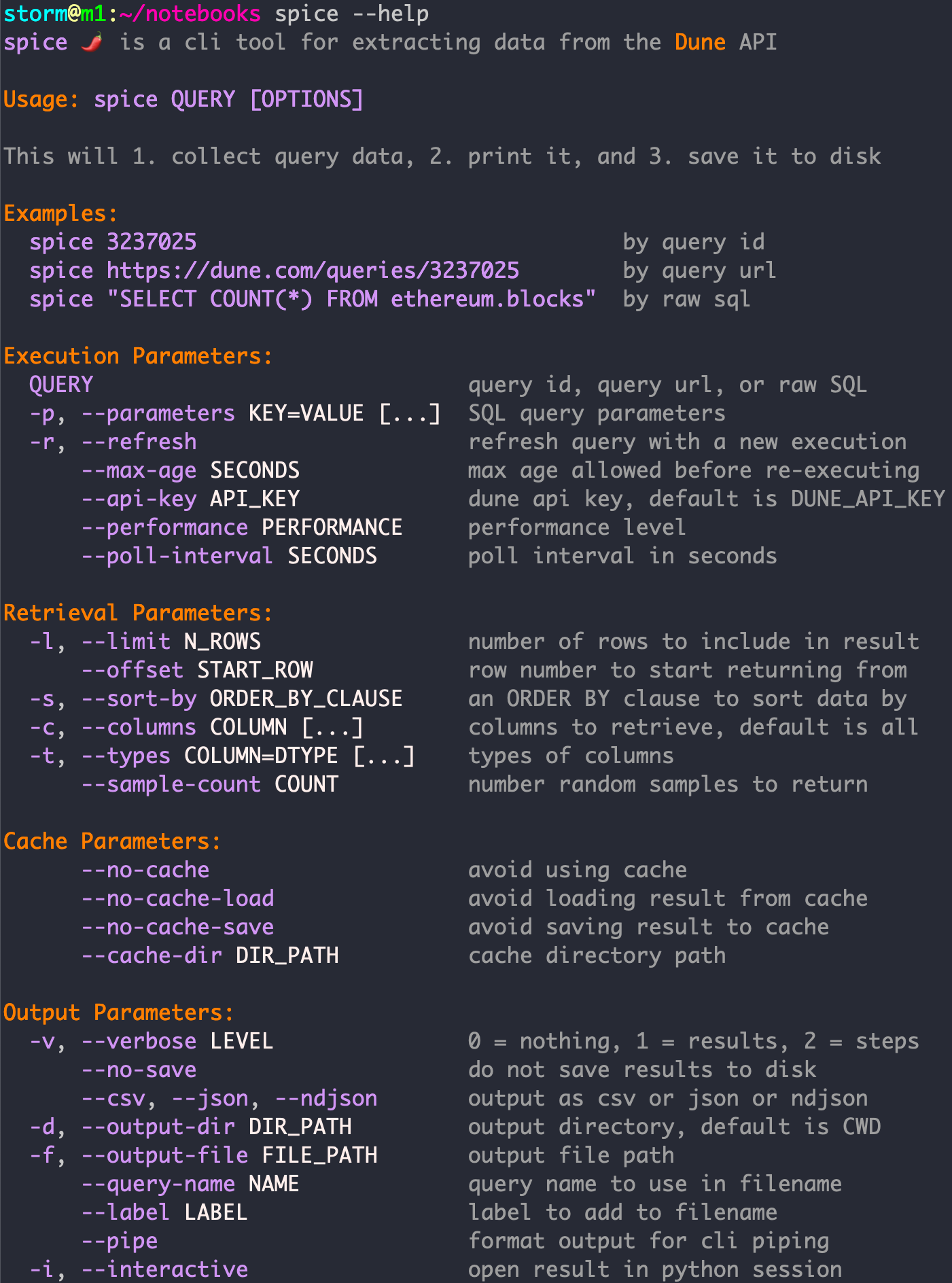
Command Line Workflow
Running the spice CLI will 1) extract the given query, 2) preview the contents, 3) and save it to a file. Each step of this process can be customized using the CLI options.
spice 21693
spice https://dune.com/queries/21693
spice "SELECT * FROM ethereum.blocks LIMIT 5"
spice $QUERY --refresh
spice $QUERY --parameters network=ethereum
Quality of Life
spice contains additional quality of life features such as:
- automatically cache results locally to save time and credits for repeated queries
- automatically handle pagination of multi-page results
- automatically execute queries that have no existing executions, especially when using new parameter values
- allow type overrides using the
typesparameter - support raw dynamic querying using parameter templates in order to 1) minimize roundtrips and 2) not require a paid API plan
- auto-retry with exponential backoff when encountering HTTP429 ratelimit errors
API Reference
Python Reference
These python functions are accessed as spice.query() and spice.async_query().
def query(
    query_or_execution: Query | Execution,
    *,
    verbose: bool = True,
    refresh: bool = False,
    max_age: int | float | None = None,
    parameters: Mapping[str, Any] | None = None,
    api_key: str | None = None,
    performance: Performance = 'medium',
    poll: bool = True,
    poll_interval: float = 1.0,
    limit: int | None = None,
    offset: int | None = None,
    sample_count: int | None = None,
    sort_by: str | None = None,
    columns: Sequence[str] | None = None,
    extras: Mapping[str, Any] | None = None,
    types: Sequence[pl.DataType] | None = None,
    cache: bool = True,
    cache_dir: str | None = None,
    save_to_cache: bool = True,
    load_from_cache: bool = True,
) -> pl.DataFrame | Execution:
    """get results of query as dataframe

    # Parameters
    - query_or_execution: query or execution to retrieve results of
    - verbose: whether to print verbose info
    - refresh: trigger a new execution, or just use most recent execution
    - max_age: max age of last execution in seconds, or trigger a new execution
    - parameters: dict of query parameters
    - api_key: dune api key, otherwise use DUNE_API_KEY env var
    - performance: performance level
    - poll: wait for result as DataFrame, or just return Execution handle
    - poll_interval: polling interval in seconds
    - limit: number of rows to query in result
    - offset: row number to start returning results from
    - sample_count: number of random samples from query to return
    - sort_by: an ORDER BY clause to sort data by
    - columns: columns to retrieve, by default retrieve all columns
    - extras: extra parameters used for fetching execution result
        - examples: ignore_max_datapoints_per_request, allow_partial_results
    - types: column types to use in output polars dataframe
    - cache: whether to use cache for saving or loading
    - cache_dir: directory to use for cached data (create tmp_dir if None)
    - save_to_cache: whether to save to cache, set false to load only
    - load_from_cache: whether to load from cache, set false to save only
    - include_execution: return Execution metadata alongside query result
    """
    ...

async def async_query(
    # all the same parameters as query()
    ...
) -> pl.DataFrame | Execution:
    """get results of query as dataframe, asynchronously

    ## Parameters
    [see query()]
    """
    ...
Command Line Reference
FAQ
How do I set my Dune API key?
Set your API key using one of these approaches:
- specify key for all sessions: set the
DUNE_API_KEYenvironment variable (e.g. write exportDUNE_API_KEY=your-api-keyin your~/.bash_profile) - specify key for single session: set the
DUNE_API_KEYentry in python'sos.environ(e.g.os.environ['DUNE_API_KEY'] = your-api-key) - specify key for query: in python use the
api_keyargument (df = query(api_key='your-api-key', ...)) or for cli use the--api-keyargument (spice --api-key your-api-key ...)
How do I obtain a Dune API key?
- Create a Dune account
- Go to Settings --> API
- Click "Create new API key"
Does spice work with a Dune free account?
Yes. But to fetch the result of large queries, you may need to remove the "250k datapoints per request" limitation in your account settings on the Dune website.
Which endpoints does this package support?
spice interacts only with Dune's SQL-related API endpoints, documented here.
Release history Release notifications | RSS feed


Download files
Download the file for your platform. If you're not sure which to choose, learn more about installing packages.
Source Distribution
Built Distribution
Filter files by name, interpreter, ABI, and platform.
If you're not sure about the file name format, learn more about wheel file names.
Copy a direct link to the current filters
File details
Details for the file dune_spice-0.2.7.tar.gz.
File metadata
- Download URL: dune_spice-0.2.7.tar.gz
- Upload date:
- Size: 22.8 kB
- Tags: Source
- Uploaded using Trusted Publishing? No
- Uploaded via: uv/0.8.0
File hashes
| Algorithm | Hash digest | |
|---|---|---|
| SHA256 |
db96d5fe2d9b370708d0c111f83c3a5e6a8521927e0f040c26ef2d3bfc37fdad
|
|
| MD5 |
9d4ae28fb0a7c34783aad7420be0837c
|
|
| BLAKE2b-256 |
22cbc3816ba339227cdeceb9c427854e8bfc47d2c828987f4fd8dbb10df4ca34
|
File details
Details for the file dune_spice-0.2.7-py3-none-any.whl.
File metadata
- Download URL: dune_spice-0.2.7-py3-none-any.whl
- Upload date:
- Size: 23.6 kB
- Tags: Python 3
- Uploaded using Trusted Publishing? No
- Uploaded via: uv/0.8.0
File hashes
| Algorithm | Hash digest | |
|---|---|---|
| SHA256 |
37ca32fa44a6fcd362e8742d6e717e6fdb2ee03978aee68db09716eecb909445
|
|
| MD5 |
4a33a1cf794438a3aa9779c30f0018d5
|
|
| BLAKE2b-256 |
bf93f8361c80a77371e2d079d807ce16d77eee037a2a015beb7c6d6e3f6dc0be
|






