
This release is a pre-release and may not be stable for production use.




Pipecat Flows is an add-on framework for Pipecat that allows you to build structured conversations in your AI applications. It enables you to create both predefined conversation paths and dynamically generated flows while handling the complexities of state management and LLM interactions.
The framework consists of:
- A Python module for building conversation flows with Pipecat
- A visual editor for designing and exporting flow configurations
Dependencies
- Python 3.10 or higher
- Pipecat
Installation
-
Install uv
curl -LsSf https://astral.sh/uv/install.sh | sh
Need help? Refer to the uv install documentation.
-
Install the module
# For new projects
uv init my-pipecat-flows-app
cd my-pipecat-flows-app
uv add pipecat-ai-flows

# Or for existing projects
uv add pipecat-ai-flows
Using pip? You can still use
pip install pipecat-ai-flowsto get set up.
Quick Start
See Quick Start README.
For more detailed examples and guides, visit our documentation.
Examples
The repository includes several complete example implementations demonstrating various features of Pipecat Flows.
Available Examples
The examples demonstrate various conversation flows including food ordering, restaurant reservations, patient intake, insurance quotes, and warm transfers. All examples support multiple LLM providers (OpenAI, Anthropic, Google Gemini, AWS Bedrock) to demonstrate cross-platform compatibility.
Getting Started with Examples
For detailed setup instructions, configuration, and running examples, see the Examples README.
Quick start:
# Install dependencies
uv sync
uv pip install "pipecat-ai[daily,openai,deepgram,cartesia,silero,examples]"

# Configure environment
cp env.example .env  # Add your API keys

# Run an example
uv run examples/food_ordering.py
Contributing to the framework
-
Clone the repository and navigate to it:
git clone https://github.com/pipecat-ai/pipecat-flows.git
cd pipecat-flows
-
Install development dependencies:
uv sync --group dev
-
Install the git pre-commit hooks (these help ensure your code follows project rules):
uv run pre-commit install
The package is automatically installed in editable mode when you run
uv sync.
Tests
The package includes a comprehensive test suite covering the core functionality.
Setup Test Environment
Install venv and dependencies:
uv sync --group dev
Running Tests
Run all tests:
uv run pytest tests/
Run specific test file:
uv run pytest tests/test_state.py
Run specific test:
uv run pytest tests/test_state.py -k test_initialization
Run with coverage report:
uv run pytest tests/ --cov=pipecat_flows
Pipecat Flows Editor
The Flows Editor is deprecated and will be removed along with Static Flows.
We have future plans to introduce a new editor capability that supports dynamic flows, but we don't have a timeline yet. We're open to collaborating with any developers or teams who have an interesting in building out this type of UI! Reach out to us on Discord if you're interested.
A visual editor for creating and managing Pipecat conversation flows.
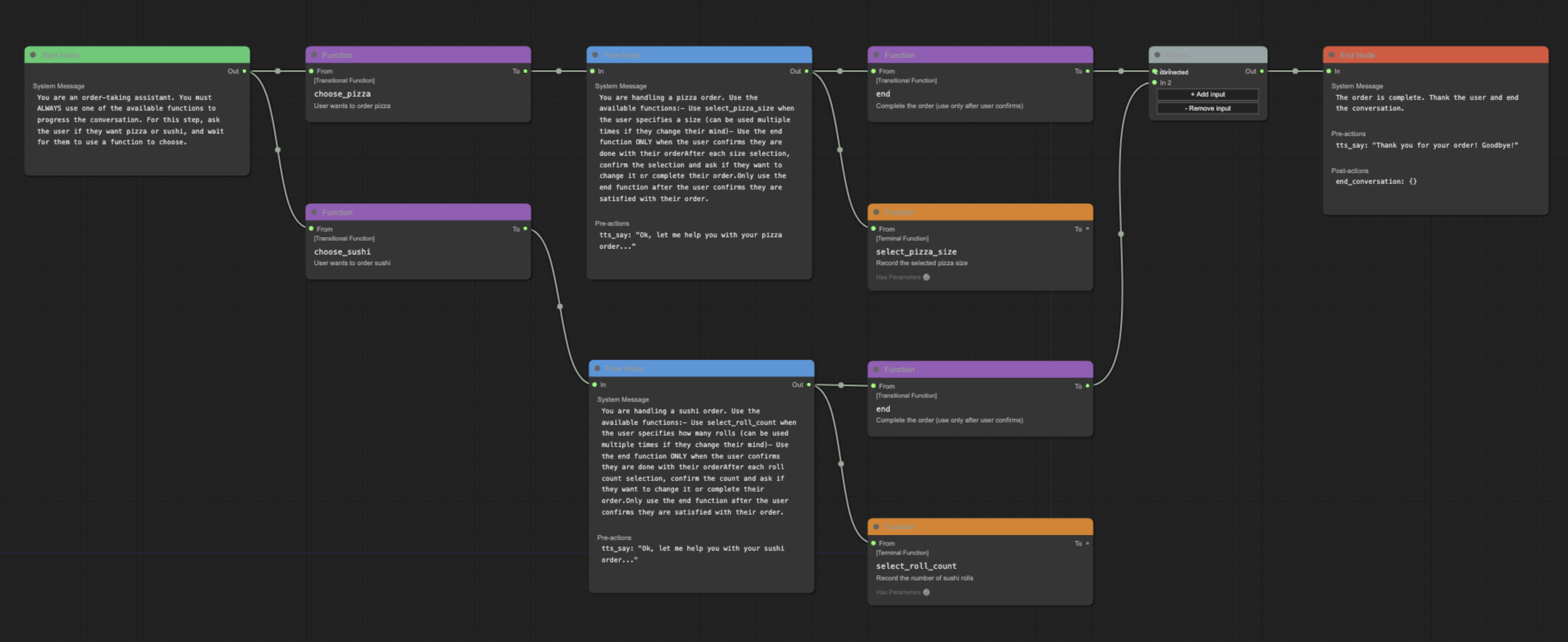
Features
- Visual flow creation and editing
- Import/export of flow configurations
- Support for node and edge functions
- Merge node support for complex flows
- Real-time validation
Naming Conventions
While the underlying system is flexible with node naming, the editor follows these conventions for clarity:
- Start Node: Named after your initial conversation state (e.g., "greeting", "welcome")
- End Node: Conventionally named "end" for clarity, though other names are supported
- Flow Nodes: Named to reflect their purpose in the conversation (e.g., "get_time", "confirm_order")
These conventions help maintain readable and maintainable flows while preserving technical flexibility.
Online Editor
The editor is available online at flows.pipecat.ai.
Local Development
Prerequisites
- Node.js (v14 or higher)
- npm (v6 or higher)
Installation
Clone the repository
git clone git@github.com:pipecat-ai/pipecat-flows.git
Navigate to project directory
cd pipecat-flows/editor
Install dependencies
npm install
Start development server
npm run dev
Open the page in your browser: http://localhost:5173.
Usage
- Create a new flow using the toolbar buttons
- Add nodes by right-clicking in the canvas
- Start nodes can have descriptive names (e.g., "greeting")
- End nodes are conventionally named "end"
- Connect nodes by dragging from outputs to inputs
- Edit node properties in the side panel
- Export your flow configuration using the toolbar
Examples
The editor/examples/ directory contains sample flow configurations:
food_ordering.jsonmovie_explorer.pypatient_intake.jsonrestaurant_reservation.jsontravel_planner.json
To use an example:
- Open the editor
- Click "Import Flow"
- Select an example JSON file
See the examples directory for the complete files and documentation.
Development
Available Scripts
npm start- Start production servernpm run dev- Start development servernpm run build- Build for productionnpm run preview- Preview production build locallynpm run preview:prod- Preview production build with base pathnpm run lint- Check for linting issuesnpm run lint:fix- Fix linting issuesnpm run format- Format code with Prettiernpm run format:check- Check code formattingnpm run docs- Generate documentationnpm run docs:serve- Serve documentation locally
Documentation
The Pipecat Flows Editor project uses JSDoc for documentation. To generate and view the documentation:
Generate documentation:
npm run docs
Serve documentation locally:
npm run docs:serve
View in browser by opening: http://localhost:8080
Contributing
We welcome contributions from the community! Whether you're fixing bugs, improving documentation, or adding new features, here's how you can help:
- Found a bug? Open an issue
- Have a feature idea? Start a discussion
- Want to contribute code? Check our CONTRIBUTING.md guide
- Documentation improvements? Docs PRs are always welcome
Before submitting a pull request, please check existing issues and PRs to avoid duplicates.
We aim to review all contributions promptly and provide constructive feedback to help get your changes merged.
Getting help
2 maintainers


Metadata
2 maintainers
Release files for dv-pipecat-flows 0.0.22.dev485
For a detailed explanation of source distributions (sdists) and built distributions (wheels), please see the package formats documentation.
Built distribution (wheel)
| File | Interpreter | ABI | Platform | Reset |
|---|---|---|---|---|
| dv_pipecat_flows-0.0.22.dev485-py3-none-any.whl | Python 3 | none | any | Details |
Release files / dv_pipecat_flows-0.0.22.dev485-py3-none-any.whl
| Download URL | dv_pipecat_flows-0.0.22.dev485-py3-none-any.whl |
|---|---|
| Size | 35.7 kB |
| Tags | Python 3 |
|
SHA-256 checksum How to use checksums |
4f0a21063c5bc1ff9ece03f1241f39b61dd1867f62ef55c0ef5bf62f63a5e740
|
|
BLAKE2b-256 checksum How to use checksums |
8edf53f67840d3eb674aa63bdfe9fc7d5fa8590e4a1564c1348170410bee38f2
|
| Upload date | |
|
Uploaded using Trusted Publishing? What is trusted publishing? |
No |
| Uploaded via |
twine/6.2.0 CPython/3.12.0
|
Security for dv-pipecat-flows 0.0.22.dev485
Provenance
Provenance describes where a file came from. On PyPI, provenance is shared via attestations, which provide a verifiable record of the build or publishing details. View details, limitations and caveats.
No provenance found
None of the files in this release were uploaded with provenance metadata.
A note on package security
PyPI is a repository for distributing packages, not a service for auditing them. While third-party security researchers and our staff do their best to detect and remove malicious packages, PyPI cannot guarantee the quality, security or suitability of any given package.
To learn more about protecting yourself from malicious actors, visit our package security documentation.














