
Generate a clear diagram of your DVC pipeline.
Verified details
These details have been verified by PyPIProject links
GitHub Statistics
Maintainers

Project description
dvc-dag
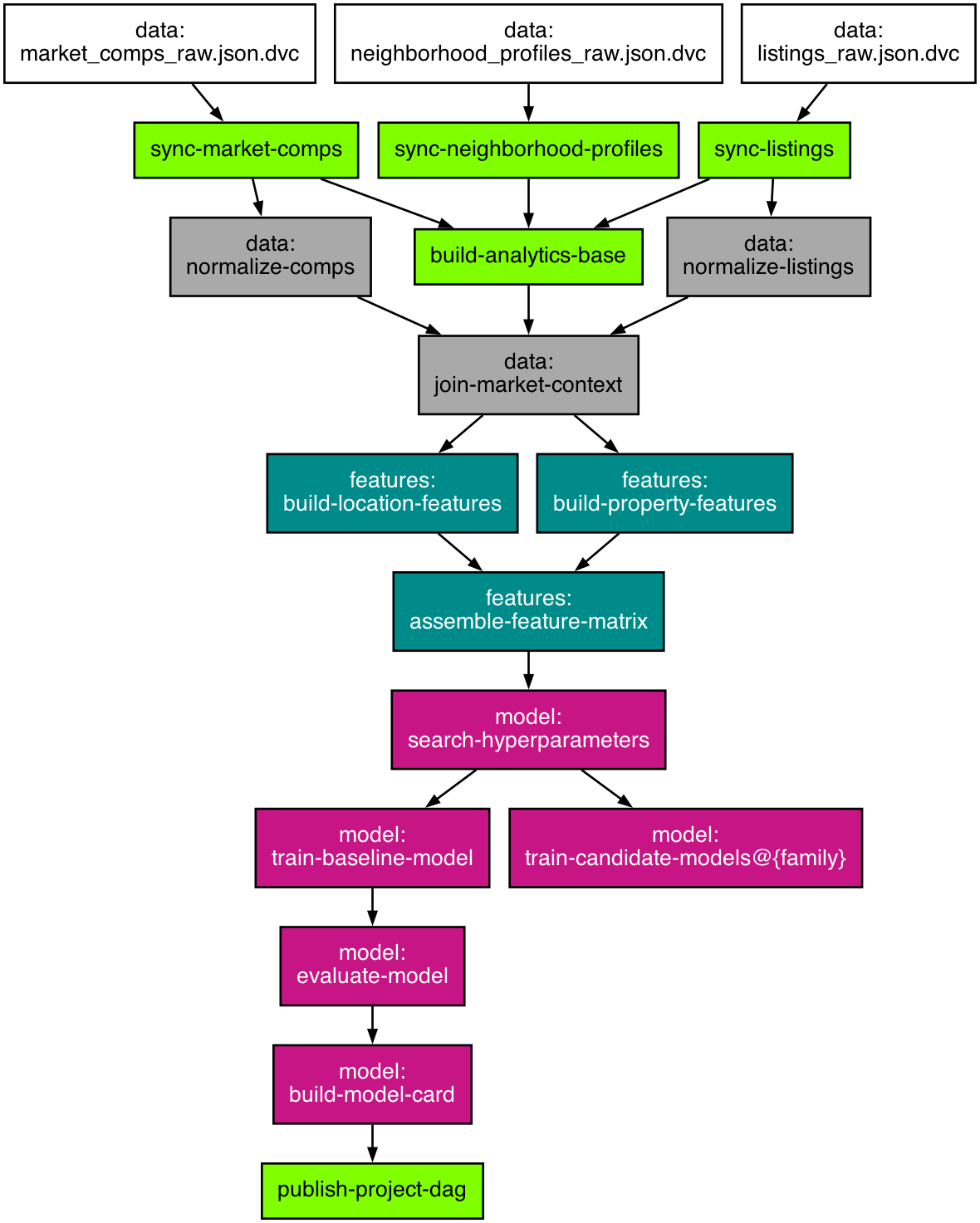
Generate a readable PNG diagram of your DVC pipeline.




Overview
The bundled dvc dag command is useful, but larger pipelines quickly become hard to read.
dvc-dag renders the pipeline as a PNG and applies a few readability
improvements:
- trims transitive edges
- collapses parameterized stages when requested
- simplifies displayed paths
- uses colors and shapes to distinguish nodes
Requirements
dvc-dag supports Python 3.10 and newer.
dvc-dag must be run inside a Git repository initialized with DVC.
It also requires Graphviz on your PATH, specifically the dot and tred
executables.
Install Graphviz with your system package manager:
- macOS:
brew install graphviz - Debian/Ubuntu:
sudo apt-get install graphviz - Windows: install Graphviz from https://graphviz.org/download/
Installation
Install the package from PyPI:
pip install dvc-dag
Or install it as an isolated CLI:
pipx install dvc-dag
Usage
Generate a PNG in the current DVC repository:
dvc-dag
Show all options:
dvc-dag --help
Show the installed version:
dvc-dag --version
Collapse parameterized stages:
dvc-dag --collapse-stage "train-candidate-models=family"
The --collapse-stage format is:
stage_name=parameter_name
path/to/dvc.yaml:stage_name=parameter_name
CLI Options
--out PATHWrite the generated PNG toPATH. Parent directories are created automatically. Default:dvc_dag.png.--delete-text TEXTRemove repeated path fragments from displayed node labels to keep the graph readable. Pass it multiple times to strip more than one fragment.--collapse-stage RULECollapse a parametrized stage into a single node. Usestage_name=parameter_nameorpath/to/dvc.yaml:stage_name=parameter_name. The collapsed label is rendered asstage_name@{parameter_name}.--colors-random-seed INTEGERControl the color assignment for graph nodes. Use the same seed to keep colors stable across runs. Default:42.--debugShow full tracebacks instead of the default concise runtime errors.--versionPrint the installeddvc-dagversion and exit.--helpShow the full command help generated by Typer.
Typical example:
dvc-dag \
  --out docs/dvc_dag.png \
  --delete-text "pipelines/" \
  --delete-text "stages/" \
  --collapse-stage "train-candidate-models=family"
Troubleshooting
DVC was not found: installdvcand ensure it is on yourPATH.Not inside a DVC repository: rundvc initin the project first.Graphviz dot/tred was not found: install Graphviz and ensure both tools are on yourPATH.
Development
The repository includes a committed DVC fixture project under tests/fixtures/
for end-to-end testing.
The release workflow is documented in docs/releasing.md.
You can try the CLI manually against the committed fixture project:
cd tests/fixtures/dvc_project
uv run dvc-dag --out /tmp/dvc_project_dag.png
Or render the fixture DAG straight from the repository root:
make dag
make dag is the supported way to refresh the demo DAG. It regenerates the
fixture image and then syncs docs/dvc_project_dag.png for the README.
Project details
Verified details
These details have been verified by PyPIProject links
GitHub Statistics
Maintainers
Release history Release notifications | RSS feed


Download files
Download the file for your platform. If you're not sure which to choose, learn more about installing packages.
Source Distribution
Built Distribution
Filter files by name, interpreter, ABI, and platform.
If you're not sure about the file name format, learn more about wheel file names.
Copy a direct link to the current filters
File details
Details for the file dvc_dag-0.2.0.tar.gz.
File metadata
- Download URL: dvc_dag-0.2.0.tar.gz
- Upload date:
- Size: 118.6 kB
- Tags: Source
- Uploaded using Trusted Publishing? Yes
- Uploaded via: twine/6.1.0 CPython/3.13.12
File hashes
| Algorithm | Hash digest | |
|---|---|---|
| SHA256 |
7c214120bd6ae00e4b66c3005746c4d22b5592ef7860d60673a3d2190710313c
|
|
| MD5 |
c82ddb481fcca0f405776dc674424e87
|
|
| BLAKE2b-256 |
160bf332f2bea4185f9fe10d7b35eddc9546056eb9c3d1f93f3f87c9d33d872d
|
Provenance
The following attestation bundles were made for dvc_dag-0.2.0.tar.gz:
Publisher:
publish.yml on AndreaVidali/dvc-dag
-
Statement:
-
Statement type:
https://in-toto.io/Statement/v1 -
Predicate type:
https://docs.pypi.org/attestations/publish/v1 -
Subject name:
dvc_dag-0.2.0.tar.gz -
Subject digest:
7c214120bd6ae00e4b66c3005746c4d22b5592ef7860d60673a3d2190710313c - Sigstore transparency entry: 1363150335
- Sigstore integration time:
-
Permalink:
AndreaVidali/dvc-dag@f17d0743e761a64663e7e1de7cc4214a0955d80a -
Branch / Tag:
refs/tags/0.2.0 - Owner: https://github.com/AndreaVidali
-
Access:
public
-
Token Issuer:
https://token.actions.githubusercontent.com -
Runner Environment:
github-hosted -
Publication workflow:
publish.yml@f17d0743e761a64663e7e1de7cc4214a0955d80a -
Trigger Event:
release
-
Statement type:
File details
Details for the file dvc_dag-0.2.0-py3-none-any.whl.
File metadata
- Download URL: dvc_dag-0.2.0-py3-none-any.whl
- Upload date:
- Size: 11.3 kB
- Tags: Python 3
- Uploaded using Trusted Publishing? Yes
- Uploaded via: twine/6.1.0 CPython/3.13.12
File hashes
| Algorithm | Hash digest | |
|---|---|---|
| SHA256 |
82fe5a524d935417c08c21c1b66579ba5fdb2f56381cf12eada157502cca51bf
|
|
| MD5 |
a972ca5487f4c7863238f64a350bad44
|
|
| BLAKE2b-256 |
f1ef1b3869032747990ac7af4ebd3189d60a87b73a962e3a560a762117a15390
|
Provenance
The following attestation bundles were made for dvc_dag-0.2.0-py3-none-any.whl:
Publisher:
publish.yml on AndreaVidali/dvc-dag
-
Statement:
-
Statement type:
https://in-toto.io/Statement/v1 -
Predicate type:
https://docs.pypi.org/attestations/publish/v1 -
Subject name:
dvc_dag-0.2.0-py3-none-any.whl -
Subject digest:
82fe5a524d935417c08c21c1b66579ba5fdb2f56381cf12eada157502cca51bf - Sigstore transparency entry: 1363150505
- Sigstore integration time:
-
Permalink:
AndreaVidali/dvc-dag@f17d0743e761a64663e7e1de7cc4214a0955d80a -
Branch / Tag:
refs/tags/0.2.0 - Owner: https://github.com/AndreaVidali
-
Access:
public
-
Token Issuer:
https://token.actions.githubusercontent.com -
Runner Environment:
github-hosted -
Publication workflow:
publish.yml@f17d0743e761a64663e7e1de7cc4214a0955d80a -
Trigger Event:
release
-
Statement type:






