
Tool for finding and extracting motion events in video files (e.g. security camera footage).
Verified details
These details have been verified by PyPIProject links
GitHub Statistics
Maintainers

Project description

:vhs: Find and extract motion events in videos.
Latest Release: v1.8.2.1 (May 9, 2026)
Website: dvr-scan.com
User Guide: dvr-scan.com/guide
Documentation: dvr-scan.com/docs
Discord: discord.gg/69kf6f2Exb
DVR-Scan is a command-line application that automatically detects motion events in video files (e.g. security camera footage). DVR-Scan looks for areas in footage containing motion, and saves each event to a separate video clip. DVR-Scan is free and open-source software, and works on Windows, Linux, and Mac.
Quick Install
pip install dvr-scan --upgrade
Windows builds (installer + portable) are also available on the Downloads page.
Quickstart (UI)
Start DVR-Scan (run dvr-scan-app or click the app shortcut), Add your input videos, and hit Start:
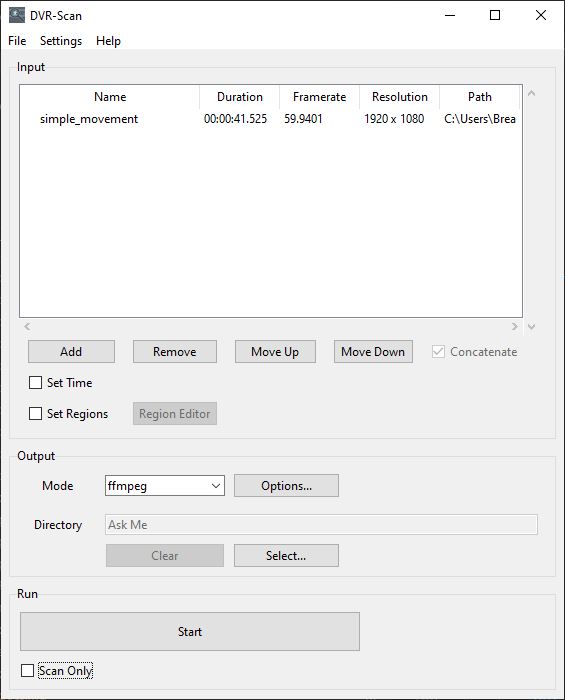
See the User Guide for a more comprehensive overview.
Quickstart (CLI)
Scan video.mp4 (separate clips for each event):
dvr-scan -i video.mp4
Select a region to scan using the region editor:
dvr-scan -i video.mp4 -r
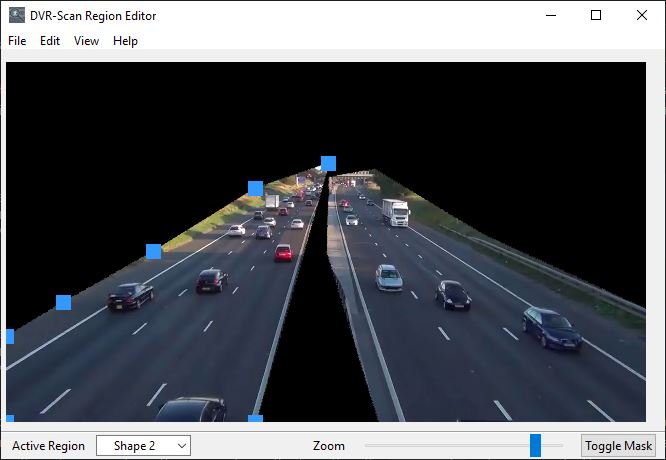
Select a region to scan using command line (list of points as X Y):
dvr-scan -i video.mp4 -a 50 50 100 50 100 100 100 50
Draw boxes around motion:
dvr-scan -i video.mp4 -bb
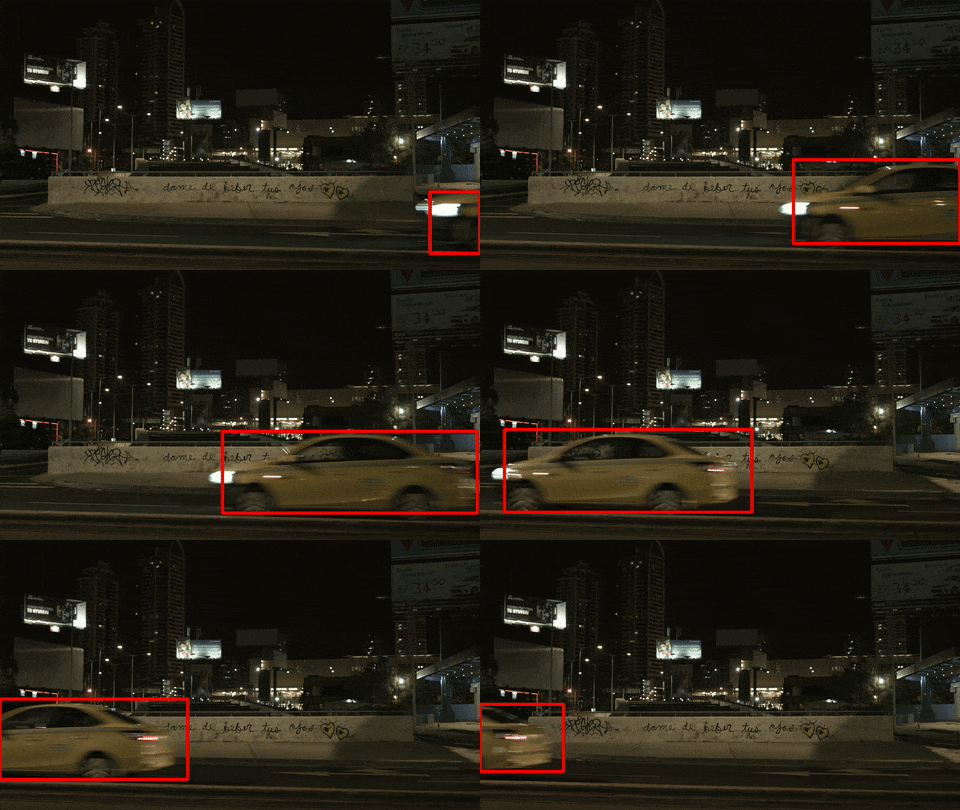
Use ffmpeg to extract events:
dvr-scan -i video.mp4 -m ffmpeg
See the documentation for a complete list of all command-line and configuration file options which can be set. You can also type dvr-scan --help for an overview of command line options. Some program options can also be set using a config file.
Copyright © 2016-2026 Brandon Castellano. All rights reserved. Licensed under BSD 2-Clause (see the LICENSE file for details).
Project details
Verified details
These details have been verified by PyPIProject links
GitHub Statistics
Maintainers
Release history Release notifications | RSS feed


Download files
Download the file for your platform. If you're not sure which to choose, learn more about installing packages.
Source Distribution
Built Distribution
Filter files by name, interpreter, ABI, and platform.
If you're not sure about the file name format, learn more about wheel file names.
Copy a direct link to the current filters
File details
Details for the file dvr_scan-1.8.2.1.tar.gz.
File metadata
- Download URL: dvr_scan-1.8.2.1.tar.gz
- Upload date:
- Size: 330.2 kB
- Tags: Source
- Uploaded using Trusted Publishing? Yes
- Uploaded via: twine/6.1.0 CPython/3.13.12
File hashes
| Algorithm | Hash digest | |
|---|---|---|
| SHA256 |
e424eaa8f2502a773588c97722bfe163f1317129e6e7073c25c4282bcf5f8e40
|
|
| MD5 |
cf78113c6353e3cfaed510df40da1881
|
|
| BLAKE2b-256 |
4784a3256473a827f0c17e3e724c409a33146a26d6515f87df38c3a649547b7d
|
Provenance
The following attestation bundles were made for dvr_scan-1.8.2.1.tar.gz:
Publisher:
publish-pypi.yml on Breakthrough/DVR-Scan
-
Statement:
-
Statement type:
https://in-toto.io/Statement/v1 -
Predicate type:
https://docs.pypi.org/attestations/publish/v1 -
Subject name:
dvr_scan-1.8.2.1.tar.gz -
Subject digest:
e424eaa8f2502a773588c97722bfe163f1317129e6e7073c25c4282bcf5f8e40 - Sigstore transparency entry: 1486962226
- Sigstore integration time:
-
Permalink:
Breakthrough/DVR-Scan@f773c133281743050eecd653fd7ce3d437821541 -
Branch / Tag:
refs/heads/main - Owner: https://github.com/Breakthrough
-
Access:
public
-
Token Issuer:
https://token.actions.githubusercontent.com -
Runner Environment:
github-hosted -
Publication workflow:
publish-pypi.yml@f773c133281743050eecd653fd7ce3d437821541 -
Trigger Event:
workflow_dispatch
-
Statement type:
File details
Details for the file dvr_scan-1.8.2.1-py3-none-any.whl.
File metadata
- Download URL: dvr_scan-1.8.2.1-py3-none-any.whl
- Upload date:
- Size: 348.4 kB
- Tags: Python 3
- Uploaded using Trusted Publishing? Yes
- Uploaded via: twine/6.1.0 CPython/3.13.12
File hashes
| Algorithm | Hash digest | |
|---|---|---|
| SHA256 |
088346ffad74f1ea28118bfe0ebf96ac1b5c9c2c41d369ef0b8f40c95434d29e
|
|
| MD5 |
05053de4cb0f9e31c7c75ca0971244ef
|
|
| BLAKE2b-256 |
f2d2763ccdcf38b88e0f9515afad0663eb0b4b5d2c949f19b88b322587b2fff1
|
Provenance
The following attestation bundles were made for dvr_scan-1.8.2.1-py3-none-any.whl:
Publisher:
publish-pypi.yml on Breakthrough/DVR-Scan
-
Statement:
-
Statement type:
https://in-toto.io/Statement/v1 -
Predicate type:
https://docs.pypi.org/attestations/publish/v1 -
Subject name:
dvr_scan-1.8.2.1-py3-none-any.whl -
Subject digest:
088346ffad74f1ea28118bfe0ebf96ac1b5c9c2c41d369ef0b8f40c95434d29e - Sigstore transparency entry: 1486962248
- Sigstore integration time:
-
Permalink:
Breakthrough/DVR-Scan@f773c133281743050eecd653fd7ce3d437821541 -
Branch / Tag:
refs/heads/main - Owner: https://github.com/Breakthrough
-
Access:
public
-
Token Issuer:
https://token.actions.githubusercontent.com -
Runner Environment:
github-hosted -
Publication workflow:
publish-pypi.yml@f773c133281743050eecd653fd7ce3d437821541 -
Trigger Event:
workflow_dispatch
-
Statement type:






