
dweet2ser
A serial <-> dweet.io interface
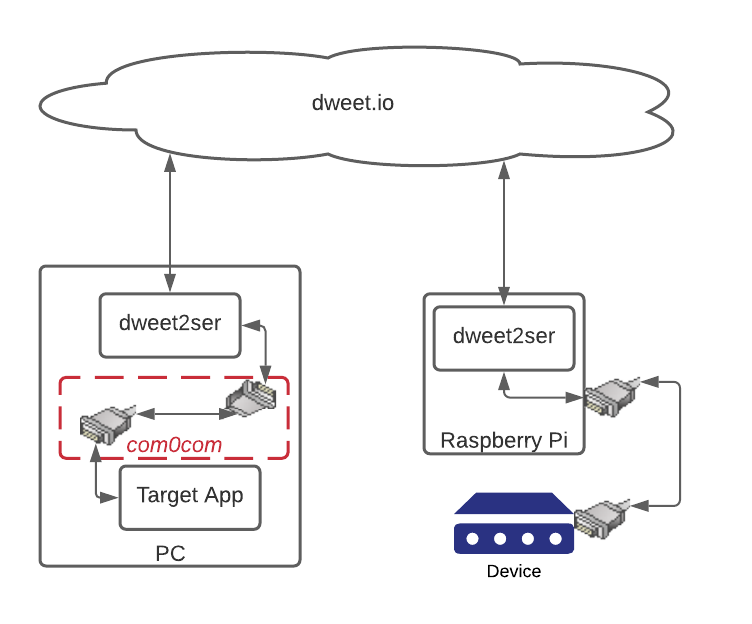
dweet2ser allows for the two-way exchange of data between serial devices and computers over the internet, using the free dweet.io API as an intermediary. This is particularly useful for connecting to faraway devices that aren't on the same LAN. dweet2ser allows for connecting an arbitrary number of devices to an arbitrary number of computers.
dweet2ser works for connecting remotely to things like weather stations, sensors, or other devices that send simple data intermittently. It is not going to work for things like modems or printers, due to the limitations of dweet.io among other things.
Installation
Python environment
pip install dweet2ser
Windows executable
If you don't have or don't wish to use a Python environment, a Windows executable version is available on the source repository on GitHub.
Get the source
The source code is always available at https://github.com/zhenry9/dweet2ser.
Configuration
Modify config.ini to suit your needs, or configure interactively using the prompts in the software. Some example
configurations can be seen in the example-configs directory in the project repository.
Usage
dweet2ser borrows terminology from the original RS232 protocol. "DCE" stands for Data Circuit-terminating Equipment. These are the serial devices themselves, such as sensors or synchronized timers. "DTE" stands for Data Terminal Equipment. These are the computers, or software instances that the DCE devices connect to. dweet2ser facilitates the connection of DCE devices to DTE devices using dweet.io and local serial ports. Every message received from a DCE device is written to every DTE device, and every message received from a DTE device is written to every DCE device. dweet2ser allows for connecting an arbitrary number of devices, either local or remote. In this way it is possible to connect one DCE device to many computers, or many DCE devices to one serial port.
dweet2ser needs to be running and individually configured on all DTE and DCE devices that are part of the connection.
Default
dweet2ser
This starts dweet2ser with a web interface on localhost:5000.
If dweet2ser is run without command line options, it will attempt to load devices from the default config file. This
will be '~/.config/dweet2ser/config.ini', or '/etc/dweet2ser/config.ini' if run as superuser.
If you are running dweet2ser for the first time or with an empty config file, no devices will be loaded. You can add
devices interactively using the web interface.
CLI
dweet2ser --nowebui
This will load dweet2ser with a command line interface only, whithout the web interface. Configuration can be done interactively from the command line.
Empty
dweet2ser --empty
This will ignore the default config file and start dweet2ser without any devices loaded. This is useful for fixing bad config files, or creating new ones from scratch.
From file
dweet2ser --file FILENAME
This will attempt to start dweet2ser by loading the devices specified in an arbitrary config file at FILENAME.
Override
dweet2ser --override MODE PORT THING_NAME
This allows dweet2ser to be configured for a simple connection directly from the command line. MODE is the type of device connected to the local serial port PORT, either DCE or DTE. THING_NAME is the dweet.io name of the device on the other side of the connection. For example, to set up a connection to a DCE device connected to a Raspberry Pi:
dweet2ser --override DCE /dev/ttyUSB0 dweet2ser_default
This starts dweet2ser listening for messages from a DCE device on Linux port '/dev/ttyUSB0'. Any messages it receives will be sent to dweet.io using the thing name 'dweet2ser_default'. It will also listen for incoming messages from 'dweet2ser_default', and write them to the serial port.
To set up the same connection on the DTE side:
dweet2ser --override DTE COM20 dweet2ser_default
This will listen for dweet.io messages from 'dweet2ser_default' and write them to the Windows port 'COM20'. It will also send any messages received from 'COM20' to dweet.io using the name 'dweet2ser_default'.
Display help page
dweet2ser --help
This prints out the help page for command line options.
Virtual COM ports
On the computer (DTE) side of the connection you'll need to set up a virtual null modem to allow dweet2ser to communicate with the target software. This is just a pair of com ports connected to each other. dweet2ser connects to one port, and your software application connects to the other.
On Windows this can be accomplished with com0com.
In the above example, we could use com0com to create a virtual null modem with ports COM20 and COM21. dweet2ser would connect to COM20, and the PC software to COM21.
Licensing and Copyright
GNU GPL v3 License Copyright (c) Zach Henry.
1 maintainer

Metadata
1 maintainer
Release files for dweet2ser 0.4.0
For a detailed explanation of source distributions (sdists) and built distributions (wheels), please see the package formats documentation.
Source distribution (sdist)
| File | Size | Uploaded | Provenance | Actions |
|---|---|---|---|---|
| dweet2ser-0.4.0.tar.gz | 70.4 kB | Without provenance | Details for dweet2ser-0.4.0.tar.gz |
Built distribution (wheel)
| File | Interpreter | ABI | Platform | Actions Reset |
|---|---|---|---|---|
| dweet2ser-0.4.0-py3-none-any.whl | Python 3 | none | any | Details for dweet2ser-0.4.0-py3-none-any.whl |
Total release size: 144.9 kB
Release files / dweet2ser-0.4.0.tar.gz
| Download URL | dweet2ser-0.4.0.tar.gz |
|---|---|
| Size | 70.4 kB |
| Tags | Source |
|
SHA-256 checksum How to use checksums |
7d03dccfeb418b86ac90fddf08f0c9c6d8aba0301f4348f2c337b25e7f257339
|
|
BLAKE2b-256 checksum How to use checksums |
75cc2614b0ac0fcdca15b0c82e2ea92635d3f1895958719b7433314c67ab0a7f
|
| Upload date | |
|
Uploaded using Trusted Publishing? What is trusted publishing? |
No |
| Uploaded via |
twine/3.4.1 importlib_metadata/3.10.1 pkginfo/1.7.0 requests/2.25.1 requests-toolbelt/0.9.1 tqdm/4.60.0 CPython/3.9.4
|
Release files / dweet2ser-0.4.0-py3-none-any.whl
| Download URL | dweet2ser-0.4.0-py3-none-any.whl |
|---|---|
| Size | 74.6 kB |
| Tags | Python 3 |
|
SHA-256 checksum How to use checksums |
f35a6da83c73f52f434d956926725cab6312589a8d55cfd575d22a7e19d1fd06
|
|
BLAKE2b-256 checksum How to use checksums |
b5eef828fe49f9574f3856ee4869f2f6650119fe66b5e24f0ec037ab90901cf9
|
| Upload date | |
|
Uploaded using Trusted Publishing? What is trusted publishing? |
No |
| Uploaded via |
twine/3.4.1 importlib_metadata/3.10.1 pkginfo/1.7.0 requests/2.25.1 requests-toolbelt/0.9.1 tqdm/4.60.0 CPython/3.9.4
|
Security for dweet2ser 0.4.0
Provenance
Provenance describes where a file came from. On PyPI, provenance is shared via attestations, which provide a verifiable record of the build or publishing details. View details, limitations and caveats.
No provenance found
None of the files in this release were uploaded with provenance metadata.
A note on package security
PyPI is a repository for distributing packages, not a service for auditing them. While third-party security researchers and our staff do their best to detect and remove malicious packages, PyPI cannot guarantee the quality, security or suitability of any given package.
To learn more about protecting yourself from malicious actors, visit our package security documentation.














