
A tool to wipe disks and partitions for Linux

Project description
dwipe
dwipe is tool to wipe disks and partitions for Linux helps secure you data. dwipes aims to reduce mistakes by providing ample information about your devices during selection.
Quick Start:
- Install
dwipeusingpipx install dwipe, or however you install python scripts from PyPi.org.- Run
dwipefrom a terminal and observe the context sensitive help on the 1st line.
To help with your disk scrubbing, dwipe:
- shows disks and partitions that can be wiped along with selected information to help choose them (i.e.,; labels, sizes, and types); disallowed are mounted devices and overlapping wipes and manually "locked" disks.
- updates the device list when it changes; newly added devices are marked differently to make it easier to see them.
- supports starting multiple wipes, shows their progress, and shows completion states.
- supports either zeroing devices or filling with random data.
- supports filtering for devices by name/pattern in case of too many for one screen, etc.
- supports stopping wipes in progress.
dwipe shows file system labels, and if not the partition label. It is best practice to label partitions and file systems well to make selection easier.
Usage
Simply run
dwipefrom the command line w/o arguments normally. Its command line arguments mostly for debugging including "--dry-run" which lets you test/practice the interface w/o risk.
Here is a typical screen:
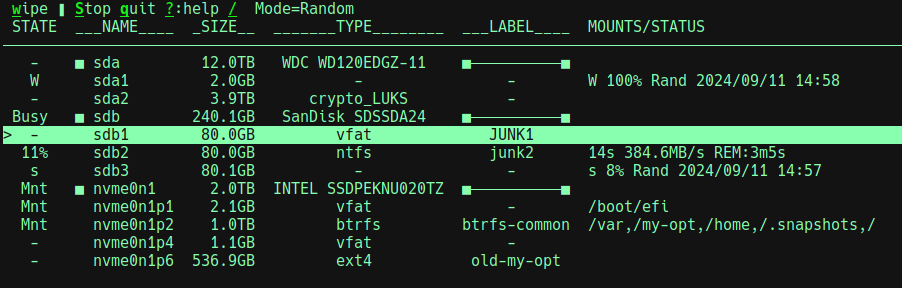
The possible state values and meanings are:
- - : indicates the device is ready for wiping if desired.
- ^ : similar to -, but also indicates the device was added after
dwipestarted - Mnt : the partition is mounted or the disk has partitions that are mounted. You cannot wipe the device in this state.
- N% : if a percent is seen, then a wipe is in progress.
- STOP : indicates that a wipe is being stopped.
- s : indicates that a wipe was stopped (so the device is partly wiped) and wiping can be restarted.
- W : indicates that a wipe was completed and wiping can be restarted.
- Lock : indicates that the disk is manually locked, its partitions are hidden, and you cannot wipe the disk or its partitions.
- Unlk : indicates that the disk was manually unlocked after a manual lock; this is a transitory state.
The top line shows available actions and other info. Some actions are context sensitive:
- w : wipe : wipe the selected device; before starting, you must confirm your intent.
- s : stop : stops the selected wipe in progress (can take a while).
- S : Stop : stops all wipes in progress (can take a while).
- q : quit : quits the app after stopping wipes in progress.
- ? : help : bring up help screen with all actions and navigation keys explained.
- / : search : limits the show devices to those matching the given regex plus all wipes in progress.
The top line shows the "Mode" which is Random or Zeros. For some disks, zeroing may be faster than random. Typing r toggles the mode (this is seen on the help screen). When Random, a wiped device is filled with random data and then the first 16KB is zeroed.
The write rate and estimating remaining times are shown when wiping a device. Due to write queueing, the initial rates may be inflated, final rates are deflated, and the times are optimistic.
The 'W' (Wiped) and 's' (partly wiped) states are disk persistent. For those states, more information is provided about the wipe including when and percent complete.
The Help Screen
When ? is typed, the help screen looks like:
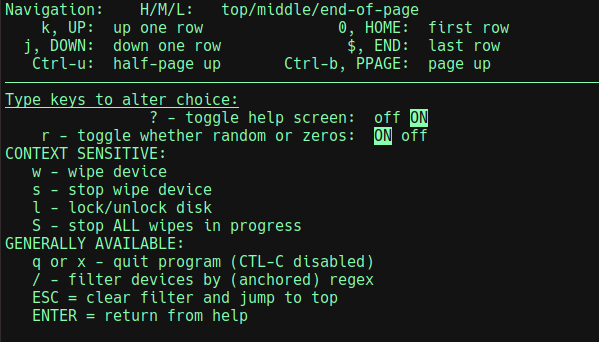
You can navigate the list of devices with arrow keys and vi-like keys.
Release history Release notifications | RSS feed


Download files
Download the file for your platform. If you're not sure which to choose, learn more about installing packages.
Source Distribution
Built Distribution
Filter files by name, interpreter, ABI, and platform.
If you're not sure about the file name format, learn more about wheel file names.
Copy a direct link to the current filters
File details
Details for the file dwipe-1.0.7.tar.gz.
File metadata
- Download URL: dwipe-1.0.7.tar.gz
- Upload date:
- Size: 135.9 kB
- Tags: Source
- Uploaded using Trusted Publishing? No
- Uploaded via: python-requests/2.31.0
File hashes
| Algorithm | Hash digest | |
|---|---|---|
| SHA256 |
83120d183b9ee11db56c43d9f6689eee291661cba0345765ab273b16d345575d
|
|
| MD5 |
40a675a11e66b493bebc0d8c32302828
|
|
| BLAKE2b-256 |
59cd9e0c7b4adc8c3e66c859be12df69aaf0d93d283afaf5675c5c635804f21c
|
File details
Details for the file dwipe-1.0.7-py3-none-any.whl.
File metadata
- Download URL: dwipe-1.0.7-py3-none-any.whl
- Upload date:
- Size: 13.5 kB
- Tags: Python 3
- Uploaded using Trusted Publishing? No
- Uploaded via: python-requests/2.31.0
File hashes
| Algorithm | Hash digest | |
|---|---|---|
| SHA256 |
4b6cc70ad39e92d9d1cd7a520ee36973b02cd25d4f6ae196ecbbd396c9aa9cef
|
|
| MD5 |
c2a77b7fcb59ee328a6153ee954a48bb
|
|
| BLAKE2b-256 |
797eb43dbff8b9b28187f0660679987d6c48d6ae188c83e73489329bb24342b8
|






