
DWLOAD Server
DWLOAD server implemented in Python (OpenSource, GPL v3 or above).
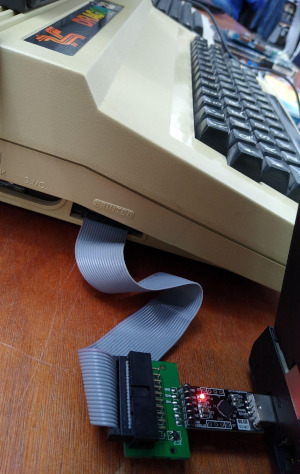
Connect your Dragon 32 into your PC and LOAD/SAVE basic listings.
Quickstart
~$ git clone https://codeberg.org/jedie/DwLoadServer.git
~$ cd DwLoadServer
~/DwLoadServer$ ./cli.py run --help
The help page looks like:
usage: dwload-server run [-h] [RUN OPTIONS]

Start the DWLOAD server.

╭─ options ────────────────────────────────────────────────────────────────────────╮
│ -h, --help         show this help message and exit                               │
│ --root-dir PATH    Root path for dwload files (default: /home/jens/dwload-files) │
│ --interface STR    Use interface: "becker" or "serial" (default: becker)         │
│ --ip STR           IP address for the interface (default: 127.0.0.1)             │
│ --port INT         Port number (default: 65504)                                  │
│ --serial-port STR  Serial port for serial interface (default: /dev/ttyUSB0)      │
│ -v, --verbosity    Verbosity level; e.g.: -v, -vv, -vvv, etc. (repeatable)       │
╰──────────────────────────────────────────────────────────────────────────────────╯
features
- load/save files via DWLOAD
- on-the-fly converting ASCII BASIC listing (see below)
- dynamic "AUTOLOAD.DWL" (see below)
- backup all files on save
- Support USB Adapter and Becker TCP/IP Interface.
current state
Tested DWEEBS:
| DWEEB | example | Description |
|---|---|---|
| DLOAD | DLOAD |
Load AUTOLOAD.DWL (Used on Dragon startup) |
| SAVE | DLOAD"SAVE""MYFILE.BAS" |
Save BASIC listing |
| RESAVE | DLOAD"RESAVE""MYFILE.BAS" |
Save BASIC listing |
Implemented DriveWire Transactions:
| hex | dez | DW name | Description |
|---|---|---|---|
| $00 | 0 | OP_NOP | NOP Transaction -> ignored |
| $01 | 1 | OP_NAMEOBJ_MOUNT | Mount a file to a virtual drive number |
| $02 | 2 | OP_NAMEOBJ_CREATE | (Does in this implementation the same as OP_NAMEOBJ_MOUNT) |
| $d2 | 210 | OP_READEX | Send 256 bytes sector from the DWLOAD server to the client |
| $57 | 87 | OP_WRITE | Write 256 bytes sector of data from the client into a file on the server |
TODO
- enhance
AUTOLOAD.DWL.py, see: http://archive.worldofdragon.org/phpBB3/viewtopic.php?f=5&t=4977 - compare checksum
- write unittests
dynamic "AUTOLOAD.DWL"
There exist a way to generate a dynamic DWLOAD menu.
At first start the directory dwload_server/dwload-demo-files/ with all files are copied to "~/dwload-files/"
This directory is used to LOAD / SAVE files. The dynamic menu is generated with filenames in this directory.
The generated listing looks like this:
10 CLS
20 PRINT" *** DYNAMIC MENU ***  14:11:18"
30 PRINT"/HOME/FOO/DWLOAD-FILES"
40 PRINT" 0 - HEXVIEW.BAS"
50 PRINT" 1 - TEST.BAS"
60 PRINT" 2 - PLASMA"
70 PRINT"PLEASE SELECT (X FOR RELOAD) !"
80 A$=INKEY$:IF A$="" GOTO 80
90 IF A$="X" THEN DLOAD
100 IF A$="0" THEN DLOAD"HEXVIEW.BAS"
110 IF A$="1" THEN DLOAD"TEST.BAS"
120 IF A$="2" THEN DLOAD"PLASMA"
130 GOTO 10
s.: http://archive.worldofdragon.org/phpBB3/viewtopic.php?f=5&t=4977
You must only call DLOAD on you Dragon to get this menu. Because a DLOAD will request AUTOLOAD.DWL and the Python server will all .py and call AUTOLOAD.DWL.py if exist.
This feature make the following file:
| /dwload_server/hooks/dynamic_dwl.py | general API to 'pyscript' files | | /dwload_server/pyscripts/autoload_dwl.py | generates the DWLOAD menu |
on-the-fly converting ASCII BASIC listing
The server read/save ASCII BASIC listing and send/store them to the DWLOAD client on-the-fly. So you can edit listings on your PC and try them on your Dragon without any external conventions!
e.g.: save
10 PRINT"HELLO WORLD!"
DLOAD"SAVE""HELLO.BAS"
DWLOAD
!
OK
The server will create two files:
| filename | format | description |
|---|---|---|
| HELLO.DWL | raw tokenized binary | Dragon DOS Binary Format data from the Dragon (256 Bytes padded) |
| HELLO.BAS | ASCII listing | on-the-fly converted ASCII BASIC listing |
e.g. load (and execute):
DLOAD"HELLO.BAS"
!HELLO WORLD!
OK
(Note: the first ! is from DWLOAD ROM routine)
The server will read the HELLO.BAS ASCII listing and convert is on-the-fly to the needed Dragon DOS Binary Format
and send this back to the Dragon.
This feature make the following files:
| /dwload_server/hooks/read_ascii.py | read ASCII listing and send as binary to client | | /dwload_server/hooks/save_ascii.py | save binary from client as ASCII on server |
dweeb files
Some DWLOAD Extensible Execution Blocks files are included into this repository in:
dwload_server/dweeb/ and dwload_server/dwload-demo-files/
They by "tormod" from the archive file dwload-demo-files.tar.xz.zip from here: https://archive.worldofdragon.org/phpBB3/viewtopic.php?f=5&t=4964
More info: https://worldofdragon.org/index.php?title=Dweebs
install
Currently just clone the project and just start the cli (that will create a virtualenv and installs every dependencies)
e.g.:
~$ git clone https://codeberg.org/jedie/DwLoadServer.git
~$ cd DwLoadServer
~/DwLoadServer$ ./cli.py --help
The output of ./cli.py --help looks like:
usage: dwload-server [-h] {run,version}


╭─ options ────────────────────────────────────╮
│ -h, --help   show this help message and exit │
╰──────────────────────────────────────────────╯
╭─ subcommands ────────────────────────────────╮
│ (required)                                   │
│   • run      Start the DWLOAD server.        │
│   • version  Print version and exit          │
╰──────────────────────────────────────────────╯
You can also run as cli, e.g.: Start serial DWLOAD server:
~/DwLoadServer$ ./devshell.py run serial
development
Use the dev. CLI:s ./dev-cli.py --help looks like:
usage: ./dev-cli.py [-h] {coverage,install,lint,mypy,nox,pip-audit,publish,test,update,update-readme-history,update-test-snapshot-files,version}


╭─ options ──────────────────────────────────────────────────────────────────────────────╮
│ -h, --help    show this help message and exit                                          │
╰────────────────────────────────────────────────────────────────────────────────────────╯
╭─ subcommands ──────────────────────────────────────────────────────────────────────────╮
│ (required)                                                                             │
│   • coverage  Run tests and show coverage report.                                      │
│   • install   Install requirements and 'dwload_server' via pip as editable.            │
│   • lint      Check/fix code style by run: "ruff check --fix"                          │
│   • mypy      Run Mypy (configured in pyproject.toml)                                  │
│   • nox       Run nox                                                                  │
│   • pip-audit                                                                          │
│               Run pip-audit check against current requirements files                   │
│   • publish   Build and upload this project to PyPi                                    │
│   • test      Run unittests                                                            │
│   • update    Update dependencies (uv.lock) and git pre-commit hooks                   │
│   • update-readme-history                                                              │
│               Update project history base on git commits/tags in README.md             │
│                                                                                        │
│               Will be exited with 1 if the README.md was updated otherwise with 0.     │
│                                                                                        │
│               Also, callable via e.g.:                                                 │
│                   python -m cli_base update-readme-history -v                          │
│   • update-test-snapshot-files                                                         │
│               Update all test snapshot files (by remove and recreate all snapshot      │
│               files)                                                                   │
│   • version   Print version and exit                                                   │
╰────────────────────────────────────────────────────────────────────────────────────────╯
History
- v0.7.0
- 2026-10-11 - fix tests
- 2026-10-11 - Update requirements
- 2026-10-11 - cleanup file structure
- 2026-10-11 - enhance loggins
- 2026-10-10 - WIP: dweeb
- 2026-10-10 - log chunk number
- 2026-10-10 - remove old hook code
- 2026-10-10 - enhance logging
- 2026-10-10 - Simplify implementation
- v0.6.0
- 2026-10-08 - fix setup default ~/dwload/AUTOLOAD.DWL.py
- 2026-10-08 - update README
- 2026-10-08 - Bugfix: Use system uv
- 2026-10-08 - apply manageprojects updates: Use system uv
- 2026-10-08 - GitHub -> Codeberg, OpenCommit, GitLab + Radicle
- 2025-12-16 - Migrate to UV
- 2023-09-24 - Update requirements
- v0.5.1
- 2023-05-01 - Remove Python 3.8 support and bump version to v0.5.1
- 2023-05-01 - add flake8 config
- 2023-05-01 - Update requirements
- 2022-09-11 - update git ignore
- v0.5.0
- 2022-09-11 - bugfix publishing
- 2022-09-11 - update git ignore
- 2022-09-11 - README
- 2022-09-11 - update README
- 2022-09-11 - command cli() call
- 2022-09-10 - code cleanup
- 2022-09-10 - Add "OP NOP"
- 2022-09-10 - update code style
- 2022-09-10 - bugfixes
- 2022-09-10 - Move CLI into dev-shell
- 2022-09-10 - Add editor config
- 2022-09-09 - pyupgrade
- 2022-09-09 - use dev-shell
- 2022-09-09 - Replace README.creole with markdown
- 2014-11-20 - even more info
- 2014-11-20 - more info
Expand older history entries ...
- v0.4.0
- 2014-11-20 - update README
- 2014-11-20 - cosmetics
- 2014-11-20 - dynamic AUTOLOAD.DWL works!
- 2014-11-14 - WIP: dynamic 'pyscript' files.
- 2014-11-20 - bugfixes
- 2014-11-19 - merge has_extension() func
- 2014-11-19 - Update README.creole
- 2014-11-19 - add TODO: dynamic "AUTOLOAD.DWL"
- v0.3.0
- 2014-11-19 - Bugfix for ReSt
- 2014-11-19 - fix write filename handling
- 2014-11-19 - display type of a hook
- 2014-11-19 - Bugfix: save/read ASCII BASIC listings
- 2014-11-19 - remove obsolete file
- 2014-11-19 - bugfix: missing root_logger
- 2014-11-19 - "implement" OP_NAMEOBJ_CREATE
- 2014-11-18 - add note that only python 3 is useable, yet.
- 2014-11-18 - display content on parse error
- 2014-11-18 - Bugfix save listing
- 2014-11-17 - WIP: convert ASCII file on-the-fly
- 2014-11-17 - WIP: Split the hook codes
- 2014-11-17 - backup rename before create ASCII listing
- 2014-11-17 - WIP: Sabe BASIC as ASCII listing, too.
- 2014-11-17 - remove obsolete phrase... ;)
- v0.2.0
- 2014-11-17 - add MANIFEST.in
- 2014-11-17 - update README
- 2014-11-17 - refactor:
- 2014-11-17 - update serial server
- 2014-11-16 - Bugfix: Wait until all bytes are received
- 2014-11-16 - Display checksum
- 2014-11-16 - WIP: Refactor for reconnect
- 2014-11-16 - WIP: Add becker interface support
- 2014-11-15 - repro transfer: DWLOAD -> 6809
- 2014-11-14 - Add a batch file for windows to startup the server
- v0.1.1
- 2014-11-14 - update boot scripts/README
- 2014-11-14 - +.idea
- 2014-11-14 - add git update info
- 2014-11-14 - Bugfix install as editable
- 2014-11-14 - add virtualenv
- 2014-11-14 - Bugfix: install git repro as editable
- 2014-11-14 - add missing OPs in README
- 2014-11-14 - update README
- 2014-11-14 - Add DocStrings
- 2014-11-14 - add error code handling
- 2014-11-14 - Helpfull error message
- 2014-11-14 - Bugfix CLI
- 2014-11-14 - Add missing own package ;)
- 2014-11-14 - Add working bootstrap file.
- 2014-11-13 - WIP: add bootstrap script and create real package
- 2014-11-13 - save files work
- 2014-11-12 - initial commit
Links
| Forum Thread (en) | worldofdragon.org |
| Forum Thread (de) | forum.classic-computing.de |
| PyPi | https://pypi.python.org/pypi/dwload_server/ |
some project related links:
- About DWLOAD: http://archive.worldofdragon.org/phpBB3/viewtopic.php?f=5&t=4964
- DWEEBS application Thread: http://archive.worldofdragon.org/phpBB3/viewtopic.php?f=5&t=4968
- Dragon 32/64 DriveWire Adapter: http://archive.worldofdragon.org/index.php?title=Dragon_32/64_Drivewire_Adapter
- Drivewire for dummies: http://archive.worldofdragon.org/index.php?title=Drivewire_for_dummies
- http://sourceforge.net/p/drivewireserver/wiki/DriveWire_Specification/
- http://sourceforge.net/p/drivewireserver/wiki/
GitHub suspended me!
Important notice:
GitHub suspended my account sometime in late August 2026 ! There was no warning beforehand, nor any explanation of the reasons afterwards. Since then, I have had no access or control over my data on GitHub.
All my projects and everything about me have completely disappeared. Everything just results in a 404 "Not Found" error page.
Add also: https://codeberg.org/jedie/blog#2026-08-31-github-suspended-me
Now you can find my on these places:
- Codeberg.org/jedie
- OpenCommit.eu/jedie
- GitLab.com/users/jedie
- Radicle: did🔑z6MkfvNUuBCwRtNZwANEAGd4vaTzyuZXMKfiSyjoBALga934 | jedie.radicle.garden
That is why there will probably be a lot of broken links pointing to my GitHub account for quite some time!
#GitHubSuspendedMe #GiveUpGitHub
Project links
1 maintainer

Metadata
1 maintainer
Release files for dwload-server 0.7.0
For a detailed explanation of source distributions (sdists) and built distributions (wheels), please see the package formats documentation.
Source distribution (sdist)
| File | Size | Uploaded | |
|---|---|---|---|
| dwload_server-0.7.0.tar.gz | 159.1 kB | Details |
Built distribution (wheel)
| File | Interpreter | ABI | Platform | Reset |
|---|---|---|---|---|
| dwload_server-0.7.0-py3-none-any.whl | Python 3 | none | any | Details |
Total release size: 223.7 kB
Release files / dwload_server-0.7.0.tar.gz
| Download URL | dwload_server-0.7.0.tar.gz |
|---|---|
| Size | 159.1 kB |
| Tags | Source |
|
SHA-256 checksum How to use checksums |
028b1003f9fce8c5cbb36ba74c87a2b72a958100a17fdfc974abd762f42876b7
|
|
BLAKE2b-256 checksum How to use checksums |
711a42787ba19210e03009f90e2cb01983adffbe9ebc2bdc3d351ff337ea1547
|
| Upload date | |
|
Uploaded using Trusted Publishing? What is trusted publishing? |
No |
| Uploaded via |
twine/7.0.0 CPython/3.14.7
|
Release files / dwload_server-0.7.0-py3-none-any.whl
| Download URL | dwload_server-0.7.0-py3-none-any.whl |
|---|---|
| Size | 64.7 kB |
| Tags | Python 3 |
|
SHA-256 checksum How to use checksums |
bc2598d8c3e024fb6fcff49fe31ce9b18ccf991c66ca28710f5278f872e8d784
|
|
BLAKE2b-256 checksum How to use checksums |
dd26d3b9c98cf5444648464e2fdcc006addb90e064c110d51787c79cc229a8e8
|
| Upload date | |
|
Uploaded using Trusted Publishing? What is trusted publishing? |
No |
| Uploaded via |
twine/7.0.0 CPython/3.14.7
|














