
dworshak-prompt
A Python utility that ensures you can always get user input by falling back through multiple interfaces.
dworshak-prompt is a CI-safe, shell-friendly prompting engine that integrates with persistent config and secret storage.
How it works
It captures input by cycling through modes based on environment availability:
- Console (CLI)
- GUI (Tkinter)
- Web (Local Browser Server)
Automatically skips incompatible modes (e.g., GUI on WSL) via pyhabitat.
Install
Install on most systems.
pip install "dworshak-prompt[typer,cryptography]"
Install on Termux.
pkg add python-cryptography
uv venv --system-site-packages
uv add "dworshak-prompt[typer]"
Obtain vs DworshakPrompt
Use Obtain for managed config/secret storage; use DworshakPrompt directly if you want to handle values yourself.
Usage
Obtain
Leverage dworshak-config, dworshak-secret, and dworshak-env to automatically handle values.
from dworshak_prompt import Obtain

obtain = Obtain()

obtain.config(service, item, message)
obtain.secret(service, item, message)
obtain.env(key, message)
Ask
Prompt the user then handle values manually.
from dworshak_prompt import DworshakPrompt, PromptMode

# Basic
val = DworshakPrompt().ask("Enter value")

# Options
val = DworshakPrompt().ask(
    message = "Secure Key",
    hide_input=True,
    interface_priority = [PromptMode.CLI, PromptMode.GUI]
    interface_avoid = {PromptMode.WEB}

)
Another example, for handling CI:
from dworshak_prompt import Obtain

# If this runs in GitHub Actions, it returns "staging" immediately.
# If it runs on a laptop, it pops up a GUI or Console prompt.
obtain = Obtain()
val = obtain.env(
    key = "TARGET_ENV",
    message = "Target Environment",
    suggestion="production",  # What the human sees
    default="staging"         # What the CI/Headless system uses if the request fails.
)
Leveraging dworshak-prompt for calling and adding configured values.
The default config file path is "~/.dworshak/config.json".
from dworshak_prompt import Obtain, PromptMode, InterruptBehavior,

# Identify custom path for a specific project, and set defaults during instantiation of the Obtain class.
obtain = Obtain(
    config_path="~/.pipeline-eds/config.json"
    interface_priority = [PromptMode.GUI, PromptMode.WEB]
    interface_avoid = {PromptMode.CLI}
    interrupt_behavior = InterruptBehavior.EXIT,
    debug = True
    )
api_key = obtain.config("emerson-ovation-api","api_key", message="Enter EDS API Key")
Another example of the Obtain pattern.
from O365 import Account
from dworshak_prompt import Obtain, InterruptBehavior, PromptMode
import os
import logging
logger=logging.getLogger(__name__)

avoid_set = set()
DWO_AVOID_CONSOLE = os.environ.get('DWO_AVOID_CONSOLE')
if  DWO_AVOID_CONSOLE == "1":
    avoid_set.add(PromptMode.CLI)
else:
    logger.warning("Use 'export DWO_AVOID_CONSOLE=1 to avoid the console, to make enable unhiding hidden input.'")
logger.debug(f"{avoid_set=}")
logger.debug(f"{DWO_AVOID_CONSOLE=}")

# Instantiate the prompt handler
prompt = Obtain(
    interrupt_behavior = InterruptBehavior.EXIT,
    interface_avoid = avoid_set
)

# Ask for client credentials securely
CLIENT_ID = prompt.secret(
    service="o365",
    item="CLIENT_ID",
    message="Enter your O365 Client ID: "
    ).value
CLIENT_SECRET = prompt.secret(
    service="o365",
    item="CLIENT_SECRET",
    message="Enter your O365 Client Secret: "
    ).value

# Prepare credentials tuple
credentials = (CLIENT_ID, CLIENT_SECRET)

# Initialize O365 account
account = Account(credentials)

# Authenticate (interactive for first-time login)
if not account.is_authenticated:
    account.authenticate(scopes=['https://graph.microsoft.com/Mail.Read'])

# Access mailbox and list folders
mailbox = account.mailbox()
folders = mailbox.list_folders()

print("Mailbox folders:")
for folder in folders:
    print("-", folder.name)
CLI
The dworshak layer is the intended primary CLI entry point, but the dworshak-prompt CLI can be used directly.
pipx install "dworshak-prompt[typer]"
dworshak-prompt --version
dworshak-prompt --help
dworshak-prompt ask --message "Please state name" --interface web
dworshak-prompt is designed to be useful even without Python code.
It can be used directly from shell scripts, CI pipelines, and ops tooling to safely obtain, persist, and reuse configuration values.
Piping and environment variable capture works, but will naturally fallback to GUI or Web input because in these cases stdout is not a TTY. However, you may continue to use console input and leverage dev/tty by using envionrmental variable DWORSHAK_FORCE_INTERACTIVE_TTY.
# Enable console input during wrapped or piped shell capture.
export DWORSHAK_FORCE_INTERACTIVE_TTY=1
VAR=$(dworshak-prompt obtain secret "special_api" "password" --emit)
See the dworshak-prompt Typer CLI structure.
dworshak-prompt helptree
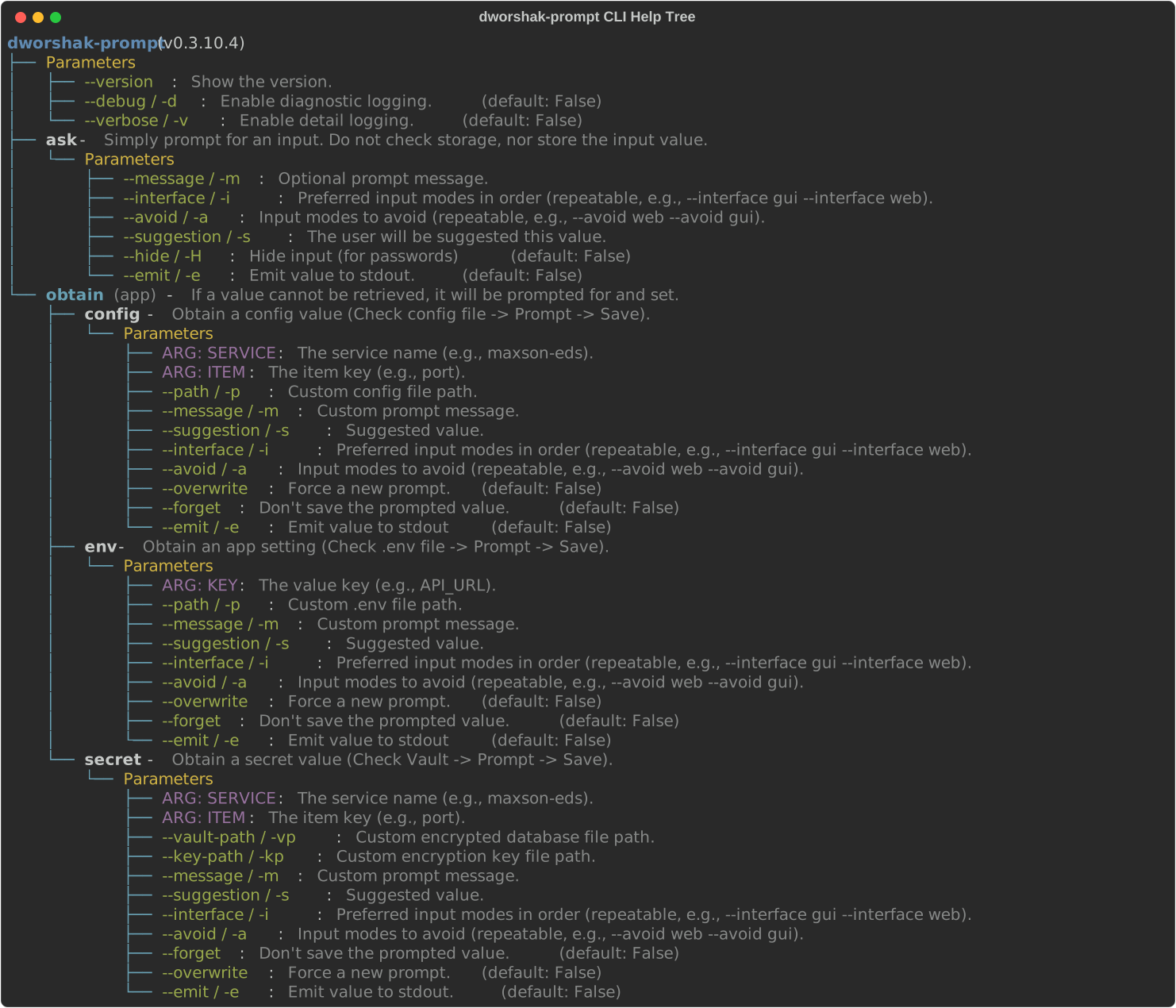
helptree is utility funtion for Typer CLIs, imported from the typer-helptree library.
- GitHub: https://github.com/City-of-Memphis-Wastewater/typer-helptree
- PyPI: https://pypi.org/project/typer-helptree/
Add dworshak-prompt to Python project
When using uv for dependency management.
uv add dworshak-prompt --extra typer
Or, when using raw pip for dependency management.
pip install "dworshak-prompt[typer]"
Including the typer optional dependency group ensures that Typer and Rich are included as a dependencies.
Without this, the CLI and console prompting functionality are still stable, due to Python standard library fallbacks.
More Information
Sister Projects in the Dworshak Ecosystem
- CLI/Orchestrator: dworshak
- Interactive UI: dworshak-prompt
- Secrets Storage: dworshak-secret
- Plaintext Pathed Configs: dworshak-config
- Classic .env Injection: dworshak-env
pipx install dworshak
pip install dworshak-secret
pip install dworshak-config
pip install dworshak-env
pip install dworshak-prompt
1 maintainer

Metadata
1 maintainer
Release files for dworshak-prompt 0.3.11
For a detailed explanation of source distributions (sdists) and built distributions (wheels), please see the package formats documentation.
Source distribution (sdist)
| File | Size | Uploaded | |
|---|---|---|---|
| dworshak_prompt-0.3.11.tar.gz | 33.2 kB | Details |
Built distribution (wheel)
| File | Interpreter | ABI | Platform | Reset |
|---|---|---|---|---|
| dworshak_prompt-0.3.11-py3-none-any.whl | Python 3 | none | any | Details |
Total release size: 70.8 kB
Release files / dworshak_prompt-0.3.11.tar.gz
| Download URL | dworshak_prompt-0.3.11.tar.gz |
|---|---|
| Size | 33.2 kB |
| Tags | Source |
|
SHA-256 checksum How to use checksums |
8cbdeea3e7fdb7335772e00c602d5fc21152e3a8a7272703ac34d3d48da4fff8
|
|
BLAKE2b-256 checksum How to use checksums |
104e2698f8a65b0bc47c582002a0d26ca617ce2f1c4a745e9fd2795bb3269024
|
| Upload date | |
|
Uploaded using Trusted Publishing? What is trusted publishing? |
Yes |
| Uploaded via |
twine/6.1.0 CPython/3.13.12
|
Provenance
Provenance describes where a file came from. On PyPI, provenance is shared via attestations, which provide a verifiable record of the build or publishing details. View details, limitations and caveats.


PyPI Publish Attestation
PyPI verified that this artifact, at this checksum, originated from the publisher listed below.
Signed by GitHub Actions, verified by PyPI on Jun 16, 2026.
Transparency logRelease files / dworshak_prompt-0.3.11-py3-none-any.whl
| Download URL | dworshak_prompt-0.3.11-py3-none-any.whl |
|---|---|
| Size | 37.6 kB |
| Tags | Python 3 |
|
SHA-256 checksum How to use checksums |
ed678800063be958be8c16ceeff44c749ba90daec19374b57f807dbace0953e7
|
|
BLAKE2b-256 checksum How to use checksums |
e8f9f4c679dc001519c4dd2b763de436daefd15d55a8ae46a0ff08a4f55f6c4e
|
| Upload date | |
|
Uploaded using Trusted Publishing? What is trusted publishing? |
Yes |
| Uploaded via |
twine/6.1.0 CPython/3.13.12
|
Provenance
Provenance describes where a file came from. On PyPI, provenance is shared via attestations, which provide a verifiable record of the build or publishing details. View details, limitations and caveats.
PyPI Publish Attestation
PyPI verified that this artifact, at this checksum, originated from the publisher listed below.
Signed by GitHub Actions, verified by PyPI on Jun 16, 2026.
Transparency log













