
Configuration and credential waterfall with user-in-the-loop prompting and CLI access.
Verified details
These details have been verified by PyPIProject links
GitHub Statistics
Maintainers

Project description
Dworshak 🌊
dworshak is a cross-platform credential and config management solution.
There are options to manage encrypted cresentials, store plaintext config to JSON, or to leverage traditional Pythonic .env files.
dworshak is the CLI layer which allows your to edit and inspect values which you can also obtain programatically by using the wider dworshak ecosystem.
The dworshak ecosystem is build to be a configuration and credential waterfall with user-in-the-loop prompting.
Quick Start
# Install the CLI (for most environments)
pipx install "dworshak[crypto]"

# Bootstrap the security layer
dworshak setup

# Register your API credential
dworshak secret set "rjn_api"  "username"

# -> You will then be prompted,
#    with the input characters securely hidden.

# Alternatively, if you want to have the option to hide/show the secret value without introducing it to console history,
# use the web or gui input
dworshak prompt obtain secret "rjn_api" "password" --interface web
TL;DR: Use dworshak to securely store and retrieve secrets, configs, and env values in scripts. Enjoy the Obtain pattern.
Supports Termux, Alpine, macOS, Linux, Windows.
Clean stdout means you can assign variables directly:
PORT=$(dworshak prompt obtain config myapp port -e)
dworshak helptree
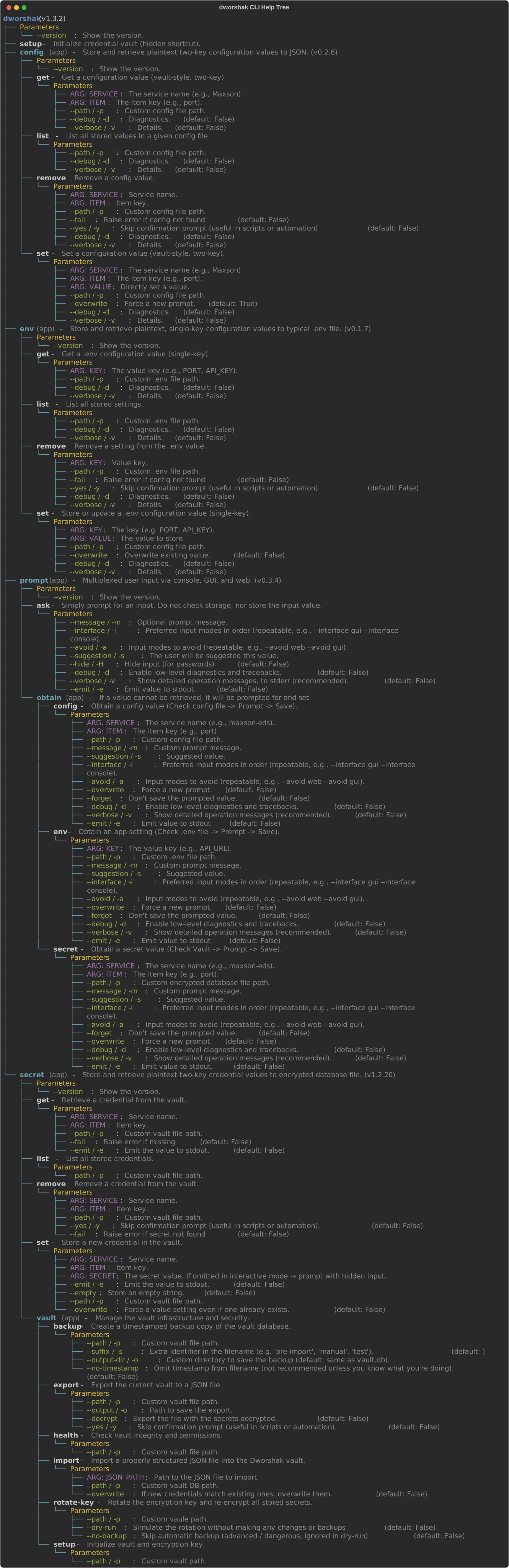
helptree is utility funtion for Typer CLIs, imported from the typer-helptree library.
- GitHub: https://github.com/City-of-Memphis-Wastewater/typer-helptree
- PyPI: https://pypi.org/project/typer-helptree/
🏗 The Ultimate Vision
To become a stable credential management tool for scripting the flow of Emerson Ovation data and related APIs, supporting multiple projects in and beyond at the Maxson Wastewater Treatment Plant.
Furthermore, we want to offer Python developers a seamless configuration management experience that they can enjoy for years to come, on all of their devices. We especially love unlocking superuser gains and rollout in Termux environments.
The Secret Sauce Behind dworshk-secret: Use Industry-standard AES (Fernet) encryption to manage a local ~/.dworshak/ directory which includes a .key file, a vault.db encrypted credential file, and a config.json file for controlling defaults.
🚀 Attributes
- Secure Vault: Fernet-encrypted SQLite storage for API credentials.
- Root of Trust: A local
.keyfile architecture that works identically on Windows and Termux. - CLI Entry: A
typer-based interface for setup and credential management.
Bash Scripting
Use dworshak to prompt for Microsoft Fabric / Azure credentials
#!/usr/bin/env bash
set -euo pipefail

# Prompt human securely
SQL_PASSWORD=$(dworshak prompt ask \
  --message "Enter Fabric SQL password" \
  --hide --emit)

# Push into Azure Key Vault
az keyvault secret set \
  --vault-name my-fabric-vault \
  --name sql-password \
  --value "$SQL_PASSWORD"

echo "Secret stored in Azure Key Vault"
Use dworshak to prompt for AWS credentials
#!/usr/bin/env bash
set -euo pipefail

# 1. Human-friendly prompt
DB_PASSWORD=$(dworshak prompt ask \
  --message "Enter production DB password" \
  --hide --emit)

# 2. Push into AWS Secrets Manager
aws secretsmanager put-secret-value \
  --secret-id prod/db/password \
  --secret-string "$DB_PASSWORD"

echo "Secret stored in AWS Secrets Manager"
Recommended aliases:
alias dwobsec='dworshak prompt obtain secret'
alias dwobfig='dworshak prompt obtain config'
alias dwobenv='dworshak prompt obtain env'
Typical installation (macOS, Ubuntu, Windows 11, etc)
pipx install "dworshak[crypto]"
Termux installation
pkg install python-cryptography
pipx install dworshak --system-site-packages
iSH Alpine installation
apk add py3-cryptography
pipx install dworshak --system-site-packages
Sister Projects in the Dworshak Ecosystem
- CLI/Orchestrator: dworshak
- Interactive UI: dworshak-prompt
- Secrets Storage: dworshak-secret
- Plaintext Pathed Configs: dworshak-config
- Classic .env Injection: dworshak-env
pipx install dworshak
pip install dworshak-secret
pip install dworshak-config
pip install dworshak-env
pip install dworshak-prompt
Documentation
Project details
Verified details
These details have been verified by PyPIProject links
GitHub Statistics
Maintainers
Release history Release notifications | RSS feed


Download files
Download the file for your platform. If you're not sure which to choose, learn more about installing packages.
Source Distribution
Built Distribution
Filter files by name, interpreter, ABI, and platform.
If you're not sure about the file name format, learn more about wheel file names.
Copy a direct link to the current filters
File details
Details for the file dworshak-1.3.2.tar.gz.
File metadata
- Download URL: dworshak-1.3.2.tar.gz
- Upload date:
- Size: 9.3 kB
- Tags: Source
- Uploaded using Trusted Publishing? Yes
- Uploaded via: twine/6.1.0 CPython/3.13.12
File hashes
| Algorithm | Hash digest | |
|---|---|---|
| SHA256 |
022e6c87dab67a7104ea7ede2039610aae654d988362d5a3e9acd418e5951af9
|
|
| MD5 |
df60094687ffba1f777155fa814a5d61
|
|
| BLAKE2b-256 |
320857394d52f9b85c33bd0c705dc900dc9aa2433658a4ff6c9b6051e9903f28
|
Provenance
The following attestation bundles were made for dworshak-1.3.2.tar.gz:
Publisher:
publish.yml on City-of-Memphis-Wastewater/dworshak
-
Statement:
-
Statement type:
https://in-toto.io/Statement/v1 -
Predicate type:
https://docs.pypi.org/attestations/publish/v1 -
Subject name:
dworshak-1.3.2.tar.gz -
Subject digest:
022e6c87dab67a7104ea7ede2039610aae654d988362d5a3e9acd418e5951af9 - Sigstore transparency entry: 1343330114
- Sigstore integration time:
-
Permalink:
City-of-Memphis-Wastewater/dworshak@012494b4324f33e1f42f9943fc67593d354f7c3d -
Branch / Tag:
refs/tags/v1.3.2 - Owner: https://github.com/City-of-Memphis-Wastewater
-
Access:
public
-
Token Issuer:
https://token.actions.githubusercontent.com -
Runner Environment:
github-hosted -
Publication workflow:
publish.yml@012494b4324f33e1f42f9943fc67593d354f7c3d -
Trigger Event:
release
-
Statement type:
File details
Details for the file dworshak-1.3.2-py3-none-any.whl.
File metadata
- Download URL: dworshak-1.3.2-py3-none-any.whl
- Upload date:
- Size: 7.3 kB
- Tags: Python 3
- Uploaded using Trusted Publishing? Yes
- Uploaded via: twine/6.1.0 CPython/3.13.12
File hashes
| Algorithm | Hash digest | |
|---|---|---|
| SHA256 |
c14847b3766493eb9ec0a32a053911421ee22e8c335c34b3196899621a423aea
|
|
| MD5 |
a521376ab4d9c2a7309449bab76b49ca
|
|
| BLAKE2b-256 |
ad0c90c0d7f3379a6cf604f906cad4b3007653ffd9feaf1a9bac95a39b2040f2
|
Provenance
The following attestation bundles were made for dworshak-1.3.2-py3-none-any.whl:
Publisher:
publish.yml on City-of-Memphis-Wastewater/dworshak
-
Statement:
-
Statement type:
https://in-toto.io/Statement/v1 -
Predicate type:
https://docs.pypi.org/attestations/publish/v1 -
Subject name:
dworshak-1.3.2-py3-none-any.whl -
Subject digest:
c14847b3766493eb9ec0a32a053911421ee22e8c335c34b3196899621a423aea - Sigstore transparency entry: 1343330121
- Sigstore integration time:
-
Permalink:
City-of-Memphis-Wastewater/dworshak@012494b4324f33e1f42f9943fc67593d354f7c3d -
Branch / Tag:
refs/tags/v1.3.2 - Owner: https://github.com/City-of-Memphis-Wastewater
-
Access:
public
-
Token Issuer:
https://token.actions.githubusercontent.com -
Runner Environment:
github-hosted -
Publication workflow:
publish.yml@012494b4324f33e1f42f9943fc67593d354f7c3d -
Trigger Event:
release
-
Statement type:






