
Dynamic Command WebServer (dycow)



A tiny web-server app with a configuration file, NO NEED TO CODE
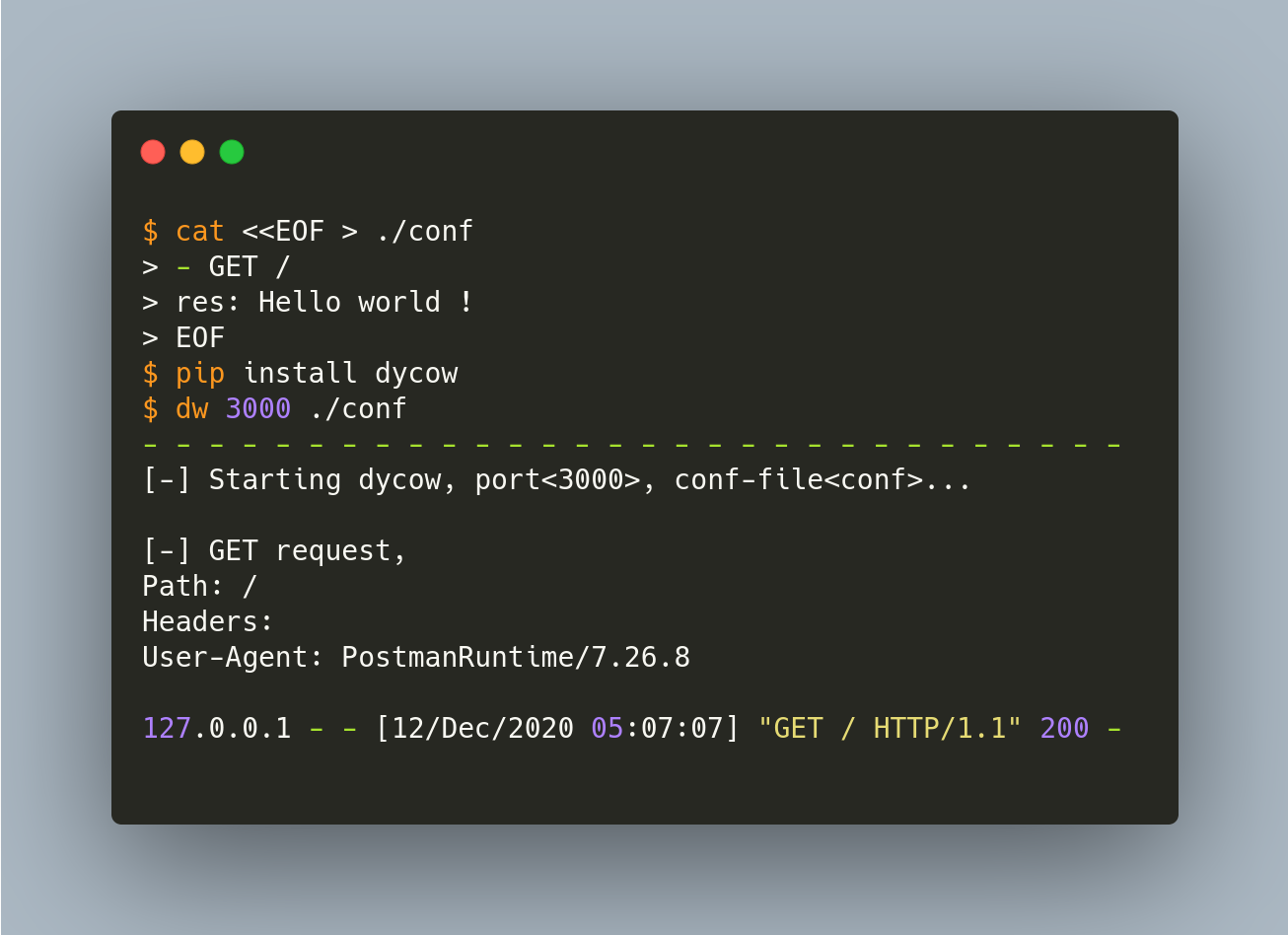
Introduction
This project is a small webserver that just have to get a port and a configuration file to perform preconfigurated commands.
Disclaimer
This was a test-research project for a specific user-case on my raspberry-pi, therefore, i configurated only two methods (GET and POST)
Why use dycow
- It's fast
- Simple to configure, you just have to create a conf file to be ready to start
- It's lightweight (The wheel is ~5Kb)
Requirements
- Python (3.x recommend)
How to install
You just have to run :
pip install dycow
How to use
$ dw -h

[-] dycow v0.0.9.7.
[-] Help center !
[x] Run : dw <port> <conf-file>
[x] Documentation online https://github.com/sanix-darker/dycow
You have to create a file, for example conf and set actions, for example :
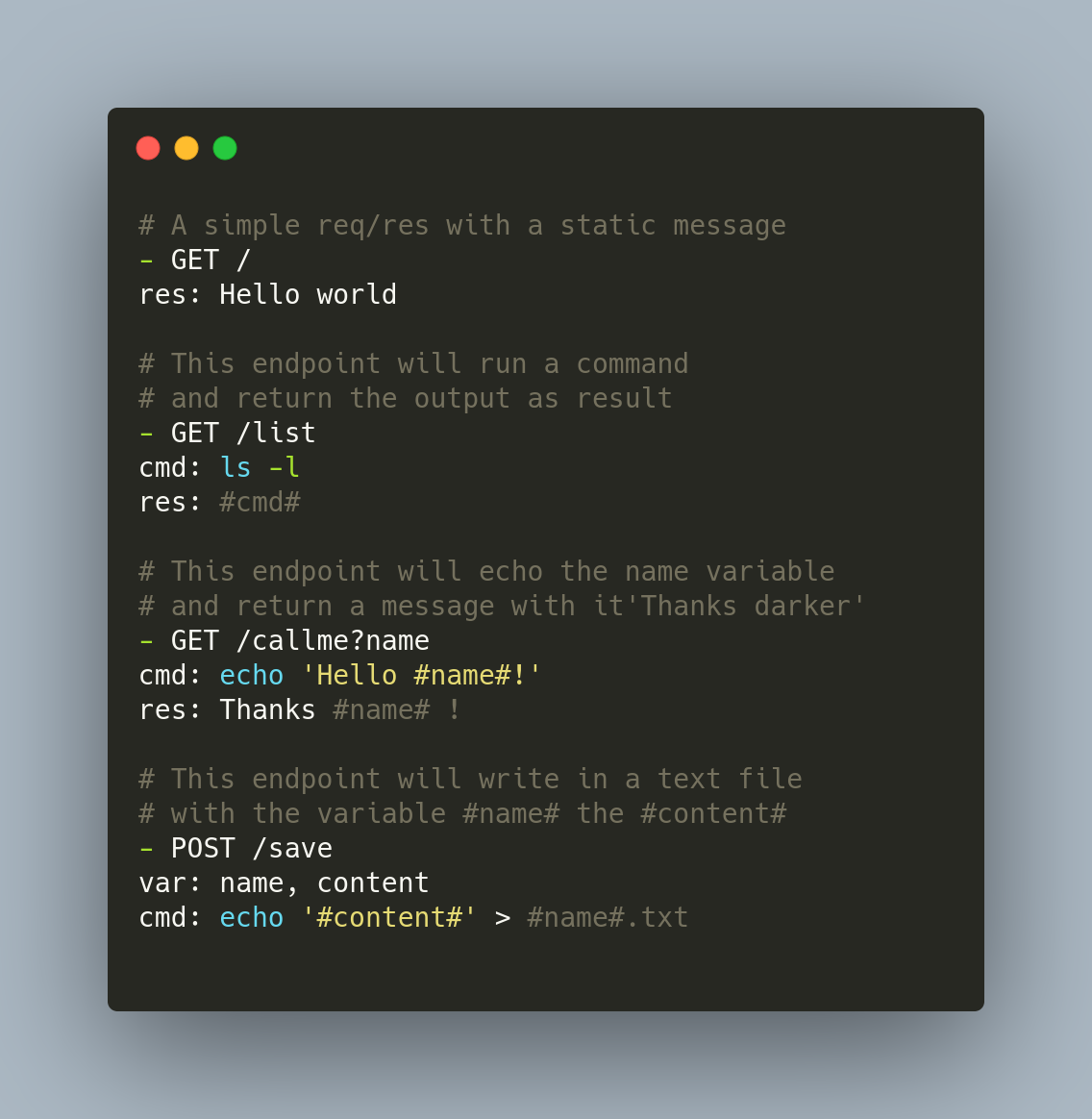
- GET(or - POST) is the type of the request, just after it the endPoint (/save, /callme?name&content).
cmd is the command line that will be executed on a request.
res[NOT REQUIRED] is the response to the request.
var is to specify POST variables. \
Variables like #content# means, the content variable will be replace with the input value as parameter.
- Then run the server application:
# dw <port> <configuration-file>
dw 3000 conf
It will start a small server on port 3000 and following rules you specified in the configuration file.
- You can access API-DOC here .
Tests
To run rest-api tests, i made a bash file in ./tests directory.
you just have to run bash ./tests/rest-api-test.sh
$ bash ./tests/rest-api-test.sh
[-] Running Endpoints tests on dycow.
[✓] GET / passed.
[✓] GET /list passed.
[✓] GET /callme?name=darker passed.
[✓] POST /save passed.
- - -
[-] Tests run :
[-] 4 tests succeed !
[-] 0 tests failed !
[-] Stopping tests Endpoints on dycow.
Author
LICENSE
1 maintainer

Download files
Download the file for your platform. If you're not sure which to choose, learn more about installing packages.
Source Distribution
Built Distribution
Filter files by name, interpreter, ABI, and platform.
If you're not sure about the file name format, learn more about wheel file names.
Copy a direct link to the current filters
File details
Details for the file dycow-0.1.0.0.tar.gz.
File metadata
- Download URL: dycow-0.1.0.0.tar.gz
- Upload date:
- Size: 5.3 kB
- Tags: Source
- Uploaded using Trusted Publishing? No
- Uploaded via:
twine/3.7.1 importlib_metadata/4.10.0 pkginfo/1.8.2 requests/2.26.0 requests-toolbelt/0.9.1 tqdm/4.62.3 CPython/3.8.10
File hashes
| Algorithm | Hash digest | |
|---|---|---|
| SHA256 |
d17a05fff36b3a43173cf922a0e896cfc12192fe3f9c4252e486f8d96514054d
|
|
| MD5 |
8b5cf8947e5806c08830eacfe1062572
|
|
| BLAKE2b-256 |
49f050cc171d53a80632cf979d1fd77fde254404206dc333c1a52cbd2353c594
|
File details
Details for the file dycow-0.1.0.0-py3-none-any.whl.
File metadata
- Download URL: dycow-0.1.0.0-py3-none-any.whl
- Upload date:
- Size: 6.9 kB
- Tags: Python 3
- Uploaded using Trusted Publishing? No
- Uploaded via:
twine/3.7.1 importlib_metadata/4.10.0 pkginfo/1.8.2 requests/2.26.0 requests-toolbelt/0.9.1 tqdm/4.62.3 CPython/3.8.10
File hashes
| Algorithm | Hash digest | |
|---|---|---|
| SHA256 |
1f869c4f5b7ac4ca7038503d245c37b8e861bced6bfd103fad881eae7bbe7480
|
|
| MD5 |
8e8a59fef77151bec65145cf7731e69c
|
|
| BLAKE2b-256 |
b091ef223200bd0c8437b44f5f3fd4ea248801e6f436443c76d859fcd141cce0
|







