
Consider the project as a proof of concept! Definitely not production ready!
Dynafile
Embedded pure Python NoSQL database following DynamoDB concepts.
pip install dynafile

# with string filter support using filtration

pip install "dynafile[filter]"

# bloody edge

pip install git+https://github.com/eruvanos/dynafile.git
pip install filtration
Overview
Dynafile stores items within partitions, which are stored as separate files. Each partition contains a SortedDict
from sortedcontainers which are sorted by the sort key attribute.
Dynafile does not implement the interface or functionality of DynamoDB, but provides familiar API patterns.
Differences:
- Embedded, file based
- No pagination
Features
- persistence
- put item
- get item
- delete item
- scan - without parameters
- query - starts_with
- query - index direction
- query - filter
- scan - filter
- batch writer
- atomic file write
- event stream hooks (put, delete)
- TTL
Roadmap
- GSI - global secondary index
- update item
- batch get
- thread safeness
-
LSI - local secondary index - split partitions
- parallel scans - pre defined scan segments
- transactions
- optimise disc load time (cache partitions in memory, invalidate on file change)
- conditional put item
- improve file consistency (options: acidfile)
API
from dynafile import *

# init DB interface
db = Dynafile(path=".", pk_attribute="PK", sk_attribute="SK")

# put items
db.put_item(item={"PK": "user#1", "SK": "user#1", "name": "Bob"})
db.put_item(item={"PK": "user#1", "SK": "role#1", "TYPE": "sender"})
db.put_item(item={"PK": "user#2", "SK": "user#2", "name": "Alice"})

# more performant batch operation
with db.batch_writer() as writer:
    db.put_item(item={"PK": "user#3", "SK": "user#3", "name": "Steve"})
    db.delete_item(key={"PK": "user#3", "SK": "user#3"})

# retrieve items
item = db.get_item(key={
    "PK": "user#1",
    "SK": "user#1"
})

# query item collection by pk
items = list(db.query(pk="user#1"))

# scan full table
items = list(db.scan())

# add event stream listener to retrieve item modification
def print_listener(event: Event):
    print(event.action)
    print(event.old)
    print(event.new)


db.add_stream_listener(print_listener)
Filter
query and scan support filter, you can provide callables as filter like lambda expressions.
Another option are filtration expressions.
- Equal ("==")
- Not equal ("!=")
- Less than ("<")
- Less than or equal ("<=")
- Greater than (">")
- Greater than or equal (">=")
- Contains ("in")
- RHS must be a list or a Subnet
- Regular expression ("=~")
- RHS must be a regex token
Examples:
SK =~ /^a/- SK starts with aSK == 1- SK is equal 1SK == 1- SK is equal 1nested.a == 1- accesses nested structureitem.nested.a
TTL - Time To Live
TTL provides the option to expire items on read time (get, query, scan).
import time
from dynafile import *

db = Dynafile(path=".", pk_attribute="PK", sk_attribute="SK", ttl_attribute="ttl")

item = {"PK": "1", "SK": "2", "ttl": time.time() - 1000} # expired ttl
db.put_item(item=item)

list(db.scan()) # -> []
Architecture
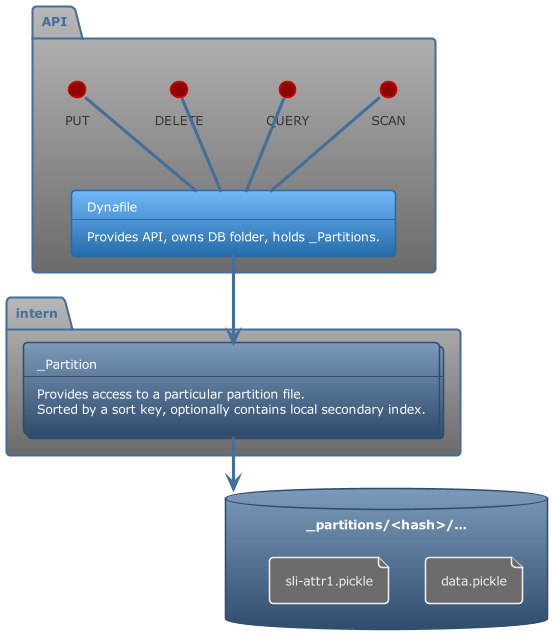
File Structure
--- ROOT ---
./db/

--- MAIN DB ---

|- meta.json - meta information
|- _partitions/
    |- <hash>/
        |- data.pickle - Contains partition data by sort key (SortedDict)
        |- lsi-attr1.pickle - Contains partition data by lsi attr (SortedDict)

--- GSI ---
|- _gsi-<gsi-name>/
    |- _partitions/
        |- <hash>/
            |- data.pickle - Contains partition data by sort key (SortedDict)
1 maintainer

Download files
Download the file for your platform. If you're not sure which to choose, learn more about installing packages.
Source Distribution
Built Distribution
Filter files by name, interpreter, ABI, and platform.
If you're not sure about the file name format, learn more about wheel file names.
Copy a direct link to the current filters
File details
Details for the file dynafile-0.1.3.tar.gz.
File metadata
- Download URL: dynafile-0.1.3.tar.gz
- Upload date:
- Size: 55.9 kB
- Tags: Source
- Uploaded using Trusted Publishing? No
- Uploaded via:
twine/4.0.2 CPython/3.12.2
File hashes
| Algorithm | Hash digest | |
|---|---|---|
| SHA256 |
f9402213a375358b4a22d9cdf3b423c4c99016f92a7505c893d0ade399f74aae
|
|
| MD5 |
3b2718945156f5b7235faa287009b6dd
|
|
| BLAKE2b-256 |
c4d90d7e79caf7d3c7ac66dac24871c567bc4a40ffd3b53a3603238e9be018da
|
File details
Details for the file dynafile-0.1.3-py3-none-any.whl.
File metadata
- Download URL: dynafile-0.1.3-py3-none-any.whl
- Upload date:
- Size: 6.9 kB
- Tags: Python 3
- Uploaded using Trusted Publishing? No
- Uploaded via:
twine/4.0.2 CPython/3.12.2
File hashes
| Algorithm | Hash digest | |
|---|---|---|
| SHA256 |
09ead0032825d5e83662d469891069d0e63a8630f420bd1429e2cf208052b0a9
|
|
| MD5 |
a7f84493b3d8c7f39443e8fbd76d6ad9
|
|
| BLAKE2b-256 |
b4aa7c02df390215aa2dcd24519e2651ea490d8ab1ddbfcbb70cd25f5e2ae1df
|














