
Setup📦
1. Installing pip [Python Package Manager]
$ sudo apt-get install python3-pip
2. Clone this repository to your local drive
$ git clone https://github.com/IndianOpenSourceFoundation/dynamic-cli.git
3. Install dependencies
$ pip3 install -r requirements.txt
4. Go to dynamic directory
$ cd dynamic-cli/
5. Install with pip
$ pip3 install -e .
If you face some issue running dynamic on mac, follow the below instructions
Note for mac users: Make sure to add these lines in you
~/.bashrcor~/.zhsrc(depending upon your shell) 👇export LC_ALL=en_US.UTF-8 export LANG=en_US.UTF-8 export LC_CTYPE=en_US.UTF-8
Usage🛠
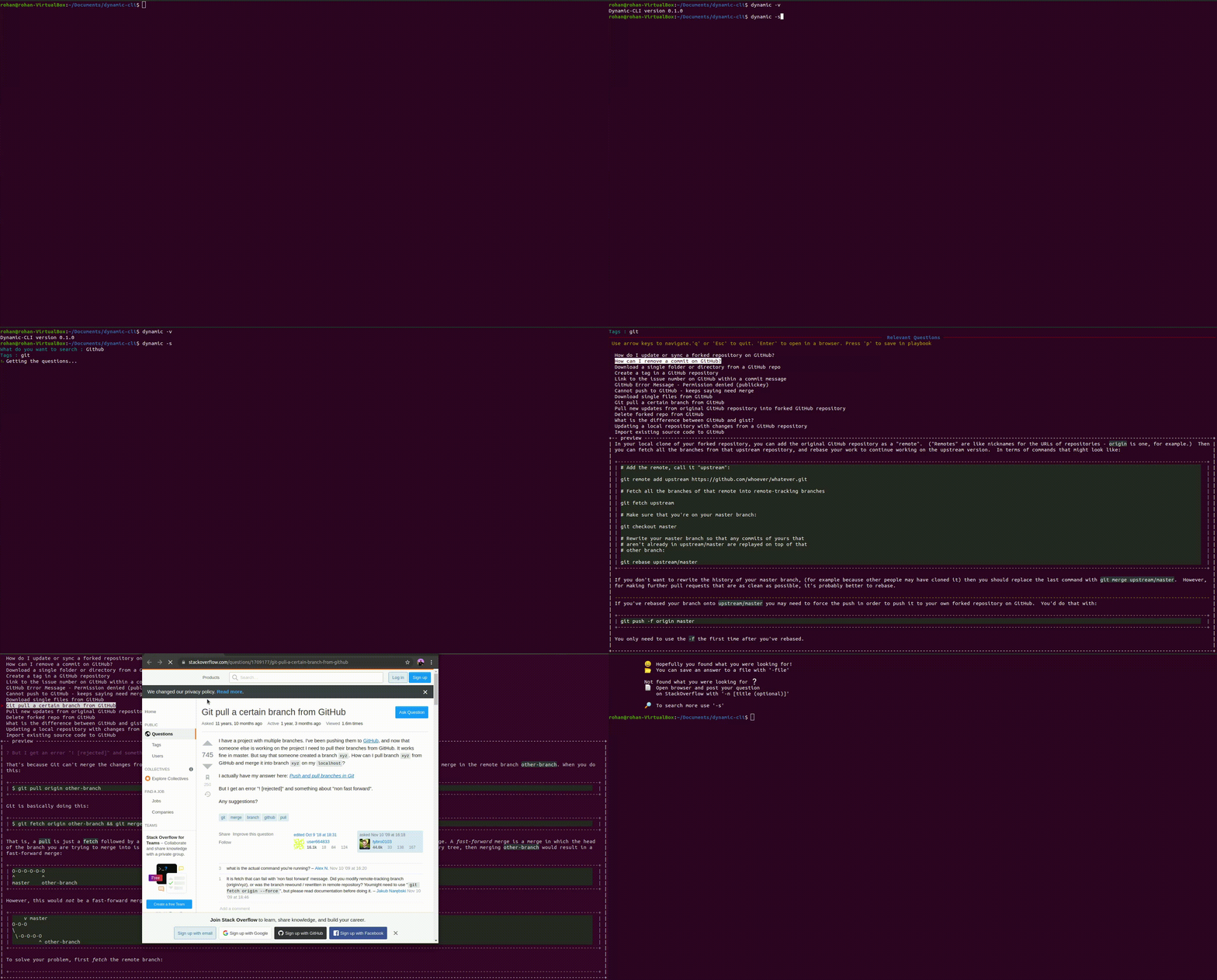
Dynamic CLI allows users to search for keywords/issues with some relevant tags.
Arguments⚙
Usage: Dynamic [OPTIONS]
A Modern, user-friendly command-line HTTP client for the API testing, and if you're stuck - Search and browse StackOverflow without leaving the CLI.
Options:
-st, --start -> Introduces Dynamic CLI
-v, --version -> Gives the Version of the CLI
-s, --search -> Search a question on Stackoverflow
-no, --notion -> Open browser to login to Notion.so
-d, --debug -> Turn on Debugging mode
-c, --custom -> Setup a custom API key
-h, --help -> Shows this message and exit
-GET -> Make a GET request to an API
-POST -> Make a POST request to an API
-DELETE -> Make a DELETE request to an API
License🗄
The project is licensed under the GNU General Public License v3. Check out LICENSE
Contributing


We're accepting PRs for our open and unassigned issues. Please check CONTRIBUTING.md. We'd love your contributions! Kindly follow the steps below to get started:
1. Fork this repository.
2. Clone the forked repository.
git clone https://github.com/<your-github-username>/project_name.git
3. Navigate to the project directory.
cd dynamic-cli
4. Make changes in source code.
P.S. If you want to add emojis 😁, use unicodes.
Emoji unicodes can be found at https://unicode.org/emoji/charts/full-emoji-list.html
To include an emoji in a string, copy the unicode (Eg: U+1F600), replace + with 000 and
prefix it with a \.
Eg: \U0001F604
5. Stage your changes and commit
# Add changes to Index
git add .

# Commit to the local repo
git commit -m "<your_commit_message>"
7. Push your local commits to the remote repo.
git push
8. Create a PR !
9. Congratulations! Sit and relax, you've made your contribution to Dynamic-CLI project.
Dynamic CLI is a part of these open source programs

Contributors👨🏽💻
Credit goes to these people:✨

|

1 maintainer

Release files for dynamic-cli 1.1
For a detailed explanation of source distributions (sdists) and built distributions (wheels), please see the package formats documentation.
Source distribution (sdist)
| File | Size | Uploaded | |
|---|---|---|---|
| dynamic-cli-1.1.tar.gz | 29.0 kB | Details |
Built distribution (wheel)
| File | Interpreter | ABI | Platform | Reset |
|---|---|---|---|---|
| dynamic_cli-1.1-py3-none-any.whl | Python 3 | none | any | Details |
Total release size: 58.5 kB
Release files / dynamic-cli-1.1.tar.gz
| Download URL | dynamic-cli-1.1.tar.gz |
|---|---|
| Size | 29.0 kB |
| Tags | Source |
|
SHA-256 checksum How to use checksums |
b8a9de08080bde83e9a34ecc59f62757a2f85b4b1147520c70996d2f2ff453fb
|
|
BLAKE2b-256 checksum How to use checksums |
5d49fc5f54e92d3612b04636cd1db86c90fdc32941585b4397b5ccf07a01001d
|
| Upload date | |
|
Uploaded using Trusted Publishing? What is trusted publishing? |
No |
| Uploaded via |
twine/3.7.1 importlib_metadata/4.9.0 pkginfo/1.8.2 requests/2.24.0 requests-toolbelt/0.9.1 tqdm/4.62.3 CPython/3.8.10
|
Release files / dynamic_cli-1.1-py3-none-any.whl
| Download URL | dynamic_cli-1.1-py3-none-any.whl |
|---|---|
| Size | 29.5 kB |
| Tags | Python 3 |
|
SHA-256 checksum How to use checksums |
bdf8e1ecf97ced1a4f85e73781614906cb6a71b5e7f47a023a949fafdae0169b
|
|
BLAKE2b-256 checksum How to use checksums |
3e740cfab39ef33946573517db97bd75aefddc6b0ba29045892c86115d69b711
|
| Upload date | |
|
Uploaded using Trusted Publishing? What is trusted publishing? |
No |
| Uploaded via |
twine/3.7.1 importlib_metadata/4.9.0 pkginfo/1.8.2 requests/2.24.0 requests-toolbelt/0.9.1 tqdm/4.62.3 CPython/3.8.10
|














