
dynamo-dlm




Distributed lock manager for Python using AWS DynamoDB for persistence
Currently, this module exposes a single distributed locking primitive, DynamoDbLock that functions similarly to threading.Lock in the standard library
Locks are scoped to a logical resource, represented by an arbitrary but uniquely identifying string, referred to below as the resource_id.
All instances of DynamoDbLock with the same table name and resource id will respect the lock rules.
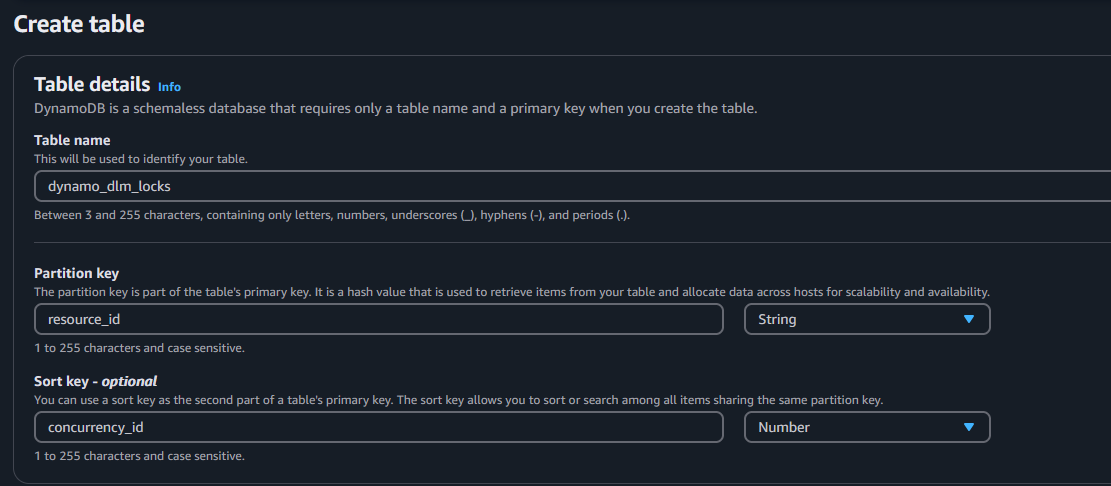
By default, the lock looks for a DynamoDB table named dynamo_dlm_locks.
You may use a custom name for the table as outlined below.
As of version 2.0, the table must have a primary key of type String named resource_id
and a sort key of type Number named concurrency_id:
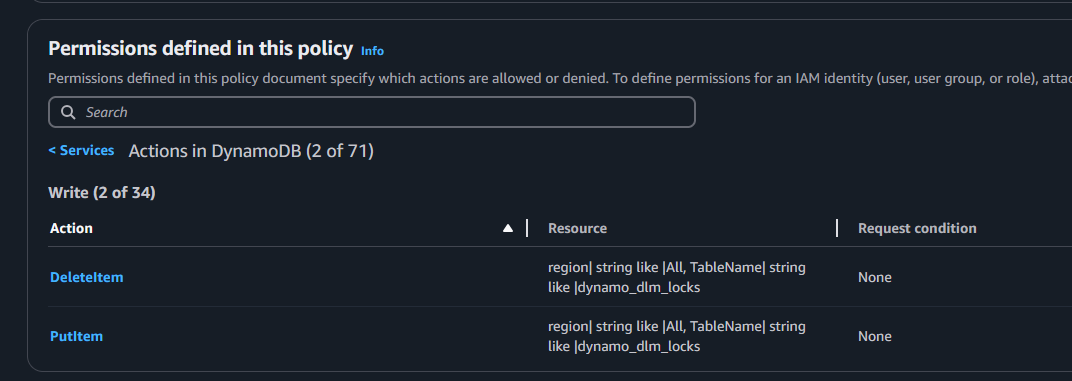
Your application will need the following permissions in order to function properly:
A note on capacity and performance:
The lock class has been designed such that it should never fail under normal circumstances.
Given enough time, it should eventually acquire a lock even if there are thousands of simultaneous requests.
When using on-demand capacity all locks should acquire in constant time, every time.
DynamoDB provisioned capacity is a topic too in depth to go into here but if you are using it and run into issues with locks taking too long to acquire then you likely need to increase your write capacity.
The lock should never consume read capacity. This is due to the way that DynamoDB handles conditional writes.
However, as of version 2.0, calling the The count() method on a lock will consume read capacity.count method was found to be unreliable and has been removed in version 2.1.
Logging has been added at log level WARNING to notify you of any backoffs related to provisioned capacity.
When not constrained by write capacity or network speed, the average acquire/release cycle takes approximately 100ms when running outside of AWS.
If your execution environment is within AWS it will be markedly faster, as low as 10 ms when within the same region.
Installation and usage
Install via pip:
pip install dynamo-dlm
Using the lock primitive is pretty straightforward.
Just create an instance with a unique identifier and call acquire().
This will block any other instances' calls to acquire() until release() is called or the lock expires, whichever comes first.
When you're done with the resource you needed locked, call release() to give up control of the lock.
Remember: all instances with the same identifier and table name will respect the same lock.
Ideally you want to time the expiration to slightly longer than you expect the operation to take.
The lock only operates on whole second increments, so the shortest reasonable lock time is 1 second.
As you're developing, keep an eye on the WARNING logger for indications that your locks are expiring, meaning operations are taking longer than expected.
import dynamo_dlm as dlm

resource_id = 'a unique resource identifier'
lock = dlm.DynamoDbLock(resource_id)
lock.acquire()
# Code executed here is protected by the lock until it expires
lock.release()
The lock class is also implemented as a context manager:
import dynamo_dlm as dlm

resource_id = 'a unique resource identifier'
with dlm.DynamoDbLock(resource_id):
    # Code executed inside the "with" block is protected by the lock until it expires
    pass
By default, locks last for 10 seconds if not released. The duration and/or table name can be set globally at the module level:
import dynamo_dlm as dlm

dlm.DEFAULT_DURATION = 5
dlm.DEFAULT_TABLE_NAME = 'my_dynamo_db_lock_table'

resource_id = 'a unique resource identifier'
lock = dlm.DynamoDbLock(resource_id)
They can also be overridden per lock:
import dynamo_dlm as dlm

resource_id = 'a unique resource identifier'
lock = dlm.DynamoDbLock(resource_id, duration=5, table_name='my_dynamo_db_lock_table')
Now supporting multiple concurrency as of version 2.0. Each instance will allow multiple connections up to the concurrency limit before blocking.
Defaults to 1 for backwards compatibility and as a sane default. The count of current unexpired locks can be obtained by calling the count() method.
import dynamo_dlm as dlm

resource_id = 'a unique resource identifier'
lock1 = dlm.DynamoDbLock(resource_id, concurrency=2)
lock2 = dlm.DynamoDbLock(resource_id, concurrency=2)
lock3 = dlm.DynamoDbLock(resource_id, concurrency=2)

lock1.acquire() # normal acquire
lock2.acquire() # second concurrent acquire
lock3.acquire() # blocked until lock1 or lock2 release or expire
Version 2.1 introduces a new flag indicating whether the lock should wait to acquire or just give up if all concurrency slots are filled.
Defaults to True as this was the original behavior.
import dynamo_dlm as dlm

resource_id = 'a unique resource identifier'
lock1 = dlm.DynamoDbLock(resource_id, concurrency=1, wait_forever=False)
lock2 = dlm.DynamoDbLock(resource_id, concurrency=1, wait_forever=False)

lock1.acquire() # normal acquire
lock2.acquire() # raises an exception because wait_forever was False
1 maintainer

Release files for dynamo-dlm 2.1.0
For a detailed explanation of source distributions (sdists) and built distributions (wheels), please see the package formats documentation.
Source distribution (sdist)
| File | Size | Uploaded | |
|---|---|---|---|
| dynamo_dlm-2.1.0.tar.gz | 17.7 kB | Details |
Built distribution (wheel)
| File | Interpreter | ABI | Platform | Reset |
|---|---|---|---|---|
| dynamo_dlm-2.1.0-py3-none-any.whl | Python 3 | none | any | Details |
Total release size: 35.2 kB
Release files / dynamo_dlm-2.1.0.tar.gz
| Download URL | dynamo_dlm-2.1.0.tar.gz |
|---|---|
| Size | 17.7 kB |
| Tags | Source |
|
SHA-256 checksum How to use checksums |
c0274d760307fea54d4cf4be491fe67da9ec6237754441fdba1c4228daf0e3f3
|
|
BLAKE2b-256 checksum How to use checksums |
7642ce60a3d15430c4c5ad742a66dee70e24175a8ca2f9a2e11394cfe26c3482
|
| Upload date | |
|
Uploaded using Trusted Publishing? What is trusted publishing? |
No |
| Uploaded via |
uv/0.6.11
|
Release files / dynamo_dlm-2.1.0-py3-none-any.whl
| Download URL | dynamo_dlm-2.1.0-py3-none-any.whl |
|---|---|
| Size | 17.5 kB |
| Tags | Python 3 |
|
SHA-256 checksum How to use checksums |
8707464ce89724624c0e6cbe30ef98e8c8692328abb1b853625b2446ddce2bcb
|
|
BLAKE2b-256 checksum How to use checksums |
d93053a296e789788f05fdd2a39bab001266813329995f000f10680f05037ae3
|
| Upload date | |
|
Uploaded using Trusted Publishing? What is trusted publishing? |
No |
| Uploaded via |
uv/0.6.11
|














