
DayZ Debug Port (Python)
DayZ Debug Port is an unofficial project for DayZ modders to enable debugging outside the Workbench app that ships with DayZ tools.
🔧 Initial setup
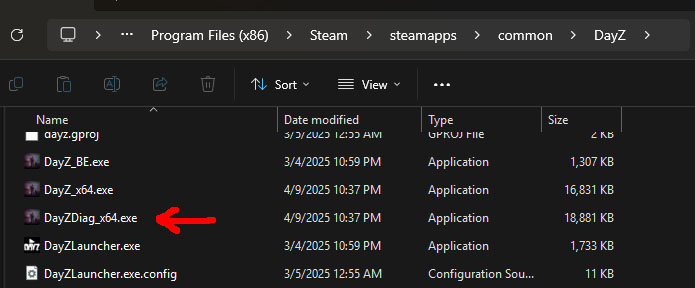
To have the game connect to the DayZ Debug Port, you'll need to run the DayZDiag_x64.exe executable instead of the vanilla DayZ_x64.exe binary. Once the game runs, it will auto-connect to the extension.
Setup Recompile on Host (Ctrl+F7)
For Recompile on Host (Ctrl+F7) to work, you'll need to run DayZDiag_x64.exe with -filePatching flag and setup shortcuts from the game's installation folder to the projects to enable filePatching on as explained in DayZ: Modding Basics - Preparing FilePatching.
Here's an example command to create a shortcut:
mklink /J "DayZInstallationFolder\FirstMod" "P:\FirstMod"
NOTE: Recompile only reloads the code! If your recompiled code doesn't run make sure it isn't something that runs once on game startup / mission startup / player connection.
(YouTube) VSCode DayZ Debug Port Quickstart Guide

📟 Python Package & Debug Console
The foundation for this extension is the Python package that can connect to the game and talk to it in the right protocol.
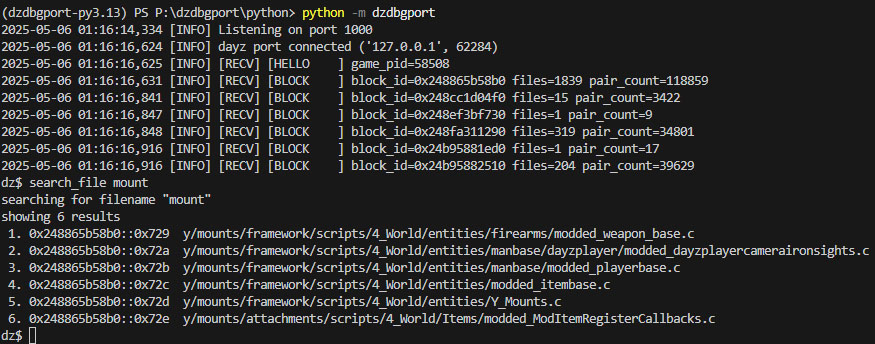
This package is bundled as an exe with the extension and talks to it using a websocket. The package also has a debug console that provides lower-level access to the functionality exposed via the VSCode extension.
1 maintainer

Release files for dzdbgport 0.3.0
For a detailed explanation of source distributions (sdists) and built distributions (wheels), please see the package formats documentation.
Source distribution (sdist)
| File | Size | Uploaded | |
|---|---|---|---|
| dzdbgport-0.3.0.tar.gz | 11.2 kB | Details |
Built distribution (wheel)
| File | Interpreter | ABI | Platform | Reset |
|---|---|---|---|---|
| dzdbgport-0.3.0-py3-none-any.whl | Python 3 | none | any | Details |
Total release size: 22.6 kB
Release files / dzdbgport-0.3.0.tar.gz
| Download URL | dzdbgport-0.3.0.tar.gz |
|---|---|
| Size | 11.2 kB |
| Tags | Source |
|
SHA-256 checksum How to use checksums |
089666470a5ead3493a6ea6855e259344d350a7f3ce9509da616a03be093806c
|
|
BLAKE2b-256 checksum How to use checksums |
5bac1c22958b779c95ea0e462160f0cee284b278cb8782e5ce3f16fa782bd7b7
|
| Upload date | |
|
Uploaded using Trusted Publishing? What is trusted publishing? |
No |
| Uploaded via |
poetry/1.8.5 CPython/3.13.2 Windows/11
|
Release files / dzdbgport-0.3.0-py3-none-any.whl
| Download URL | dzdbgport-0.3.0-py3-none-any.whl |
|---|---|
| Size | 11.4 kB |
| Tags | Python 3 |
|
SHA-256 checksum How to use checksums |
dcf4ab0aa265b835b4569dc15c330d8d9dcc2e7b9259996fe84b01736bea73bd
|
|
BLAKE2b-256 checksum How to use checksums |
245628b70fb891895a862f066268ce318541cd3f9e1e9a7bb23028c52f9c42d7
|
| Upload date | |
|
Uploaded using Trusted Publishing? What is trusted publishing? |
No |
| Uploaded via |
poetry/1.8.5 CPython/3.13.2 Windows/11
|














