
E3SM Site View
The SiteView UI presents an ARM observatory as a candidate location for in-depth analysis of simulation results. It extracts the E3SM atmosphere (EAM) columns around a site of interest and lets you explore how their fields evolve in space and time.
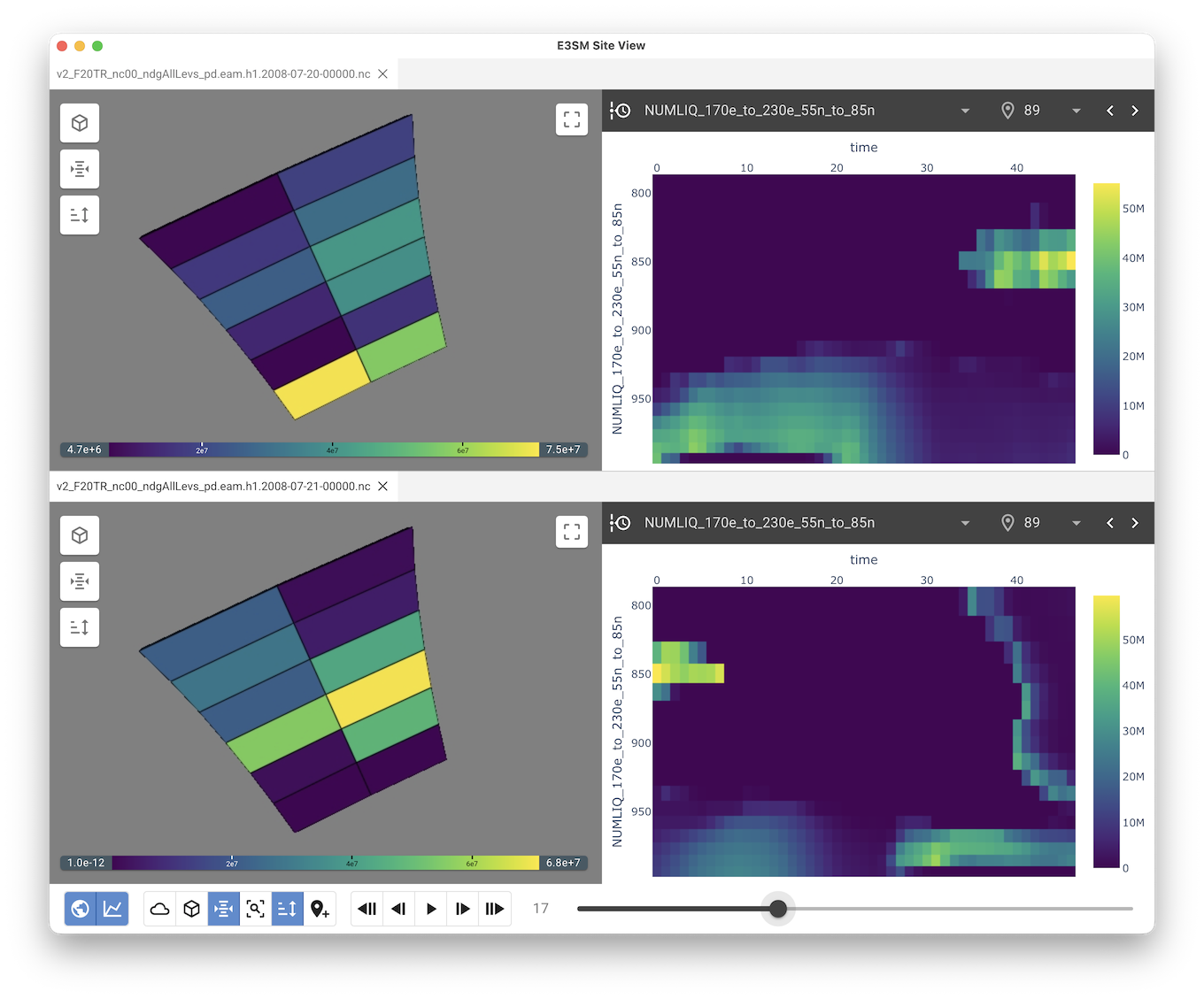
Features
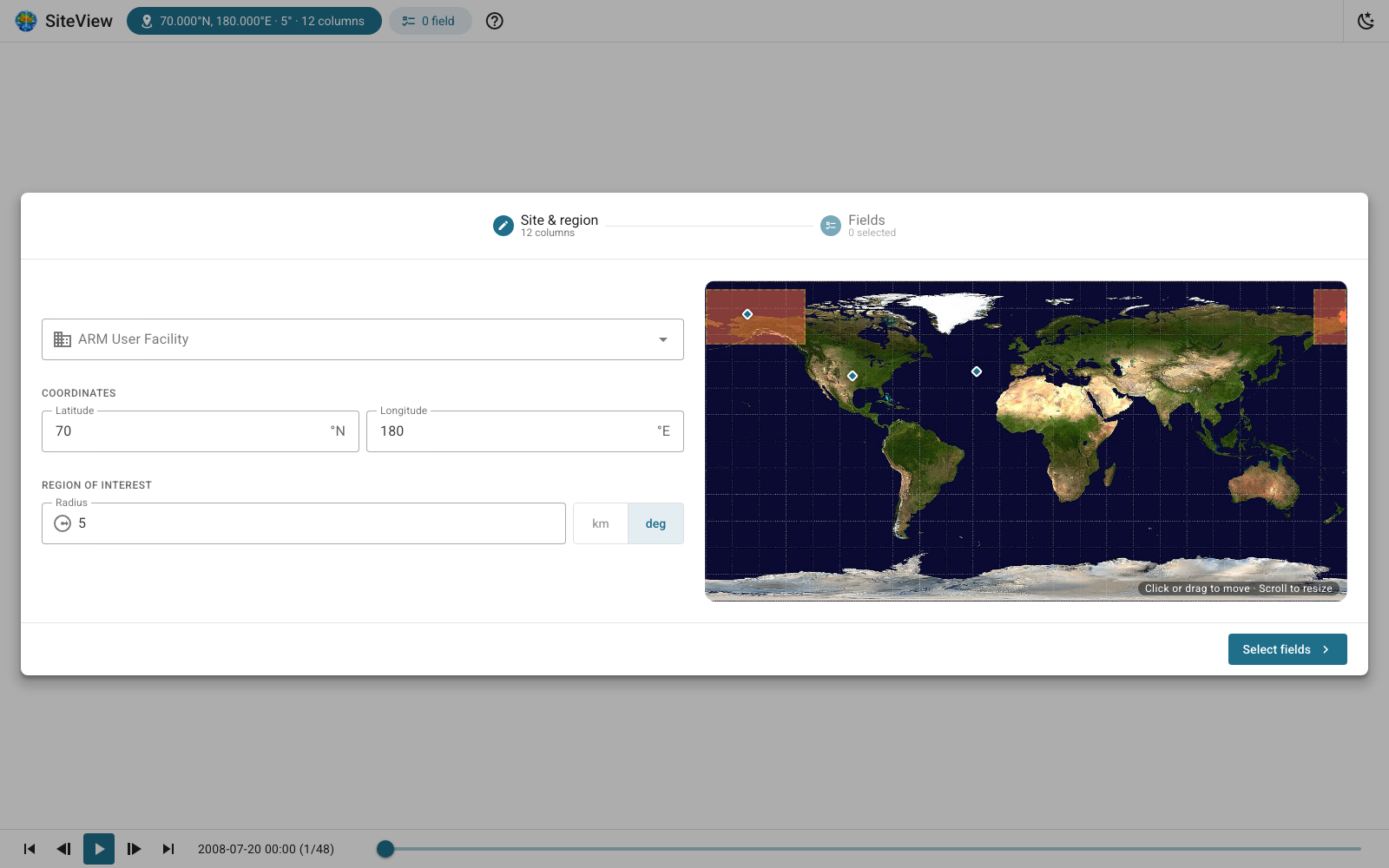
Guided setup: pick the site (from the ARM user facilities or any latitude/longitude), the radius of the region of interest and the fields to load.
3D view of the selected columns with toggleable layers: clouds, vertical scaling, surface, volume, horizontal and vertical slices, find data, histogram, column cropping and probes. The view can be saved as an image.
Column heatmap showing a field over vertical levels and time for a given column.
Cell time charts comparing one or more fields across several columns over time.
Heatmaps and charts can be downloaded.
Time animation with play/pause and step controls across all the loaded files.
Light and dark themes.
License
This library is open source and follows the Apache Software License. See LICENSE for details.
Installation
SiteView requires Python 3.12 or newer.
pip install e3sm-siteviewInput data
SiteView reads E3SM atmosphere (EAM) output in NetCDF format:
--cf: the connectivity file describing the horizontal mesh (SCRIP/TEMPEST format, e.g. connectivity_ne30pg2_TEMPEST.scrip.nc). Both global and regional meshes are supported, as long as they match the data files.
--df: one or more EAM history files (e.g. *.eam.h1.*.nc) holding the fields to explore. When several files are given, each one gets its own panel and they all share a single time control. The time steps are read from the first file only: all the files are assumed to share the same time steps.
Running the application
e3sm-siteview --cf ../data/connectivity.nc --df ../data/file_1.nc [...] ../data/file_n.ncFor example, with a regional dataset:
e3sm-siteview \
    --cf data/regional/connectivity_ne30pg2_170e_to_230e_55n_to_85n_TEMPEST.nc \
    --df data/regional/v2_F20TR_nc00_ndgAllLevs_pd.eam.h1.2008-07-*.nc
By default a browser tab opens on the application. Useful options:
Option |
Description |
|---|---|
--server |
Do not open a browser at startup (e.g. when running remotely) |
-p, --port PORT |
Port to serve the application on |
--host HOST |
Network interface to bind to (use 0.0.0.0 to allow remote access) |
--perf |
Print performance timing on stderr ([PERF] lines) |
Run e3sm-siteview --help for the full list of options.
Keyboard shortcuts
Once the data is loaded, the following shortcuts are available (they are ignored while typing in a field or when a setup dialog is open).
Key |
Action |
|---|---|
Space |
Play / pause the time animation |
← / → |
Previous / next time step (hold to keep stepping) |
R |
Reset the camera |
1 - 9 |
Toggle the 3D view layers, in the order of the left toolbar |
0 |
Toggle the 10th layer (Probes) |
Development setup
We recommend using uv for setting up and managing a virtual environment for your development.
# Create venv and install all dependencies
uv sync --all-extras --dev

# Activate environment
source .venv/bin/activate

# Install commit analysis
pre-commit install
pre-commit install --hook-type commit-msg
For running tests and checks, you can run nox.
# run all
nox

# lint
nox -s lint

# tests
nox -s tests
Examples
The examples directory contains standalone scripts that use the bundled EAM VTK readers (e3sm_siteview.io) directly, without the UI: reading the mesh and column data, building the 3D column volume, selecting columns within a radius and extracting time series.
Contributing
See CONTRIBUTING.rst for how to contribute and CHANGELOG.md for the release history.
Professional Support
Training: Learn how to confidently use trame from the expert developers at Kitware.
Support: Our experts can assist your team as you build your web application and establish in-house expertise.
Custom Development: Leverage Kitware’s 25+ years of experience to quickly build your web application.
2 maintainers


Metadata
2 maintainers
Release files for e3sm-siteview 1.3.1
For a detailed explanation of source distributions (sdists) and built distributions (wheels), please see the package formats documentation.
Source distribution (sdist)
| File | Size | Uploaded | |
|---|---|---|---|
| e3sm_siteview-1.3.1.tar.gz | 3.7 MB | Details |
Built distribution (wheel)
| File | Interpreter | ABI | Platform | Reset |
|---|---|---|---|---|
| e3sm_siteview-1.3.1-py3-none-any.whl | Python 3 | none | any | Details |
Total release size: 7.5 MB
Release files / e3sm_siteview-1.3.1.tar.gz
| Download URL | e3sm_siteview-1.3.1.tar.gz |
|---|---|
| Size | 3.7 MB |
| Tags | Source |
|
SHA-256 checksum How to use checksums |
e2c57a39fcfa9fd36277918eb5199ad7dfc369525c68eef46dd40819372943e4
|
|
BLAKE2b-256 checksum How to use checksums |
a0bf77f9124815beab0ae2256439ce1c9c4b508227a196fb049d9f4fbd50deef
|
| Upload date | |
|
Uploaded using Trusted Publishing? What is trusted publishing? |
Yes |
| Uploaded via |
twine/7.0.0 CPython/3.13.14
|
Provenance
Provenance describes where a file came from. On PyPI, provenance is shared via attestations, which provide a verifiable record of the build or publishing details. View details, limitations and caveats.


PyPI Publish Attestation
PyPI verified that this artifact, at this checksum, originated from the publisher listed below.
Signed by GitHub Actions, verified by PyPI on Oct 14, 2026.
Transparency logRelease files / e3sm_siteview-1.3.1-py3-none-any.whl
| Download URL | e3sm_siteview-1.3.1-py3-none-any.whl |
|---|---|
| Size | 3.8 MB |
| Tags | Python 3 |
|
SHA-256 checksum How to use checksums |
31af8bb3e25bc3a29bb18caa6ffa5d6b45655f423374e07ccc0d65f0c5d781a9
|
|
BLAKE2b-256 checksum How to use checksums |
16ce2dc70f374a9c292f3f994c6f3c792f5c1a7883c1ab567b33491072e484ed
|
| Upload date | |
|
Uploaded using Trusted Publishing? What is trusted publishing? |
Yes |
| Uploaded via |
twine/7.0.0 CPython/3.13.14
|
Provenance
Provenance describes where a file came from. On PyPI, provenance is shared via attestations, which provide a verifiable record of the build or publishing details. View details, limitations and caveats.
PyPI Publish Attestation
PyPI verified that this artifact, at this checksum, originated from the publisher listed below.
Signed by GitHub Actions, verified by PyPI on Oct 14, 2026.
Transparency log













