
easilastik
Easy integration of Ilastik segmentation models in Python.


🌄 Overview
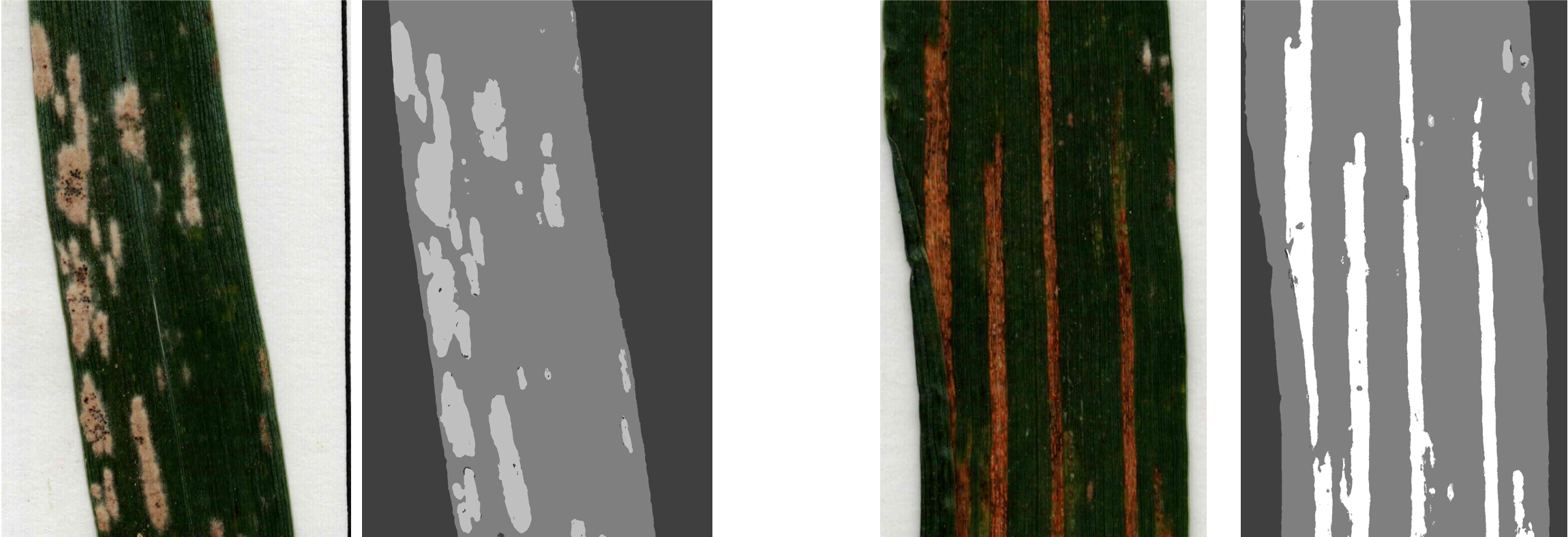
This package provides seamless integration of pre-trained image segmentation models from Ilastik into Python workflows, empowering users with efficient and intuitive image segmentation capabilities for diverse applications.
🚀 Getting Started
Prerequisites
- Ilastik software: To train your own model for image segmentation, please download the Ilastik software tailored to your computer's operating system from: https://www.ilastik.org/download.
Train a model
- To train your own model on Ilastik and properly adjust the different parameters, please refer to this documentation.
📦 Installation
To install easilastik, run the following command:
pip install easilastik
🛠️ Usage
For usage examples of this package, please refer to the Example Notebook.
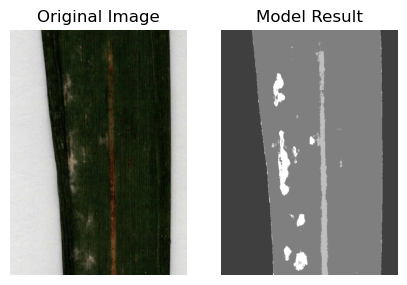
Process a single image
EasIlastik.run_ilastik(input_path = "path/to/your/image.jpg", # The path of the image to process
                       model_path = "path/to/your/model.ilp",
                       result_base_path = "path/to/your/output/folder",
                       export_source = "Simple Segmentation",
                       output_format = "png")
Process a folder of images
EasIlastik.run_ilastik(input_path = "path/to/input/folder", # The path of the folder to process
                       model_path = "path/to/your/model.ilp",
                       result_base_path = "path/to/your/output/folder",
                       export_source = "Simple Segmentation",
                       output_format = "png")

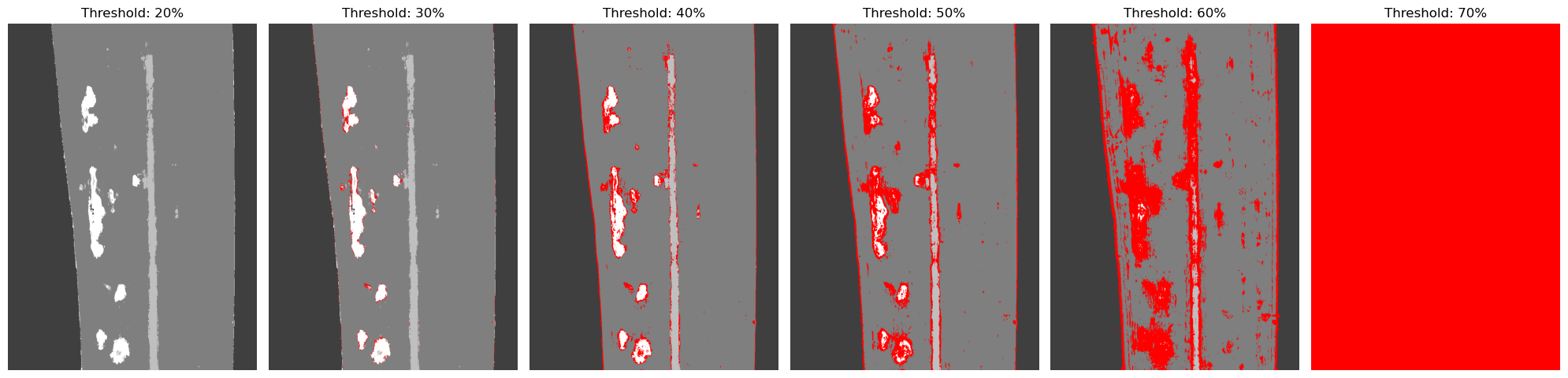
Show probabilities
EasIlastik.run_ilastik(input_path = "path/to/input/image",
                       model_path = "path/to/model.ilp",
                       result_base_path = "path/to/output/folder",
                       export_source="Probabilities", # Probabilities
                       output_format="hdf5") # hdf5 format

output_path = "path/to/output/image.h5"
image = EasIlastik.color_treshold_probabilities(output_path, threshold, below_threshold_color, channel_colors)
Run with probabilities
EasIlastik.run_ilastik_probabilities(input_path = "path/to/input/folder",
                                     model_path = "path/to/model.ilp",
                                     result_base_path = "path/to/output/folder",
                                     threshold = 70, # threshold for the probabilities
                                     below_threshold_color = [255, 0, 0], # color for the pixels below the threshold (red)
                                     channel_colors = [[63, 63, 63], [127, 127, 127], ...] # colors for the different channels
                                     )

⚖️ License
Elevatr is licensed under the GNU General Public License v3.0. This means that you are free to use, modify, and distribute this software, but any derivative works must also be licensed under the same terms. For more details, please refer to the LICENSE file.
GitHub @titouanlegourrierec · Email titouanlegourrierec@icloud.com
1 maintainer

Metadata
1 maintainer
Release files for easilastik 2.0.0
For a detailed explanation of source distributions (sdists) and built distributions (wheels), please see the package formats documentation.
Source distribution (sdist)
| File | Size | Uploaded | |
|---|---|---|---|
| easilastik-2.0.0.tar.gz | 22.5 kB | Details |
Built distribution (wheel)
| File | Interpreter | ABI | Platform | Reset |
|---|---|---|---|---|
| easilastik-2.0.0-py3-none-any.whl | Python 3 | none | any | Details |
Total release size: 44.2 kB
Release files / easilastik-2.0.0.tar.gz
| Download URL | easilastik-2.0.0.tar.gz |
|---|---|
| Size | 22.5 kB |
| Tags | Source |
|
SHA-256 checksum How to use checksums |
5eca031c6c9cbd695d7723c96640555d57229dfca9e92553a0dc3494c4f0fb95
|
|
BLAKE2b-256 checksum How to use checksums |
348a7eb29c8fe12ad50950c45ba80a75c2f9e617537499ad2ea910f6c4b282ee
|
| Upload date | |
|
Uploaded using Trusted Publishing? What is trusted publishing? |
Yes |
| Uploaded via |
uv/0.10.9 {"installer":{"name":"uv","version":"0.10.9","subcommand":["publish"]},"python":null,"implementation":{"name":null,"version":null},"distro":{"name":"Ubuntu","version":"24.04","id":"noble","libc":null},"system":{"name":null,"release":null},"cpu":null,"openssl_version":null,"setuptools_version":null,"rustc_version":null,"ci":true}
|
Release files / easilastik-2.0.0-py3-none-any.whl
| Download URL | easilastik-2.0.0-py3-none-any.whl |
|---|---|
| Size | 21.8 kB |
| Tags | Python 3 |
|
SHA-256 checksum How to use checksums |
7f5b62783e383ec8a7d7799ad405a455c9207e0c02a42ba42c6616c4c4bb8da2
|
|
BLAKE2b-256 checksum How to use checksums |
7b5623d17abcbfadb537423865b42d59527f32f4ba01135f86d2196cf3506d69
|
| Upload date | |
|
Uploaded using Trusted Publishing? What is trusted publishing? |
Yes |
| Uploaded via |
uv/0.10.9 {"installer":{"name":"uv","version":"0.10.9","subcommand":["publish"]},"python":null,"implementation":{"name":null,"version":null},"distro":{"name":"Ubuntu","version":"24.04","id":"noble","libc":null},"system":{"name":null,"release":null},"cpu":null,"openssl_version":null,"setuptools_version":null,"rustc_version":null,"ci":true}
|














