
Simple library that can be used to generate motion history images from video frames

Project description
MotionHistoryImage Python Library
Image-Processing library built in Python 3.7 allowing developers to easily
generate MHI images from from a list of frames. A motion history image (MHI) is a static image template
that helps in understanding the motion location and path as it progresses. Using MHI, moving parts of a video
sequence can be engraved within a single image, from where the motion flow can be predicted.
Essentially this library is concatenating a series of frames into one single image, where brighter values correspond to a more recent motion
Example:

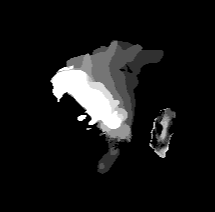
I'd recommend using OpenCV to perform background subtraction on frames being processed. I'll add a code snippet below to demonstrate how I got the above background subtraction images from raw frames.
import cv2 as cv
IMG_SIZE = 224
frame = cv.resize(frame, (IMG_SIZE, IMG_SIZE))

# Filters tend to provide smoother subtraction with less background noise
frame = cv.medianBlur(frame, 5)
frame = cv.filter2D(frame, -1, kernel)

fgbg = cv.createBackgroundSubtractorMOG2()
mask = fgbg.apply(image)
Setup
You can either setup this library by cloning this repo and running setup.py from the install directory.
$  git clone https://github.com/larrett/mhi.git
$  cd mhi
$  python setup.py install
Alternatively, use this command to install via pip:
$ sudo pip install easy-mhi
Usage
- Import the MotionHistoryImage library
from easy-mhi import generate_mhi
- Below is an demonstration of how I used the library to generate MHI's from a directory containing background subtracted images I wanted to combine in incremental order, and saving them.
from PIL import Image
import os
import shutil
from easy-mhi import generate_mhi


def generate_mhi_frames(
    file_dir,
    num_frames_per_mhi,
    start_index=1,
    output_dir='mhi_output',
    ):

    all_frames = []  # Create list of frames
    i = start_index
    while True:  # For all files
        file = file_dir + '/' + str(i) + '.jpg'  # File from starting index
        try:
            img_pixels = Image.open(file).convert('RGB').load()  # Open and load the file
            all_frames.append(img_pixels)  # Append file to list of frames
            print('Loaded frame ' + file)
        except IOError:
            print('Assuming all images are loaded... (next sequential file ' \
                + file + ' does not exist)')
            break
        i += 1  # Increment index
    print('Loaded ' + str(len(all_frames)) + ' raw motion frames!')

    # Generate each MHI frame
    num_mhis = len(all_frames) - num_frames_per_mhi + 1  # Calculation how many MHI images should be generated
    for i in range(num_mhis):

        # Compile list of frames to be used for this MHI
        mhi_frames = []  # Create a list of MHI frames
        for j in range(num_frames_per_mhi):  # Loop for amount of frames inside each MHI
            mhi_frames.append(all_frames[i + j])  # Specify which frames to get added to MHI

        # Generate MHI
        img = generate_mhi(mhi_frames, 224, 224)  # Generate 224x224 MHI based on frames in mhi_frames list
        output_path = output_dir + '/' + str(i + 1) + '.png'  # Create string for outputPath
        img.save(output_path)  # Save new MHI to outputPath
        print('MHI ' + str(i + 1) + ' saved to ' + output_path)
        # Return to top of loop, generate next MHI for the frames

    print('Generated and saved a total of ' + str(num_mhis) \
        + ' MHI frames to ' + file_dir + '/mhi_output/')
Use this project for whatever you want, I built this for my machine-learning thesis on fall detection.
Release history Release notifications | RSS feed

Download files
Download the file for your platform. If you're not sure which to choose, learn more about installing packages.
Source Distribution
Built Distribution
Filter files by name, interpreter, ABI, and platform.
If you're not sure about the file name format, learn more about wheel file names.
Copy a direct link to the current filters
File details
Details for the file easy-mhi-1.3.tar.gz.
File metadata
- Download URL: easy-mhi-1.3.tar.gz
- Upload date:
- Size: 3.6 kB
- Tags: Source
- Uploaded using Trusted Publishing? No
- Uploaded via: twine/3.2.0 pkginfo/1.6.1 requests/2.24.0 setuptools/49.2.1 requests-toolbelt/0.9.1 tqdm/4.51.0 CPython/3.9.0
File hashes
| Algorithm | Hash digest | |
|---|---|---|
| SHA256 |
8bc8ea3c0ede9e5d4c0094ae78e29c1ce81f5faca59b424777cfd60c25f3fc15
|
|
| MD5 |
30743e9ff567bdb54c8fb4e7811beecf
|
|
| BLAKE2b-256 |
9cd0c3285f34701c0b403afd51d8aa6a33d54af80d0448659c24f92e2ad4a39a
|
File details
Details for the file easy_mhi-1.3-py3-none-any.whl.
File metadata
- Download URL: easy_mhi-1.3-py3-none-any.whl
- Upload date:
- Size: 4.1 kB
- Tags: Python 3
- Uploaded using Trusted Publishing? No
- Uploaded via: twine/3.2.0 pkginfo/1.6.1 requests/2.24.0 setuptools/49.2.1 requests-toolbelt/0.9.1 tqdm/4.51.0 CPython/3.9.0
File hashes
| Algorithm | Hash digest | |
|---|---|---|
| SHA256 |
84f8e18b754ac5b4226bdee63fdfba0a6f353e14338157fe546780317c74552f
|
|
| MD5 |
293b6769f50df65988244deb023eec33
|
|
| BLAKE2b-256 |
8f86e335707579490443f81957476f678f95e8fe386eac81dd69d7d5361e4355
|






