
Forced alignment pipeline designed for efficiency and ease of use.
Verified details
These details have been verified by PyPIProject links
GitHub Statistics
Maintainers

Project description
Easier forced alignment with easyaligner
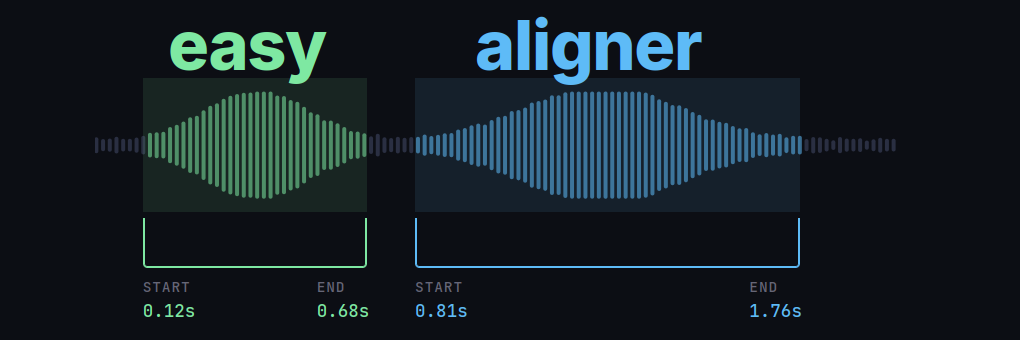
easyaligner is a fast and memory efficient forced alignment pipeline for speech and text. Given a text transcript, easyaligner will help identify where each word or phrase was spoken in the audio. The library supports aligning both from ground-truth transcripts, as well as from ASR-generated transcripts (easyaligner acts as the backend that powers alignment in easytranscriber). Some notable features of easyaligner include:
- GPU accelerated forced alignment. Uses Pytorch's forced alignment API with a GPU based implementation of the Viterbi algorithm. Enables fast and memory-efficient forced alignment of long audio segments (Pratap et al., 2024).
- Flexible text normalization for improved alignment quality. Users can supply custom regex-based text normalization functions to preprocess transcripts before alignment. A mapping from the original text to the normalized text is maintained internally. All of the applied normalizations and transformations are consequently non-destructive and reversible after alignment.
- Batch processing support for emission extraction.
easyalignersupports batched inference for wav2vec2-based models, keeping track of non-padded logits when doing alignment. - Modular pipeline design. The library has separate, independent, pipelines for VAD, emission extraction, and forced alignment. Users can run everything end-to-end, or run the separate stages individually.
Installation
With GPU support (recommended)
pip install easyaligner --extra-index-url https://download.pytorch.org/whl/cu128
[!TIP]
Remove--extra-index-urlif you want a CPU-only installation.
Using uv
When installing with uv, it will select the appropriate PyTorch version automatically (CPU for macOS, CUDA for Linux/Windows/ARM):
uv pip install easyaligner
Usage
The example below downloads a short snippet from a LibriVox audiobook recording of A Tale of Two Cities. The snippet is 57 seconds long, and corresponds to the first paragraph of the first chapter of A Tale of Two Cities. The corresponding text to be used for alignment is directly supplied below and assigned to the text variable.
from pathlib import Path

from transformers import (
    AutoModelForCTC,
    Wav2Vec2Processor,
)
from huggingface_hub import snapshot_download

from easyaligner.text import load_tokenizer
from easyaligner.data.datamodel import SpeechSegment
from easyaligner.pipelines import pipeline
from easyaligner.text import text_normalizer
from easyaligner.vad.pyannote import load_vad_model

snapshot_download(
    "Lauler/easytranscriber_tutorials",
    repo_type="dataset",
    local_dir="data/tutorials",
    allow_patterns="tale-of-two-cities_align-en/*",
)

text = """
It was the best of times, it was the worst of times, it was the age of
wisdom, it was the age of foolishness, it was the epoch of belief, it
was the epoch of incredulity, it was the season of Light, it was the
season of Darkness, it was the spring of hope, it was the winter of
despair, we had everything before us, we had nothing before us, we were
all going direct to Heaven, we were all going direct the other way--in
short, the period was so far like the present period, that some of its
noisiest authorities insisted on its being received, for good or for
evil, in the superlative degree of comparison only.
"""

text = text.strip()

# The alignments will be organized according to how the text is tokenized
tokenizer = load_tokenizer(language="english") # sentence tokenizer
span_list = list(tokenizer.span_tokenize(text)) # start, end character indices for each sentence
speeches = [[SpeechSegment(speech_id=0, text=text, text_spans=span_list, start=None, end=None)]]

# Load models and run pipeline
model_vad = load_vad_model()
model = (
    AutoModelForCTC.from_pretrained("facebook/wav2vec2-base-960h").to("cuda").half()
)
processor = Wav2Vec2Processor.from_pretrained("facebook/wav2vec2-base-960h")

# File(s) to align
audio_files = [file.name for file in Path("data/tutorials/tale-of-two-cities_align-en").glob("*")]

pipeline(
    vad_model=model_vad,
    emissions_model=model,
    processor=processor,
    audio_paths=audio_files,
    audio_dir="data/tutorials/tale-of-two-cities_align-en",
    speeches=speeches,
    alignment_strategy="speech",
    text_normalizer_fn=text_normalizer,
    tokenizer=tokenizer,
    start_wildcard=True,
    end_wildcard=True,
    blank_id=processor.tokenizer.pad_token_id,
    word_boundary="|",
)
[!TIP]
easyalignerallows organizing the output at any level of granularity the user wishes (sentence, paragraph, or other). In the above example, we use annltk.tokenize.punkt.PunktTokenizerto sentence tokenize our text. See the text processing documentation for a more detailed explanation, and a tutorial for implementing custom tokenizers.
Documentation
Check out the documentation tutorials that cover common scenarios for forced alignment, and the API reference:
- https://kb-labb.github.io/easyaligner/
- Tutorial 1: Align text and audio when the transcript covers all of the spoken content in the audio.
- Tutorial 2: Transcript covers only part of the spoken content in the audio, but we know the relevant audio region in advance.
- Tutorial 3: Transcript covers only part of the spoken content in the audio, and we don't know the relevant audio region in advance.
Outputs
By default, easyaligner saves the outputs of each stage of the pipeline (VAD, emission extraction, forced alignment) as JSON files in separate directories. The final aligned output can be found in output/alignments. The directory structure after running the full pipeline will look as follows:
output
├── alignments
├── emissions
└── vad
The output/emissions directory will, in addition to the JSON files, also contain output emissions for each JSON file in .npy format.
All intermediate files can safely be deleted, assuming there is no need to re-run the pipeline from a specific intermediate stage.
Project details
Verified details
These details have been verified by PyPIProject links
GitHub Statistics
Maintainers


Download files
Download the file for your platform. If you're not sure which to choose, learn more about installing packages.
Source Distribution
Built Distribution
Filter files by name, interpreter, ABI, and platform.
If you're not sure about the file name format, learn more about wheel file names.
Copy a direct link to the current filters
File details
Details for the file easyaligner-0.2.1.tar.gz.
File metadata
- Download URL: easyaligner-0.2.1.tar.gz
- Upload date:
- Size: 44.2 kB
- Tags: Source
- Uploaded using Trusted Publishing? Yes
- Uploaded via: uv/0.11.6 {"installer":{"name":"uv","version":"0.11.6","subcommand":["publish"]},"python":null,"implementation":{"name":null,"version":null},"distro":{"name":"Ubuntu","version":"24.04","id":"noble","libc":null},"system":{"name":null,"release":null},"cpu":null,"openssl_version":null,"setuptools_version":null,"rustc_version":null,"ci":true}
File hashes
| Algorithm | Hash digest | |
|---|---|---|
| SHA256 |
66e593dcf63030b906e5329a0fee8ccbacedf7dedbdd1999d7ff74cabeea5b5c
|
|
| MD5 |
7bce8b85a2e18bcec406fabddca9d95a
|
|
| BLAKE2b-256 |
e3c03bf82d6d4e02a84a5118f9ed6e2ef855db8ba671f85eeb757de4a5f82b65
|
File details
Details for the file easyaligner-0.2.1-py3-none-any.whl.
File metadata
- Download URL: easyaligner-0.2.1-py3-none-any.whl
- Upload date:
- Size: 48.1 kB
- Tags: Python 3
- Uploaded using Trusted Publishing? Yes
- Uploaded via: uv/0.11.6 {"installer":{"name":"uv","version":"0.11.6","subcommand":["publish"]},"python":null,"implementation":{"name":null,"version":null},"distro":{"name":"Ubuntu","version":"24.04","id":"noble","libc":null},"system":{"name":null,"release":null},"cpu":null,"openssl_version":null,"setuptools_version":null,"rustc_version":null,"ci":true}
File hashes
| Algorithm | Hash digest | |
|---|---|---|
| SHA256 |
83cb64074c0a5d4400afcddc719137bfa087b1a118796a7a430f2e28207c7c43
|
|
| MD5 |
7ca6b855e0f32cdbf2a9f563bfd51d7c
|
|
| BLAKE2b-256 |
07019eb10af21477708657715fca627fe425622e08a424758a7c498e2fe970d8
|






