
easydetect
Easy real-time object detection you can actually ship. Train in PyTorch, run anywhere with OpenVINO — CPU, GPU or NPU — and label, train and test in a browser. Apache-2.0 from the code to the model you export.




Why
- Three lines to a detector.
Detector("dfine-s"), point it at a picture, read the boxes. The same object trains, validates and exports. - One licence, all the way down. Apache-2.0 code, Apache-2.0 COCO weights, Apache-2.0 exports — nothing to clear with legal before it goes into a product or a classroom.
- Accurate for its size. The detector is D-FINE, a real-time DETR: D-FINE-S scores 48.5 COCO mAP with 10M parameters.
- Runs on the machine you have. OpenVINO runs it on a CPU, an Intel GPU or an Intel NPU; ONNX Runtime on any CPU, a Raspberry Pi included. No CUDA needed to deploy. A GPU makes training quick.
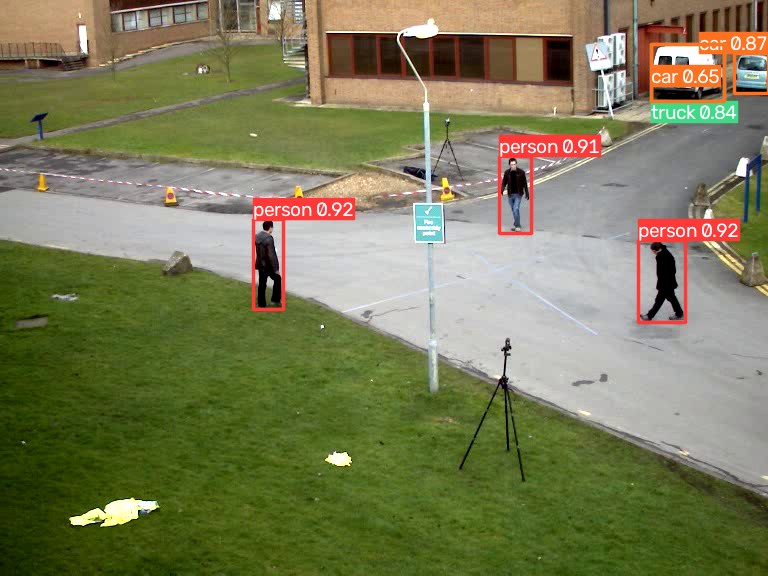
- No NMS to tune. D-FINE is trained to give each object one box. The odd second box on the same object — one vehicle as both truck and car — is dropped by a fixed overlap filter (IoU 0.7, any class), so there is no threshold to tune and a crowded frame costs no extra time.
Install
pip install easydetect              # inference: OpenVINO and ONNX Runtime
pip install "easydetect[train]"     # + training (PyTorch)
Inference never needs PyTorch. Both runtimes come with the plain install and
return the same boxes; Detector uses OpenVINO unless you pass
backend="onnxruntime". OpenVINO is the faster one on an Intel CPU (dfine-s at
640 on a 4-core Xeon: 49 ms against 132 ms) and the only way to an Intel GPU or
NPU; ONNX Runtime is the smaller one, for a box where every megabyte counts:
pip install --no-deps easydetect && pip install numpy pyyaml opencv-python onnxruntime
Detect
from easydetect import Detector

model = Detector("dfine-s")           # COCO weights, downloaded on first use
r = model("photo.jpg", conf=0.5)[0]

r.boxes.xyxy, r.boxes.conf, r.boxes.cls   # plain numpy
r.names[int(r.boxes.cls[0])]              # "person"
r.plot(); r.save(); r.show()
Point it at an image, a folder, a glob, a video, an RTSP stream, a webcam index, or a numpy array. Long sources stream, so memory stays flat:
for r in model.predict(0, stream=True, show=True):   # webcam, q or Esc quits
    print(r.boxes.xyxyn)

model.track("clip.mp4")        # adds r.boxes.id
model = Detector("dfine-s", device="NPU")            # AUTO, CPU, GPU, NPU
A webcam viewer with an FPS counter is in examples/webcam.py
— python examples/webcam.py --track.
Train
model = Detector("dfine-s")
model.train(data="data.yaml", epochs=50, imgsz=640, batch=16, device=0)
model.val(data="data.yaml").box.map50
model.export(format="openvino")       # best.xml + best.bin + labels.txt
# data.yaml
path: /data/cans
train: images/train
val: images/val
names: {0: can, 1: bottle}
Labels are one .txt per image, cls cx cy w h normalised — the layout every
labelling tool already exports. A YOLO-format download (Roboflow's included)
trains as it comes; training.md
lists the variations it accepts. Training starts from the COCO weights and saves
an average of the weights (EMA) as the checkpoint; freeze="backbone" trains
faster on a small set, and resume=True picks a killed run back up.
Label, train and watch it in a browser
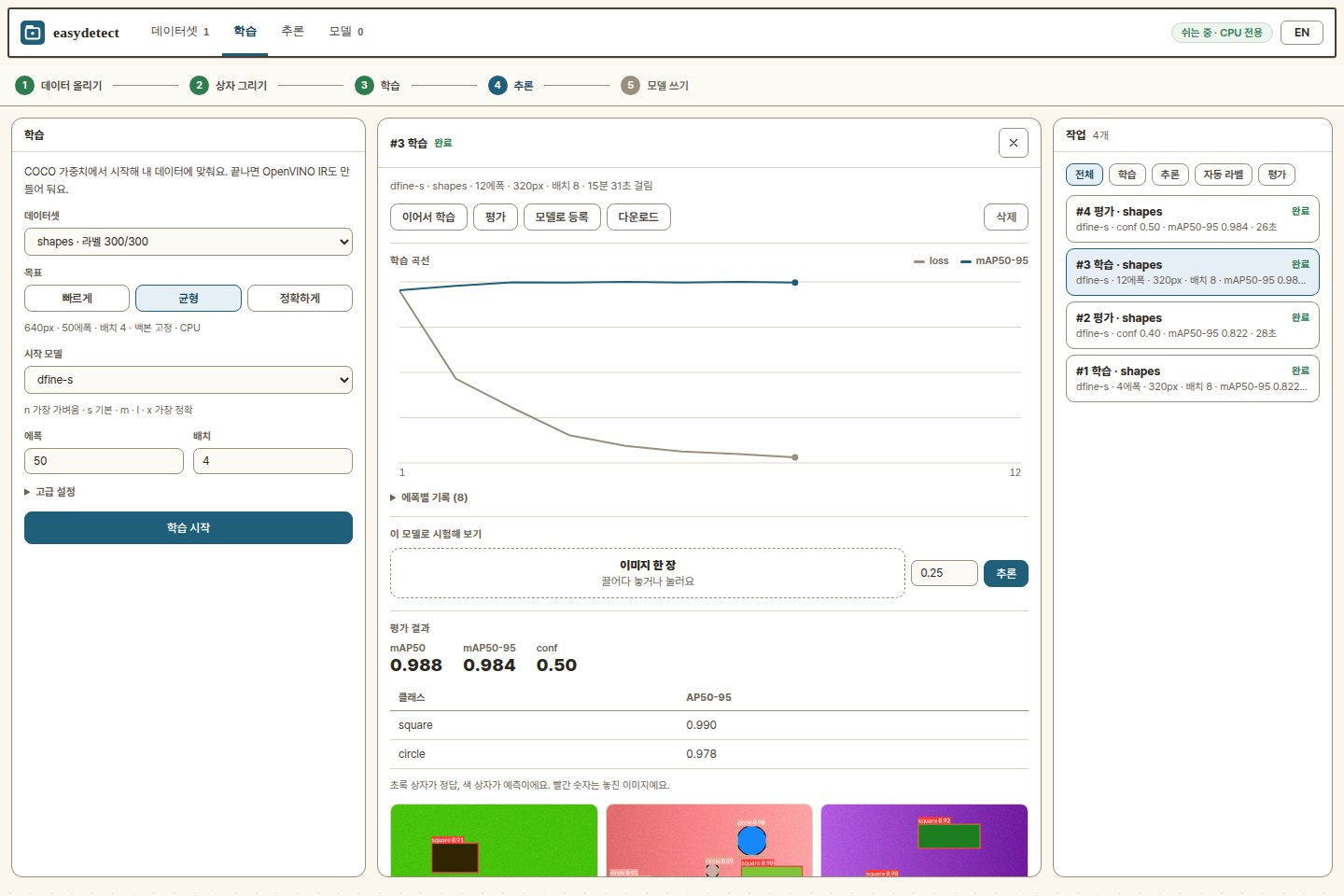
easydetect lab is a web app on top of this package, in its own repository: drop images in, label them (the model drafts the boxes, you correct them), queue a training run, watch the curve, then run the result over a folder, a video or your webcam — on one machine, with nothing leaving it. A finished run hands you copy-ready code and a Hugging Face folder whose model card is written from the run.
git clone https://github.com/themakerrobot/easydetect-lab
cd easydetect-lab
pip install -r requirements.txt     # easydetect[train] from PyPI, and the web server
python run.py                       # http://<this machine>:8080
Models
| name | backbone | params | COCO mAP50-95 |
|---|---|---|---|
dfine-n |
HGNetv2-B0 | 4M | 42.8 |
dfine-s |
HGNetv2-B0 | 10M | 48.5 — the default |
dfine-m |
HGNetv2-B2 | 19M | 52.3 |
dfine-l |
HGNetv2-B4 | 31M | 54.0 |
dfine-x |
HGNetv2-B5 | 62M | 55.8 |
COCO numbers are D-FINE's own for these checkpoints (640 px, val2017).
Speed
dfine-s at 640 on one desktop — a Core Ultra 5 250K Plus with an RTX 5090 —
whole pipeline (resize, inference, decode), median of 30 calls, from
python tools/bench.py:
device= |
latency | FPS |
|---|---|---|
"CPU" |
36 ms | 28 |
"NPU" |
38 ms | 26 — and the CPU stays free |
"GPU" (the RTX 5090 through OpenCL) |
14 ms | 72 |
The GPU returns the CPU's boxes exactly, the NPU to a mean IoU of 0.98. performance.md covers measuring your own machine and what makes it faster.
Compared with YOLO
Published COCO val2017 numbers at 640 px, as each project reports them — not re-measured here:
| model | params | COCO mAP50-95 | NMS | license |
|---|---|---|---|---|
| D-FINE n / s / m / l / x | 4M / 10M / 19M / 31M / 62M | 42.8 / 48.5 / 52.3 / 54.0 / 55.8 | not needed¹ | Apache-2.0 |
| YOLO11 n / s / m / l / x | 2.6M / 9.4M / 20.1M / 25.3M / 56.9M | 39.5 / 47.0 / 51.5 / 53.4 / 54.7 | needed | AGPL-3.0 |
¹ The model has no NMS step; predict drops a box overlapping a better one
by more than iou=0.7, the rare duplicate — see performance.
Read it plainly:
- At each size D-FINE scores a little higher on COCO, with a similar parameter count (YOLO11-n and -l are the lighter ones).
- The license is the difference that usually decides. Ultralytics YOLO is AGPL-3.0: a product that ships it, or serves it over a network, must publish its source or buy a commercial license. Everything here is Apache-2.0 — code and weights — so it goes into closed products as it is.
- Where YOLO fits better: segmentation and pose in the same tool, and a far larger ecosystem.
COCO is a guide, not your answer. Fine-tune both on your own data, then compare mAP on the same validation images and latency on the same device, NMS included.
Command line
easydetect predict model=dfine-s source=photo.jpg conf=0.5
easydetect train   model=dfine-s data=data.yaml epochs=50
easydetect val     model=best.pt data=data.yaml
easydetect export  model=best.pt format=openvino half=true
Docs
- Using the model — sources, results, tracking, saving
- Training — datasets, validation, export, CLI
- easydetect lab — the browser app: labelling, jobs, sharing
- Weights — the mirror, building it, offline use
- Performance — measuring speed and improving it
- Design — architecture and provenance
- Development — tests, releases
What it does not do
Boxes only — no segmentation, pose or classification. One training process, one machine; multi-GPU and distributed training are out of scope. Inference runs on OpenVINO or ONNX Runtime; for a CUDA deployment, take the exported ONNX to TensorRT from there.
한국어
from easydetect import Detector

model = Detector("dfine-s")                # COCO 사전학습 가중치 자동 다운로드
model("photo.jpg", conf=0.5)[0].save()     # 결과 이미지 저장
model.train(data="data.yaml", epochs=50)   # 내 데이터로 학습
model.export(format="openvino")            # 배포용 IR + labels.txt
세 줄이면 물체 검출이 됩니다. 모델은 D-FINE(실시간 DETR)이고, 코드와 가중치가 모두 Apache-2.0이라 상용 제품이나 교육 현장에 그대로 쓸 수 있습니다.
설치는 두 가지입니다. pip install easydetect는 추론용으로 OpenVINO와 ONNX
Runtime이 함께 들어가고 PyTorch는 없습니다. pip install "easydetect[train]"은
학습까지 합니다. 기본 엔진은 OpenVINO(인텔 CPU·GPU·NPU)이고,
Detector("dfine-s", backend="onnxruntime")로 ONNX Runtime(모든 CPU, 라즈베리파이
포함)을 쓸 수 있습니다. 두 엔진의 결과는 같습니다.
라벨링부터 학습·추론까지 브라우저로 하려면 easydetect lab. 가중치 캐시는
~/.easydetect/, 사내 미러는 EASYDETECT_ASSETS_URL 환경변수로 지정합니다.
Credits
The detector and its COCO weights come from D-FINE (Apache-2.0, arXiv:2410.13842), which builds on RT-DETR. This package adapts that network and loss, and adds its own training loop, inference stack and tooling — see NOTICE.
License
1 maintainer

Metadata
1 maintainer
Release files for easydetect 0.2.1
For a detailed explanation of source distributions (sdists) and built distributions (wheels), please see the package formats documentation.
Source distribution (sdist)
| File | Size | Uploaded | |
|---|---|---|---|
| easydetect-0.2.1.tar.gz | 106.5 kB | Details |
Built distribution (wheel)
| File | Interpreter | ABI | Platform | Reset |
|---|---|---|---|---|
| easydetect-0.2.1-py3-none-any.whl | Python 3 | none | any | Details |
Total release size: 194.5 kB
Release files / easydetect-0.2.1.tar.gz
| Download URL | easydetect-0.2.1.tar.gz |
|---|---|
| Size | 106.5 kB |
| Tags | Source |
|
SHA-256 checksum How to use checksums |
ecb2a69ab35fc56228af190f35c0862e736154622a30383cf2f2a66534cf5512
|
|
BLAKE2b-256 checksum How to use checksums |
6a535bb7ce2c02c21e078a69c7836423963f6bed3247555dbf86840fcb3254c7
|
| Upload date | |
|
Uploaded using Trusted Publishing? What is trusted publishing? |
Yes |
| Uploaded via |
twine/7.0.0 CPython/3.13.14
|
Provenance
Provenance describes where a file came from. On PyPI, provenance is shared via attestations, which provide a verifiable record of the build or publishing details. View details, limitations and caveats.


PyPI Publish Attestation
PyPI verified that this artifact, at this checksum, originated from the publisher listed below.
Signed by GitHub Actions, verified by PyPI on Oct 1, 2026.
Transparency logRelease files / easydetect-0.2.1-py3-none-any.whl
| Download URL | easydetect-0.2.1-py3-none-any.whl |
|---|---|
| Size | 88.0 kB |
| Tags | Python 3 |
|
SHA-256 checksum How to use checksums |
fc881ffa7a535d95d56e595ab447c0ca9d87a5e99bbf68598d46f36f8bd3514c
|
|
BLAKE2b-256 checksum How to use checksums |
81ce9022e62d454a36de65df9abb3bb4601d81bf5c7f412daaa3dabb60ceb0cd
|
| Upload date | |
|
Uploaded using Trusted Publishing? What is trusted publishing? |
Yes |
| Uploaded via |
twine/7.0.0 CPython/3.13.14
|
Provenance
Provenance describes where a file came from. On PyPI, provenance is shared via attestations, which provide a verifiable record of the build or publishing details. View details, limitations and caveats.
PyPI Publish Attestation
PyPI verified that this artifact, at this checksum, originated from the publisher listed below.
Signed by GitHub Actions, verified by PyPI on Oct 1, 2026.
Transparency log













