
easyeda2kicad v1.0.0








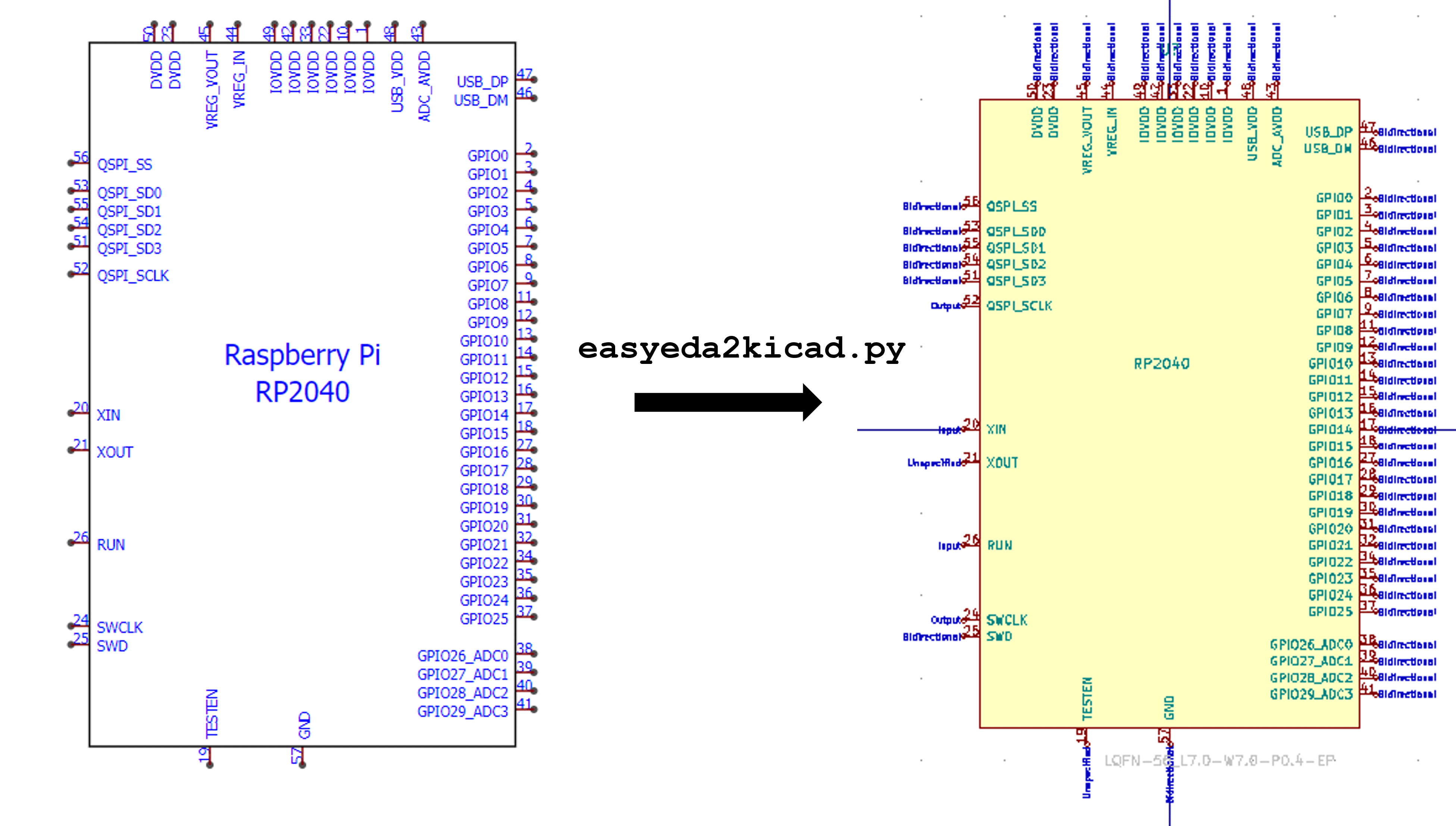
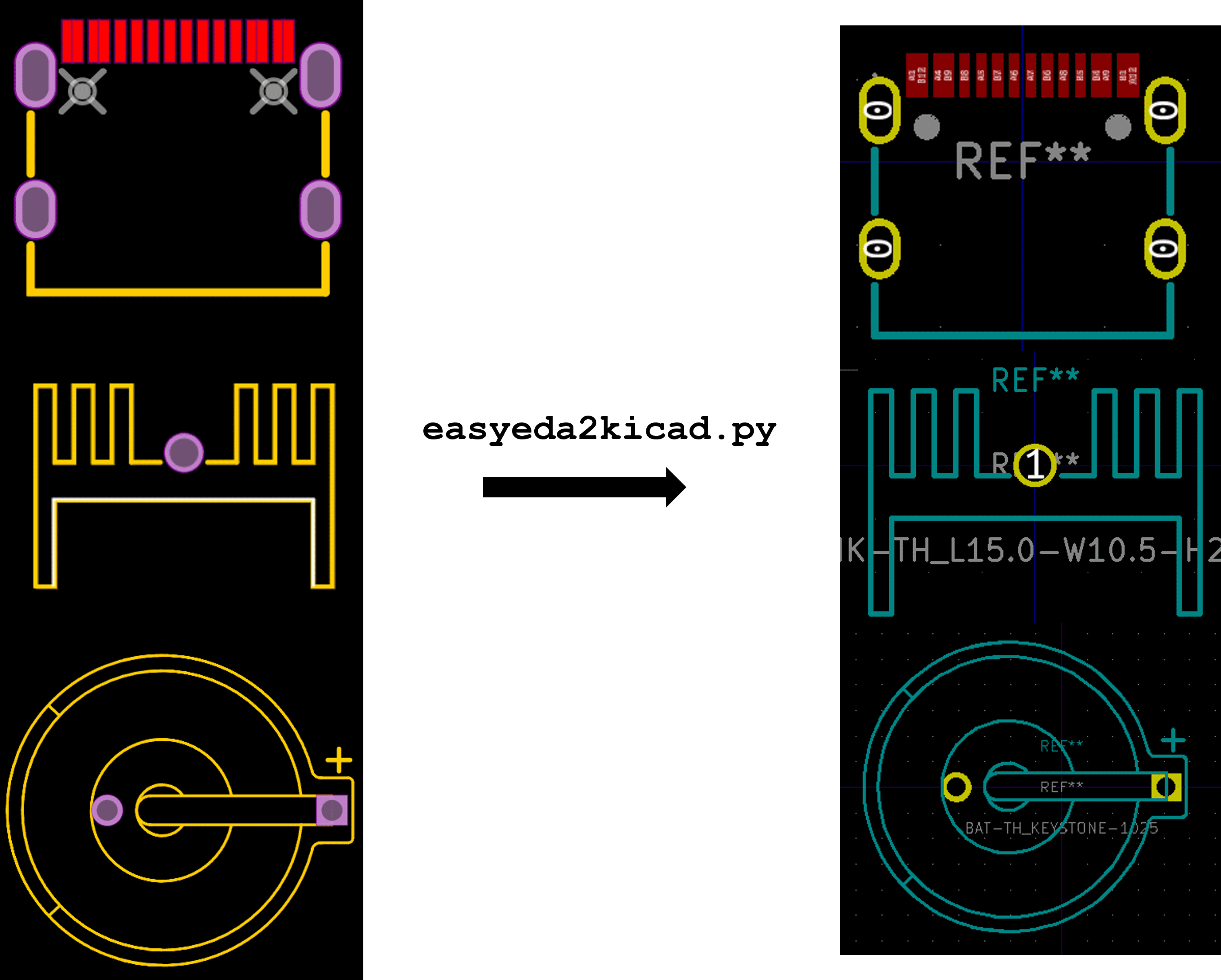
A Python script that converts any electronic components from EasyEDA or LCSC to a KiCad library including 3D model in color. This tool will speed up your PCB design workflow especially when using JLCPCB SMT assembly services. It supports KiCad v6 and newer.
💾 Installation
If you have already Python installed you can run directly in the common terminal.
If not, you can use the Python executable included with Kicad by using the KiCad Command Prompt.

Then run this command to install easyeda2kicad
pip install easyeda2kicad
Installation using the KiCad Command Prompt
KiCad ships with its own Python interpreter. If you don't have a separate Python installation, you can use the KiCad Command Prompt to install easyeda2kicad into KiCad's Python environment.
Windows: Open the KiCad Command Prompt via Start Menu → KiCad → KiCad Command Prompt, then run:
pip install easyeda2kicad
Linux / macOS: KiCad's Python is typically not on the system PATH. Use the full path to KiCad's pip, for example:
/usr/lib/kicad/lib/python3/dist-packages/../../../bin/python3 -m pip install easyeda2kicad
Or locate it with:
find /usr -name "pip*" | grep kicad
After installation, run easyeda2kicad from the same KiCad Command Prompt.
💻 Usage
# For symbol + footprint + 3d model (with --full argument)
easyeda2kicad --full --lcsc_id=C2040
# For symbol + footprint + 3d model
easyeda2kicad --symbol --footprint --3d --lcsc_id=C2040
# For symbol + footprint
easyeda2kicad --symbol --footprint --lcsc_id=C2040
# For symbol only
easyeda2kicad --symbol --lcsc_id=C2040
# For footprint only
easyeda2kicad --footprint --lcsc_id=C2040
# For 3d model only
easyeda2kicad --3d --lcsc_id=C2040
# Import multiple components at once
easyeda2kicad --full --lcsc_id C2040 C20197 C163691
By default, all libraries are saved in ~/Documents/Kicad/easyeda2kicad/ (Linux/macOS) or C:/Users/your_name/Documents/Kicad/easyeda2kicad/ (Windows), with:
easyeda2kicad.kicad_symfile for symbol library (KiCad v6+)easyeda2kicad.pretty/folder for footprint librarieseasyeda2kicad.3dshapes/folder for 3D models (.wrland.stepformat)
If you want to save components symbol/footprint in your own libs, you can specify the output lib path by using --output option.
easyeda2kicad --full --lcsc_id=C2040 --output ~/libs/my_lib
This command will save:
- the symbol in
~/libs/my_lib.kicad_symfile for symbol library. The file will be created if it doesn't exist. - the footprint in
~/libs/my_lib.pretty/folder for footprint libraries. The folder will be created if it doesn't exist. - the 3d models in
~/libs/my_lib.3dshapes/folder for 3d models. The folder will be created if it doesn't exist. The 3D models will be saved both in .WRL and .STEP format.
Use --overwrite to replace an existing symbol, footprint, or 3D model already in the library:
easyeda2kicad --full --lcsc_id=C2040 --output ~/libs/my_lib --overwrite
Project-relative 3D model paths
When working in a KiCad project folder, use --project-relative together with --output to store 3D model paths relative to the project root (${KIPRJMOD}):
easyeda2kicad --full --lcsc_id=C2040 --output ~/myproject/libs/my_lib --project-relative
This stores the 3D path as ${KIPRJMOD}/libs/my_lib.3dshapes/... instead of an absolute filesystem path, making the project portable.
Multiple IDs at once
You can import several components in a single call:
easyeda2kicad --full --lcsc_id C2040 C20197 C163691
Custom symbol fields
Use --custom-field to add extra properties to generated symbols:
easyeda2kicad --symbol --lcsc_id=C2040 --custom-field "Manufacturer:Texas Instruments" "Package:LQFN-56"
Malformed values (missing :) fail fast. Duplicate keys use the last value.
If EasyEDA does not provide a datasheet URL for a symbol, easyeda2kicad falls
back to https://www.lcsc.com/datasheet/<LCSC-ID>.pdf.
Using a proxy server
Set the HTTPS_PROXY environment variable — no extra argument needed:
# Linux / macOS
HTTPS_PROXY=http://proxy.example.com:8080 easyeda2kicad --full --lcsc_id=C2040
# Windows
set HTTPS_PROXY=http://proxy.example.com:8080 && easyeda2kicad --full --lcsc_id=C2040
Caching and debug
Use --use-cache to cache API responses in .easyeda_cache/ for faster, offline-capable runs. Use --debug for verbose log output. Both flags can be combined:
easyeda2kicad --full --lcsc_id=C2040 --use-cache --debug
Clear the cache with rm -rf .easyeda_cache.
🔗 Add libraries in Kicad
These are the instructions to add the default easyeda2kicad libraries in Kicad. Before configuring KiCad, run the script at least once to create lib files. For example :
easyeda2kicad --symbol --footprint --lcsc_id=C2040
- In KiCad, Go to Preferences > Configure Paths, and add the environment variables
EASYEDA2KICAD:- Windows :
C:/Users/your_username/Documents/Kicad/easyeda2kicad/, - Linux :
/home/your_username/Documents/Kicad/easyeda2kicad/
- Windows :
- Go to Preferences > Manage Symbol Libraries, and Add the global library
easyeda2kicad:${EASYEDA2KICAD}/easyeda2kicad.kicad_sym - Go to Preferences > Manage Footprint Libraries, and Add the global library
easyeda2kicad:${EASYEDA2KICAD}/easyeda2kicad.pretty - Enjoy :wink:
📚 Documentation
For detailed information about the EasyEDA data format and how commands are parsed:
- CMD_FOOTPRINT.md - Compact reference for all footprint commands (PAD, TRACK, RECT, etc.) with field definitions and real examples
- CMD_SYMBOL.md - Compact reference for all symbol commands (P, R, C, E, A, PL, PG, PT) with field definitions and real examples
- CMD_3D_MODEL.md - Reference for 3D model download, OBJ/STEP formats, and WRL conversion
🔥 Important Notes
WARRANTY
The correctness of the symbols and footprints converted by easyeda2kicad can't be guaranteed. Easyeda2kicad speeds up custom library design process, but you should remain careful and always double check the footprints and symbols generated.
1 maintainer

Metadata
1 maintainer
Release files for easyeda2kicad 1.0.1
For a detailed explanation of source distributions (sdists) and built distributions (wheels), please see the package formats documentation.
Source distribution (sdist)
| File | Size | Uploaded | |
|---|---|---|---|
| easyeda2kicad-1.0.1.tar.gz | 65.8 kB | Details |
Built distribution (wheel)
| File | Interpreter | ABI | Platform | Reset |
|---|---|---|---|---|
| easyeda2kicad-1.0.1-py3-none-any.whl | Python 3 | none | any | Details |
Total release size: 134.5 kB
Release files / easyeda2kicad-1.0.1.tar.gz
| Download URL | easyeda2kicad-1.0.1.tar.gz |
|---|---|
| Size | 65.8 kB |
| Tags | Source |
|
SHA-256 checksum How to use checksums |
122a48fafa3b918e730185c973dd342183928b8a0dbe24436d13d58b90290e84
|
|
BLAKE2b-256 checksum How to use checksums |
ab8b9a7abcdbb2a3a86d55e40f59f7c28b24e7e8fe9fcc08949509fff386a9a5
|
| Upload date | |
|
Uploaded using Trusted Publishing? What is trusted publishing? |
Yes |
| Uploaded via |
twine/6.1.0 CPython/3.13.7
|
Provenance
Provenance describes where a file came from. On PyPI, provenance is shared via attestations, which provide a verifiable record of the build or publishing details. View details, limitations and caveats.


PyPI Publish Attestation
PyPI verified that this artifact, at this checksum, originated from the publisher listed below.
Signed by GitHub Actions, verified by PyPI on Apr 6, 2026.
Transparency logRelease files / easyeda2kicad-1.0.1-py3-none-any.whl
| Download URL | easyeda2kicad-1.0.1-py3-none-any.whl |
|---|---|
| Size | 68.7 kB |
| Tags | Python 3 |
|
SHA-256 checksum How to use checksums |
b5a460650c5dd0af35a70658f433f63355fdbdf2c2b9e3bc411bc11ea98d06ed
|
|
BLAKE2b-256 checksum How to use checksums |
47be9be36eb493d6a8eef8b8e73957e83d75f064b97d6abb1dcdfb3537b4f056
|
| Upload date | |
|
Uploaded using Trusted Publishing? What is trusted publishing? |
Yes |
| Uploaded via |
twine/6.1.0 CPython/3.13.7
|
Provenance
Provenance describes where a file came from. On PyPI, provenance is shared via attestations, which provide a verifiable record of the build or publishing details. View details, limitations and caveats.
PyPI Publish Attestation
PyPI verified that this artifact, at this checksum, originated from the publisher listed below.
Signed by GitHub Actions, verified by PyPI on Apr 6, 2026.
Transparency log













