
Python AutoEncoder from scratch using Numpy
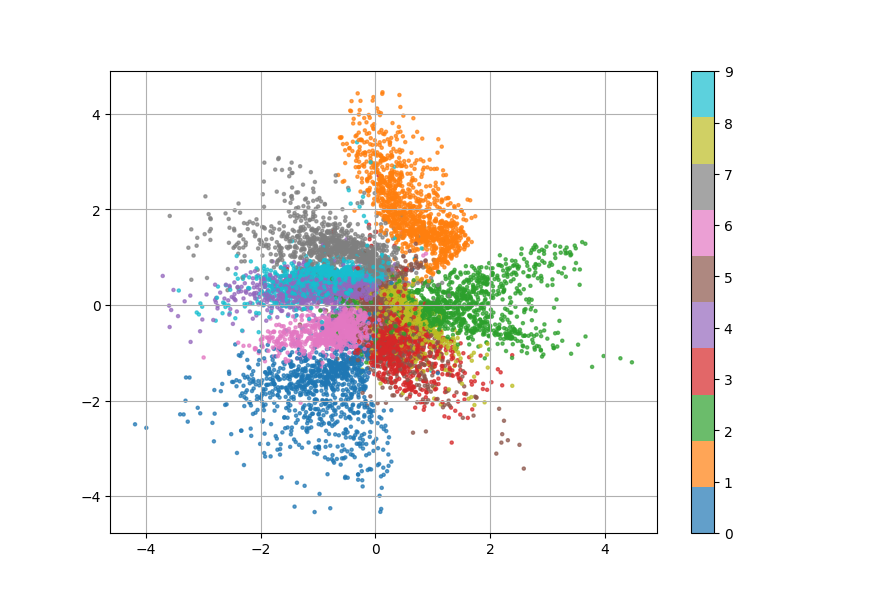
Latent-space representation of the MNIST dataset using Variational Autoencoder
Usage
- To install from source :
$ git clone git@github.com:lenoctambule/autoencoder.git
$ pip install -e autoencoder/
Or install from PyPI :
$ pip install easyvae
- Optionally, run mnist_test.py to see it in action on the MNIST dataset.
$ cd examples
$ py mnist_test.py
Training
Instatiate an ClassicalAutoencoder or VariationalAutoencoder object :
from easyvae.autoencoder import ClassicalAutoencoder, VariationalAutoencoder
from easyvae.activations import LeakyReLU

autoencoder = ClassicalAutoencoder(
    [768, 64, 16],
    [16, 64, 768],
    0.01,
    LeakyReLU()
)
# or
autoencoder = VariationalAutoencoder(
    [768, 64, 16],
    [16, 64, 768],
    0.01,
    LeakyReLU()
)
And then via the train_dataset method to train over a dataset :
autoencoder.train_dataset(data)
Or via the train method to input each data points iteratively :
autoencoder.train(v)
After training, you can save your model via the save method and load that model using load method :
autoencoder.save("mymodel.npy")
autoencoder.load("mymodel.npy")
Inference
Use your Autoencoder object with the encode, decode, forward methods like so :
example = ...
code = autoencoder.encode(example)
output = autoencoder.decode(code)
output, code = autoencoder.forward(example)
1 maintainer

Metadata
1 maintainer
Release files for easyvae 1.3.3
For a detailed explanation of source distributions (sdists) and built distributions (wheels), please see the package formats documentation.
Source distribution (sdist)
| File | Size | Uploaded | |
|---|---|---|---|
| easyvae-1.3.3.tar.gz | 7.9 kB | Details |
Built distribution (wheel)
| File | Interpreter | ABI | Platform | Reset |
|---|---|---|---|---|
| easyvae-1.3.3-py3-none-any.whl | Python 3 | none | any | Details |
Total release size: 15.9 kB
Release files / easyvae-1.3.3.tar.gz
| Download URL | easyvae-1.3.3.tar.gz |
|---|---|
| Size | 7.9 kB |
| Tags | Source |
|
SHA-256 checksum How to use checksums |
a6b3b3370e68a3d629259394b16c64aadeb911b7331ad1263da186441e82eae9
|
|
BLAKE2b-256 checksum How to use checksums |
597ea1d6cf496f8ec929798ffe316a53c81bb7bd7234861d08f89a7148940147
|
| Upload date | |
|
Uploaded using Trusted Publishing? What is trusted publishing? |
No |
| Uploaded via |
twine/6.2.0 CPython/3.13.13
|
Release files / easyvae-1.3.3-py3-none-any.whl
| Download URL | easyvae-1.3.3-py3-none-any.whl |
|---|---|
| Size | 8.0 kB |
| Tags | Python 3 |
|
SHA-256 checksum How to use checksums |
29ce641c8915238b6f74f6d91526576ad3b9409c50437faed83c4541e2da1f0f
|
|
BLAKE2b-256 checksum How to use checksums |
cbdeb3addcd012f55d9ecbd49da03d9440e28f713c99a4b02a14b22f8f6c8cc5
|
| Upload date | |
|
Uploaded using Trusted Publishing? What is trusted publishing? |
No |
| Uploaded via |
twine/6.2.0 CPython/3.13.13
|














