
ec2-spot-price: Retrieve Amazon EC2 spot instance price
This Python module provides simple functions and commands to retrieve Amazon EC2 spot instance price by AWS API.
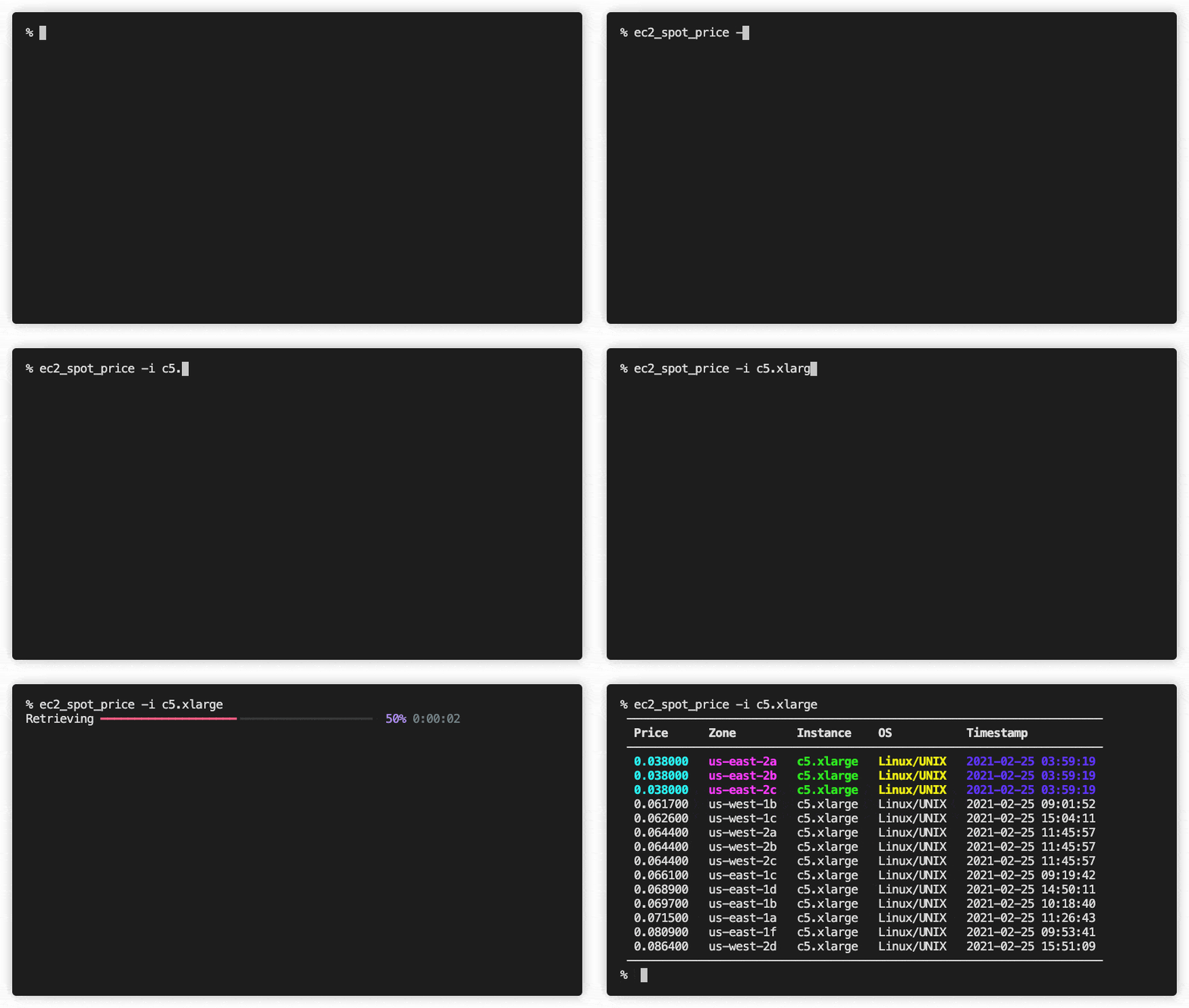
Install
Install by pip. Or pipx may be convenient to use as a CLI application.
pip install ec2-spot-price
Setup
You need to setup AWS authentication credentials which have permissions to access ec2:DescribeSpotPriceHistory and ec2:DescribeRegions APIs.
A simple way to do is to create a new IAM user and attach AmazonEC2ReadOnlyAccess policy directly to the user. Or you can use existent credentials which have permissions to access ec2:DescribeSpotPriceHistory and ec2:DescribeRegions APIs.
Create a new IAM user
Create a new IAM user like the following.
- Go to IAM console
- Click
UsersandAdd user - User name:
myuser(whatever you want) - Access type:
Programmatic access - Click
Next: Permissions - Set permissions:
Attach existing policies directly - Policy name:
AmazonEC2ReadOnlyAccess - Click
Next: Tags - Click
Next: Review - Click
Create user - Click
Download .csv - Click
Close
Note: custom policy
If you don't want to attach AmazonEC2ReadOnlyAccess policy, you can create a new policy that only allows to access ec2:DescribeSpotPriceHistory and ec2:DescribeRegions APIs. Then attach this policy instead of AmazonEC2ReadOnlyAccess policy.
{
    "Version": "2012-10-17",
    "Statement": [
        {
            "Effect": "Allow",
            "Action": [
                "ec2:DescribeSpotPriceHistory",
                "ec2:DescribeRegions"
            ],
            "Resource": "*"
        }
    ]
}
Edit ~/.aws/credentials
You can use "named profile" to have multiple credentials settings.
[myprofile]  # whatever you want, or [default]
aws_access_key_id=[copy from csv]
aws_secret_access_key=[copy from csv]
region=us-east-2  # wherever you want
If you use "named profile", you need to specify AWS_PROFILE environment variable.
export AWS_PROFILE=myprofile
Usage
ec2_spot_price command
You can run ec2_spot_price (or python /path/to/ec2_spot_price.py) command to retrieve spot instance prices.
-h option shows help message.
% ec2_spot_price -h
usage: ec2_spot_price [-h] [-r REGION] [-i INSTANCE] [-o OS] [-csv] [-d] [-V]

retrieve Amazon EC2 spot instance price.

optional arguments:
  -h, --help            show this help message and exit
  -r REGION, --region REGION
                        filter by regions. if "" is specified, retrieve all of
                        the regions. (default: "us-east-1,us-east-2,us-
                        west-1,us-west-2")
  -i INSTANCE, --instance INSTANCE
                        filter by instance types e.g. "g3.4xlarge,p2.xlarge".
                        (default: retrieve all of the instance types)
  -o OS, --os OS        filter by OS types. (default: "Linux/UNIX")
  -csv, --csv           output by CSV format. (default: False)
  -d, --debug           show debug information.
  -V, --version         show version.
You can specify region names by -r, instance types by -i and OS types by -o. For example, the following command shows table of us-east-1,us-east-2 regions, c5.xlarge,c5d.xlarge instances and Linux/UNIX OS (default value).
% ec2_spot_price -r "us-east-1,us-east-2" -i "c5.xlarge,c5d.xlarge"
 ───────────────────────────────────────────────────────────────────────
  Price      Zone         Instance     OS           Timestamp
 ───────────────────────────────────────────────────────────────────────
  0.038000   us-east-2a   c5.xlarge    Linux/UNIX   2021-02-24 03:59:14
  0.038000   us-east-2a   c5d.xlarge   Linux/UNIX   2021-02-24 18:23:40
  0.038000   us-east-2b   c5.xlarge    Linux/UNIX   2021-02-24 03:59:14
  0.038000   us-east-2b   c5d.xlarge   Linux/UNIX   2021-02-24 20:49:32
  0.038000   us-east-2c   c5.xlarge    Linux/UNIX   2021-02-24 03:59:14
  0.038000   us-east-2c   c5d.xlarge   Linux/UNIX   2021-02-24 08:06:21
  0.066500   us-east-1c   c5.xlarge    Linux/UNIX   2021-02-24 15:56:41
  0.066800   us-east-1f   c5d.xlarge   Linux/UNIX   2021-02-24 18:38:06
  0.069600   us-east-1a   c5d.xlarge   Linux/UNIX   2021-02-24 17:55:16
  0.069700   us-east-1d   c5.xlarge    Linux/UNIX   2021-02-24 19:28:40
  0.069900   us-east-1b   c5.xlarge    Linux/UNIX   2021-02-24 21:10:11
  0.072100   us-east-1a   c5.xlarge    Linux/UNIX   2021-02-24 16:55:41
  0.079600   us-east-1c   c5d.xlarge   Linux/UNIX   2021-02-24 21:01:42
  0.079600   us-east-1d   c5d.xlarge   Linux/UNIX   2021-02-24 14:31:55
  0.083700   us-east-1f   c5.xlarge    Linux/UNIX   2021-02-24 14:48:41
  0.090300   us-east-1b   c5d.xlarge   Linux/UNIX   2021-02-24 03:58:17
 ───────────────────────────────────────────────────────────────────────
In this case, you should use c5.xlarge at us-east-2 region.
Another example to retrieve all of the spot prices in all regions with verbose option.
% ec2_spot_price -r "" -i "" -o "" -csv > spot_prices.csv
% wc -l spot_prices.csv
   49822 spot_prices.csv
% head spot_prices.csv
SpotPrice,AvailabilityZone,InstanceType,ProductDescription,Timestamp
0.000800,ap-south-1a,t4g.nano,Linux/UNIX,2021-02-24 17:41:52
0.000800,ap-south-1a,t4g.nano,SUSE Linux,2021-02-24 17:41:52
0.000800,ap-south-1b,t4g.nano,Linux/UNIX,2021-02-24 17:41:52
0.000800,ap-south-1b,t4g.nano,SUSE Linux,2021-02-24 17:41:52
0.000800,ap-south-1c,t4g.nano,Linux/UNIX,2021-02-24 17:41:52
0.000800,ap-south-1c,t4g.nano,SUSE Linux,2021-02-24 17:41:52
0.000900,ap-south-1a,t3a.nano,Linux/UNIX,2021-02-24 17:06:18
0.000900,ap-south-1a,t3a.nano,SUSE Linux,2021-02-24 17:06:18
0.000900,ap-south-1b,t3a.nano,Linux/UNIX,2021-02-24 17:06:18
Then open spot_prices.csv with spread sheet application like Excel.
ec2_spot_price module
There are three functions.
Function spot_prices retrieves spot prices as list.
Function print_csv prints spot prices with CSV format.
Function print_table prints spot prices with table format.
% python
>>> import ec2_spot_price as ec2sp
>>> df = ec2sp.spot_prices(['us-east-1', 'us-east-2'], ['c5.xlarge', 'c5d.xlarge'], ['Linux/UNIX'])
>>> len(df)
16
>>> ec2sp.print_table(df)
 ───────────────────────────────────────────────────────────────────────
  Price      Zone         Instance     OS           Timestamp
 ───────────────────────────────────────────────────────────────────────
  0.038000   us-east-2a   c5.xlarge    Linux/UNIX   2021-02-24 03:59:14
  0.038000   us-east-2a   c5d.xlarge   Linux/UNIX   2021-02-24 18:23:40
  0.038000   us-east-2b   c5.xlarge    Linux/UNIX   2021-02-24 03:59:14
  0.038000   us-east-2b   c5d.xlarge   Linux/UNIX   2021-02-24 20:49:32
  0.038000   us-east-2c   c5.xlarge    Linux/UNIX   2021-02-24 03:59:14
  0.038000   us-east-2c   c5d.xlarge   Linux/UNIX   2021-02-24 08:06:21
  0.066500   us-east-1c   c5.xlarge    Linux/UNIX   2021-02-24 15:56:41
  0.066800   us-east-1f   c5d.xlarge   Linux/UNIX   2021-02-24 18:38:06
  0.069600   us-east-1a   c5d.xlarge   Linux/UNIX   2021-02-24 17:55:16
  0.069700   us-east-1d   c5.xlarge    Linux/UNIX   2021-02-24 19:28:40
  0.069900   us-east-1b   c5.xlarge    Linux/UNIX   2021-02-24 21:10:11
  0.072100   us-east-1a   c5.xlarge    Linux/UNIX   2021-02-24 16:55:41
  0.079600   us-east-1c   c5d.xlarge   Linux/UNIX   2021-02-24 21:01:42
  0.079600   us-east-1d   c5d.xlarge   Linux/UNIX   2021-02-24 14:31:55
  0.082500   us-east-1f   c5.xlarge    Linux/UNIX   2021-02-24 21:35:41
  0.090300   us-east-1b   c5d.xlarge   Linux/UNIX   2021-02-24 03:58:17
 ───────────────────────────────────────────────────────────────────────
>>> ec2sp.print_csv(df)
SpotPrice,AvailabilityZone,InstanceType,ProductDescription,Timestamp
0.038000,us-east-2a,c5.xlarge,Linux/UNIX,2021-02-24 03:59:14
0.038000,us-east-2a,c5d.xlarge,Linux/UNIX,2021-02-24 18:23:40
0.038000,us-east-2b,c5.xlarge,Linux/UNIX,2021-02-24 03:59:14
0.038000,us-east-2b,c5d.xlarge,Linux/UNIX,2021-02-24 20:49:32
0.038000,us-east-2c,c5.xlarge,Linux/UNIX,2021-02-24 03:59:14
0.038000,us-east-2c,c5d.xlarge,Linux/UNIX,2021-02-24 08:06:21
0.066500,us-east-1c,c5.xlarge,Linux/UNIX,2021-02-24 15:56:41
0.066800,us-east-1f,c5d.xlarge,Linux/UNIX,2021-02-24 18:38:06
0.069600,us-east-1a,c5d.xlarge,Linux/UNIX,2021-02-24 17:55:16
0.069700,us-east-1d,c5.xlarge,Linux/UNIX,2021-02-24 19:28:40
0.069900,us-east-1b,c5.xlarge,Linux/UNIX,2021-02-24 21:10:11
0.072100,us-east-1a,c5.xlarge,Linux/UNIX,2021-02-24 16:55:41
0.079600,us-east-1c,c5d.xlarge,Linux/UNIX,2021-02-24 21:01:42
0.079600,us-east-1d,c5d.xlarge,Linux/UNIX,2021-02-24 14:31:55
0.082500,us-east-1f,c5.xlarge,Linux/UNIX,2021-02-24 21:35:41
0.090300,us-east-1b,c5d.xlarge,Linux/UNIX,2021-02-24 03:58:17
Another example to retrieve all of the spot prices in all regions.
You can use pd.DataFrame methods to manipulate them.
>>> import ec2_spot_price as ec2sp
>>> df = ec2sp.spot_prices([], [], [])
>>> len(df)
49817
>>> df = df.query('ProductDescription == "Linux/UNIX"')
>>> df = df.drop(['Timestamp', 'ProductDescription'], axis=1)
>>> df = df.sort_values(by=['SpotPrice', 'AvailabilityZone', 'InstanceType'])
>>> df = df.query('InstanceType.str.match("c5.?\.xlarge")')
>>> len(df)
187
>>> df.head(20)
      SpotPrice AvailabilityZone InstanceType
42061  0.038000       us-east-2a    c5.xlarge
40121  0.038000       us-east-2a   c5d.xlarge
40650  0.038000       us-east-2a   c5n.xlarge
42060  0.038000       us-east-2b    c5.xlarge
39630  0.038000       us-east-2b   c5d.xlarge
40649  0.038000       us-east-2b   c5n.xlarge
42059  0.038000       us-east-2c    c5.xlarge
41712  0.038000       us-east-2c   c5d.xlarge
40648  0.038000       us-east-2c   c5n.xlarge
39716  0.042400       us-east-2c   c5a.xlarge
39592  0.044100       us-east-2b   c5a.xlarge
3105   0.052800      ap-south-1c   c5a.xlarge
3104   0.053200      ap-south-1b   c5a.xlarge
2505   0.053500      ap-south-1a   c5a.xlarge
2831   0.054000      ap-south-1a   c5n.xlarge
3430   0.054000      ap-south-1b   c5d.xlarge
3768   0.054100      ap-south-1a   c5d.xlarge
1765   0.054100      ap-south-1b   c5n.xlarge
1727   0.054100      ap-south-1c   c5d.xlarge
2981   0.054100      ap-south-1c   c5n.xlarge
Links
- https://aws.amazon.com/ec2/spot/pricing/
- https://docs.aws.amazon.com/IAM/latest/UserGuide/id_users_create.html
- https://docs.aws.amazon.com/AWSEC2/latest/UserGuide/using-spot-instances-history.html
- https://docs.aws.amazon.com/cli/latest/reference/ec2/describe-spot-price-history.html
- https://docs.aws.amazon.com/AWSEC2/latest/APIReference/API_DescribeSpotPriceHistory.html
- https://docs.aws.amazon.com/AWSEC2/latest/APIReference/API_DescribeRegions.html
- https://boto3.amazonaws.com/v1/documentation/api/latest/guide/quickstart.html#configuration
- https://boto3.amazonaws.com/v1/documentation/api/latest/reference/services/ec2.html?highlight=describe%20spot#EC2.Client.describe_spot_price_history
Author
Susumu OTA
1 maintainer

Metadata
1 maintainer
Release files for ec2-spot-price 0.2.3
For a detailed explanation of source distributions (sdists) and built distributions (wheels), please see the package formats documentation.
Source distribution (sdist)
| File | Size | Uploaded | |
|---|---|---|---|
| ec2-spot-price-0.2.3.tar.gz | 12.2 kB | Details |
Built distribution (wheel)
| File | Interpreter | ABI | Platform | Reset |
|---|---|---|---|---|
| ec2_spot_price-0.2.3-py3-none-any.whl | Python 3 | none | any | Details |
Total release size: 23.4 kB
Release files / ec2-spot-price-0.2.3.tar.gz
| Download URL | ec2-spot-price-0.2.3.tar.gz |
|---|---|
| Size | 12.2 kB |
| Tags | Source |
|
SHA-256 checksum How to use checksums |
39cf99a8646e914eae99c499e1356a6b2929c2bb5641bfe1fa45f8f465bc95b5
|
|
BLAKE2b-256 checksum How to use checksums |
5bd2e995b13b36aededd513fec747a612e68368e2279f1ddf88ee80aa6d71c3e
|
| Upload date | |
|
Uploaded using Trusted Publishing? What is trusted publishing? |
No |
| Uploaded via |
poetry/1.1.4 CPython/3.7.6 Darwin/19.6.0
|
Release files / ec2_spot_price-0.2.3-py3-none-any.whl
| Download URL | ec2_spot_price-0.2.3-py3-none-any.whl |
|---|---|
| Size | 11.2 kB |
| Tags | Python 3 |
|
SHA-256 checksum How to use checksums |
7437f53dd8d4acbd77292c413e70c94741025e87d5c4c9eb05512237a621955d
|
|
BLAKE2b-256 checksum How to use checksums |
8aaa64cbdb699a46f379bd3e5127a8932f3a002ddd91568a15e8a791a5ff35b0
|
| Upload date | |
|
Uploaded using Trusted Publishing? What is trusted publishing? |
No |
| Uploaded via |
poetry/1.1.4 CPython/3.7.6 Darwin/19.6.0
|














