
ecliptica
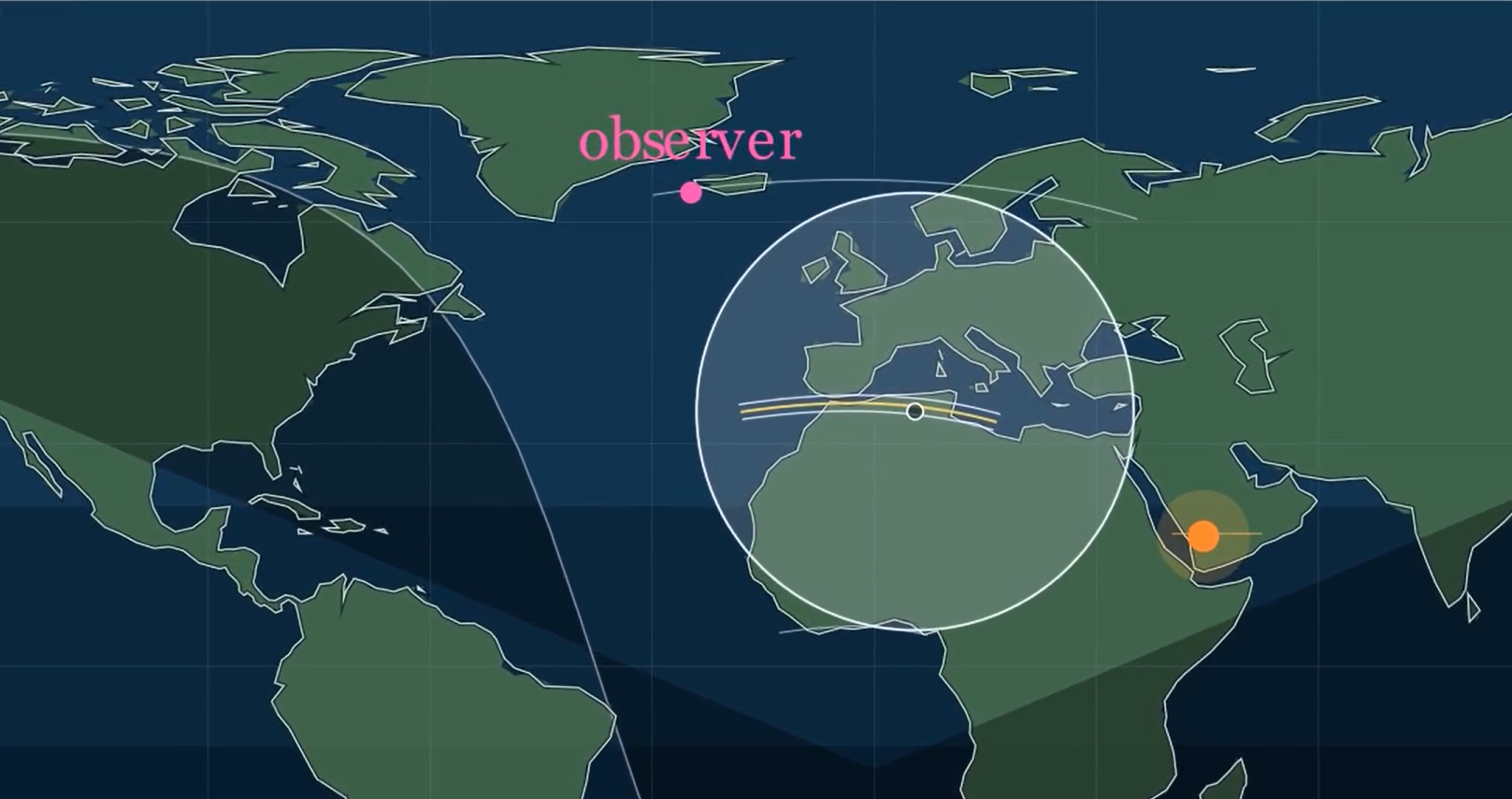
eclipticae is a Python library + CLI to compute local solar eclipse circumstances and render eclipse animations with Manim.


MVP Features
- Compute the next local eclipse from a start date (
partial,annular, ortotal). - Export eclipse metadata to JSON.
- Render 2D map or 3D globe
.mp4animations from exported JSON. - Preview mode for faster iteration (
--preview) and optional render cache control (--disable-caching).
Install
uv sync
Linux prerequisite packages for Manim (needed before uv sync):
sudo apt-get update
sudo apt-get install -y pkg-config libcairo2-dev libpango1.0-dev ffmpeg
CLI Usage
Compute an event:
uv run eclipticae compute --lat 40.4168 --lon -3.7038 --date 2026-01-01 --out event.json
Render world map shadow video (default scene):
uv run eclipticae render --input event.json --out eclipse_map.mp4 --quality high
Render fast preview while iterating on visuals:
uv run eclipticae render --input event.json --out eclipse_preview.mp4 --scene map --preview --quality low
Render 3D globe scene:
uv run eclipticae render --input event.json --out eclipse_globe.mp4 --quality high --scene globe
Render a multi-year Saros-style sequence with dimmed historical traces:
uv run eclipticae render-saros --year 2021 --name total --years 20 --out saros_paths.mp4 --quality high
Lookup a global eclipse by year/name and include a combined Saros chain:
uv run eclipticae lookup --year 2026 --name annular --out eclipse_lookup.json
Use the interactive wizard to build commands step-by-step:
uv run eclipticae wizard
Wizard highlights:
- Arrow-key menus in interactive terminals.
- Render from an existing event JSON or pick upcoming eclipses from a chosen year.
- For
render-saros, choose the anchor eclipse from that year (no manual anchor-name typing). - Adaptive defaults: low quality recommends preview mode and prefers faster renderer options.
- Global wizard setting for caching default, so you don't need to answer that every run.
- Back navigation inside wizard: choose
Backin menus or useEsc/Ctrl+C. - Outputs exact command(s) and can run them immediately.
Renderer note:
openglis currently supported for--scene globerenders.mapandrender-sarosusecairo.
Python Usage
from eclipticae import compute_site_eclipse, render_scene, save_event

event = compute_site_eclipse(
    latitude=40.4168,
    longitude=-3.7038,
    date_or_datetime="2026-01-01",
    elevation_m=667,
)
save_event(event, "event.json")
render_scene(event, "eclipse_map.mp4", quality="high", scene="map")
Dev Commands
uv run ruff check .
uv run ruff format .
uv run ty check
uv run pytest
Install pre-commit hooks:
uv run pre-commit install
Run all checks at once (PowerShell):
.\scripts\check_all.ps1
Project Docs
1 maintainer

Metadata
1 maintainer
Release files for eclipticae 0.1.0
For a detailed explanation of source distributions (sdists) and built distributions (wheels), please see the package formats documentation.
Source distribution (sdist)
| File | Size | Uploaded | |
|---|---|---|---|
| eclipticae-0.1.0.tar.gz | 170.5 kB | Details |
Built distribution (wheel)
| File | Interpreter | ABI | Platform | Reset |
|---|---|---|---|---|
| eclipticae-0.1.0-py3-none-any.whl | Python 3 | none | any | Details |
Total release size: 353.9 kB
Release files / eclipticae-0.1.0.tar.gz
| Download URL | eclipticae-0.1.0.tar.gz |
|---|---|
| Size | 170.5 kB |
| Tags | Source |
|
SHA-256 checksum How to use checksums |
d52acfa1637f0b6937c0247056b28f37d1c34c0d4ef3189830e8045e48a095bb
|
|
BLAKE2b-256 checksum How to use checksums |
34a7857cac44acbd10f4c350cf7150b6b2fad37f3ba9d1203650c6cafb58c34d
|
| Upload date | |
|
Uploaded using Trusted Publishing? What is trusted publishing? |
Yes |
| Uploaded via |
uv/0.10.11 {"installer":{"name":"uv","version":"0.10.11","subcommand":["publish"]},"python":null,"implementation":{"name":null,"version":null},"distro":{"name":"Ubuntu","version":"24.04","id":"noble","libc":null},"system":{"name":null,"release":null},"cpu":null,"openssl_version":null,"setuptools_version":null,"rustc_version":null,"ci":true}
|
Release files / eclipticae-0.1.0-py3-none-any.whl
| Download URL | eclipticae-0.1.0-py3-none-any.whl |
|---|---|
| Size | 183.4 kB |
| Tags | Python 3 |
|
SHA-256 checksum How to use checksums |
c6b92bac678ceb8110c09c73e57c4e0947076a8cb3f6f41c9d56d275f528255c
|
|
BLAKE2b-256 checksum How to use checksums |
38c8ad5ce1be1faf043768c98e9036239adb0ebd5f88b91372650b824d743ffc
|
| Upload date | |
|
Uploaded using Trusted Publishing? What is trusted publishing? |
Yes |
| Uploaded via |
uv/0.10.11 {"installer":{"name":"uv","version":"0.10.11","subcommand":["publish"]},"python":null,"implementation":{"name":null,"version":null},"distro":{"name":"Ubuntu","version":"24.04","id":"noble","libc":null},"system":{"name":null,"release":null},"cpu":null,"openssl_version":null,"setuptools_version":null,"rustc_version":null,"ci":true}
|













