
ECM Studio




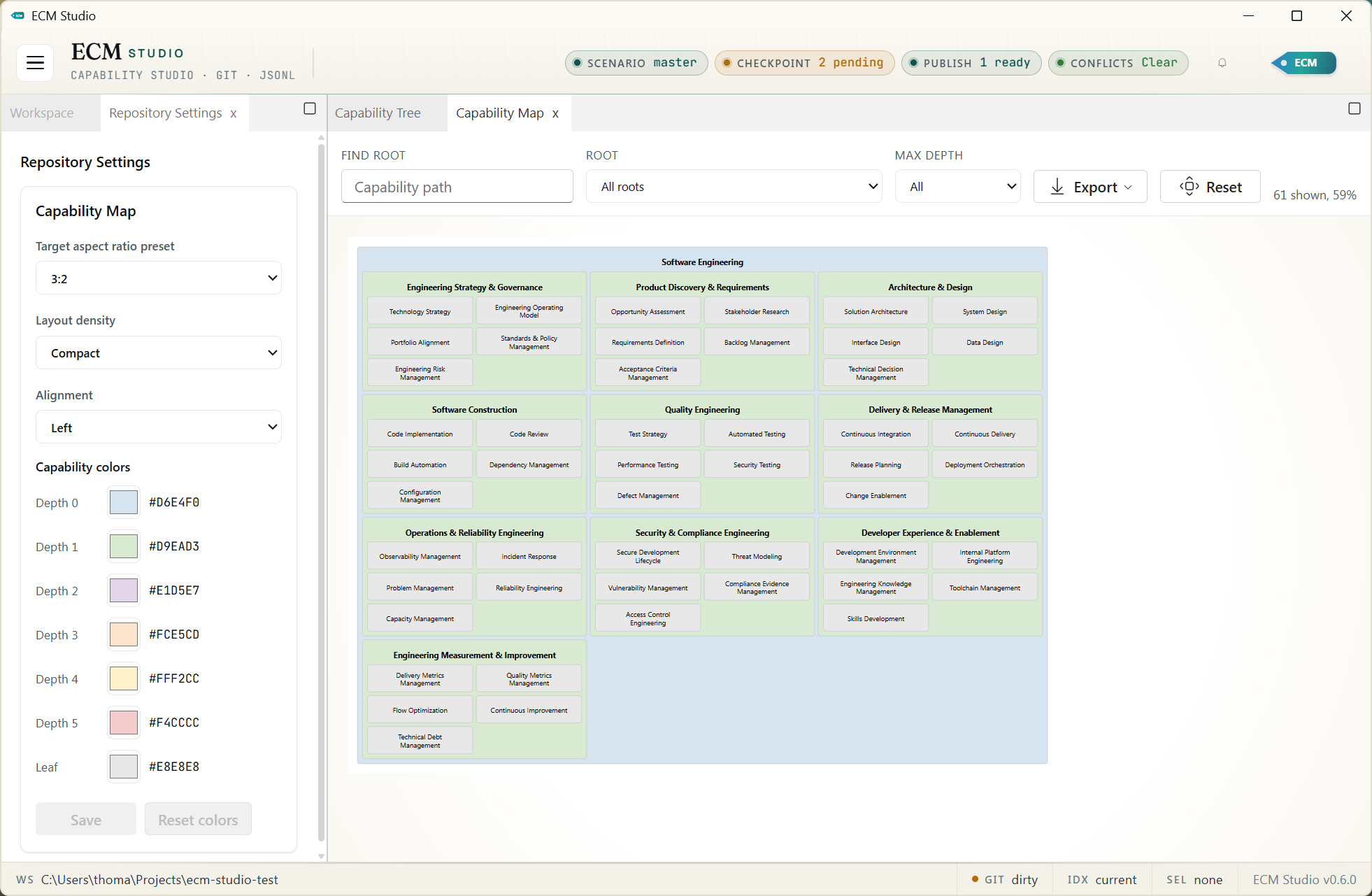
ECM Studio is a Windows-first desktop application for managing an Enterprise Capability Model as local, Git-managed JSONL files. It gives architects and capability owners a focused workspace for editing capability trees, reviewing change history, publishing model snapshots, and exporting portable artifacts without putting the authoritative model in a database.
Highlights
- Desktop UI built with React, Dockview, Fluent UI, and pywebview.
- Durable model storage in readable JSONL files under
ecm/. - Git-native workflow for checkpoints, scenarios, merges, restore, pull, and push.
- SQLite projection rebuilt locally for navigation and search speed.
- Capability map view with SVG and HTML export.
- Direct structural operations for retire, merge, and controlled Draft leaf delete.
- Model import/export for JSONL, CSV, and bundled JSON.
- Release workflow for tagged ECM model exports and GitHub release publication.
- Light/dark theme support with native Windows chrome integration.
Install
ECM Studio requires Python 3.13 or newer. Install it from PyPI:
pip install ecm-studio
On Windows, if pip points at a different Python installation, use the Python
launcher instead:
py -m pip install ecm-studio
With uv, install ECM Studio as a command-line tool:
uv tool install ecm-studio
Or install it into the current uv-managed environment:
uv pip install ecm-studio
Start the desktop app:
ecms
Open a workspace directly:
ecms C:\path\to\capability-model-repo
Check the installed package version:
ecms --version
Workspace Model
An ECM Studio workspace is a normal Git repository. The application stores the
authoritative model in ecm/*.jsonl files and keeps local runtime state in
.ecm-studio/, which should stay ignored by Git.
The SQLite database is only a local projection. It can be rebuilt from JSONL at any time and is not the source of truth.
Common Workflows
Open Or Create A Workspace
Use the workspace panel to open an existing Git-backed ECM repository or create a
new one. ECM Studio writes the model to ecm/*.jsonl, rebuilds the local SQLite
projection for search and navigation, and keeps runtime files under
.ecm-studio/.
Bootstrap An Existing Model
Many teams already have a capability model in a spreadsheet, architecture tool, or another repository. To bootstrap ECM Studio, first create or open the target workspace, then convert the existing model to CSV, JSONL, or bundled JSON and use the Import / Export panel.
Recommended first import flow:
- Prepare stable capability IDs. Use short durable IDs from the source system
when possible, because
parent_idandreplacement_capability_iddepend on those IDs. - Put top-level capabilities first when producing CSV or JSONL. The importer validates by ID rather than row order, but parent-first files are easier to inspect and review.
- Choose Validate only and preview the file. Fix duplicate IDs, duplicate names, missing parents, and hierarchy cycles before applying.
- Choose the apply mode. Use Replace current model for the first load of a new ECM Studio repo, Append new capabilities when adding new branches to an existing model, or Merge by ID when refreshing records from an external source while keeping the same stable IDs.
- Preview again in the selected apply mode, then apply the import. ECM Studio
writes
ecm/capabilities.jsonl, records a model import event, rebuilds the SQLite projection, and refreshes the workspace views.
If the workspace is already a Git repository, replace and merge-by-ID imports create a pre-import checkpoint before writing the imported model.
Bootstrap Schema
JSONL imports use one capability object per line. Bundled JSON imports use the same capability objects inside a wrapper:
{
  "_t": "ecm_model_bundle",
  "schema_version": "1.0",
  "capabilities": []
}
CSV imports support the common bootstrap columns listed below. For JSONL and
bundled JSON, the same fields are accepted as JSON object properties, with
aliases, tags, and source_references represented as arrays. JSON imports
reject unknown fields so schema mistakes fail during preview.
| Field | Required | CSV | Notes |
|---|---|---|---|
_t |
No | Filled by importer | Use capability when present in JSONL or bundled JSON. |
schema_version |
No | Filled by importer | Use 1.0 when present in JSONL or bundled JSON. |
id |
No | Yes | Stable unique ID. Generated when omitted. |
name |
Yes | Yes | Capability names must be unique after trimming and case normalization. |
parent_id |
No | Yes | Parent capability ID. Blank means top-level capability. |
order |
No | Yes | Non-negative sibling order. Defaults to 0 when omitted. |
domain |
No | Yes | Free-text business or architecture domain. |
type |
No | Yes | leaf or abstract; imported value is recomputed from hierarchy. |
lifecycle_status |
No | Yes | Draft, Active, Deprecated, or Retired. Defaults to Draft. |
description |
No | Yes | Free-text description. |
aliases |
No | Yes | CSV accepts semicolon- or comma-separated aliases. JSON uses an array. |
tags |
No | Yes | CSV accepts semicolon- or comma-separated tags. JSON uses an array. |
steward_id |
No | Yes | Owner or steward identifier. |
steward_department |
No | Yes | Steward organization or department. |
replacement_capability_id |
No | Yes | Successor capability ID for retired or merged capabilities. |
effective_from |
No | JSON only | ISO-style date or timestamp for when the capability became effective. |
effective_to |
No | JSON only | ISO-style date or timestamp for retirement or end of validity. |
rationale |
No | JSON only | Reason for the current lifecycle or structural state. |
source_references |
No | JSON only | Array of source-system links, IDs, or references. |
created_at |
No | JSON only | Timestamp generated when omitted. |
updated_at |
No | JSON only | Timestamp generated when omitted. |
Minimal CSV example:
id,name,parent_id,order,domain,type,lifecycle_status,description,aliases,tags,steward_id,steward_department,replacement_capability_id
cap-payments,Payments,,0,Banking,abstract,Active,Payment capabilities,Payments Hub;Pay,finance,owner-123,Banking,
cap-domestic-payments,Domestic Payments,cap-payments,0,Banking,leaf,Active,Domestic clearing and settlement,Local transfers,finance,owner-123,Banking,
Minimal JSONL example:
{"_t":"capability","schema_version":"1.0","id":"cap-payments","name":"Payments","parent_id":null,"order":0,"domain":"Banking","lifecycle_status":"Active","description":"Payment capabilities","aliases":["Payments Hub","Pay"],"tags":["finance"],"steward_id":"owner-123","steward_department":"Banking"}
{"_t":"capability","schema_version":"1.0","id":"cap-domestic-payments","name":"Domestic Payments","parent_id":"cap-payments","order":0,"domain":"Banking","lifecycle_status":"Active","description":"Domestic clearing and settlement","aliases":["Local transfers"],"tags":["finance"],"steward_id":"owner-123","steward_department":"Banking"}
Add Or Edit Capabilities
Create capabilities from the tree, then use the inspector to edit descriptive
fields, lifecycle status, parent placement, aliases, and external references.
Capability type is derived from hierarchy: capabilities with children are
abstract, and capabilities without children are leaves. When edits change that
derived type, ECM Studio records promote or demote audit events.
Retire A Capability
Select a capability and choose Retire from the inspector's structural
actions. Provide a rationale, optionally choose a replacement capability, and
capture any downstream handling notes. Retiring sets the capability lifecycle to
Retired, sets an effective end date, stores the rationale in audit history,
and preserves replacement_capability_id when a replacement is selected.
Use an optional replacement when the capability should no longer be used but there is a clear successor that consumers should move to. The replacement link is useful because it gives architects, reviewers, search users, and downstream consumers an explicit redirect from the retired capability to the active one. That keeps historical references understandable, makes migration decisions auditable, and avoids leaving teams to infer the intended successor from names or notes. Leave it blank when the capability is ending without a direct successor.
Merge Duplicate Capabilities
Select the duplicate source capability and choose Merge. Pick the survivor, enter a rationale, and capture downstream handling notes. ECM Studio moves the source children under the survivor, folds the source name and aliases into the survivor aliases, and prevents merge targets that would create a hierarchy cycle.
Draft sources are removed after the merge. Non-Draft sources remain in the
model as Retired records with replacement_capability_id pointing at the
survivor, so historical references still have a visible redirect.
Delete An Erroneous Draft Leaf
Use Delete Draft only for capabilities that are both Draft and leaf nodes.
ECM Studio rejects delete attempts for non-Draft capabilities or capabilities
with descendants. Deleting requires a rationale, records audit evidence, removes
the capability from JSONL, rebuilds SQLite, and refreshes the UI.
Review, Checkpoint, And Publish
Review the audit panel after structural changes. It shows direct actions such as
retire, delete, and merge, plus derived promote and demote events when
hierarchy changes alter capability type. Run diagnostics, create a Git
checkpoint, and use the release workflow or JSONL, CSV, bundled JSON, SVG, and
HTML exports when the model is ready to share.
Development
Install Python and frontend dependencies:
py -m pip install -e .[dev]
npm install --prefix ui
Run the Vite dev server and launch the desktop shell against it:
npm run dev --prefix ui
py -m ecm_studio --dev-ui http://localhost:5173
Build the frontend assets:
npm run build --prefix ui
Run checks:
ruff check src tests scripts
pytest -q
npm run lint --prefix ui
npm test --prefix ui
npm run typecheck --prefix ui
Packaging And Releases
The Python package uses Hatchling and reads its version from
src/ecm_studio/__init__.py.
Cut a release from a clean working tree:
python scripts/release.py 0.1.1
git push origin master v0.1.1
The publish.yml workflow builds the React UI, stages it into the wheel, checks
the distribution with Twine, verifies packaged UI assets, and publishes tagged
v* releases to PyPI through trusted publishing.
Open the next development cycle after a release:
python scripts/release.py --post-release 0.1.2.dev0
License
ECM Studio is released under the MIT License.
1 maintainer

Metadata
1 maintainer
Release files for ecm-studio 0.7.0
For a detailed explanation of source distributions (sdists) and built distributions (wheels), please see the package formats documentation.
Source distribution (sdist)
| File | Size | Uploaded | |
|---|---|---|---|
| ecm_studio-0.7.0.tar.gz | 1.3 MB | Details |
Built distribution (wheel)
| File | Interpreter | ABI | Platform | Reset |
|---|---|---|---|---|
| ecm_studio-0.7.0-py3-none-any.whl | Python 3 | none | any | Details |
Total release size: 2.2 MB
Release files / ecm_studio-0.7.0.tar.gz
| Download URL | ecm_studio-0.7.0.tar.gz |
|---|---|
| Size | 1.3 MB |
| Tags | Source |
|
SHA-256 checksum How to use checksums |
7af8237853329c2067dd5718814fea055d72073331b15252df163617b7c4b12d
|
|
BLAKE2b-256 checksum How to use checksums |
c287478773d38f3e50bf6bb62de579b2b1b3146a0c18ae3e80700e3d17c52b70
|
| Upload date | |
|
Uploaded using Trusted Publishing? What is trusted publishing? |
Yes |
| Uploaded via |
twine/6.1.0 CPython/3.13.12
|
Provenance
Provenance describes where a file came from. On PyPI, provenance is shared via attestations, which provide a verifiable record of the build or publishing details. View details, limitations and caveats.


PyPI Publish Attestation
PyPI verified that this artifact, at this checksum, originated from the publisher listed below.
Signed by GitHub Actions, verified by PyPI on Apr 28, 2026.
Transparency logRelease files / ecm_studio-0.7.0-py3-none-any.whl
| Download URL | ecm_studio-0.7.0-py3-none-any.whl |
|---|---|
| Size | 919.2 kB |
| Tags | Python 3 |
|
SHA-256 checksum How to use checksums |
764908980924269b296cff0a4bc60e311aa80364d3c72dd9cc8b29d1cfa3b9c5
|
|
BLAKE2b-256 checksum How to use checksums |
edb2648d8a16e6ae1ad66a54fdfd26cb4e9374e40ac18c06055f745ebfbf375b
|
| Upload date | |
|
Uploaded using Trusted Publishing? What is trusted publishing? |
Yes |
| Uploaded via |
twine/6.1.0 CPython/3.13.12
|
Provenance
Provenance describes where a file came from. On PyPI, provenance is shared via attestations, which provide a verifiable record of the build or publishing details. View details, limitations and caveats.
PyPI Publish Attestation
PyPI verified that this artifact, at this checksum, originated from the publisher listed below.
Signed by GitHub Actions, verified by PyPI on Apr 28, 2026.
Transparency log













