
EConflux: Workflows for Multi-Method Geophysical Investigations
Verified details
These details have been verified by PyPIProject links
GitHub Statistics
Maintainers

Project description
EConflux
A library for binning, geolocation, processing, and statistical analysis of multi-method geophysical data.
EConflux is designed to support users conducting joint geophysical investigations by providing functions to assist with georeferencing, co-locating, processing, and interpreting complementary geophysical datasets.
The current version of EConflux is designed to be incorporated into workflows using ResIPy (https://gitlab.com/hkex/resipy) and EMagPy (https://gitlab.com/hkex/emagpy) but should provide a suitable foundation for users looking to incorporate the functions into other inversion codes.
Installing EConflux
EConflux is available for installation on PyPI using pip or can be installeld locally by cloning the repository and perfomring a local pip install. Both options are outlined here as well as how to install just the required dependencies or the required dependencies plus optional packages needed to run the Jupyter Notebook tutorials.
Installing EConflux Using PyPI
EConflux can be installed with just its required dependencies by using:
pip install econflux
EConflux with its required dependencies plus the additional packages that are not needed for EConflux to run but are necessary to work through the example Jupyter Notebooks can be installed by using:
pip install econflux[examples]
Installing EConflux locally
Navigate to a preferred directory:
cd \path\to\clone\location
Clone the EConflux git repository
git clone https://github.com/c-terra/EConflux
EConflux can then be used by adding the path to the cloned EConflux repository to your Python sys path (see how this is done in the Jupyter Notebooks in the "examples" directory), or it can be installed using PyPI locally. This is done by doing:
cd \path\to\EConflux
pip install .
Otherwise, EConflux, its dependencies, and the needed packages to run the Jupyter Notebook examples can be installed locally using:
cd \path\to\EConflux
pip install .[examples]
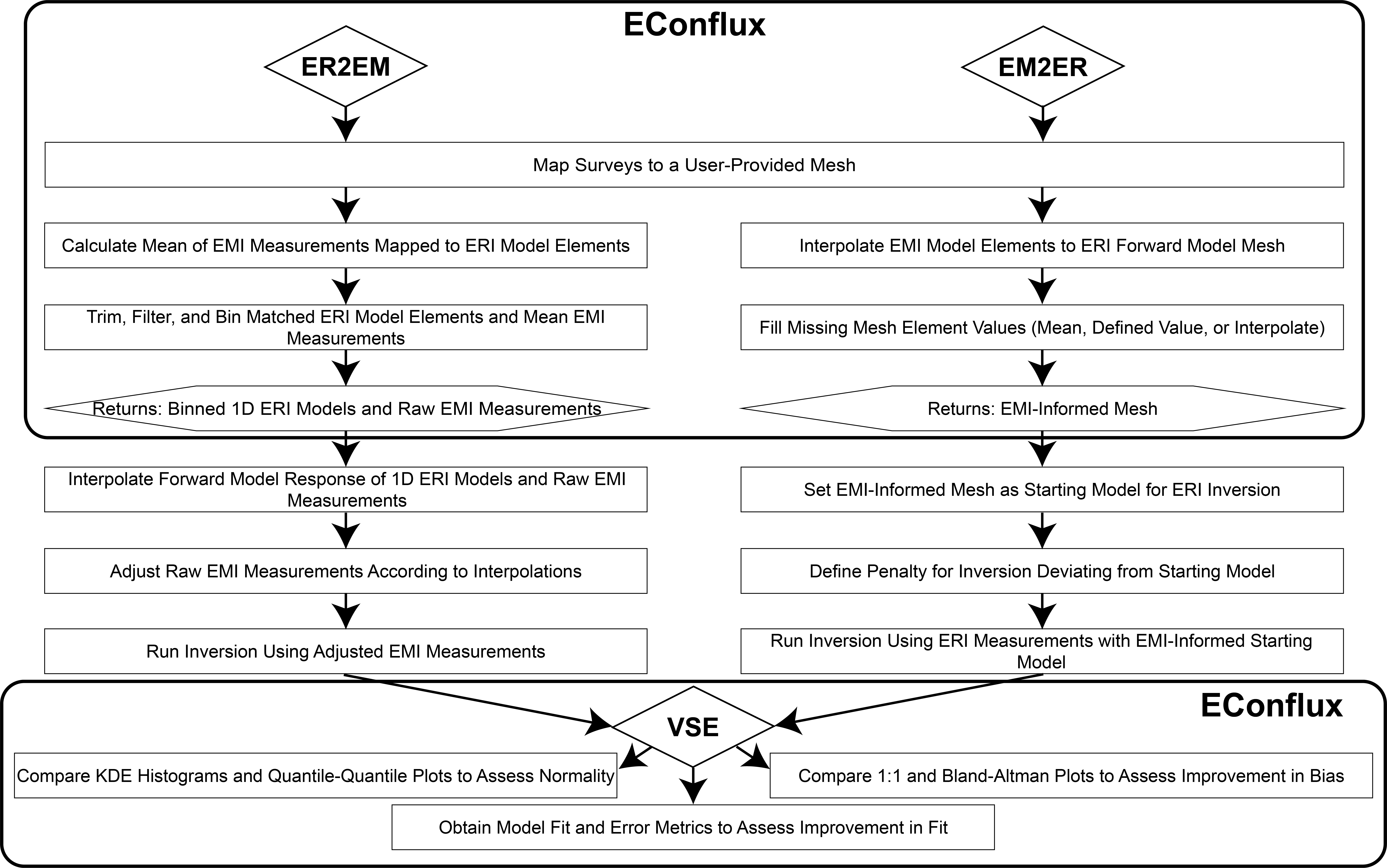
Overview of EConflux Classes and Structure
Project details
Verified details
These details have been verified by PyPIProject links
GitHub Statistics
Maintainers
Release history Release notifications | RSS feed


Download files
Download the file for your platform. If you're not sure which to choose, learn more about installing packages.
Source Distribution
Built Distribution
Filter files by name, interpreter, ABI, and platform.
If you're not sure about the file name format, learn more about wheel file names.
Copy a direct link to the current filters
File details
Details for the file econflux-0.1.2.tar.gz.
File metadata
- Download URL: econflux-0.1.2.tar.gz
- Upload date:
- Size: 15.9 MB
- Tags: Source
- Uploaded using Trusted Publishing? Yes
- Uploaded via: twine/6.1.0 CPython/3.13.7
File hashes
| Algorithm | Hash digest | |
|---|---|---|
| SHA256 |
eace3ec616170aa45e9d87c63c1371765972919fa37de97567a9bbb9f19e4be4
|
|
| MD5 |
3c2d4c2525aeef626902beb0b488d87c
|
|
| BLAKE2b-256 |
2117aea1909c5479f77d61ff44d8a3229a1aaab0052f8dd1f7fa55fd23c1c589
|
Provenance
The following attestation bundles were made for econflux-0.1.2.tar.gz:
Publisher:
publish.yml on c-terra/EConflux
-
Statement:
-
Statement type:
https://in-toto.io/Statement/v1 -
Predicate type:
https://docs.pypi.org/attestations/publish/v1 -
Subject name:
econflux-0.1.2.tar.gz -
Subject digest:
eace3ec616170aa45e9d87c63c1371765972919fa37de97567a9bbb9f19e4be4 - Sigstore transparency entry: 1123259413
- Sigstore integration time:
-
Permalink:
c-terra/EConflux@80c852bb606e9f6670c817180bde240915abc532 -
Branch / Tag:
refs/tags/v0.1.2 - Owner: https://github.com/c-terra
-
Access:
public
-
Token Issuer:
https://token.actions.githubusercontent.com -
Runner Environment:
github-hosted -
Publication workflow:
publish.yml@80c852bb606e9f6670c817180bde240915abc532 -
Trigger Event:
release
-
Statement type:
File details
Details for the file econflux-0.1.2-py3-none-any.whl.
File metadata
- Download URL: econflux-0.1.2-py3-none-any.whl
- Upload date:
- Size: 22.9 kB
- Tags: Python 3
- Uploaded using Trusted Publishing? Yes
- Uploaded via: twine/6.1.0 CPython/3.13.7
File hashes
| Algorithm | Hash digest | |
|---|---|---|
| SHA256 |
acacd509c1bb53a7f4c5f58bb84d80951216565b1ae3b458405839004165c02f
|
|
| MD5 |
b790c049651c0bfda430df84864a172f
|
|
| BLAKE2b-256 |
bb6a8b3575af2df099ff73c0e512fa4127cd011d303ce3bcf410b044c867f671
|
Provenance
The following attestation bundles were made for econflux-0.1.2-py3-none-any.whl:
Publisher:
publish.yml on c-terra/EConflux
-
Statement:
-
Statement type:
https://in-toto.io/Statement/v1 -
Predicate type:
https://docs.pypi.org/attestations/publish/v1 -
Subject name:
econflux-0.1.2-py3-none-any.whl -
Subject digest:
acacd509c1bb53a7f4c5f58bb84d80951216565b1ae3b458405839004165c02f - Sigstore transparency entry: 1123259417
- Sigstore integration time:
-
Permalink:
c-terra/EConflux@80c852bb606e9f6670c817180bde240915abc532 -
Branch / Tag:
refs/tags/v0.1.2 - Owner: https://github.com/c-terra
-
Access:
public
-
Token Issuer:
https://token.actions.githubusercontent.com -
Runner Environment:
github-hosted -
Publication workflow:
publish.yml@80c852bb606e9f6670c817180bde240915abc532 -
Trigger Event:
release
-
Statement type:






