
EconSimulacra: A Digital Twin Platform of Socio-Economic Systems Powered by LLM Agents
Verified details
These details have been verified by PyPIProject links
GitHub Statistics
Maintainers

Project description







EconSimulacra is a simulation platform for studying complex socio-economic systems with large language model (LLM) agents. The framework enables researchers and practitioners to simulate:
- household consumption
- firm pricing strategies
- narrative diffusion through social networks
- spatial mobility of agents
By combining agent-based modeling with LLM reasoning, EconSimulacra allows researchers to study emergent macroeconomic phenomena from micro-level behavioral rules.
Key Features
- 🧠 LLM-driven agents with internal states and reasoning
- 🏙 Spatial grid environments with agent mobility
- 🛒 Market interactions (consumption, pricing)
- 🌐 Social network dynamics (follow, unfollow, narrative diffusion)
- 📊 Structured simulation logs for analysis
- ⚡ Parallel simulation execution
- 🧩 Modular architecture for extensibility
Install
This package is available on pypi as econsimulacra
$ pip install econsimulacra
$ python
>> import econsimulacra
Conceptual Architecture
EconSimulacra consists of the following main components:
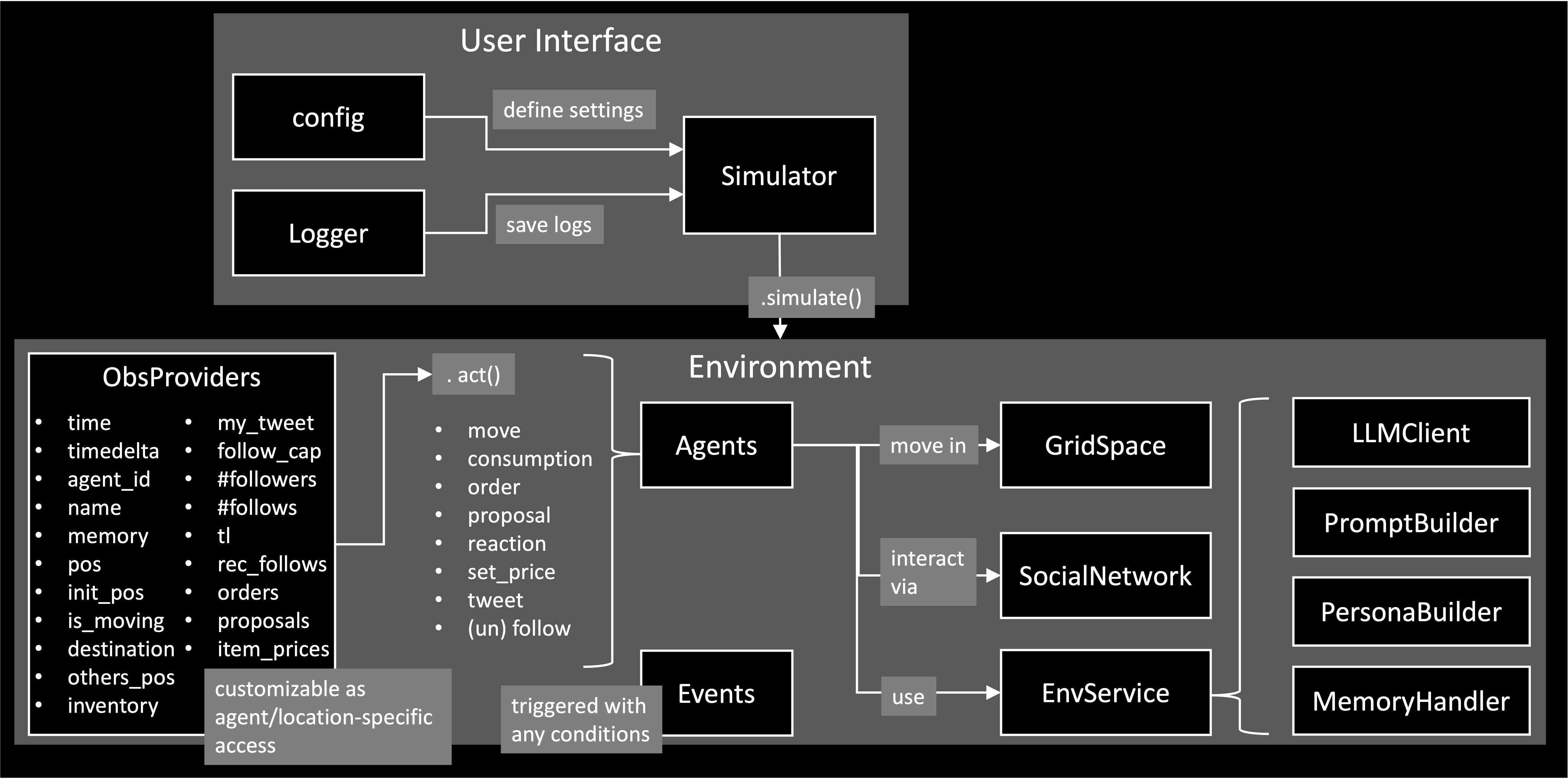
Simulator
The Simulator executes the simulation, manages temporal progression, and supports parallel execution. At each simulation step, the simulator collects actions from all agents based on their observations and applies them to the environment. The core logic of the simulator is conceptually as follows.
num_steps: int
for _ in range(num_steps):
    all_actions_dic = {}
    for agent_id in env.agent_ids:
        agent = self.env.agent_id2agent[agent_id]
        obs = self.env.get_observations(agent_id=agent_id)
        action_dic = agent.act(obs)
        all_actions_dic[agent_id] = action_dic
    self.env.step(all_actions_dic)
In each step:
- The environment provides observations to each agent
env.get_observations(agent_id=agent_id) - Agents decide their actions based on these observations
action_dic = agent.act(obs) - The environment updates the global state according to the agents' actions.
env.step(all_actions_dic)
The Simulator requires config to apply your simulation settings. See examples/openai/config.json for an example.
simulator = Simulator(
    config=config_dic_path,
    env_class=Environment,
    logger=logger,
    summarizer_class=SimulationSummarizer,
)
You can introduce your custom classes in your simulation by specifying "type": "MyClass" in the config and register them to the Simulator. examples/openai/main.py provides an example to introduce the custom event SubsidyEvent.
simulator.register_classes([MyClass1, MyClass2])
Environment
The Environment manages the global state of the simulated world, including the internal states of all agents. It is responsible for:
- providing observations to agents (
.get_observations) - applying agents’ actions and updating the world state (
.step)
The environment includes multiple submodules, such as:
- GridSpace: A spatial environment in which agents reside and move. This allows the simulation of spatial interactions, mobility, and location-dependent behaviors.
- SocialNetwork: A communication layer where agents can exchange messages and interact socially, enabling the study of information diffusion and social influence. The social network also includes a customizable RecommenderSystem that can suggest other agents to follow.
Agent
An Agent represents an autonomous decision-maker in the simulation Agents receive structured observations from the environment and determine their actions (.act).
The information available to each agent, both as observations received from the environment and as information disclosed to other agents, is fully configurable via the agent configuration. For example, requestObs field defines what an agent can perceive from the environment, while provideInfo* fields define what an agent reveals to others.
EconSimulacra provides a built-in LLMAgent implementation that leverages LLMs to generate agent behaviors. To ensure reliable and stable simulations, agent actions are generated as structured outputs using Outlines, which enforces predefined schemas for the generated actions.
The LLM-based agent system is modular and consists of several customizable submodules:
- LLMClient – manages the underlying language model and inference settings
- PersonaBuilder – assigns role-playing personas to agents
- PromptBuilder – constructs prompts used for agent reasoning
- MemoryHandler - stores and provides each agent the sequence of their experience in the past time steps as memory
By customizing these components, users can easily modify LLM configurations and experiment with different prompting strategies, personas, and model backends without changing the core simulation logic.
Event
An EventManager is responsible for managing events and triggering them at appropriate times during the simulation. Events can be scheduled based on:
- specific timestamps, (
at) - time intervals or durations, (
between) - periodic execution (e.g., every k steps), (
every) - or the occurrence of specific logs (e.g., when a transaction is generated). (
with)
You can also adapt probabilistic triggering via probability. By registering custom events, users can introduce exogenous dynamics into the simulation, such as policy interventions or regime shifts, in a flexible and extensible manner.
Basic Usage
OpenAI API
This section explains how to run EconSimulacra using the OpenAI API, based on the example in examples/openai.
1. Set OpenAI API Key
You need to provide your OpenAI API key in one of the following ways:
Option A: Environment Variable (recommended)
$ export OPENAI_API_KEY="your_api_key"
Option B: config.json
{
    "llmClient": {
        "type": "OpenAIClient",
        "modelName": "gpt-4o-mini",
        "apiKey": "your_api_key",
        ...
    },
}
VLLM
This section explains how to run EconSimulacra by using a vLLM-backed OpenAI-compatible server.
1. Create a Separate Virtual Environment
We recommend preparing a dedicated virtual environment for vLLM, and running the vLLM server there as a separate process, since some dependency requirements conflict with EconSimulacra environment.
$ python3.10 -m venv .venv-vllm
$ source .venv-vllm/bin/activate
$ pip install vllm
2. Set VLLM configs
{
    "llmClient": {
        "type": "VLLMClient",
        "modelName": "meta-llama/Meta-Llama-3-8B-Instruct",
        "vllmPython": "path_to_venv_vllm/.venv-vllm/bin/python",
        "useGpu": true,
        "gpuIds": [0, 1],
        "isDataParallel": true,
        "host": "127.0.0.1",
        "port": 8000,
        "timeOut": 60,
        "maxRetries": 3,
        "serverStartTimeout": 300,
        "maxConcurrentGenerations": 32,
        "trustRemoteCode": false,
        "gpuMemoryUtilization": 0.9,
    },
}
2. Configure Simulation
An example configuration is provided at: config.json. This file defines simulation parameters (e.g., number of steps), environment settings (e.g., agents, items, space) and LLM-related services (e.g., llm client, prompt settings). You can modify this file to design your own simulation scenario.
3. Set Log Output Path
To save simulation logs, set the following environment variable:
$ export LOG_TXT_PATH="path/to/output_log.txt"
4. Run Simulation
Move to the example directory and execute:
$ cd examples/openai
$ python main.py
In this script, custom Event class: SubsidyEvent is implemented. The script will 1) load config.json, 2) generate simulator and register the SubsidyEvent to the simulator, 3) reset the environment and run the simulation loop, and 4) output logs to the specified path.
Project details
Verified details
These details have been verified by PyPIProject links
GitHub Statistics
Maintainers
Release history Release notifications | RSS feed


Download files
Download the file for your platform. If you're not sure which to choose, learn more about installing packages.
Source Distribution
Built Distribution
Filter files by name, interpreter, ABI, and platform.
If you're not sure about the file name format, learn more about wheel file names.
Copy a direct link to the current filters
File details
Details for the file econsimulacra-0.7.6.tar.gz.
File metadata
- Download URL: econsimulacra-0.7.6.tar.gz
- Upload date:
- Size: 71.1 kB
- Tags: Source
- Uploaded using Trusted Publishing? Yes
- Uploaded via: twine/6.1.0 CPython/3.13.12
File hashes
| Algorithm | Hash digest | |
|---|---|---|
| SHA256 |
03de9a2df29e5c1ab189e9b1bab4442e7c66d90e167f0b7bfac41c5e36245a92
|
|
| MD5 |
2ffe1f5c83df6cf55f5921813bbde7f1
|
|
| BLAKE2b-256 |
654f7a9d638406481a3ca131d0f9d60f95e94e72dbc7919ccb49d1b323c0fb2a
|
Provenance
The following attestation bundles were made for econsimulacra-0.7.6.tar.gz:
Publisher:
release.yml on SimulacraBusiness/econsimulacra
-
Statement:
-
Statement type:
https://in-toto.io/Statement/v1 -
Predicate type:
https://docs.pypi.org/attestations/publish/v1 -
Subject name:
econsimulacra-0.7.6.tar.gz -
Subject digest:
03de9a2df29e5c1ab189e9b1bab4442e7c66d90e167f0b7bfac41c5e36245a92 - Sigstore transparency entry: 1323268574
- Sigstore integration time:
-
Permalink:
SimulacraBusiness/econsimulacra@ebd5b872997a58170a0565ab8bb59d819ae3dec6 -
Branch / Tag:
refs/tags/v0.7.6 - Owner: https://github.com/SimulacraBusiness
-
Access:
public
-
Token Issuer:
https://token.actions.githubusercontent.com -
Runner Environment:
github-hosted -
Publication workflow:
release.yml@ebd5b872997a58170a0565ab8bb59d819ae3dec6 -
Trigger Event:
push
-
Statement type:
File details
Details for the file econsimulacra-0.7.6-py3-none-any.whl.
File metadata
- Download URL: econsimulacra-0.7.6-py3-none-any.whl
- Upload date:
- Size: 84.1 kB
- Tags: Python 3
- Uploaded using Trusted Publishing? Yes
- Uploaded via: twine/6.1.0 CPython/3.13.12
File hashes
| Algorithm | Hash digest | |
|---|---|---|
| SHA256 |
cacf51c8aa520d11ff59c6ae83f65a224b36a3ae2026cff86dcce8f118642c64
|
|
| MD5 |
2dc0eaadbed641d87e39f3cdb177ca8b
|
|
| BLAKE2b-256 |
b2ee1731210420b01ef2c768143bcb441ab9cd7f8e665832f5e2591bc768f840
|
Provenance
The following attestation bundles were made for econsimulacra-0.7.6-py3-none-any.whl:
Publisher:
release.yml on SimulacraBusiness/econsimulacra
-
Statement:
-
Statement type:
https://in-toto.io/Statement/v1 -
Predicate type:
https://docs.pypi.org/attestations/publish/v1 -
Subject name:
econsimulacra-0.7.6-py3-none-any.whl -
Subject digest:
cacf51c8aa520d11ff59c6ae83f65a224b36a3ae2026cff86dcce8f118642c64 - Sigstore transparency entry: 1323268697
- Sigstore integration time:
-
Permalink:
SimulacraBusiness/econsimulacra@ebd5b872997a58170a0565ab8bb59d819ae3dec6 -
Branch / Tag:
refs/tags/v0.7.6 - Owner: https://github.com/SimulacraBusiness
-
Access:
public
-
Token Issuer:
https://token.actions.githubusercontent.com -
Runner Environment:
github-hosted -
Publication workflow:
release.yml@ebd5b872997a58170a0565ab8bb59d819ae3dec6 -
Trigger Event:
push
-
Statement type:






