
ECS MCP Server
Version
v0.1.0
Overview
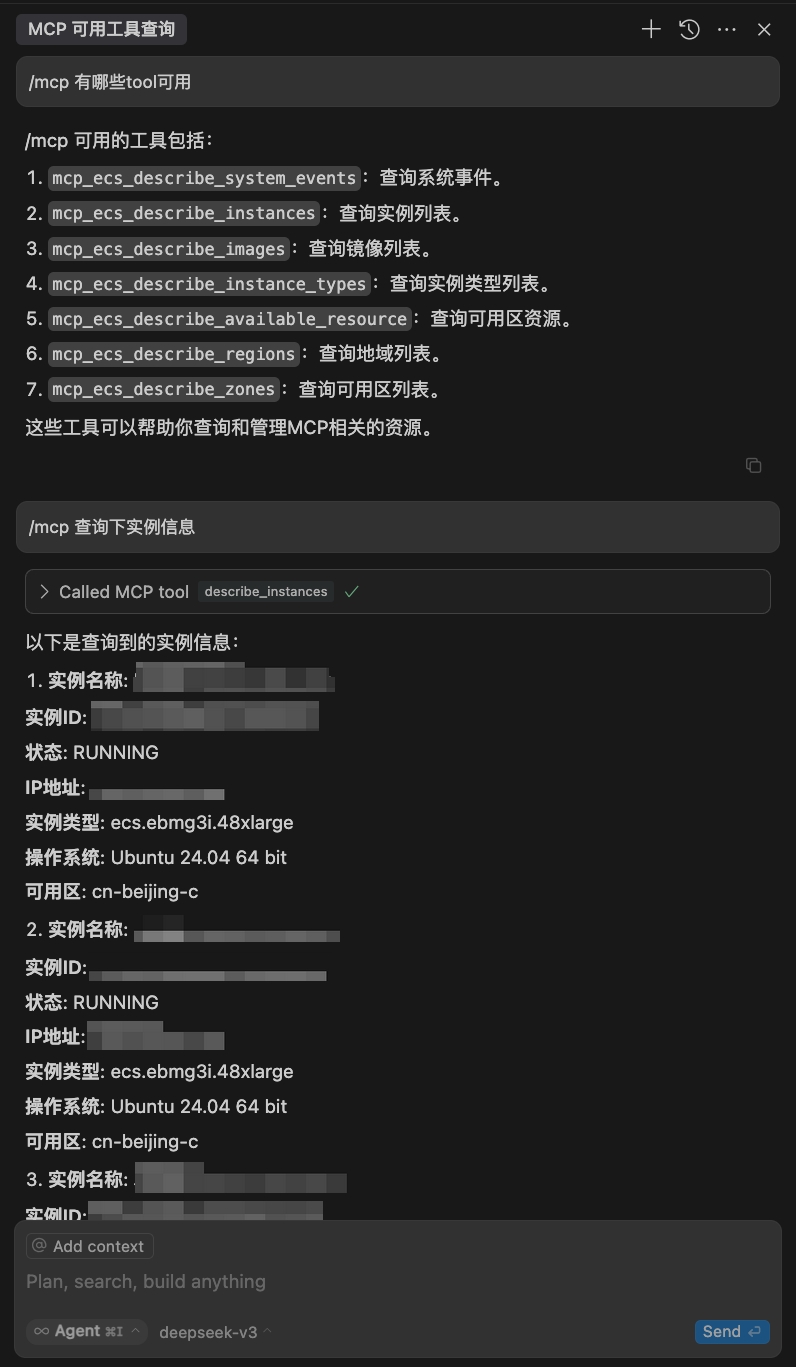
ECS MCP Server is a Model Context Protocol server that provides MCP clients (such as Claude Desktop) with the ability to interact with the Volcengine ECS service. It enables full-chain management of cloud instance resources based on natural language, supporting query operations for instances, images, regions, availability zones, available resources, and system events, thereby achieving efficient management of ECS resources.
Category
ECS
Features
- Query instance information
- Query event information
- Query region information
Available Tools
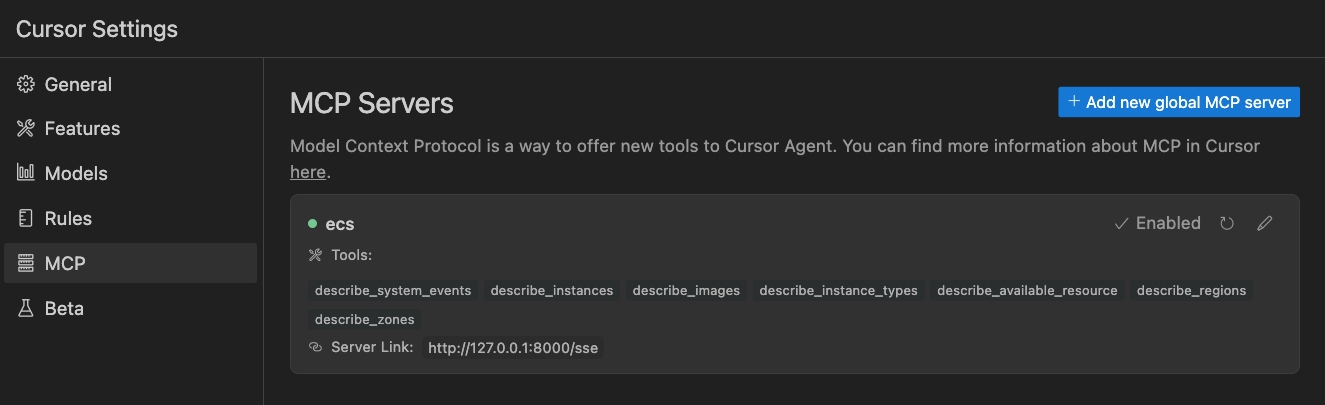
describe_instances: query instance listdescribe_images: query image listdescribe_instance_types: query instance type listdescribe_available_resource: query available resourcesdescribe_system_events: query system eventsdescribe_regions: query region listdescribe_zones: query availability zone list
Usage Guide
Prerequisites
- Python 3.12+
- UV
Linux/macOS:
curl -LsSf https://astral.sh/uv/install.sh | sh
Windows:
powershell -ExecutionPolicy ByPass -c "irm https://astral.sh/uv/install.ps1 | iex"
Installation
Clone the repository:
git clone git@github.com:volcengine/mcp-server.git
Usage
Start the server:
UV
cd mcp-server/server/mcp_server_ecs
uv run mcp-server-ecs

# Start with sse mode (default is stdio)
uv run mcp-server-ecs -t sse
Use a client to interact with the server:
Claude Desktop | Cline | Cursor | Trae | ...
Configuration
The main configuration file for the MCP server is located at:
src/mcp_server_ecs/conf/settings.toml
src/mcp_server_ecs/conf/.secrets.toml
This configuration file contains key settings for the server, such as logging and Volcengine account AK|SK configuration.
Environment Variables
The following environment variables are available for configuring the MCP server:
| Environment Variable | Description | Default Value |
|---|---|---|
FASTMCP_PORT |
MCP server listening port | 8000 |
VOLC_ACCESSKEY |
Volcengine account ACCESSKEY | - |
VOLC_SECRETKEY |
Volcengine account SECRETKEY | - |
VOLC_REGION |
Volcengine resource region | - |
VOLC_ENDPOINT |
Volcengine endpoint | - |
For example, set these environment variables before starting the server:
export FASTMCP_PORT=8000
export VOLC_ACCESSKEY={ak}
export VOLC_SECRETKEY={sk}
export VOLC_REGION={region}
export VOLC_ENDPOINT={endpoint}
Run with uvx
{
    "mcpServers": {
        "mcp-server-ecs": {
            "command": "uvx",
            "args": [
            "--from",
            "git+https://github.com/volcengine/mcp-server#subdirectory=server/mcp_server_ecs",
            "mcp-server-ecs"
          ],
            "env": {
                "VOLC_ACCESSKEY": "",
                "VOLC_SECRETKEY": "",
                "VOLC_ENDPOINT": "",
                "VOLC_REGION": "",
                "FASTMCP_PORT": ""
            }
        }
    }
}
Examples
Cursor
License
volcengine/mcp-server is licensed under the MIT License.
1 maintainer

Metadata
1 maintainer
Release files for ecs-mcp-server 0.1.0
For a detailed explanation of source distributions (sdists) and built distributions (wheels), please see the package formats documentation.
Source distribution (sdist)
| File | Size | Uploaded | |
|---|---|---|---|
| ecs_mcp_server-0.1.0.tar.gz | 11.9 kB | Details |
Built distribution (wheel)
| File | Interpreter | ABI | Platform | Reset |
|---|---|---|---|---|
| ecs_mcp_server-0.1.0-py3-none-any.whl | Python 3 | none | any | Details |
Total release size: 27.8 kB
Release files / ecs_mcp_server-0.1.0.tar.gz
| Download URL | ecs_mcp_server-0.1.0.tar.gz |
|---|---|
| Size | 11.9 kB |
| Tags | Source |
|
SHA-256 checksum How to use checksums |
7081ae6ad07fe8d6fa9da592bbff0feab278f29f87fae9af45cd3595c94d7fda
|
|
BLAKE2b-256 checksum How to use checksums |
619f684e26b316422f9f06709724c422575a17ba5c4983b7aac30b2d09e859bc
|
| Upload date | |
|
Uploaded using Trusted Publishing? What is trusted publishing? |
No |
| Uploaded via |
uv/0.6.9
|
Release files / ecs_mcp_server-0.1.0-py3-none-any.whl
| Download URL | ecs_mcp_server-0.1.0-py3-none-any.whl |
|---|---|
| Size | 15.9 kB |
| Tags | Python 3 |
|
SHA-256 checksum How to use checksums |
e4c8a61ab6a66878596a7af34c9e485593309b2e2ad39a3eceb1e7170d040430
|
|
BLAKE2b-256 checksum How to use checksums |
86033096283a18e986263f3bb8da4a130dcf224db7d296032a568949983d1fca
|
| Upload date | |
|
Uploaded using Trusted Publishing? What is trusted publishing? |
No |
| Uploaded via |
uv/0.6.9
|













