
ecsodus









Safely migrate AWS Copilot CLI apps to Terraform-managed ECS.
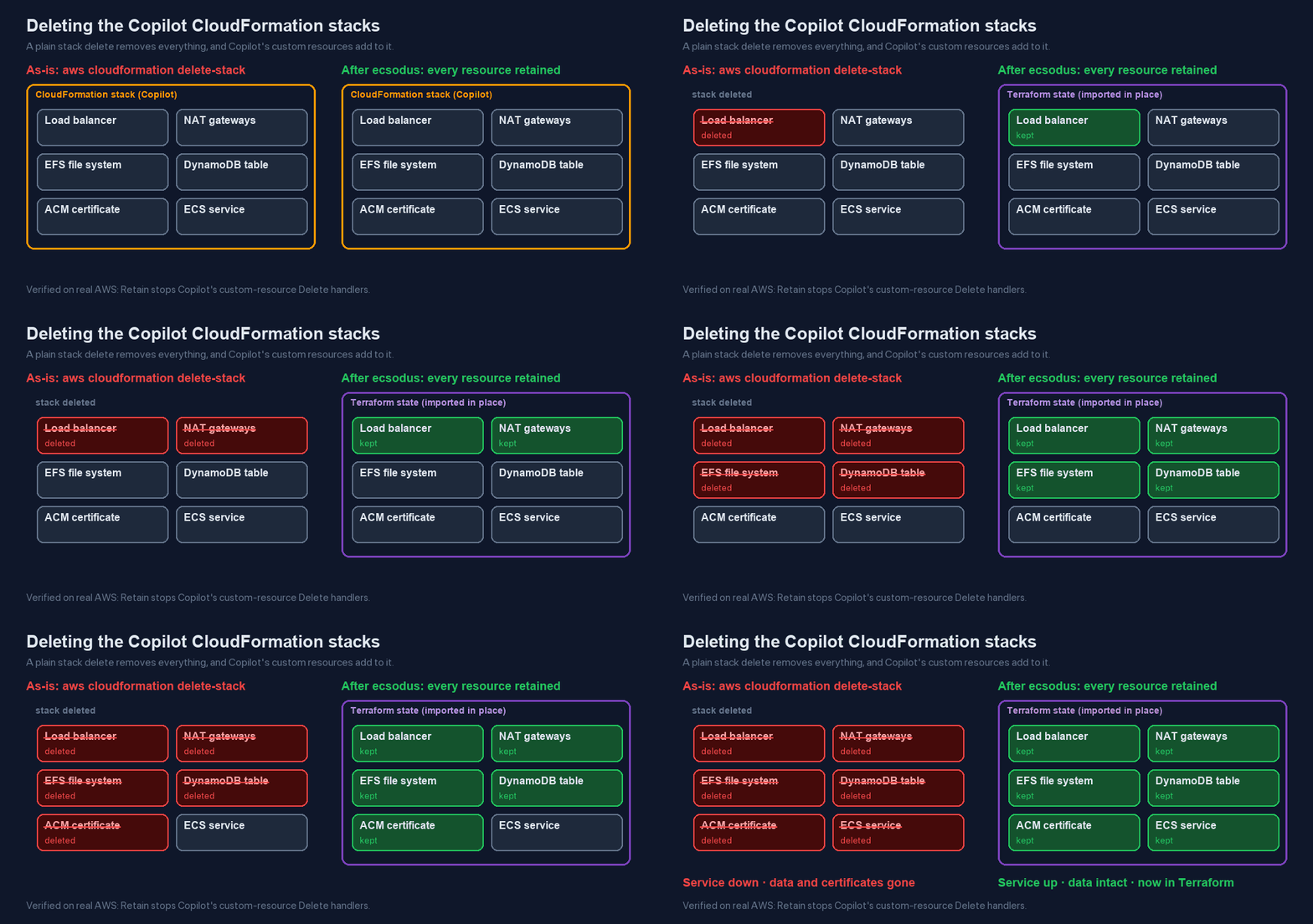
AWS ended support for the Copilot CLI on 2026-06-12 and archived its repository on 2026-06-22. Your Copilot services keep running as CloudFormation stacks. Moving them to Terraform means deleting those stacks without deleting what they manage, and done naively that destroys production:
- Custom-resource Delete handlers. When a stack is deleted, Copilot's Lambda-backed custom resources delete ACM certificates, DNS alias and validation records, and the NS delegation, and they empty the ELB access-logs bucket.
- The env-controller. Deleting the last service stack makes the env-controller remove the shared ALB, the NAT gateways and the EFS file system from the environment stack.
- Unprotected addons. Addon databases (Aurora, DynamoDB) live in nested stacks with no
DeletionPolicy. --retain-resourcesdoesn't help. The obvious flag only works on stacks already inDELETE_FAILED.
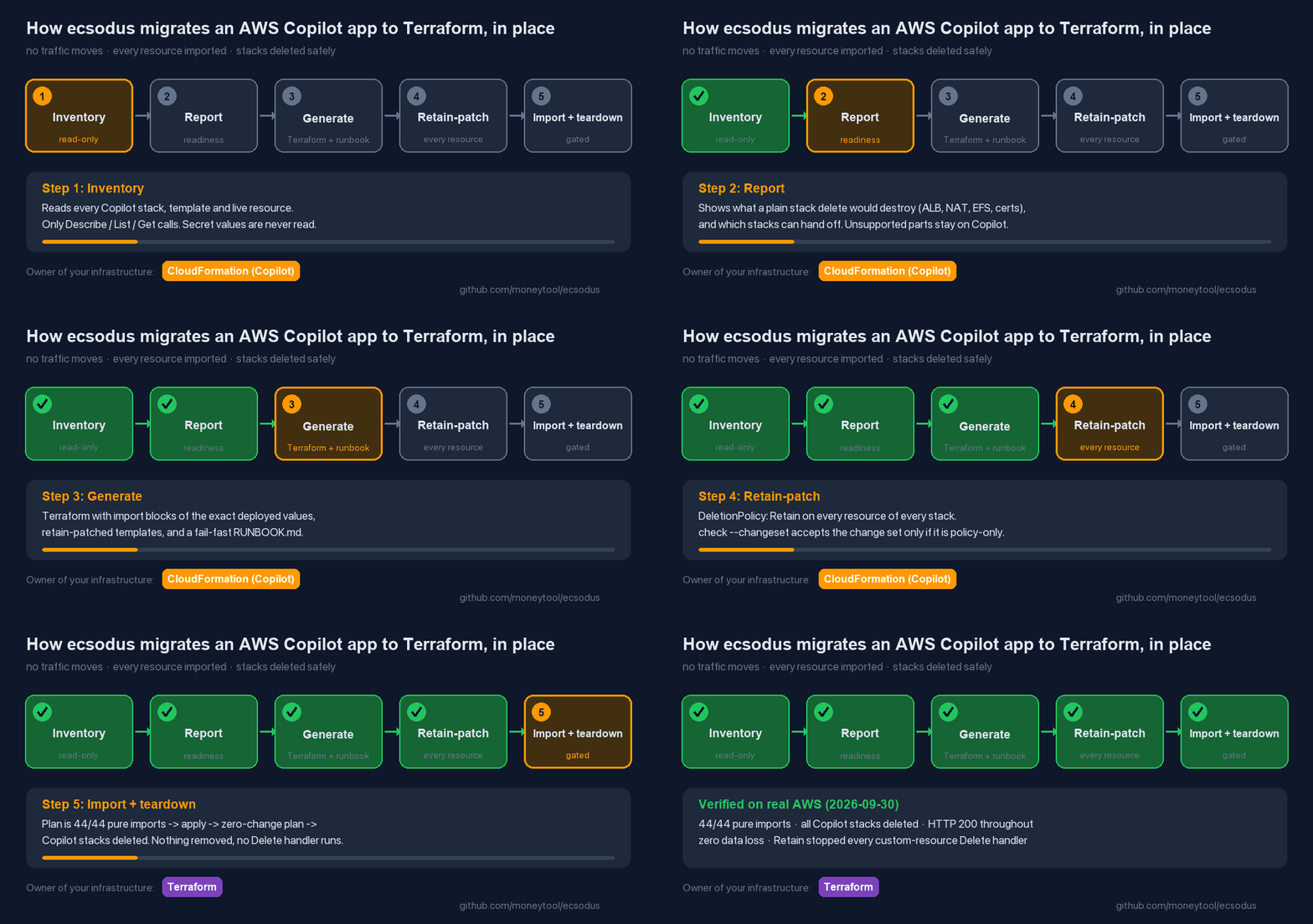
ecsodus knows where these traps are. It reads your Copilot app and adopts it in place: Terraform imports the resources exactly as they run today, and no traffic moves. It writes retain patches so that no stack delete can remove anything, and a step-by-step runbook with a machine check before every mutating step.
Status: v0.1.0, alpha. It is tested offline against real Copilot-generated templates, and it passed a real AWS end-to-end run on 2026-09-30, including teardown (report). Read the verified scope before running it against production.
Install
pipx install ecsodus # or run it without installing: uvx ecsodus --help
What it does
ecsodus inventory --app myapp -o inventory.json    # read-only: stacks, templates, live state
ecsodus report    inventory.json                   # REPORT.md: readiness, fates, blockers
ecsodus generate  inventory.json --out infra/      # Terraform + retain patches + RUNBOOK.md
ecsodus check     plan.json --manifest infra/ecsodus-manifest.json --phase import
ecsodus verify-retain --app myapp                  # read-only: is every resource Retain?
- Read-only by construction. Every AWS client refuses any operation that isn't
Describe/List/Get/Lookup, and secret values are never read. ecsodus never applies Terraform, deletes anything or moves traffic. You run the runbook. - Exact imports. Imported resources become flat
aws_*blocks built from literal deployed values, so the first plan is import-only.check --phase importrejects any update, create, delete or replacement. - Retain everything first. Every resource in every handed-off stack gets
DeletionPolicy: RetainandUpdateReplacePolicy: Retain. The patch edits the deployed template line by line, so every other byte stays identical. It is applied through change sets, andcheck --changesetaccepts only change sets that change policies and nothing else. - Never split a stack. A stack is either handed off completely or kept on Copilot completely. If anything is unsupported, the stack and everything it depends on stay on Copilot, and the report says why. Nothing is ever dropped silently.
- Honest baseline. Every report starts with the zero-risk option: keep the CloudFormation.

Safety gates
Every mutating step in the runbook runs only after an ecsodus check passes. An import that
would also change a resource fails, and so does a retain-patch change set that touches anything
except deletion policies:

How it compares
| Approach | Moves traffic? | Keeps your data? | Ends on Terraform? | Handles Copilot's Delete handlers? |
|---|---|---|---|---|
| ecsodus (adopt in place) | No | Yes, every resource is retained, then imported | Yes | Yes: retain patches, verified on AWS |
| Rebuild on ECS Express Mode or CDK (AWS's suggestion) | Yes, a cutover | You migrate stateful resources yourself | No (Express Mode / CDK) | Not applicable until you delete the old stacks |
| Convert templates with cf2tf | Depends | Only if you import and retain by hand | Yes | No |
| Keep the CloudFormation | No | Yes | No | Not triggered |
If you don't need Terraform, keeping the CloudFormation is the zero-risk choice, and every ecsodus report says so first.
Scope (v0.1)
Supported:
- Load Balanced Web Services and Backend Services
- their environment (created or imported VPC)
- workload and environment addons: Aurora/RDS, DynamoDB, S3
- aliases and custom domains
- the app stack and StackSet
Detected and reported as blocked: Worker Services, Scheduled Jobs, Request-Driven Web Services, Static Sites, NLB, CloudFront, sidecars, Service Connect, pipelines and multi-account environments.
Planned:
- v0.2: App Runner, with a rebuild-in-parallel mode
- v0.3: more workload types
Documentation
Docs site: https://moneytool.github.io/ecsodus/ — includes AWS Copilot CLI end of support: what to do, how to migrate AWS Copilot to Terraform and the FAQ.
- Project status: what is done and what is pending
- AWS end-to-end report: the real run (passed)
- Worked example: REPORT.md and RUNBOOK.md for a real Copilot app
- Quickstart
- How it works: fates, hand-off, retain patches and the checks
- Copilot custom resources and what their Delete handlers do
- Copilot stack layering
- The approved plan, the council reviews behind it, and the decision records
Development
uv sync
uv run pytest            # offline: fixtures, moto, and terraform validate if terraform is installed
uv run ruff check . && uv run mypy src
See CONTRIBUTING.md and SECURITY.md.
Citation
If you use ecsodus, please cite it: doi:10.5281/zenodo.23073590
(all versions), or see CITATION.cff. GitHub's "Cite this
repository" button reads it.
License
Apache-2.0. Test fixtures under tests/fixtures/copilot/ are copied verbatim from
aws/copilot-cli (Apache-2.0); see SOURCE.md there.
1 maintainer

Metadata
1 maintainer
Release files for ecsodus 0.1.2
For a detailed explanation of source distributions (sdists) and built distributions (wheels), please see the package formats documentation.
Source distribution (sdist)
| File | Size | Uploaded | |
|---|---|---|---|
| ecsodus-0.1.2.tar.gz | 105.8 kB | Details |
Built distribution (wheel)
| File | Interpreter | ABI | Platform | Reset |
|---|---|---|---|---|
| ecsodus-0.1.2-py3-none-any.whl | Python 3 | none | any | Details |
Total release size: 226.4 kB
Release files / ecsodus-0.1.2.tar.gz
| Download URL | ecsodus-0.1.2.tar.gz |
|---|---|
| Size | 105.8 kB |
| Tags | Source |
|
SHA-256 checksum How to use checksums |
bbc3906279c41348b26af09dd6f380e9999765769cfe7bc3f1282f66697e4268
|
|
BLAKE2b-256 checksum How to use checksums |
8e4436adbb4ea1fe14dac11d769b3dc30156355ce561520fed5db8c130a6fb21
|
| Upload date | |
|
Uploaded using Trusted Publishing? What is trusted publishing? |
Yes |
| Uploaded via |
uv/0.12.21 {"installer":{"name":"uv","version":"0.12.21","subcommand":["publish"]},"python":null,"implementation":{"name":null,"version":null},"distro":{"name":"Ubuntu","version":"24.04","id":"noble","libc":null},"system":{"name":null,"release":null},"cpu":null,"openssl_version":null,"setuptools_version":null,"rustc_version":null,"ci":true}
|
Release files / ecsodus-0.1.2-py3-none-any.whl
| Download URL | ecsodus-0.1.2-py3-none-any.whl |
|---|---|
| Size | 120.7 kB |
| Tags | Python 3 |
|
SHA-256 checksum How to use checksums |
8d89ee1e91087ecd832f04997fec4d8b0d2ce46e48a0430927a9ef9949cdfd92
|
|
BLAKE2b-256 checksum How to use checksums |
d1c6e51973f0fdbfcd9981f5ae25bd17328a833ed8fee3b8e98e36a2f5d52b3f
|
| Upload date | |
|
Uploaded using Trusted Publishing? What is trusted publishing? |
Yes |
| Uploaded via |
uv/0.12.21 {"installer":{"name":"uv","version":"0.12.21","subcommand":["publish"]},"python":null,"implementation":{"name":null,"version":null},"distro":{"name":"Ubuntu","version":"24.04","id":"noble","libc":null},"system":{"name":null,"release":null},"cpu":null,"openssl_version":null,"setuptools_version":null,"rustc_version":null,"ci":true}
|














