Edge AI Model Development Toolkit

Project description
Edge AI Model Development Toolkit User Manual
Introduction
The Edge-MDT (Model Development Toolkit) package installs all of the packages that are necessary to quantise, compress, and convert a model so that it can run on your IMX500 device.
Edge-MDT contains the following packages:
-
MCT (Model Compression Toolkit) – An open-source python package for quantizing and compressing a neural network model, so that the model can be converted to run efficiently on the hardware device, while maintaining the accuracy of the model as closely as possible to the original floating-point model.
-
IMX500 Converter – A CLI application that converts (compiles) the neural network model that is the output of MCT (.onnx or .keras formats) into a binary file that can be loaded onto the IMX500 device, and executed in real time.
-
TPC (Target Platform Capabilities) – An open-source package that contains descriptions for the various attributes (capabilities) of the target device’s hardware and software. MCT uses the relevant device description during the optimization process, so that the output model will be the best fit for the specific target device.
Edge-MDT offers a streamlined installation process through its single installer package. With just one command, you’ll get all necessary components installed, and Edge-MDT automatically manages version compatibility between packages. While the packages work together seamlessly, you still operate each component independently.
We strongly recommend using Edge-MDT for standard installations. The alternative approach of installing components separately puts the burden of version management on you and often requires more complex manual setup. This individual installation method can lead to compatibility issues and doesn’t guarantee a smooth working environment.
How to use Edge-MDT
Typical use of Edge-MDT:
-
Take an off-the-shelf or custom, pre-trained floating point model, in the framework environment (TensorFlow or PyTorch)
-
Use MCT to quantize and compress the floating point model, and export it
-
Use Converter to convert the output of MCT to a binary image that can be packaged and loaded onto the device
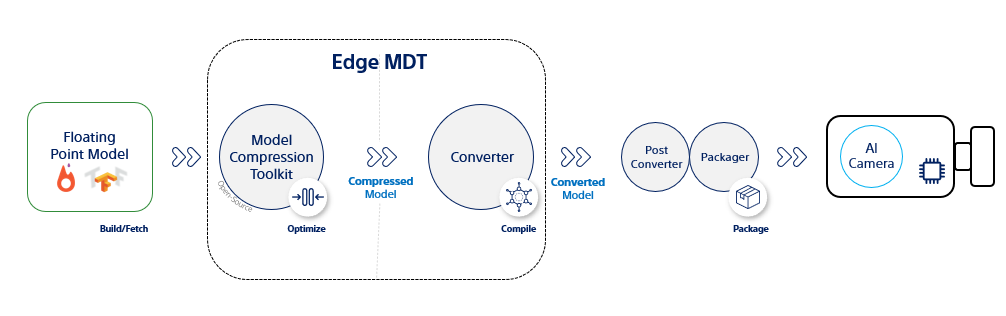
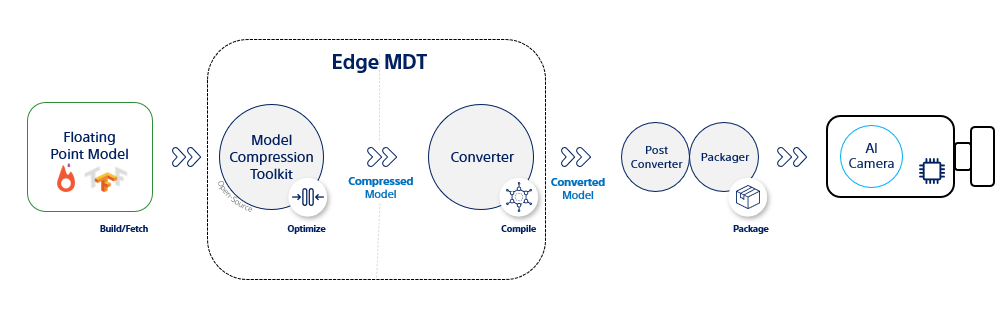
The figure Model development flow shows the entire development and deployment flow, and where MCT and the Converter fit in as part of the entire flow. After using Converter, you should use the output from Converter as input to the Packager. The Packager packs the converted model with additional information for deployment on the target device.
For further information about MCT and Converter, please refer to the relevant user manuals.
[!NOTE] The Packager component is not a part of Edge-MDT, and is out of scope of this manual.
Install with parameters
The Edge-MDT package takes a parameter to select between installing the PyTorch or TensorFlow version of it.
If you are using PyTorch:
$ pip install edge-mdt[pt]
if you are using TensorFlow:
$ pip install edge-mdt[tf]
Advanced installation cases
There may be a few scenarios in which you might want to perform a special installation.
For example, if you need to install both PyTorch and TensorFlow versions on the same machine, or if you need to install a specific combination of Edge-MDT packages that is different from the combination included in the Edge-MDT package.
In these cases, we strongly recommend doing special installations in
separate Python virtual environments (for example, using
python -m venv <virtual-environment-name>). This avoids problems with
conflicts between packages or versions.
Operating environment
System requirements
The system running the neural network converter should at least meet the
requirements:
Linux PC (recommended)
-
RAM: 4 GB
-
Python: 3.11
-
JVM 17
-
OS: Tested and verified with Ubuntu 22.04.
Raspberry Pi
-
Raspberry Pi 4+
-
RAM: 4 GB
-
Python: 3.11
-
JVM 17
Supported frameworks
| Framework | Tested FW versions | Tested Python versions | Serialization | Opset |
|---|---|---|---|---|
| PyTorch | 2.3-2.6 | 3.10-3.12 | .onnx | 15-20 |
| TensorFlow | 2.14-2.15 | 3.10-3.11 | .keras |
Framework extensions
Edge-MDT makes use of several framework extensions. The extensions are installed as dependent libraries for the MCT and Converter packages:
-
MCTQ – An open-source python library of quantization layers and classes that is used by MCT to add quantization to a network. You do not need to directly make use of this library.
-
Custom layers – An open-source python library containing several post processing layers. If some of the layers in an existing model cannot be converted, you can replace these specific layers in your model with one of the available custom layers from this library. This can allow the model to be converted for the hardware device.


Download files
Download the file for your platform. If you're not sure which to choose, learn more about installing packages.
Source Distributions
Built Distribution
Filter files by name, interpreter, ABI, and platform.
If you're not sure about the file name format, learn more about wheel file names.
Copy a direct link to the current filters
File details
Details for the file edge_mdt-1.3.0-py3-none-any.whl.
File metadata
- Download URL: edge_mdt-1.3.0-py3-none-any.whl
- Upload date:
- Size: 8.2 kB
- Tags: Python 3
- Uploaded using Trusted Publishing? No
- Uploaded via: twine/6.2.0 CPython/3.11.15
File hashes
| Algorithm | Hash digest | |
|---|---|---|
| SHA256 |
1d1874f94c1f17795841ee745afd9e9719ef48591d52c375d6a434ef7f548333
|
|
| MD5 |
25421c6915543f04adee4642993a4cf1
|
|
| BLAKE2b-256 |
22da10140723171d29c98da9fcfdf23b57f0dc30072802677062f8bf6897312d
|