
Resilient telemetry & edge-sync SDK for the Raspberry Pi — buffer sensor data locally and sync it reliably across network dropouts, in order, with no duplicates.

Project description
Telemetry & Edge-Sync SDK
A resilient telemetry & edge-sync SDK for the Raspberry Pi — buffer sensor data locally, sync it reliably across network dropouts, in correct time order, with no duplicates. Works with any sensors; ships with a solar-race-car integration as a real, proven example.
Description
Lots of Raspberry Pi projects stream sensor data over a flaky link — a field weather station, a robot, an environmental or industrial monitor, or a solar race car threading through tunnels and dead zones. A naive "push to the cloud" loses every sample sent during an outage.
This SDK is the fix. On the device it buffers telemetry to a local SQLite queue
first, batches it, and syncs it to a REST server — surviving network dropouts and
reboots. A web portal visualizes it live. Your code integrates in three lines
(init / track / force_flush); whoever watches the dashboard writes zero.
The pipeline is sensor-agnostic — it only moves metric / value / timestamp. Two
ready integrations show the range: a hardware-free Raspberry Pi system-metrics one
that runs on any Pi out of the box, and the flagship solar race car (BMS / motor /
battery-temp decoded from CAN).
The one guarantee: no data is lost when the device loses signal, and it arrives in correct chronological order, with no duplicates.
Install
pip install edge-sync-sdk
from edge_sync import init, track, force_flush

init("https://your-server.example.com", api_key="<key>", device_id="pi-01")
track("cpu_temp_C", 54.2)      # any metric — non-blocking, persisted to disk
force_flush()                  # drain the queue before exit
Requires Python 3.9+. The only dependency is httpx.
(To run the server + dashboard locally, clone the repo and pip install -r requirements.txt — see Quick start.)
Features
- Durable offline queue — every reading is written to on-device SQLite before any send, so dropouts and reboots lose nothing.
- Smart batching — many samples per request (by count or time): fewer round-trips, less radio/battery cost.
- Auto-sync recovery — backlog drains oldest-first the moment the link returns.
- Ordered, idempotent ingestion — points carry a client-assigned id; the server upserts on it, so retries never duplicate. Stored by device time, not arrival time.
- Network-aware sync policy — batch size & frequency adapt to link type and battery.
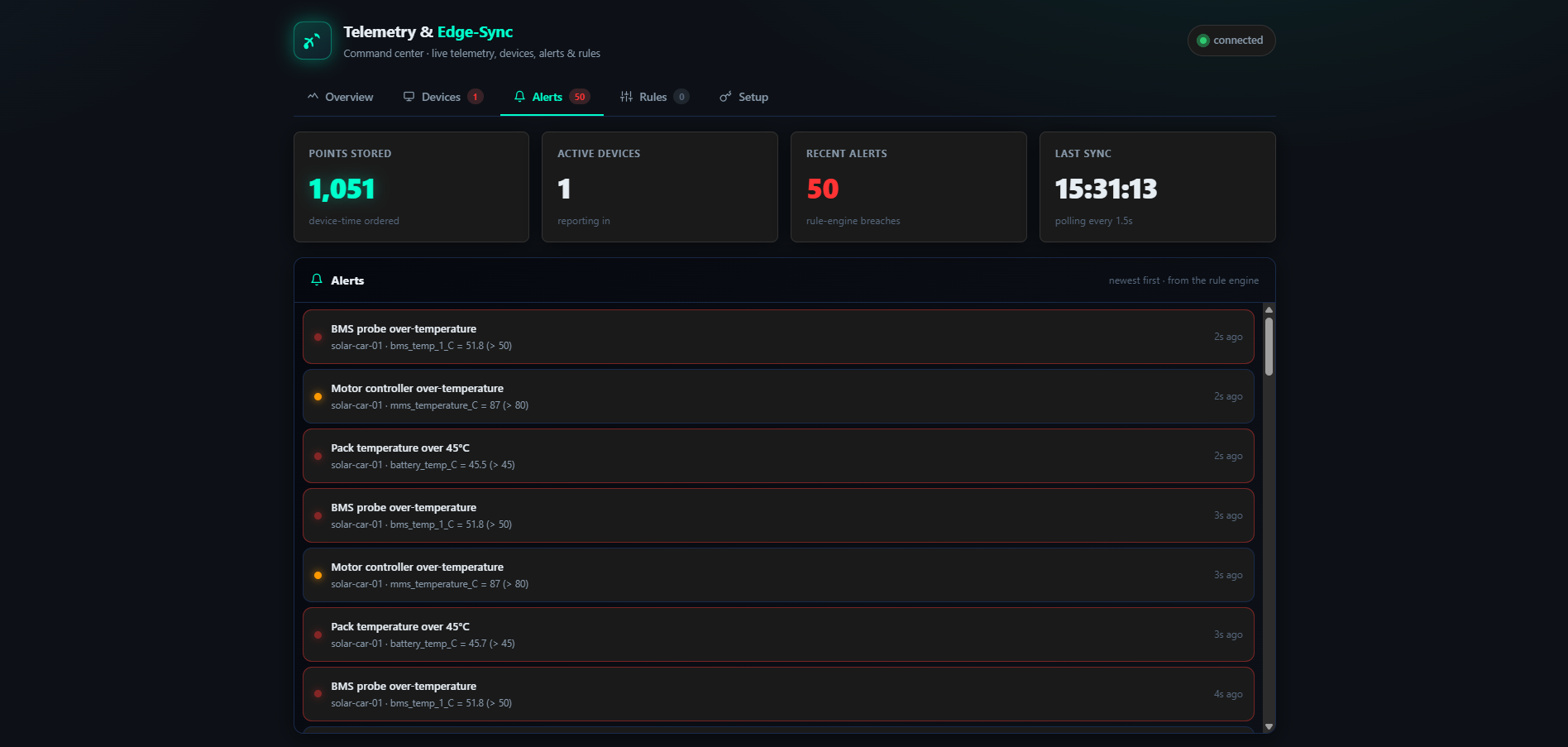
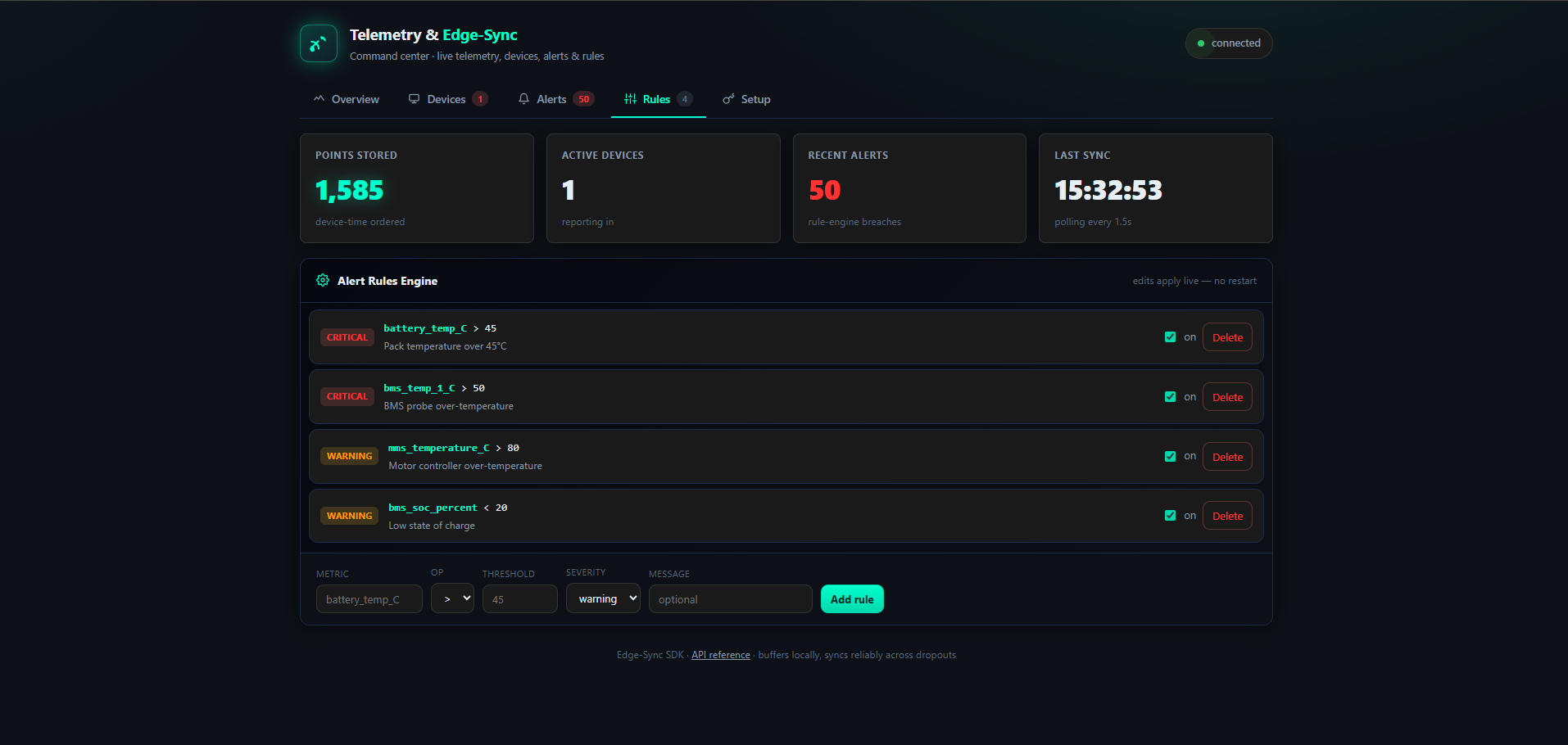
- Server-side alert rule engine — threshold rules over your signals, editable live from the portal.
- API keys — generate/revoke keys from the dashboard; the SDK can
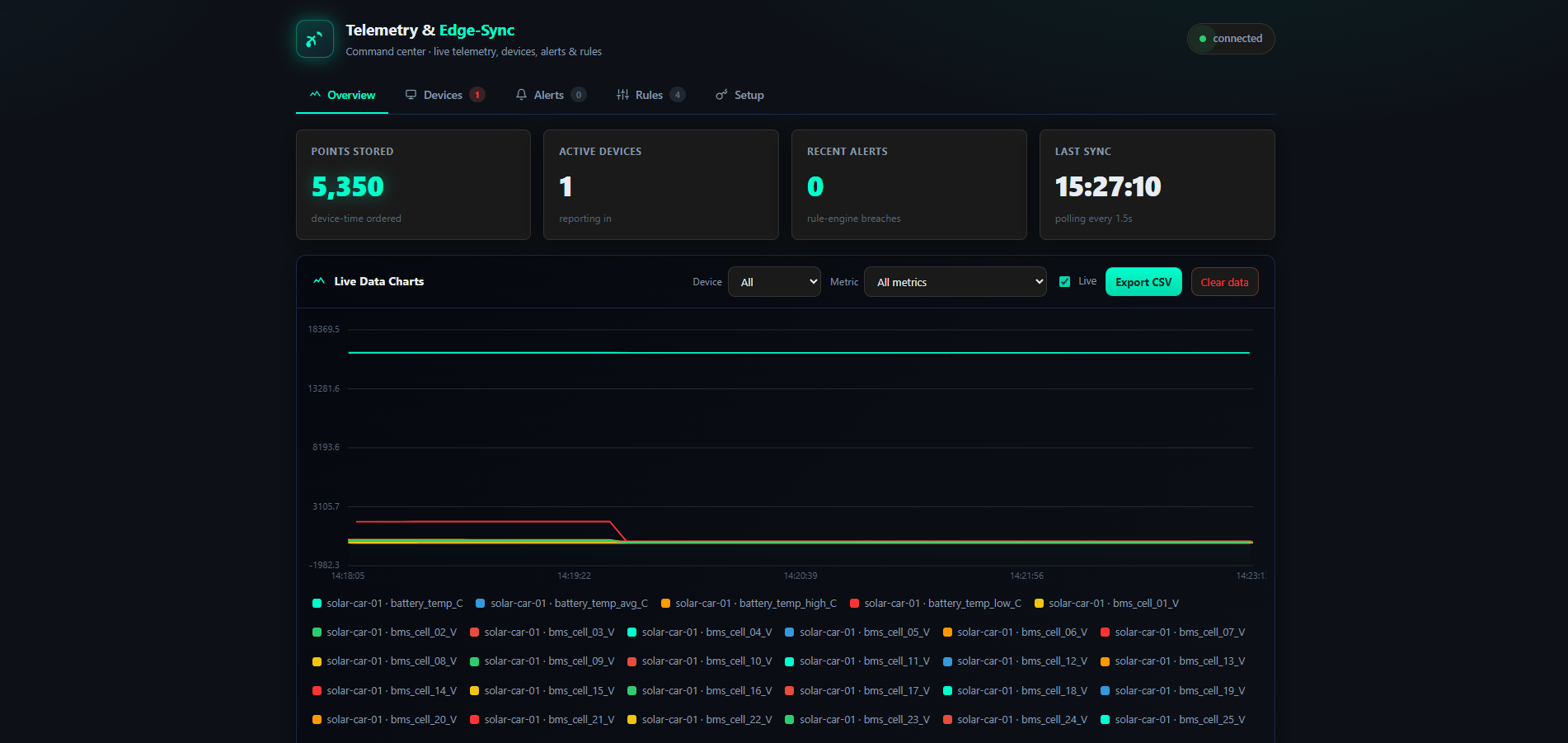
auto_init()from config or environment. - Pit-wall portal — live charts, device health, alerts, rules editor, device setup.
- Your own backend — plain REST to your own server, no vendor lock-in and no cloud credentials on the car.
Screenshots
Overview — live charts
Alerts
Rules editor
Video
Data model (JSON)
A telemetry point the SDK produces:
{ "id": "solar-car-01-000042-1718900000123", "metric": "battery_temp_C", "value": 46.2, "ts": 1718900000123 }
id = device-sequence-timestamp (client-assigned → enables idempotent ingestion).
ts is the device timestamp in epoch ms (the source of truth for ordering).
A batch the SDK POSTs (static metadata once, dynamic points many):
{
  "device_id": "solar-car-01",
  "metadata": { "fw": "RaceOS-2.0", "type": "solar-car", "network": "lte" },
  "points": [
    { "id": "solar-car-01-000001-1718900000100", "metric": "bms_voltage_V",   "value": 108.4, "ts": 1718900000100 },
    { "id": "solar-car-01-000002-1718900000101", "metric": "bms_soc_percent", "value": 76.0,  "ts": 1718900000101 }
  ]
}
Database
Server storage is SQLite. The core table (full schema + ERD in docs/diagrams.md):
CREATE TABLE telemetry (
  id          TEXT PRIMARY KEY,   -- client-assigned -> idempotent upsert
  device_id   TEXT NOT NULL,
  metric      TEXT NOT NULL,
  value       REAL NOT NULL,
  device_ts   INTEGER NOT NULL,   -- order + late-arrival by device time
  received_ts INTEGER NOT NULL    -- server arrival (diagnostics only)
);
-- sample row:
-- ('solar-car-01-000042-...', 'solar-car-01', 'battery_temp_C', 46.2, 1718900000123, 1718900000130)
Other tables: device_meta (latest metadata per device), alerts (rule breaches),
rules (editable alert rules), api_keys (issued keys). On the car, the SDK keeps a
durable outbox table.
Public functions
What the car's software calls. Full reference + examples in docs/sdk-reference.md.
| Function | Purpose |
|---|---|
init(server_url, api_key, device_id, **opts) |
Configure the SDK (target, auth, identity, options). |
auto_init(config_path=None) |
Configure from a telemetry.json file or TELEMETRY_* env vars — no hand-coding. |
track(metric, value, ts=None) |
Record one data point. Non-blocking, durable. Returns the point id. |
force_flush(timeout=15.0) |
Block until the queue drains (e.g. before shutdown). |
Client(...) |
The SDK object behind the module API (use directly for multiple devices/instances). |
Client.set_link(network=, battery=) |
Update link conditions at runtime; the batcher adapts immediately. |
track_vehicle_state(vehicle_state, client=None, ts=None) |
Hand a SolarRace-OS dict to the SDK — tracks every numeric signal. |
from edge_sync.client import init, track, force_flush
init("https://your-server.example.com", api_key="<key>", device_id="pi-01")
track("cpu_temp_C", 54.2)      # any metric — a sensor reading, a system stat, …
force_flush()
Integrations
Device-specific bridges live in edge_sync/integrations/ — write a small one for your
project, or just call track() directly. Two ship with the SDK:
| Integration | What it does |
|---|---|
raspberry_pi |
Streams the Pi's own system metrics (CPU temp, load, memory, uptime) — no hardware needed, runs on any Pi. |
solar_race (flagship) |
Hands a solar car's decoded vehicle_state (BMS / motor / battery-temp) to the SDK in one call. |
Internal functions
The implementation behind the guarantee (see docs/implementation.md).
| Where | Function | Role |
|---|---|---|
edge_sync/queue.py |
Queue.enqueue / fetch_unsent / mark_sent |
Durable SQLite outbox; fetch oldest-first; mark sent only after ack. |
edge_sync/client.py |
_run |
Background batcher loop: flush on timer/nudge, retry with exponential backoff. |
edge_sync/client.py |
_send_batch / _http_send |
Package points into a batch and POST with X-API-Key. |
edge_sync/client.py |
_apply_policy / _next_id |
Apply network policy; mint the client-assigned point id. |
edge_sync/sync_policy.py |
plan(network, battery) |
Map link conditions → (batch_size, flush_interval, allow_send). |
server/main.py |
ingest / _valid_key / load_rules |
Auth, idempotent upsert, alert-rule evaluation. |
Diagrams
(Also in docs/diagrams.md. Mermaid renders on GitHub.)
System architecture
flowchart LR
    subgraph CAR["Solar car — Raspberry Pi"]
        OS["SolarRace-OS<br/>decodes CAN → vehicle_state"] --> BRIDGE["track_vehicle_state()"]
        subgraph SDK["Edge-Sync SDK"]
            BRIDGE --> Q[("SQLite outbox")] --> BATCH["Batcher"] --> SEND["Sender (retry)"]
        end
    end
    SEND -- "POST /api/v1/telemetry (X-API-Key)" --> API
    subgraph SERVER["REST API server (FastAPI)"]
        API["Ingest: auth · upsert · rules"] --> DB[("SQLite")]
    end
    DB --> READ["GET /metrics · /alerts · /devices"] -- "poll 1.5s" --> PORTAL["Pit-wall portal"]
Entity-relationship diagram
erDiagram
    OUTBOX      ||..|| TELEMETRY : "syncs (by point id)"
    TELEMETRY   ||--o{ ALERTS    : "breach raises"
    RULES       ||--o{ ALERTS    : "evaluated into"
    DEVICE_META ||--o{ TELEMETRY : "describes (device_id)"
    API_KEYS    ||..o{ TELEMETRY : "authenticates ingest"
Full table-by-table ERD with columns is in docs/diagrams.md.
Sequence (track → chart, with offline recovery)
sequenceDiagram
    autonumber
    participant Pi as Car (SolarRace-OS)
    participant SDK as Edge-Sync SDK
    participant API as REST server
    participant UI as Pit portal
    Pi->>SDK: track_vehicle_state(vehicle_state, ts)
    SDK->>SDK: enqueue to SQLite (durable)
    loop batcher
        alt network up
            SDK->>API: POST /telemetry (batch)
            API->>API: validate key · upsert · rules
            API-->>SDK: 200 {accepted, alerts}
            SDK->>SDK: mark_sent
        else network down
            SDK--xAPI: fails → backoff, keep buffering
        end
    end
    UI->>API: GET /metrics (poll)
    API-->>UI: points (device-time order) + alerts
State (the batcher)
stateDiagram-v2
    [*] --> Idle
    Idle --> Draining: timer / full / force_flush
    Draining --> Sending: unsent exist
    Draining --> Idle: empty
    Sending --> Idle: 200 OK (mark_sent)
    Sending --> Backoff: send failed
    Backoff --> Sending: wait (1s→2s→4s…)
    Idle --> BufferOnly: network = offline
    BufferOnly --> Idle: link restored
Quick start
pip install -r requirements.txt
Run the server only (no simulator — use this with a real Pi, and it's exactly what the cloud runs):
uvicorn server.main:app --host 0.0.0.0 --port 8000
Or run the all-in-one local demo (server + a simulated solar car + opens the portal — for trying it out with no hardware):
python scripts/run.py
- Portal: http://127.0.0.1:8000/ · API docs (Swagger): http://127.0.0.1:8000/docs
- In the portal's Setup tab, generate an API key — it shows a ready-to-paste
auto_init()snippet for your device. Full walkthrough: docs/getting-started.md. - On a real Pi, stream its own system metrics (no hardware) with
python examples/pi_metrics.py, or wire your sensors with threetrack()calls. - To run the server publicly (so a remote Pi can reach it), deploy it with the
included
render.yaml/Procfile.
Resilience demo: while data is streaming, stop and restart the server — the device keeps buffering and drains the backlog in order, nothing lost.
REST API
| Method & path | Role |
|---|---|
POST /api/v1/telemetry |
Ingest a batch (auth X-API-Key). Idempotent upsert by point id. |
GET /api/v1/metrics?device=&metric=&from=&to= |
Read points, ordered by device time. |
GET /api/v1/devices |
Per-device health + latest metadata. |
GET /api/v1/alerts?device=&limit= |
Recent alerts. |
GET/POST/PATCH/DELETE /api/v1/rules |
Manage alert rules. |
GET/POST/DELETE /api/v1/keys |
Issue / list / revoke API keys. |
Full reference: docs/rest-api.md.
Documentation
Full docs live in docs/ (the permalink once pushed to GitHub):
index · use cases · features ·
getting started · SDK reference ·
user init & API keys · dashboard ·
implementation · REST API ·
diagrams.
Deploying to the cloud
To run the server publicly so a remote Pi (on cellular) can reach it, deploy to Render (or
any Procfile host) using the included render.yaml / Procfile.
Project layout
edge_sync/              edge SDK: client (queue→batch→retry), durable queue, sync policy, auto_init
  integrations/   device bridges — raspberry_pi.py (system metrics) + solar_race.py (flagship)
server/           FastAPI REST API + alert rule engine + API keys, serves the portal
dashboard/        single-page command-center portal (no build step, no CDN)
docs/             the documentation set (architecture, API reference, diagrams, …)
examples/         runnable demo.py + pi_metrics.py + the telemetry.json config template
scripts/          run.py — one-command launcher (server + simulated solar car)
tests/            test suite + shared conftest fixtures
pyproject.toml · requirements.txt        project config + dependencies
Procfile · render.yaml · runtime.txt     cloud-deploy config (Render)
Testing
pytest
Covers the core guarantees: no-loss across a network drop, idempotency on lost
acknowledgements, data survival across a process restart, the alert rule engine, the
network-aware sync policy, API-key validation, and auto_init.
Design & scope
- docs/architecture.md — full design and key engineering decisions.
- docs/future-work.md — what's deferred (TSDB, message broker, Protobuf, WebSocket push, multi-car fleet) and why, with the path to add each.
Release history Release notifications | RSS feed


Download files
Download the file for your platform. If you're not sure which to choose, learn more about installing packages.
Source Distribution
Built Distribution
Filter files by name, interpreter, ABI, and platform.
If you're not sure about the file name format, learn more about wheel file names.
Copy a direct link to the current filters
File details
Details for the file edge_sync_sdk-0.1.1.tar.gz.
File metadata
- Download URL: edge_sync_sdk-0.1.1.tar.gz
- Upload date:
- Size: 16.3 kB
- Tags: Source
- Uploaded using Trusted Publishing? No
- Uploaded via: twine/6.2.0 CPython/3.12.10
File hashes
| Algorithm | Hash digest | |
|---|---|---|
| SHA256 |
f80f2d251bac73fb78d416dff9c65868974067a15f2853e7a64d1309ad4c1ae5
|
|
| MD5 |
343b1dd52ae0b48daf77b75ec1849391
|
|
| BLAKE2b-256 |
7823a24a0f3cd7de18d199a48a2ea2d3e09b5a7acb4cf7dfd5417e8787b48ad7
|
File details
Details for the file edge_sync_sdk-0.1.1-py3-none-any.whl.
File metadata
- Download URL: edge_sync_sdk-0.1.1-py3-none-any.whl
- Upload date:
- Size: 19.9 kB
- Tags: Python 3
- Uploaded using Trusted Publishing? No
- Uploaded via: twine/6.2.0 CPython/3.12.10
File hashes
| Algorithm | Hash digest | |
|---|---|---|
| SHA256 |
d8bb560827ceb509afa726d1f3eb805cc17a6b4636a920b2ae80958c5aa5324e
|
|
| MD5 |
1380fcfaa747d8f226c95572ee0dcedc
|
|
| BLAKE2b-256 |
3b3b0c5b75d5294f3ca14b2e7e35169a0c96cdac76e470e72ac26262afa67649
|






