
EdgeLens

Measure. Diagnose. Validate. Edge AI performance engineering for real pipelines.




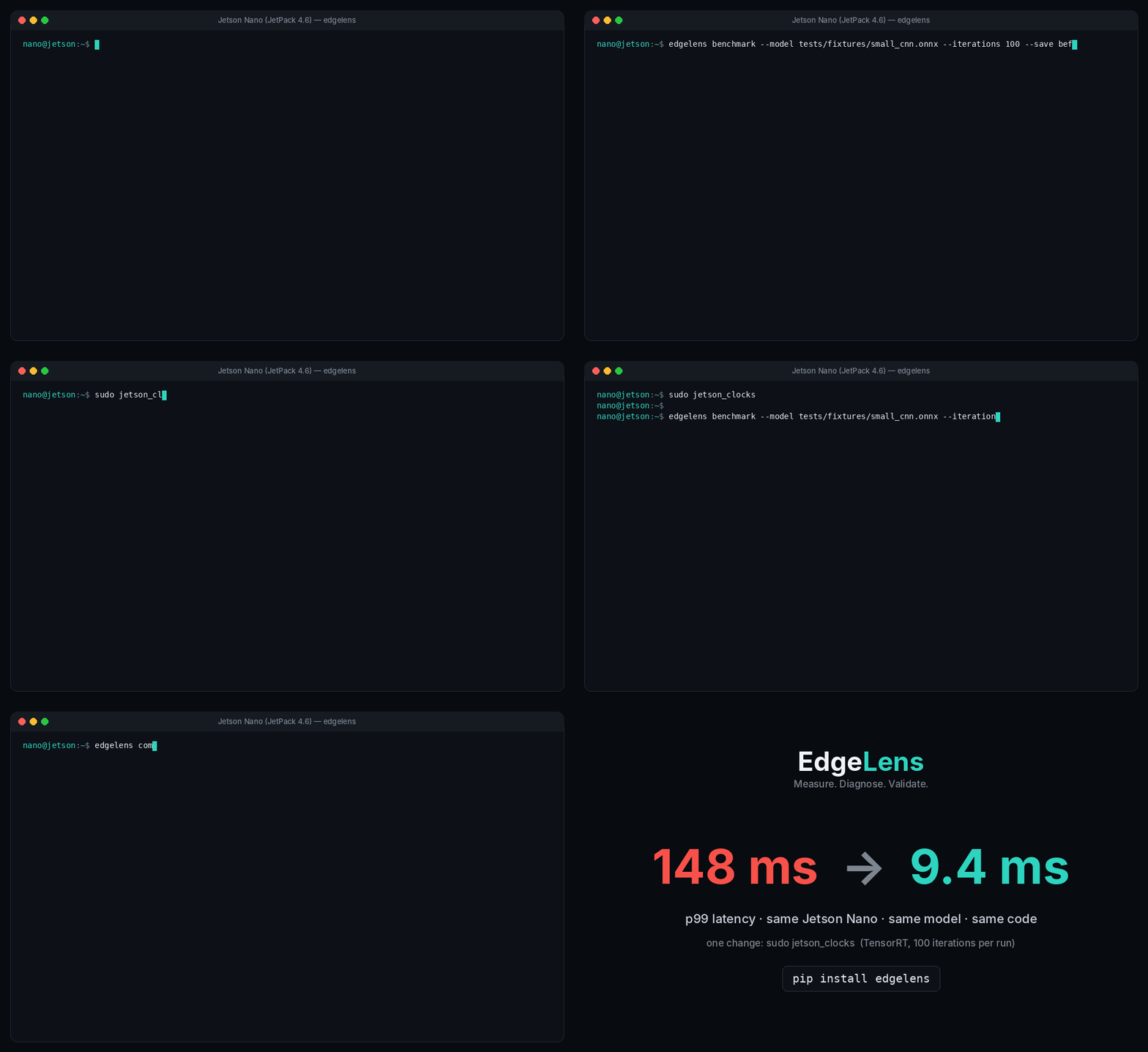
sudo jetson_clocks; full numbers in docs/jetson.md.
Same Jetson Nano, same model, same code: p99 latency 148 ms → 9.4 ms after pinning clocks. FPS never showed it. EdgeLens did. (measured)
pip install edgelens
edgelens doctor                                        # is this board ready to benchmark?
edgelens benchmark --model model.onnx --deadline-ms 33
edgelens diagnose                                       # why it is slow, with evidence
edgelens validate --p99-ms 33 --max-miss-ratio 0.001    # PASS / FAIL against your requirement
Most edge monitoring tools tell you what the board is doing (CPU 47%, GPU 92%, 61 °C). That is not the engineering question. The engineering question is a loop, and EdgeLens is built around it:
| Question | EdgeLens v0.1 | Coming |
|---|---|---|
| Does my system meet its requirement? | validate --p99-ms 10 --max-miss-ratio 0.001 --max-energy-mj 60: PASS / FAIL / INCONCLUSIVE per requirement, with the measured value |
v0.2: contract files, quality and thermal requirements, validated on Jetson AGX Orin |
| If not, why? | validate names the limiting stage and attaches the diagnosis; diagnose on its own gives the full evidence |
v0.3: concurrent stages, queues, critical path |
| What should I change? | each finding names the next experiment to run | v0.4: run the experiments for you, under your constraints |
| Did the change actually help? | compare: before/after per stage; warns when the runs come from different environments (--strict-env fails instead) |
— |
Measured fact → evidence → hypothesis → experiment → measured result. Every number EdgeLens reports was measured on the board; nothing is inferred by a model, and nothing is reported with more confidence than the data allows.
$ edgelens benchmark --pipeline examples/timeseries_vibration.py --iterations 1200
  Stage               Role         Mean      p99    Share
  acquire             input        0.004 ms  0.009  1.3%
  filter              preprocess   0.008 ms  0.019  2.5%
  fft                 preprocess   0.022 ms  0.044  7.0%
  feature_extraction  preprocess   0.274 ms  0.458  87.3%
  classify            inference    0.006 ms  0.018  1.9%
  decision            decision     0.000 ms  0.001  0.0%
End-to-end: mean 0.318 ms   Throughput: 3144.65 it/s   (1200 iterations)
min 0.260 · p50 0.283 · p95 0.486 · p99 0.542 · p99.9 0.866 · max 1.354 · jitter 0.082 ms
╭─ Deadline ─ MET  deadline 51.2 ms · misses 0/1200 (0.000%) · worst 1.354 ms ─╮
Real-time factor: mean 0.0062 · p99 0.0106 · max 0.0264 (hop period 51.2 ms, headroom 99.38%)
environment_id 6bc5f4e78f66 · experiment_id 783fa6dc9268 · run_id 20261002T142630-ed4566

$ edgelens diagnose ts.json
  DEADLINE_MET  (strong evidence)
  All 1200 iterations finished within the 51.2 ms deadline; worst 1.354 ms (97% headroom).
(Real output, run on a laptop CPU. On a Jetson the same run also reports GPU load, board power and energy per window.)
See it catch a win
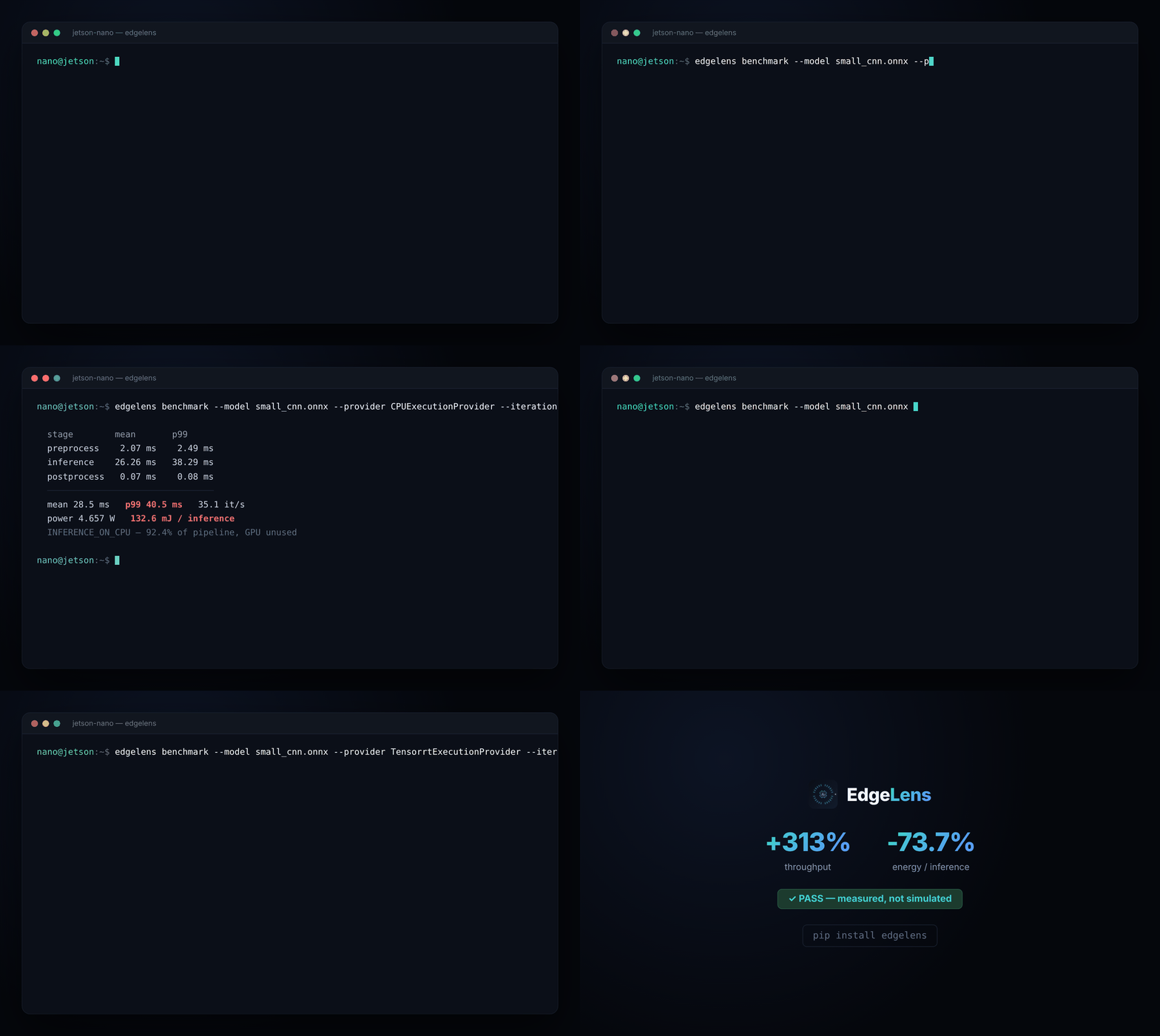
edgelens compare before.json after.json doesn't just print two numbers
side by side — it tells you whether the change is a real improvement or a
regression, per metric and per stage, and fails CI (--strict-env, exit
code 2) if the environment changed under you.
Status
Validated on a real Jetson Nano (JetPack 4.6 / L4T R32.7.6): core engine, statistics, requirements, telemetry, and power/energy all verified against real hardware. Jetson Orin support is implemented, not yet hardware-verified. Full per-area validation table, known limits, and measured results: docs/jetson.md.
Install
pip install edgelens               # core: any Linux host, Python 3.8+
pip install "edgelens[onnx]"       # + onnxruntime (CPU) for --model
On Jetson, don't install the [onnx] extra. On JetPack 4.x, first run python -m pip install --upgrade pip inside a new venv:
the pip that python3.8 -m venv creates is too old for current wheels and tries to compile NumPy. It pulls the CPU-only
onnxruntime from PyPI, which replaces NVIDIA's GPU build. Install the
JetPack-matched onnxruntime-gpu wheel (see the
Jetson Zoo), then plain
pip install edgelens. edgelens doctor shows which execution providers
you actually have (you want Tensorrt, CUDA, CPU).
From source (contributors):
git clone https://github.com/Infinity-ops/edgelens
cd edgelens
pip install -e ".[dev,onnx]"       # on Jetson: pip install -e ".[dev]"
python -m pytest -q
| Extra | Adds | When you need it |
|---|---|---|
dev |
pytest |
Running tests/ |
onnx |
onnxruntime (CPU) |
--model on a non-Jetson host |
fixtures |
onnx (the model library) |
Only to regenerate the test .onnx files |
onnx is kept out of dev on purpose: recent releases pull in
protobuf>=6, which broke sibling packages pinned to protobuf 5.x in real
testing.
Three ways in
- Just a model —
edgelens benchmark --model model.onnx --deadline-ms 33 - Your own pipeline, EdgeLens drives the loop —
import edgelens as el, define stages,pipe.run(...) - Keep your loop, add three lines —
with el.trace(...) as t: ... with t.stage("inference"): ...
Full examples for all three, plus scenario packs (vision, timeseries,
custom): docs/usage.md.
Commands
| Command | Purpose |
|---|---|
edgelens doctor |
Hardware + software fingerprint, which telemetry sources work, and benchmark readiness (clocks pinned? GPU inference? power readable?) with copyable fixes |
edgelens monitor |
Live dashboard: CPU / GPU / RAM / temperatures / board power |
edgelens benchmark |
--model, --pipeline or --demo; per-stage + end-to-end latency, tail, jitter, deadline, power/energy, trace |
edgelens diagnose |
Evidence-based verdict (deadline, bottleneck, thermal, memory, pack-specific) with categorical evidence strength |
edgelens report |
Self-contained HTML report, attachable to an issue |
edgelens compare before.json after.json |
Before/after diff of any pipeline; PASS/REGRESSION; warns when the environment differs (--strict-env → exit code 2) |
edgelens validate run.json --p99-ms 10 ... |
Requirements → PASS / FAIL / INCONCLUSIVE with measured values; on FAIL the limiting stage and why. Never PASSes a requirement the run cannot measure. Exit codes 0 / 1 / 2 |
Useful benchmark flags: --deadline-ms, --period-ms, --pace,
--idle-baseline SECONDS (measures idle power first, then reports the
workload's dynamic energy), --input-shape, --provider.
Exit codes: compare returns 0 (pass), 1 (regression), 2 (environments
differ, with --strict-env); validate returns 0 (pass), 1 (fail),
2 (inconclusive). Both drop straight into CI.
validate requirements (any combination): --p50-ms, --p95-ms, --p99-ms
(needs ≥ 100 iterations), --p99.9-ms (needs ≥ 1000), --max-latency-ms,
--max-miss-ratio (needs a run with --deadline-ms), --min-fps,
--max-power-w, --max-energy-mj (need a readable power sensor).
Full result schema and internals: docs/architecture.md.
Why not just jtop / Nsight / trtexec?
| Tool | Answers |
|---|---|
| jetson-stats (jtop) | What is my board doing right now? |
| Nsight Systems | What is my whole system doing, at the CUDA level? |
| trtexec | How fast is this one engine? |
| EdgeLens | Does my application meet its budget, why not, what does it cost in energy, and did my change help? |
Use jtop to watch your board. Use EdgeLens to measure your application. EdgeLens does not replace these tools, and it does not import jetson-stats (AGPL); it reads the same kernel interfaces directly and stays MIT.
Contributing and citing
Bug reports with edgelens doctor output from your board are the most
valuable contribution right now, especially from Jetson Orin, Xavier and
Orin Nano. See CONTRIBUTING.md. If you use EdgeLens in
research, please cite it (CITATION.cff; GitHub's "Cite this
repository" button).
License
MIT, see LICENSE.
1 maintainer

Metadata
1 maintainer
Release files for edgelens 0.1.0
For a detailed explanation of source distributions (sdists) and built distributions (wheels), please see the package formats documentation.
Source distribution (sdist)
| File | Size | Uploaded | |
|---|---|---|---|
| edgelens-0.1.0.tar.gz | 314.0 kB | Details |
Built distribution (wheel)
| File | Interpreter | ABI | Platform | Reset |
|---|---|---|---|---|
| edgelens-0.1.0-py3-none-any.whl | Python 3 | none | any | Details |
Total release size: 397.9 kB
Release files / edgelens-0.1.0.tar.gz
| Download URL | edgelens-0.1.0.tar.gz |
|---|---|
| Size | 314.0 kB |
| Tags | Source |
|
SHA-256 checksum How to use checksums |
77a06528bbfc5b5bf80e42f9ac0cc0f07ae2f0213ebad65c914c19d0e39e8b24
|
|
BLAKE2b-256 checksum How to use checksums |
2ffce6e14631c799c0f971e1e8a13ddfa01940032691724c6e1f014ea5249c15
|
| Upload date | |
|
Uploaded using Trusted Publishing? What is trusted publishing? |
Yes |
| Uploaded via |
twine/7.0.0 CPython/3.13.14
|
Provenance
Provenance describes where a file came from. On PyPI, provenance is shared via attestations, which provide a verifiable record of the build or publishing details. View details, limitations and caveats.


PyPI Publish Attestation
PyPI verified that this artifact, at this checksum, originated from the publisher listed below.
Signed by GitHub Actions, verified by PyPI on Oct 7, 2026.
Transparency logRelease files / edgelens-0.1.0-py3-none-any.whl
| Download URL | edgelens-0.1.0-py3-none-any.whl |
|---|---|
| Size | 83.9 kB |
| Tags | Python 3 |
|
SHA-256 checksum How to use checksums |
05c844adfec294073e9db6b005891fd92daa8971743879b54f261b2f4761d029
|
|
BLAKE2b-256 checksum How to use checksums |
2a3cb9c62a5082cc99e2e57e7f958f82c1e1715ead8f3afaef866808cdd98c97
|
| Upload date | |
|
Uploaded using Trusted Publishing? What is trusted publishing? |
Yes |
| Uploaded via |
twine/7.0.0 CPython/3.13.14
|
Provenance
Provenance describes where a file came from. On PyPI, provenance is shared via attestations, which provide a verifiable record of the build or publishing details. View details, limitations and caveats.
PyPI Publish Attestation
PyPI verified that this artifact, at this checksum, originated from the publisher listed below.
Signed by GitHub Actions, verified by PyPI on Oct 7, 2026.
Transparency log












