
ediFabric Native X12 - Python bindings
ediFabric Native is a self-contained, high-performance X12 EDI native shared library. It converts X12 EDI to JSON (and back), validates transaction sets, and generates acknowledgments — callable from any language with a C foreign-function interface (C, C++, Rust, Go, Python, Node.js, Java/JNA, .NET, …). No .NET runtime, JVM, or other dependency is required on the target machine.
Python ctypes bindings for ediFabric Native.
| File | Purpose |
|---|---|
edifabric_x12/ |
ctypes bindings for the complete C ABI |
example_all_functions.py |
runnable walkthrough of every entry point |
c-abi-edifabric_x12_tools.h |
the C header these bindings mirror |
PUBLISHING.md |
how the PyPI package is built and published |
Install
pip install edifabric-x12
The wheel for your platform includes the ediFabric Native library, so there is
nothing else to download. Wheels are published for Windows x64, Linux x64 and
arm64 (glibc 2.34 or later), and macOS arm64 (12 or later). A library you pass to
load_library(path) or set in EDIFABRIC_X12_LIB takes precedence over the
bundled one.
Requirements
- Python 3.8 or later (standard library only)
- 64-bit Windows, Linux, or macOS
- The native library for your platform (bundled in the PyPI wheels; download it when you run from a clone):
| Platform | File |
|---|---|
| Windows | edifabric-x12-tools.dll |
| Linux | edifabric-x12-tools.so |
| macOS | edifabric-x12-tools.dylib |
- Sign up free for Community to get an evaluation serial key. Community never expires, requires no credit card, and is for non-production use. The first 14 days after you subscribe have unlimited operations, then the quota is 250 per day. To extend the unlimited period, ask through the support portal or at support@edifabric.com. After signup, retrieve your serial from Your Account.
- Download the ediFabric Native library.
Plus your model files (per transaction set) and a map file that tells the engine where to find them. See Model map for details.
Getting started
Sign up free for Community at edifabric.com/pricing
to get an evaluation serial key, then download the library from
here.
Put the native library in the repository root, beside the edifabric_x12 folder, then run the walkthrough with your serial:
python example_all_functions.py --serial YOUR_SERIAL
It authorizes with your Community (or paid) serial, loads the model map, and calls every function in the ABI, printing what each one returns.
======================================================================
Parse: parse (mode 2, JSON + validation report)
======================================================================
  1754 bytes total, validation starts at offset 1708
  validation -> {"errors":[],"errors_count":0,"data_count":10}
Options:
python example_all_functions.py --serial YOUR_SERIAL   # Community or paid serial (required)
python example_all_functions.py --lib /opt/edifabric   # library file or folder
You can also set EDIFABRIC_SERIAL instead of passing --serial.
The library path is resolved from --lib, then EDIFABRIC_X12_LIB, then the
package folder (where the wheel puts the bundled library), its parent, and the
working directory. The serial comes from
--serial, then EDIFABRIC_SERIAL.
All strings and payloads cross the boundary as UTF‑8 byte buffers
(pointer + length). Every function returns 0 on success or a non-zero
error code.
Usage
import json
import edifabric_x12 as ef

serial = "your-serial"   # from your Community or paid plan

ef.load_library()                  # or ef.load_library(r"C:\libs\edifabric-x12-tools.dll")
ef.set_serial(serial)              # Community: set_serial. Developer: prefer ensure_token. Enterprise: prefer set_token.
ef.set_map(json.dumps({"default": serial, "maps": {}}))

edi = open("purchase-order.edi", "rb").read()
transactions, _ = ef.parse(edi, ef.ParseMode.JSON)
print(transactions)
Read a file from a subfolder of the script:
from pathlib import Path

edi = (Path(__file__).resolve().parent / "edi" / "838p.txt").read_bytes()
Validation and acknowledgments
parse returns (output, offset). In modes 2 and 3, offset marks where the
validation and acknowledgment JSON starts inside the output.
config = json.dumps({
    "validate": {"snip_level": 2, "max_errors": 0},
    "ack": {"gen997": False, "supress_ta1": False},
})

output, offset = ef.parse(edi, ef.ParseMode.JSON_VALIDATE_ACK, config)
transactions = output[:offset]
report = json.loads(output[offset:])
print(report["errors_count"], report["ack"])
| Mode | Constant | Output |
|---|---|---|
| 1 | ParseMode.JSON |
transaction-set JSON |
| 2 | ParseMode.JSON_VALIDATE |
JSON plus a validation report |
| 3 | ParseMode.JSON_VALIDATE_ACK |
JSON plus validation and a 999/997/TA1 acknowledgment |
Streaming large interchanges
iter_split streams one transaction set (or repeating loop) at a time with flat
memory use. segment_id must be ST or the first segment of a repeating loop.
config = json.dumps({"split": {"segment_id": "LX", "segment_depth": 6, "loop_id": "2400"}})

for payload, offset, is_last in ef.iter_split(edi, ef.ParseMode.JSON, config):
    handle(json.loads(payload))
iter_merge streams a full interchange JSON document back out one segment at a time:
with open("out.edi", "wb") as f:
    for segment in ef.iter_merge(transactions):
        f.write(segment + b"\r\n")
Both wrap the underlying start_split/split/get_result and
start_merge/merge/get_result sequences, which you can also drive directly.
Building EDI
edi_text = ef.build(transactions, postfix="\r\n") # postfix=None for compact output
API reference
Conventions used by every function:
- Returns
int:0= success, non-zero = error code. - Inputs are UTF‑8
byte*+int length. - Output functions use grow-and-retry: if the buffer is too small the call
returns
1(InsufficientCapacity) and writes the required size into the length out-parameter; reallocate and call again. - Exceptions never cross the boundary.
Every wrapper raises EdiFabricError when the native call returns a non-zero
status. Buffer growth (InsufficientCapacity) is retried automatically.
| Group | Functions |
|---|---|
| Loading | load_library |
| Lifecycle | init_logger, shutdown_logger, clear_cache |
| Licensing | ensure_token, get_app_version, get_token, validate_token, set_token, get_token_expiration, set_serial |
| Model map | set_map |
| Processing | parse, start_split, split, build, start_merge, merge, get_result |
| Errors | get_error, free_error, check |
| Wrappers | iter_split, iter_merge |
| Constants | ParseMode, LogLevel, ErrorCode, EdiFabricError |
get_error frees the native string for you. Call free_error only if you
invoke the raw export yourself. Builds that do not export free_error fall back
to the C runtime free.
Licensing
| Plan | What works | Recommended |
|---|---|---|
| Community | set_serial only |
set_serial |
| Developer | set_serial and ensure_token (ensure_token caches the result for 1 day) |
ensure_token |
| Enterprise | set_serial, ensure_token, get_token / set_token |
set_token (offline tokens) |
# Community: authorize per process against the license server
ef.set_serial(serial)

# Developer (recommended): 1-day built-in cache; refreshes if the token expires within N seconds
ef.ensure_token(serial, 3600)
print(ef.get_token_expiration())   # .NET UTC ticks, 0 when unset

# Developer (also works): same as Community, online check per process
ef.set_serial(serial)

# Enterprise (recommended): fetch / validate / set an offline token yourself
token = ef.get_token(serial)
ef.validate_token(token)
ef.set_token(token)
Model map
set_map tells the engine where to find transaction-set models. Keys are
message:version. Set default to your serial to resolve unmapped transaction
sets through the online spec service, or leave it null (or "") and map
everything locally.
The example builds that JSON at runtime instead of hard-coding paths. Online
fallback is a dict with default set to your serial:
ef.set_map(json.dumps({"default": serial, "maps": {}}))
For local models, load a map file and rewrite each entry's location to the
folder that actually holds the JSON files (see load_local_map in
example_all_functions.py):
from pathlib import Path

map_path = Path("map") / "map.json"
map_location = str(map_path.parent.resolve())
local_map = json.loads(map_path.read_text(encoding="utf-8"))
for entry in local_map.get("maps", {}).values():
    entry["location"] = map_location

ef.set_map(json.dumps(local_map))
map.json lists each transaction set; location is filled in at runtime so the
same file works from any working directory:
{
  "default": "",
  "maps": {
    "837:005010X222A1": { "type": 1, "name": "model837P.json", "location": "" },
    "834:005010X220A1": { "type": 1, "name": "model834.json",  "location": "" }
  }
}
You can also mix both: keep default as your serial and add local entries under
maps for the transaction sets you ship on disk.
All X12 transactions, such as 837P, 834 and 850, are represented as ediFabric Native JSON models. The models are the same on every plan, Community or paid.
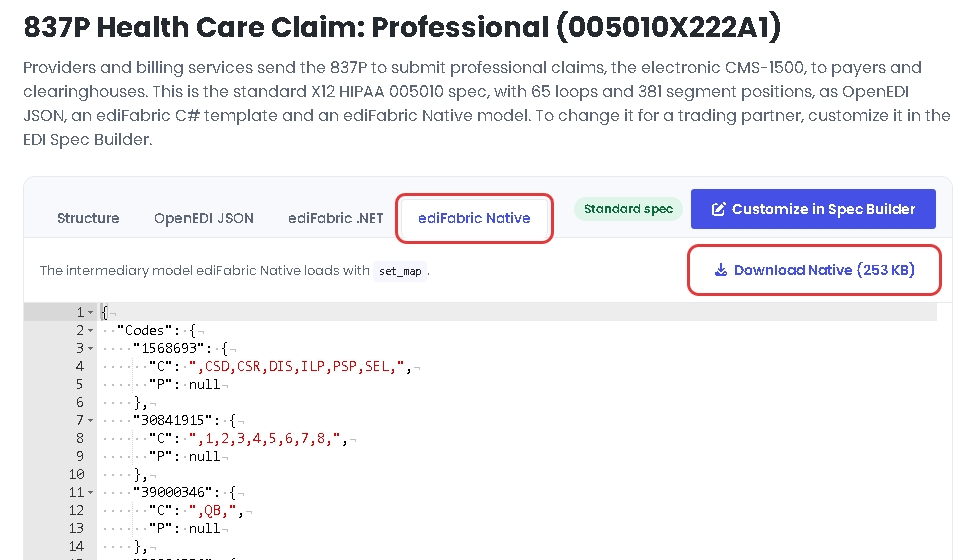
Standard models come from the EDI spec library, and you can download them without an account. Open the transaction, for example 837P, and on the ediFabric Native tab select Download Native.
Custom models come from the EDI Spec Builder. When a trading partner changes the standard, open the transaction in the EDI spec library and select Customize in Spec Builder, or import your own OpenEDI file. Edit the OpenEDI schema until it matches the partner's guide and select Update. Then, on the ediFabric Native tab, select Download Native.
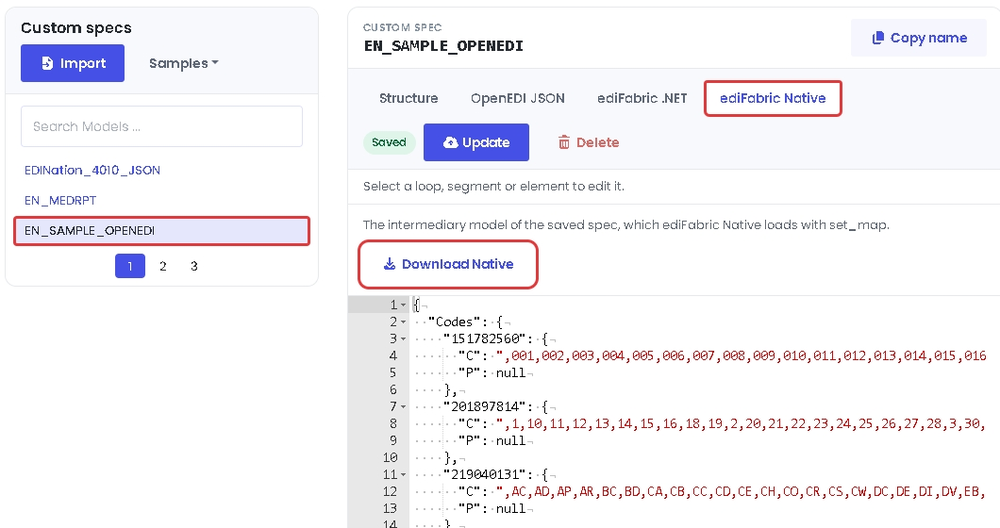
Save the downloaded file where the map can name it, and add it to maps under its message:version key, for example 837:005010X222A1. The file is the compiled layout the engine loads, not the OpenEDI schema. To change a model, edit the spec in the EDI Spec Builder and download it again. See EDI models and OpenEDI format.
Configuration JSON
All JSON uses snake_case keys and is case-insensitive.
ParseConfig (parse)
{
  "validate": { "regex": null, "date_format": null, "time_format": null,
                "skip_seq_count": false, "skip_hl_seq": false,
                "snip_level": 0, "max_errors": 0 },
  "ack":      { "supress_ta1": false, "ak901p": false,
                "gen_for_valid": false, "gen997": false }
}
validate— applied whenmode ≥ 2;snip_levelis1–4.ack— applied whenmode == 3.
All sections are optional for parse.
SplitConfig (start_split)
{
  "split":    { "segment_id": "ST", "segment_depth": 0, "loop_id": null }
}
split— required forstart_split.
Splitting is possible for the following boundaries:
- Transaction - for files that contain batches of transactions.
- Repeating loop - for files that contain batches of loops, such as order lines, claims or benefit enrollments.
The splitter must be configured as follows:
segment_id— the name of the segment to split by. It must be either ST or the first segment in the repeatable loop (Mandatory).segment_depth— the depth of the segment in the model hierarchy (Mandatory).loop_id— the name of the loop for the segment specified in segment_id (Optional).
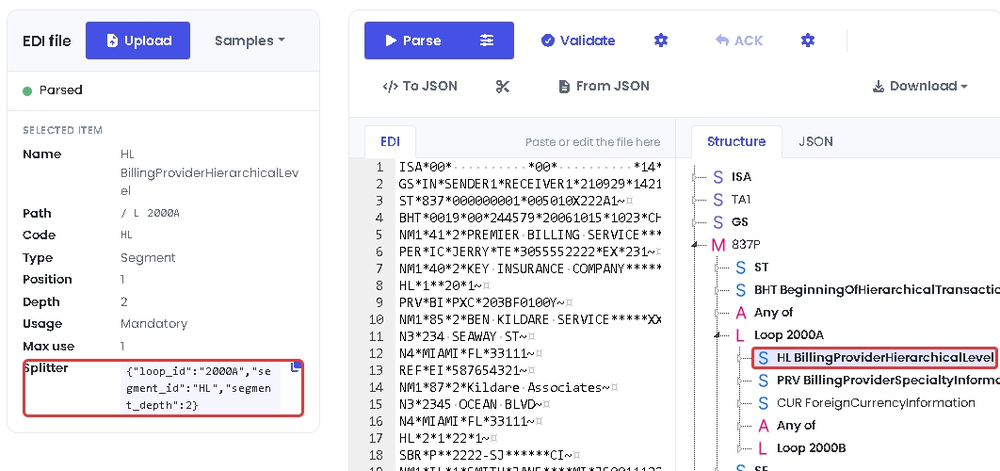
The values for the splitter are in EdiNation, the free X12 editor. Load a file, select Parse, and select the first segment of the loop in the Structure tab. For example, to split an 837P by loop 2000A, load the 837P sample from Samples and select the HL segment in loop 2000A. Under Selected item, segment_id is Code, loop_id is the last item in Path, and segment_depth is Depth.
The easiest way to get the splitter configuration is to select the copy button next to Splitter, which copies the three values as JSON. Paste them as the value of split.
Threading
The library holds process-global state (model map, active split reader, active
merge writer, last result, license) behind an internal lock. parse and build
are independent per call, but each split or merge sequence must run to
completion without another split or merge interleaving from a different thread.
Error codes
0 is success and 1 means the output buffer was too small. Library-level codes
are exposed as ErrorCode, and get_error(code) returns the message.
Validation codes (elements, segments, transaction sets, groups, and interchanges)
appear in the parse report when mode ≥ 2.
Error 639 means the Community (evaluation) daily quota was exceeded. Upgrade your plan at edifabric.com/pricing if you wish to continue.
Parser and library
| Code | Meaning |
|---|---|
| 1 | The suggested output buffer size is too small |
| 501 | Unexpected error. Contact support@edifabric.com and include a sample project/file to reproduce the issue |
| 502 | No connection to EdiNation API |
| 503 | The model map configuration is invalid. Check the paths and the model file names are correct |
| 611 | The input buffer is either null or its size is nill |
| 612 | The logger failed to log |
| 613 | The map configuration file is invalid |
| 614 | The output capacity must be positive |
| 615 | Models map must be set before parsing or splitting |
| 616 | Mode must be any of: 1 - Parse, 2 - Parse and Validate, 3 - Parse and Validate and Acknowledge |
| 617 | Parser failed. Contact support@edifabric.com and include a sample project/file to reproduce the issue |
| 618 | Validation failed. Contact support@edifabric.com and include a sample project/file to reproduce the issue |
| 619 | Validation serializer failed. Contact support@edifabric.com and include a sample project/file to reproduce the issue |
| 620 | The token is invalid. Contact support@edifabric.com for assistance |
| 621 | The configuration file is invalid |
| 622 | The split segment ID must not be blank |
| 623 | Call start_split before splitting |
| 624 | The result can't be retrieved. Contact support@edifabric.com and include a sample project/file to reproduce the issue |
| 625 | Result buffer size mismatched |
| 626 | Call start_merge before merging |
| 627 | The output buffer is either null or its size is nill |
| 628 | The serial number is missing or incorrect. get_token doesn't work with Developer license |
| 629 | License was not installed. Contact support@edifabric.com for assistance |
| 630 | No license to use this version. Contact support@edifabric.com for assistance |
| 631 | The token has expired. Get and set a new token to continue |
| 632 | The token is missing. Set token to continue |
| 633 | Reached the maximum number of licenses. Set token to continue |
| 634 | Environment not recognized for licensing or reached the maximum number of licenses |
| 635 | Serial or token not found. Either set token or serial to continue |
| 636 | The rate to get serials was exceeded for your license. Wait for 60 seconds and try again or upgrade your license |
| 637 | Invalid JSON. Enable logging for additional details |
| 638 | The operation is not supported by your license |
| 639 | Community daily quota exceeded. Your license has reached its daily call limit. Upgrade your plan at edifabric.com to continue |
Troubleshooting
FileNotFoundError: Could not load edifabric-x12-tools.dll — the library is
not on any searched path. Pass ef.load_library("/path/to/library") or set
EDIFABRIC_X12_LIB.
Error 615 on parse — call set_map before parsing or splitting. clear_cache
resets the map, so reload it afterwards.
Error 628 / 635 on parse — authorize first: set_serial on Community,
ensure_token (or set_serial) on Developer, or set_token on Enterprise.
Error 633 on ensure_token / get_token — the plan's machine quota is used up. Contact support.
Error 639 — the Community (evaluation) daily quota was exceeded. Wait until the next day, or upgrade your plan if you wish to continue.
Links
1 maintainer

Metadata
1 maintainer
Release files for edifabric-x12 1.1.1
For a detailed explanation of source distributions (sdists) and built distributions (wheels), please see the package formats documentation.
Built distributions (wheels)
| File | Reset | |||
|---|---|---|---|---|
| edifabric_x12-1.1.1-py3-none-win_amd64.whl | Python 3 | none | Windows x86-64 | Details |
| edifabric_x12-1.1.1-py3-none-manylinux_2_34_x86_64.whl | Python 3 | none | Linux glibc 2.34+ x86-64 | Details |
| edifabric_x12-1.1.1-py3-none-manylinux_2_34_aarch64.whl | Python 3 | none | Linux glibc 2.34+ ARM64 | Details |
| edifabric_x12-1.1.1-py3-none-macosx_12_0_arm64.whl | Python 3 | none | macOS 12.0+ ARM64 | Details |
Total release size: 15.6 MB
Release files / edifabric_x12-1.1.1-py3-none-win_amd64.whl
| Download URL | edifabric_x12-1.1.1-py3-none-win_amd64.whl |
|---|---|
| Size | 3.6 MB |
| Tags | Python 3 Windows x86-64 |
|
SHA-256 checksum How to use checksums |
8c204d62f2f840e0eadbe4c66ec5cf3de1246a48744216a345a445c19dd3a1e7
|
|
BLAKE2b-256 checksum How to use checksums |
6ef4080834096bcfae84610df790b3d887ba9073e508cabb8e7edb359ce38c93
|
| Upload date | |
|
Uploaded using Trusted Publishing? What is trusted publishing? |
Yes |
| Uploaded via |
twine/7.0.0 CPython/3.13.14
|
Provenance
Provenance describes where a file came from. On PyPI, provenance is shared via attestations, which provide a verifiable record of the build or publishing details. View details, limitations and caveats.


PyPI Publish Attestation
PyPI verified that this artifact, at this checksum, originated from the publisher listed below.
Signed by GitHub Actions, verified by PyPI on Oct 13, 2026.
Transparency logRelease files / edifabric_x12-1.1.1-py3-none-manylinux_2_34_x86_64.whl
| Download URL | edifabric_x12-1.1.1-py3-none-manylinux_2_34_x86_64.whl |
|---|---|
| Size | 4.3 MB |
| Tags | Linux glibc 2.34+ x86-64 Python 3 |
|
SHA-256 checksum How to use checksums |
511d88446df423d24fea901c5c76c541307a359f83437a96d77c28227fe4a8ff
|
|
BLAKE2b-256 checksum How to use checksums |
18144a35485aea24779427b43d849dc60716589d17aab89feb99e7faf5060c05
|
| Upload date | |
|
Uploaded using Trusted Publishing? What is trusted publishing? |
Yes |
| Uploaded via |
twine/7.0.0 CPython/3.13.14
|
Provenance
Provenance describes where a file came from. On PyPI, provenance is shared via attestations, which provide a verifiable record of the build or publishing details. View details, limitations and caveats.
PyPI Publish Attestation
PyPI verified that this artifact, at this checksum, originated from the publisher listed below.
Signed by GitHub Actions, verified by PyPI on Oct 13, 2026.
Transparency logRelease files / edifabric_x12-1.1.1-py3-none-manylinux_2_34_aarch64.whl
| Download URL | edifabric_x12-1.1.1-py3-none-manylinux_2_34_aarch64.whl |
|---|---|
| Size | 4.0 MB |
| Tags | Linux glibc 2.34+ ARM64 Python 3 |
|
SHA-256 checksum How to use checksums |
77a34e574ee0931af260d8508ac0cf3e88bc0e1f67807a04d398fb7f146f8e73
|
|
BLAKE2b-256 checksum How to use checksums |
011c70c0a0fe8f2ca40367dfa3ce128020c8b54106beaa45b3a1c50606e163d6
|
| Upload date | |
|
Uploaded using Trusted Publishing? What is trusted publishing? |
Yes |
| Uploaded via |
twine/7.0.0 CPython/3.13.14
|
Provenance
Provenance describes where a file came from. On PyPI, provenance is shared via attestations, which provide a verifiable record of the build or publishing details. View details, limitations and caveats.
PyPI Publish Attestation
PyPI verified that this artifact, at this checksum, originated from the publisher listed below.
Signed by GitHub Actions, verified by PyPI on Oct 13, 2026.
Transparency logRelease files / edifabric_x12-1.1.1-py3-none-macosx_12_0_arm64.whl
| Download URL | edifabric_x12-1.1.1-py3-none-macosx_12_0_arm64.whl |
|---|---|
| Size | 3.7 MB |
| Tags | Python 3 macOS 12.0+ ARM64 |
|
SHA-256 checksum How to use checksums |
f0789c85f65cb299a3b0c29d6a6e9af69a9469c41530b2bb65be4ef9e7abbaa2
|
|
BLAKE2b-256 checksum How to use checksums |
dd43d9483d2317f5ef9cbbd734bc326bd605c945f84a007cc9178b04385eaa18
|
| Upload date | |
|
Uploaded using Trusted Publishing? What is trusted publishing? |
Yes |
| Uploaded via |
twine/7.0.0 CPython/3.13.14
|
Provenance
Provenance describes where a file came from. On PyPI, provenance is shared via attestations, which provide a verifiable record of the build or publishing details. View details, limitations and caveats.
PyPI Publish Attestation
PyPI verified that this artifact, at this checksum, originated from the publisher listed below.
Signed by GitHub Actions, verified by PyPI on Oct 13, 2026.
Transparency logSecurity for edifabric-x12 1.1.1
Provenance
Provenance describes where a file came from. On PyPI, provenance is shared via attestations, which provide a verifiable record of the build or publishing details. View details, limitations and caveats.
Full provenance
All 4 files in this release have been uploaded with provenance metadata.
Attestation for edifabric_x12-1.1.1-py3-none-win_amd64.whl
PyPI Publish Attestation
PyPI verified that this artifact, at this checksum, originated from the publisher listed below.
Signed by GitHub Actions, verified by PyPI on Oct 13, 2026.
Transparency logA note on package security
PyPI is a repository for distributing packages, not a service for auditing them. While third-party security researchers and our staff do their best to detect and remove malicious packages, PyPI cannot guarantee the quality, security or suitability of any given package.













