

edifactlib
A Python package for parsing, validating, and inspecting EDIFACT interchanges. It comes both with a CLI tool for inspecting EDIFACT files directly from the terminal, and with a regular Python library for use in code.
Installation
pip install edifactlib
Usage
As a Python library
from edifactlib import Parser, InterchangeResolver

message = """
UNA:+.? '
UNB+UNOC:3+5412345000013:14+4012345000006:14+260704:1200+REF00001'
UNH+1+ORDERS:D:24A:UN'
BGM+220+PO123456+9'
DTM+137:20260704:102'
NAD+BY+5412345000013::9'
NAD+SU+4012345000006::9'
LIN+1++4712345:EN'
QTY+21:100'
LIN+2++4798765:EN'
QTY+21:50'
UNS+S'
UNT+11+1'
UNZ+1+REF00001'
"""

parser = Parser()
interchange = parser.parse(message)

resolver = InterchangeResolver()
resolver.resolve(interchange)
Parser turns the raw EDIFACT message as an Interchange model (segments, data elements, components) and validates it against the corresponding EDIFACT directory by default (pass validate=False to parser.parse(...) to skip validation). InterchangeResolver then enriches the parsed data with the names/descriptions from the directory.
Command line
After installation, the edifact command is available.
Read and inspect an EDIFACT file:
edifact /path/to/message.edi
Alternatively, pass the message directly as a string:
edifact --from-string "UNA:+.? 'UNB+UNOC:3+...'"
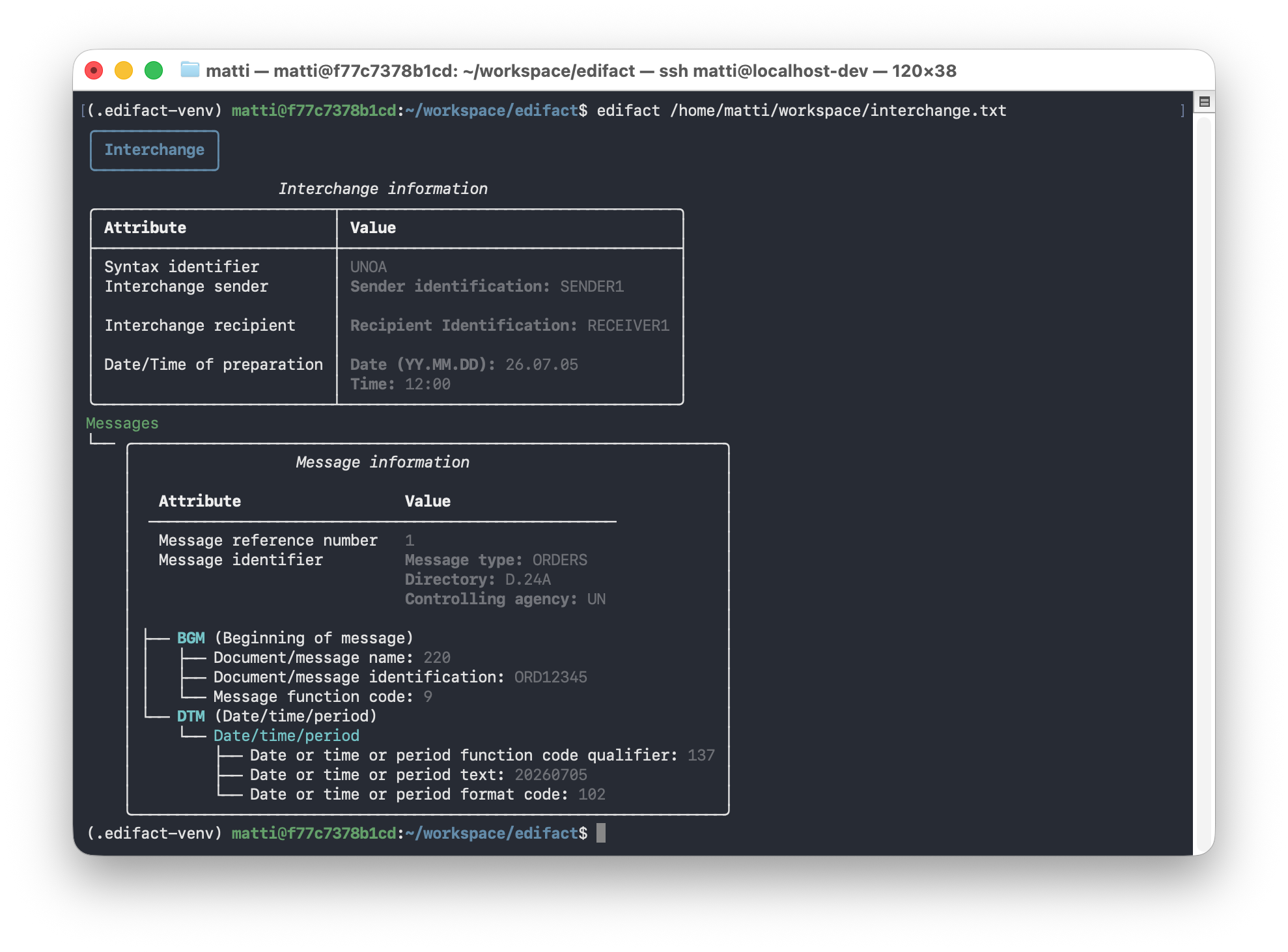
The interchange header, contained messages, and functional groups are printed to the console in a formatted view:
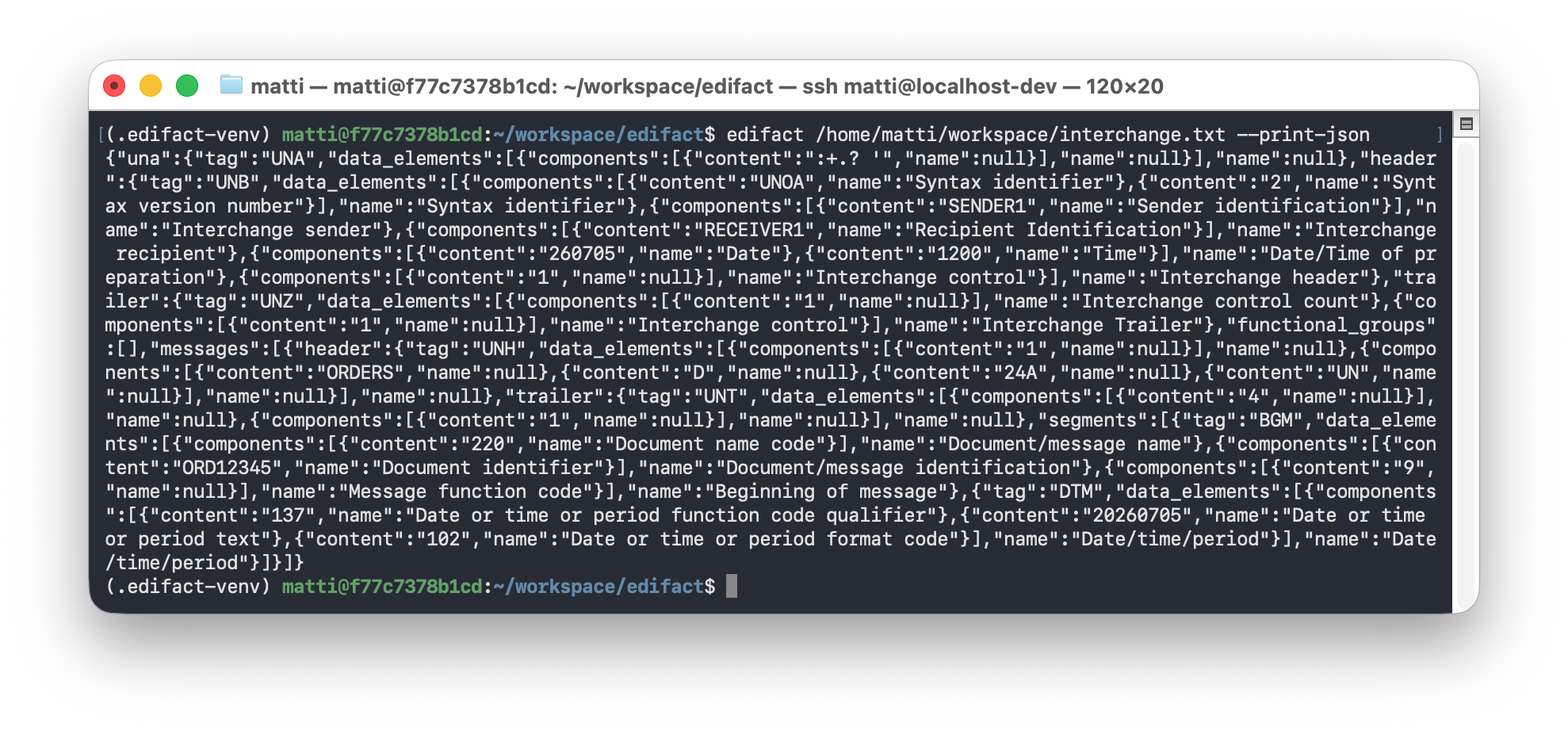
Pass --print-json to print the parsed interchange as JSON instead, e.g. for piping into other tools:
edifact /path/to/message.edi --print-json
Supported EDIFACT versions and directories
EDIFACT version
Currently version 2 and 3 are supported. An implementation for version 4 is planned.
Directories
The following directories are currently supported:
D.24AD.23AD.22BD.22AD.21BD.21A
Older directories will follow.
Transparency regarding AI-generated content
This project values transparency about which content was hand-written and which was created with AI assistance:
- Source code under
src/is mainly hand-written. Any AI-generated portions are explicitly marked as such. - Exception: docstrings. Docstrings under
src/may be AI-generated and are not individually marked. - Exception: the
testsfolder. Test code is created with AI assistance. - Any AI-generated code within the
testsfolder is marked as such with a corresponding comment in the code. - If a file in the
testsfolder does not contain such a marker comment, its content was written manually. - The README.MD file was mostly generated by AI.
Development
Code is formatted with Black (line length 120) and imports are sorted with isort (Black profile). Install the dev dependencies with:
pip install -e ".[dev]"
Then format the code with:
black .
isort .
Status
This project is under active development. The API may still change before the first stable release.
1 maintainer

Metadata
1 maintainer
Release files for edifactlib 0.4.0
For a detailed explanation of source distributions (sdists) and built distributions (wheels), please see the package formats documentation.
Source distribution (sdist)
| File | Size | Uploaded | |
|---|---|---|---|
| edifactlib-0.4.0.tar.gz | 1.3 MB | Details |
Built distribution (wheel)
| File | Interpreter | ABI | Platform | Reset |
|---|---|---|---|---|
| edifactlib-0.4.0-py3-none-any.whl | Python 3 | none | any | Details |
Total release size: 1.4 MB
Release files / edifactlib-0.4.0.tar.gz
| Download URL | edifactlib-0.4.0.tar.gz |
|---|---|
| Size | 1.3 MB |
| Tags | Source |
|
SHA-256 checksum How to use checksums |
600630d9b3d0b5ce476e96f47003a19a2447bf1014acff5b691ff2e2e06f7040
|
|
BLAKE2b-256 checksum How to use checksums |
055c425a2fb16ddd010b652e9f76b5c16cc98f294adcc07840feb683beecf1e7
|
| Upload date | |
|
Uploaded using Trusted Publishing? What is trusted publishing? |
No |
| Uploaded via |
twine/7.0.0 CPython/3.12.3
|
Release files / edifactlib-0.4.0-py3-none-any.whl
| Download URL | edifactlib-0.4.0-py3-none-any.whl |
|---|---|
| Size | 163.6 kB |
| Tags | Python 3 |
|
SHA-256 checksum How to use checksums |
18e39f591df99deed8f6d2ba8f265b4491e35683604c5de5f6c17ee49f2dd90f
|
|
BLAKE2b-256 checksum How to use checksums |
a5d90d4068acf59525835c6a5918b85ae30e035ec7464f79b699b8c6c332657e
|
| Upload date | |
|
Uploaded using Trusted Publishing? What is trusted publishing? |
No |
| Uploaded via |
twine/7.0.0 CPython/3.12.3
|














