
A high-performance CLI tool from eDNA-Explorer to generate metadata from a directory of fastq files.
Verified details
These details have been verified by PyPIProject links
GitHub Statistics
Maintainers

Project description
ee-metadata
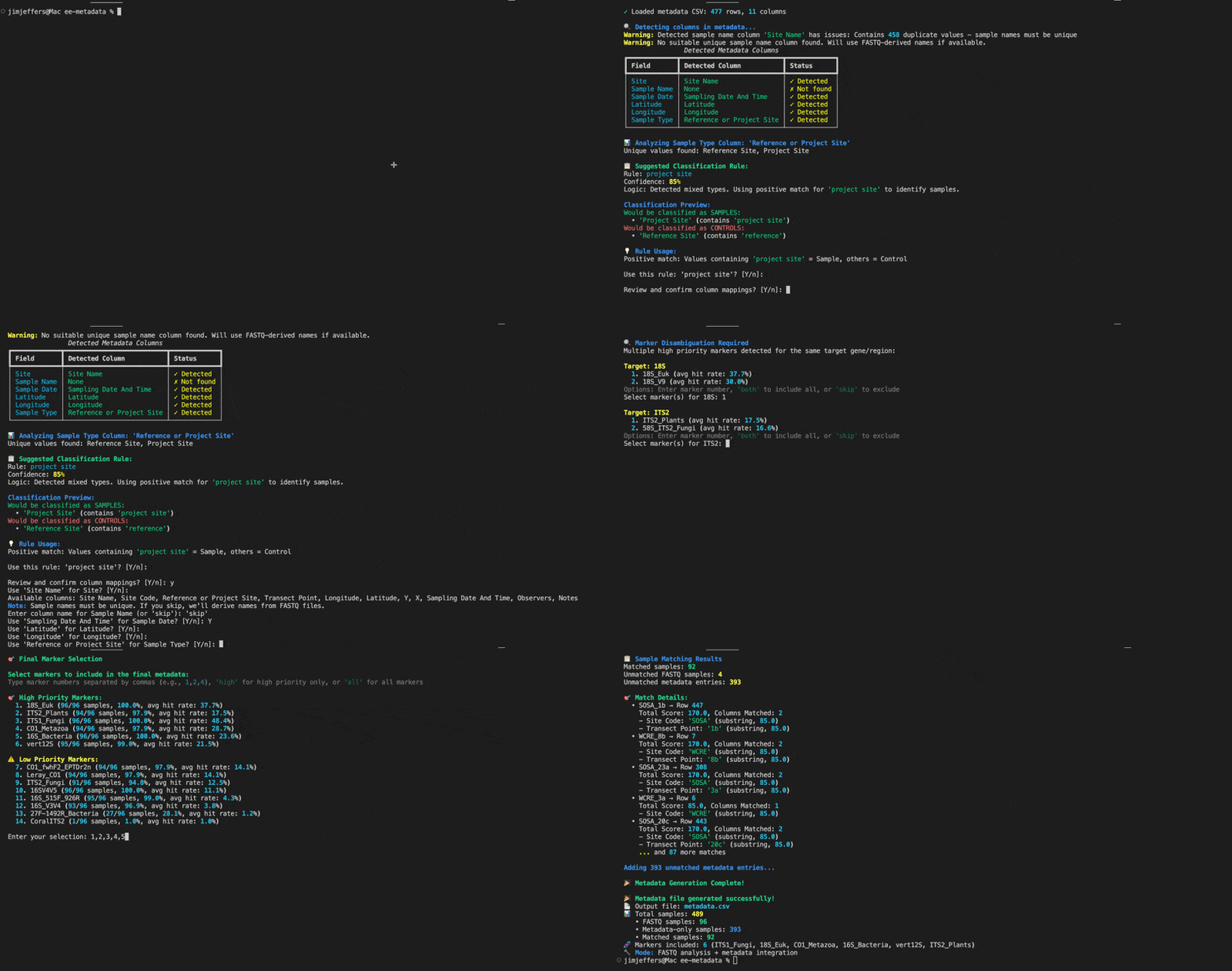
A command-line tool from eDNA Explorer for analyzing FASTQ files, generating metadata CSVs, and uploading data — all from your terminal.
Installation
Using uv (Recommended)
uv installs ee-metadata as a standalone tool — no need to manage Python environments yourself.
uv tool install ee-metadata
Don't have uv? Install it with
curl -LsSf https://astral.sh/uv/install.sh | sh(macOS/Linux) or see the uv install guide.
Using pip
pip install ee-metadata
Verify it works
ee-metadata --help
Quick Start
The typical workflow looks like this:
# 1. Log in to eDNA Explorer
ee-metadata login

# 2. Generate a metadata CSV from your FASTQ files
ee-metadata generate ./my-fastq-files --output metadata.csv

# 3. Upload files to your project
ee-metadata upload ./my-fastq-files --project YOUR_PROJECT_ID
Commands
login — Authenticate with eDNA Explorer
Logs you in so you can upload files. By default, it opens your browser to complete the login.
ee-metadata login [OPTIONS]
| Option | Description |
|---|---|
--no-browser |
Skip the browser and paste a token manually |
--device |
Use device-code flow (useful over SSH or on servers) |
--insecure-storage |
Store token as a plain text file instead of your system keyring |
--api-url, -u |
Custom API URL (defaults to https://www.ednaexplorer.org) |
Your token is stored securely in your system's keyring (macOS Keychain, Windows Credential Manager, or Linux Secret Service). If no keyring is available, you'll be prompted to use --insecure-storage.
logout — Remove stored credentials
ee-metadata logout
auth-status — Check your login status
Shows whether you're logged in, which account is active, and how your token is stored.
ee-metadata auth-status
generate — Analyze FASTQ files and create metadata
Scans .fastq.gz files for primer sequences, pairs forward/reverse reads, and outputs a metadata CSV.
ee-metadata generate [INPUT_DIR] [OPTIONS]
| Option | Short | Description | Default |
|---|---|---|---|
--primers |
-p |
Path to a primers CSV file | Built-in primer database |
--input-metadata |
-m |
Existing metadata CSV to merge with | — |
--output |
-o |
Output CSV filename | metadata.csv |
--num-records |
-n |
FASTQ records to scan per file | 100 |
--force-pairing |
Force R1/R2 pairing by filename | false |
Examples:
# Interactive mode — the tool will prompt you for what it needs
ee-metadata generate

# Specify a directory of FASTQ files
ee-metadata generate ./data/raw_reads

# Merge with an existing metadata spreadsheet
ee-metadata generate ./data/raw_reads --input-metadata sample_sheet.csv --output merged.csv
upload — Upload FASTQ files to a project
Uploads .fastq.gz files to an eDNA Explorer project. Requires being logged in first.
ee-metadata upload DIRECTORY --project PROJECT_ID [OPTIONS]
| Option | Short | Description | Default |
|---|---|---|---|
--project |
-p |
Project ID to upload to (required) | — |
--dry-run |
Preview what would be uploaded without uploading | false |
|
--concurrency |
-c |
Number of parallel uploads (1–8) | 4 |
Features:
- Resumable uploads — if a large file transfer gets interrupted, it picks up where it left off
- Skips files that have already been uploaded and verified
- Shows progress bars with transfer speed and ETA
Examples:
# Preview an upload plan without sending anything
ee-metadata upload ./my-fastq-files --project abc123 --dry-run

# Upload with 2 parallel connections (slower internet)
ee-metadata upload ./my-fastq-files --project abc123 --concurrency 2
Shell Tab Completion (Optional)
Enable tab completion for file paths and options:
# Bash
ee-metadata --install-completion bash

# Zsh
ee-metadata --install-completion zsh

# Fish
ee-metadata --install-completion fish
Development Setup
git clone https://github.com/eDNA-Explorer/ee-metadata.git
cd ee-metadata
uv sync
Run locally during development:
uv run ee-metadata --help
Contributing
Contributions are welcome! Feel free to open an issue or submit a pull request on GitHub.
Project details
Verified details
These details have been verified by PyPIProject links
GitHub Statistics
Maintainers
Release history Release notifications | RSS feed


Download files
Download the file for your platform. If you're not sure which to choose, learn more about installing packages.
Source Distribution
Built Distribution
Filter files by name, interpreter, ABI, and platform.
If you're not sure about the file name format, learn more about wheel file names.
Copy a direct link to the current filters
File details
Details for the file ee_metadata-0.2.3.tar.gz.
File metadata
- Download URL: ee_metadata-0.2.3.tar.gz
- Upload date:
- Size: 125.5 kB
- Tags: Source
- Uploaded using Trusted Publishing? Yes
- Uploaded via: twine/6.1.0 CPython/3.13.7
File hashes
| Algorithm | Hash digest | |
|---|---|---|
| SHA256 |
da8c86f3a38f35d1b336d886bcfb7b68666cf5de6d4023ddf577b92be45b3a12
|
|
| MD5 |
4717063ca3f12f8617441f470028eaa8
|
|
| BLAKE2b-256 |
b68b0aa02b7c857d3e4e584daf1b672dd2e047be506c3db28ae8ba29077b4251
|
Provenance
The following attestation bundles were made for ee_metadata-0.2.3.tar.gz:
Publisher:
publish.yml on eDNA-Explorer/ee-metadata
-
Statement:
-
Statement type:
https://in-toto.io/Statement/v1 -
Predicate type:
https://docs.pypi.org/attestations/publish/v1 -
Subject name:
ee_metadata-0.2.3.tar.gz -
Subject digest:
da8c86f3a38f35d1b336d886bcfb7b68666cf5de6d4023ddf577b92be45b3a12 - Sigstore transparency entry: 1034837570
- Sigstore integration time:
-
Permalink:
eDNA-Explorer/ee-metadata@24e56e77002ce04144c8769c802868f52988033a -
Branch / Tag:
refs/heads/main - Owner: https://github.com/eDNA-Explorer
-
Access:
public
-
Token Issuer:
https://token.actions.githubusercontent.com -
Runner Environment:
github-hosted -
Publication workflow:
publish.yml@24e56e77002ce04144c8769c802868f52988033a -
Trigger Event:
workflow_dispatch
-
Statement type:
File details
Details for the file ee_metadata-0.2.3-py3-none-any.whl.
File metadata
- Download URL: ee_metadata-0.2.3-py3-none-any.whl
- Upload date:
- Size: 48.9 kB
- Tags: Python 3
- Uploaded using Trusted Publishing? Yes
- Uploaded via: twine/6.1.0 CPython/3.13.7
File hashes
| Algorithm | Hash digest | |
|---|---|---|
| SHA256 |
1f06b138c41a94e91c8cb15f4bcdb0707a0cbb94d12ff805ca78b7250d9c6a19
|
|
| MD5 |
ce09df4bffb23b6d3a50b2721e7f297f
|
|
| BLAKE2b-256 |
5787db7c11afd32e039d7b1bddf40594d5d06ba82ea2fe453b4f30682e4923be
|
Provenance
The following attestation bundles were made for ee_metadata-0.2.3-py3-none-any.whl:
Publisher:
publish.yml on eDNA-Explorer/ee-metadata
-
Statement:
-
Statement type:
https://in-toto.io/Statement/v1 -
Predicate type:
https://docs.pypi.org/attestations/publish/v1 -
Subject name:
ee_metadata-0.2.3-py3-none-any.whl -
Subject digest:
1f06b138c41a94e91c8cb15f4bcdb0707a0cbb94d12ff805ca78b7250d9c6a19 - Sigstore transparency entry: 1034837607
- Sigstore integration time:
-
Permalink:
eDNA-Explorer/ee-metadata@24e56e77002ce04144c8769c802868f52988033a -
Branch / Tag:
refs/heads/main - Owner: https://github.com/eDNA-Explorer
-
Access:
public
-
Token Issuer:
https://token.actions.githubusercontent.com -
Runner Environment:
github-hosted -
Publication workflow:
publish.yml@24e56e77002ce04144c8769c802868f52988033a -
Trigger Event:
workflow_dispatch
-
Statement type:






