
EEG preprocessing pipeline on Python


Project description
EEGPrep
EEGPrep is a Python package that reproduces the EEGLAB default preprocessing pipeline with numerical accuracy down to 1e-5 uV, including clean_rawdata and ICLabel, enabling MATLAB-to-Python equivalence for EEG analysis. It takes BIDS data as input and produces BIDS derivative dataset as output, which can then be reimported into other packages as needed (EEGLAB, Fieldtrip, Brainstorm, MNE). It does produce plots. The package will be fully documented for conversion, packaging, and testing workflows, with installation available via PyPI.
Pre-Release
EEGPrep is currently in a pre-release phase. It functions end-to-end (bids branch) but has not yet been tested with multiple BIDS datasets. The documentation is incomplete, and use is at your own risk. The planned release is scheduled for the end of 2025.
Install
To install the complete EEGPrep including the ICLabel classifier (which can pull in ~7GB of binaries on Linux), use the following line:
pip install eegprep[all]
To install the lean version:
pip install eegprep
You can then manually install a lightweight CPU-only version of PyTorch if desired by your operating system.
Comparing MATLAB and Python implementations
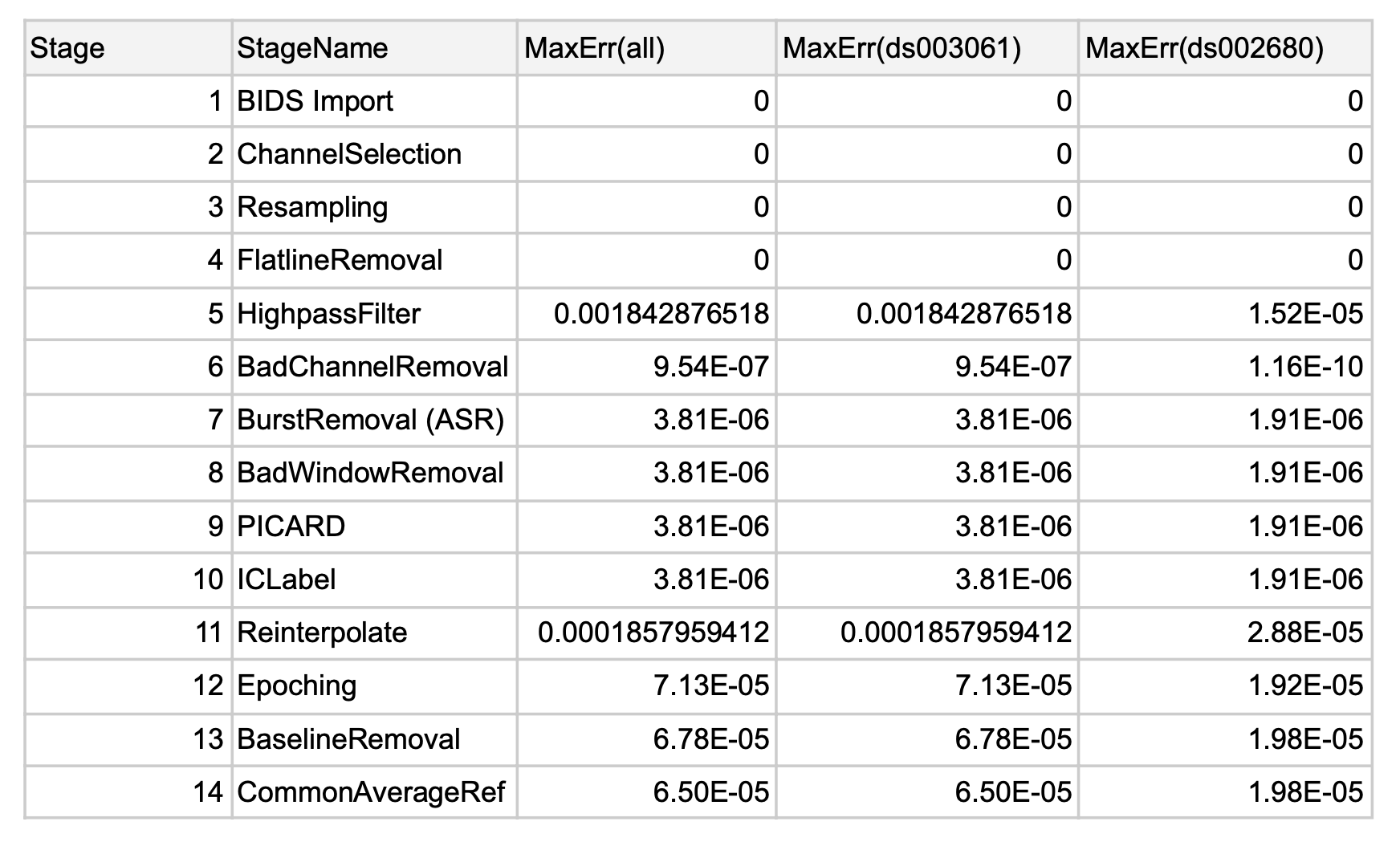
The MATLAB and Python implementations were compared using the first two subjects from the BIDS datasets ds003061 and ds002680 available on NEMAR. The observed differences were extremely small, with the largest (during HighpassFilter) below 0.002, indicating excellent numerical consistency between the two implementations.
versioning
- Change version inside the file pyproject.toml
- Change version inside the file main (for docker)
- Run make_release in the script folder and tag with the version
- Use the correct docker version when building (see below)
Docker (SCCN Power Users)
docker build -t eegprep:0.2.6 -f DOCKERFILE .
docker tag eegprep:0.2.6 arnodelorme/eegprep:0.2.6
docker push arnodelorme/eegprep:0.2.6
Check the project on https://hub.docker.com/
Mounted folder in /usr/src/project
PYPI Release Process (Maintainers Only)
Quick Release Workflow
Use the release script for streamlined releases:
python scripts/make_release.py
The script will:
- Check prerequisites (build, twine, git status)
- Confirm the version from
pyproject.toml - Let you choose: test release, production release, or both
- Build and upload the package (automatically uses
eegprep_testname for TestPyPI) - Create and push git tags for production releases
Note: The script automatically handles a TestPyPI naming conflict by building a package with the name
eegprep_testfor test releases.
Prerequisites
Install build tools:
pip install build twine
API Tokens
- Get API token for PyPI and TestPyPI (both maintainers should have these)
- Twine will prompt for them during upload
- Store them in
~/.pypircfor convenience
Manual Release Process
Recommended: Use scripts/make_release.py instead to avoid manual errors with package naming.
If you need to release manually:
1. Update version in pyproject.toml
2. Test release (staging):
Note: A former maintainer owns the
eegpreppackage name on TestPyPI, so you will not be able to post a package namedeegprepthere at this time. To work around this when performing the build manually (note themake_release.pyscript handles this for you), temporarily change the package name toeegprep_testinpyproject.tomlbefore building. Remember to change it back toeegprepafter uploading!
# In pyproject.toml, temporarily change: name = "eegprep" to name = "eegprep_test"
python -m build
python -m twine upload --repository testpypi dist/*
# Change name back to "eegprep" in pyproject.toml

# Test the installation:
pip install -i https://test.pypi.org/simple/ --extra-index-url https://pypi.org/simple/ eegprep_test==X.Y.Z
# (imports still work as 'import eegprep')
3. Production release:
python -m twine upload dist/*
git tag -a vX.Y.Z -m "Release version X.Y.Z"
git push origin vX.Y.Z
pip install eegprep==X.Y.Z
Documentation
https://packaging.python.org/en/latest/tutorials/packaging-projects/
Install Package
Packaging was done following the tutorial: https://packaging.python.org/en/latest/tutorials/packaging-projects/ with setuptools
To install the package with all optional dependencies, run:
pip install eegprep[all]
Running Tests
Install MATLAB interface pip install /your/path/to/matlab/extern/engines/python
Use tests/main_compare.m
This project uses unittest. You can run tests from the project root via the command:
python -m unittest discover -s tests
...or use the unittest integration in your IDE (e.g., PyCharm, VS Code, or Cursor).
Core maintainers
- Arnaud Delorme, UCSD, CA, USA
- Christian Kothe, Intheon, CA, USA
- Bruno Aristimunha Pinto, Inria, France
Release history Release notifications | RSS feed


Download files
Download the file for your platform. If you're not sure which to choose, learn more about installing packages.
Source Distribution
Built Distribution
Filter files by name, interpreter, ABI, and platform.
If you're not sure about the file name format, learn more about wheel file names.
Copy a direct link to the current filters
File details
Details for the file eegprep-0.2.8.tar.gz.
File metadata
- Download URL: eegprep-0.2.8.tar.gz
- Upload date:
- Size: 11.1 MB
- Tags: Source
- Uploaded using Trusted Publishing? No
- Uploaded via: twine/6.2.0 CPython/3.12.2
File hashes
| Algorithm | Hash digest | |
|---|---|---|
| SHA256 |
6d5edfb5ded6a13d0d55484a711843f3d470be06fa3e1a6dbcb2c7b0a518cf39
|
|
| MD5 |
c9e7f8646f1ed93a9705cb491e8d2f46
|
|
| BLAKE2b-256 |
b55adb79e4c404d9c81bd43215908e3734b55c9cd64f564ed3373d7b89c54a28
|
File details
Details for the file eegprep-0.2.8-py3-none-any.whl.
File metadata
- Download URL: eegprep-0.2.8-py3-none-any.whl
- Upload date:
- Size: 11.0 MB
- Tags: Python 3
- Uploaded using Trusted Publishing? No
- Uploaded via: twine/6.2.0 CPython/3.12.2
File hashes
| Algorithm | Hash digest | |
|---|---|---|
| SHA256 |
d2ea01ffb55c15646195dec74c35a4a131170e5bf89efaed5ebd39f913e9cc21
|
|
| MD5 |
f57c5cf05c3a1e0cf6d78e2235260ddf
|
|
| BLAKE2b-256 |
7ee2ba2c105fcbd7d82c249f0f9577dfd656dd0984a95d486c0ff5474a1dcab0
|






