
EfficientNet model re-implementation. Keras.

Project description
EfficientNet-Keras
This repository contains a Keras reimplementation of EfficientNet, a lightweight convolutional neural network architecture achieving the state-of-the-art accuracy with an order of magnitude fewer parameters and FLOPS, on both ImageNet and five other commonly used transfer learning datasets.
The codebase is heavily inspired by the TensorFlow implementation.
Table of Contents
About EfficientNet Models
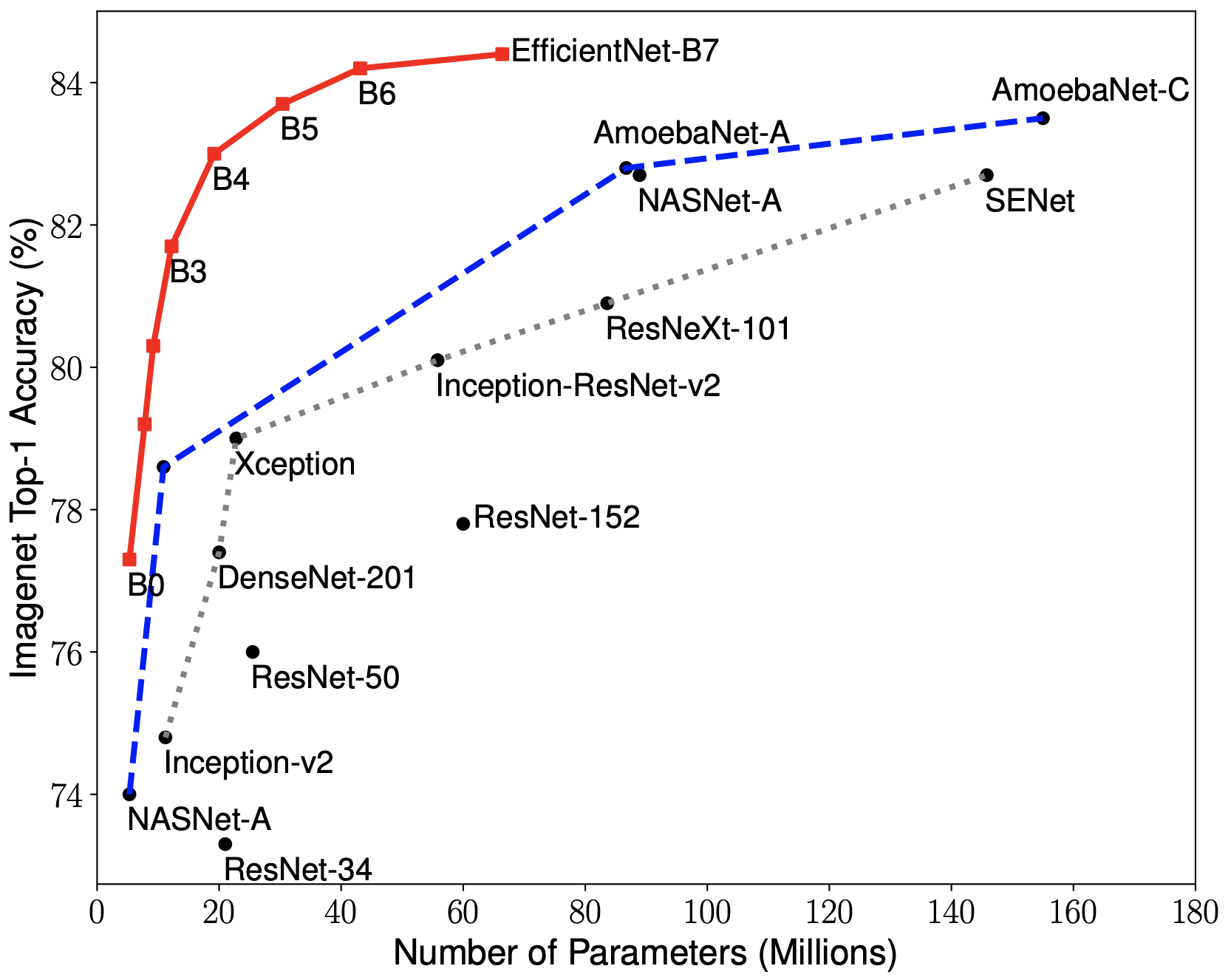
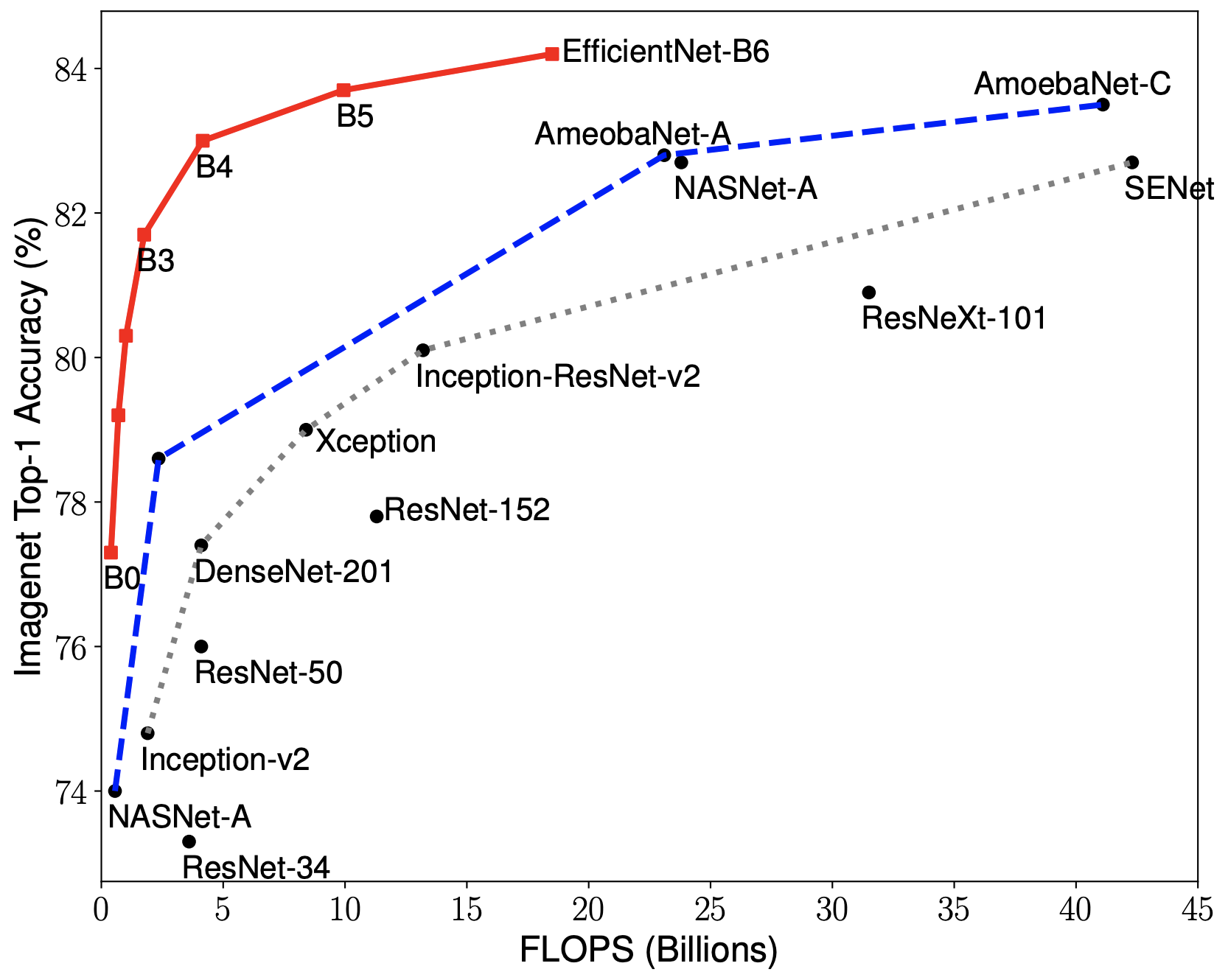
EfficientNets rely on AutoML and compound scaling to achieve superior performance without compromising resource efficiency. The AutoML Mobile framework has helped develop a mobile-size baseline network, EfficientNet-B0, which is then improved by the compound scaling method to obtain EfficientNet-B1 to B7.
|
|
EfficientNets achieve state-of-the-art accuracy on ImageNet with an order of magnitude better efficiency:
-
In high-accuracy regime, EfficientNet-B7 achieves the state-of-the-art 84.4% top-1 / 97.1% top-5 accuracy on ImageNet with 66M parameters and 37B FLOPS. At the same time, the model is 8.4x smaller and 6.1x faster on CPU inference than the former leader, Gpipe.
-
In middle-accuracy regime, EfficientNet-B1 is 7.6x smaller and 5.7x faster on CPU inference than ResNet-152, with similar ImageNet accuracy.
-
Compared to the widely used ResNet-50, EfficientNet-B4 improves the top-1 accuracy from 76.3% of ResNet-50 to 82.6% (+6.3%), under similar FLOPS constraints.
Examples
- Initializing the model:
from efficientnet import EfficientNetB0

model = EfficientNetB0(weights='imagenet')
- Loading the pre-trained weights:
from efficientnet import load_model

model = load_model('path/to/model.h5')
See the complete example of loading the model and making an inference in the Jupyter notebook here.
Models
The performance of each model variant using the pre-trained weights converted from checkpoints provided by the authors is as follows:
| Architecture | @top1* | @top5* | Weights |
|---|---|---|---|
| EfficientNetB0 | 0.7668 | 0.9312 | + |
| EfficientNetB1 | 0.7863 | 0.9418 | + |
| EfficientNetB2 | 0.7968 | 0.9475 | + |
| EfficientNetB3 | 0.8083 | 0.9531 | + |
| EfficientNetB4 | 0.8259 | 0.9612 | + |
| EfficientNetB5 | 0.8309 | 0.9646 | + |
| EfficientNetB6 | - | - | - |
| EfficientNetB7 | - | - | - |
* - topK accuracy score for converted models (imagenet val set)
Installation
Requirements
keras >= 2.2.0+tensorflowscikit-image
Installing from the source
pip install -U git+https://github.com/qubvel/efficientnet
Installing from PyPI
pip install -U efficientnet
Frequently Asked Questions
- How can I convert the original TensorFlow checkpoints to Keras HDF5?
Pick the target directory (like dist) and run the converter script from the repo directory as follows:
./scripts/convert_efficientnet.sh --target_dir dist
You can also optionally create the virtual environment with all the dependencies installed by adding --make_venv=true and operate in a self-destructing temporary location instead of the target directory by setting --tmp_working_dir=true.
- Why are B6 and B7 model variants not yet supported?
Weights for B6-B7 have not been made available yet, but might appear soon. Follow the issue for updates.
Release history Release notifications | RSS feed


Download files
Download the file for your platform. If you're not sure which to choose, learn more about installing packages.
Source Distribution
File details
Details for the file efficientnet-0.0.4.tar.gz.
File metadata
- Download URL: efficientnet-0.0.4.tar.gz
- Upload date:
- Size: 13.9 kB
- Tags: Source
- Uploaded using Trusted Publishing? No
- Uploaded via: twine/1.13.0 pkginfo/1.5.0.1 requests/2.22.0 setuptools/41.0.1 requests-toolbelt/0.9.1 tqdm/4.32.2 CPython/3.5.6
File hashes
| Algorithm | Hash digest | |
|---|---|---|
| SHA256 |
b5a74cb90531fac350efc728a434e727c9a174262201f0ec907c2296e4dd4321
|
|
| MD5 |
abc04c6d8974f8a07a987c557e41b45e
|
|
| BLAKE2b-256 |
a680f2c098284f7c07491e66af18d9a5fea595d4b507d10c0845275b8d47dc6f
|






