
Depot Simulation for eFLIPS
Project description


eflips-depot
Part of the eFLIPS/simBA list of projects.
eFLIPS has been developed within several research projects at the Department of Methods of Product Development and Mechatronics at the Technische Universität Berlin (see https://www.tu.berlin/mpm/forschung/projekte/eflips).
With eFLIPS, electric fleets and depots can be simulated, planned and designed. This repository contains only the planning and design tool for depots.
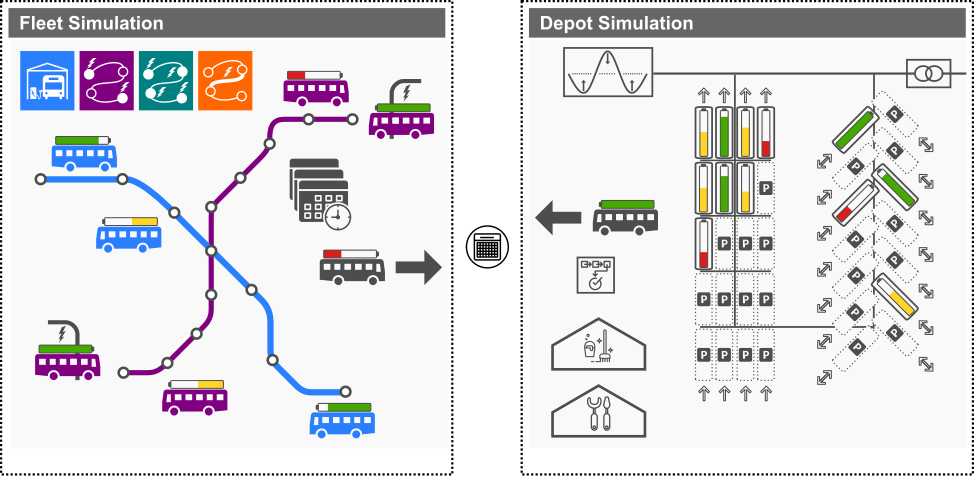
The repository contains an example for the simulation and planning of an elecric bus depot, which is based on the dissertation by Dr.-Ing. Enrico Lauth (see https://depositonce.tu-berlin.de/items/f47662f7-c9ae-4fbf-9e9c-bcd307b73aa7).
Installation
-
Clone this git repository (or download a specific release)
git clone git@github.com:mpm-tu-berlin/eflips-depot.git
-
Install the packages listed in
poetry.lockandpyproject.tomlinto your Python environment. Notes:- The suggested Python version os 3.11.*, it may work with other versions, but this is not tested.
- Using the poetry package manager is recommended. It can be installed accoring to the instructions listed here.
macOS
poetry env use 3.11
poetry install
Windows
If you are using Windows, you have to provide the full path to the desired Python executable, e.g.:
poetry env use C:\Users\user\AppData\Local\Programs\Python\Python311\python.exe
poetry install
-
To start a simulation, an existing eFLIPS-Model database is requires. Once you have that, you can run the script
bin/example.py
Usage
Please refer to the Documentation section of this Readme for information on how to use eFLIPS-Depot.
The API of eFLIPS-Depot can be accessed via eFLIPS.depot.api. A usage example can be found in the
script bus_depot/user_example.py.
Testing
NOTE: Be aware that the tests will clear the database specified in the DATABASE_URL environment variable. Make sure that you are not using a database that you want to keep.
Testing is done using the pytest framework with tests located in the testsdirectory. To run the tests, execute the following command in the root directory of the repository:
   export PYTHONPATH=tests:. # To make sure that the tests can find the eflips package
   export DATABASE_URL=postgis://postgres:postgres@localhost:5432/postgres # Or whatever your database URL is
   export DJANGO_SETTINGS_MODULE=tests.api.djangosettings # To make sure that the tests use the correct settings
   pytest
Documentation
Documentation is available on Read the Docs.
To locally create the documentaiton from the docstrings in the code using sphinx-autoapi, you can create the documentation execute the following command in the root directory of the repository:
   cd docs/
   sphinx-build -b html . _build
Development
We utilize the GitHub Flow branching structure. This means
that the main branch is always deployable and that all development happens in feature branches. The feature branches
are merged into main via pull requests.
We use black for code formatting. You can use pre-commit to ensure the code is formatted correctly before committing. You are also free to use other methods to format the code, but please ensure that the code is formatted correctly before committing.
Please make sure that your poetry.lock and pyproject.toml files are consistent before committing. You can use poetry check to check this. This is also checked by pre-commit.
License
This project is licensed under the AGPLv3 license - see the LICENSE file for details.
Funding Notice
This code was developed as part of the project eBus2030+ funded by the Federal German Ministry for Digital and Transport (BMDV) under grant number 03EMF0402.
Project details
Release history Release notifications | RSS feed


Download files
Download the file for your platform. If you're not sure which to choose, learn more about installing packages.
Source Distribution
Built Distribution
Filter files by name, interpreter, ABI, and platform.
If you're not sure about the file name format, learn more about wheel file names.
Copy a direct link to the current filters
File details
Details for the file eflips_depot-4.15.13.tar.gz.
File metadata
- Download URL: eflips_depot-4.15.13.tar.gz
- Upload date:
- Size: 216.9 kB
- Tags: Source
- Uploaded using Trusted Publishing? Yes
- Uploaded via: twine/6.1.0 CPython/3.13.7
File hashes
| Algorithm | Hash digest | |
|---|---|---|
| SHA256 |
182cb35cea7f758e13ff4f249538aab5c9efd647d3fec3f16ce0af6478715a59
|
|
| MD5 |
60ebf9b674cf2fe052329d0ad73eadb8
|
|
| BLAKE2b-256 |
fb418e8d92ef7cbf150d3a44a17f049967040b2d8ca1e32a393821c566a014d5
|
Provenance
The following attestation bundles were made for eflips_depot-4.15.13.tar.gz:
Publisher:
release.yml on mpm-tu-berlin/eflips-depot
-
Statement:
-
Statement type:
https://in-toto.io/Statement/v1 -
Predicate type:
https://docs.pypi.org/attestations/publish/v1 -
Subject name:
eflips_depot-4.15.13.tar.gz -
Subject digest:
182cb35cea7f758e13ff4f249538aab5c9efd647d3fec3f16ce0af6478715a59 - Sigstore transparency entry: 1096875770
- Sigstore integration time:
-
Permalink:
mpm-tu-berlin/eflips-depot@6c011795887b7443e6e5fae3ad572a30e068117b -
Branch / Tag:
refs/heads/main - Owner: https://github.com/mpm-tu-berlin
-
Access:
public
-
Token Issuer:
https://token.actions.githubusercontent.com -
Runner Environment:
github-hosted -
Publication workflow:
release.yml@6c011795887b7443e6e5fae3ad572a30e068117b -
Trigger Event:
push
-
Statement type:
File details
Details for the file eflips_depot-4.15.13-py3-none-any.whl.
File metadata
- Download URL: eflips_depot-4.15.13-py3-none-any.whl
- Upload date:
- Size: 231.8 kB
- Tags: Python 3
- Uploaded using Trusted Publishing? Yes
- Uploaded via: twine/6.1.0 CPython/3.13.7
File hashes
| Algorithm | Hash digest | |
|---|---|---|
| SHA256 |
c92908fe38b28d8d85dfb973ffda947645413d18dd5eeb25026f289b98d3a74a
|
|
| MD5 |
0a08d373b4c7caf6a6a005586ae8b5e0
|
|
| BLAKE2b-256 |
aae51d8c4b966f9703c594f05147d682fb57073778215d1d177b60d416270f85
|
Provenance
The following attestation bundles were made for eflips_depot-4.15.13-py3-none-any.whl:
Publisher:
release.yml on mpm-tu-berlin/eflips-depot
-
Statement:
-
Statement type:
https://in-toto.io/Statement/v1 -
Predicate type:
https://docs.pypi.org/attestations/publish/v1 -
Subject name:
eflips_depot-4.15.13-py3-none-any.whl -
Subject digest:
c92908fe38b28d8d85dfb973ffda947645413d18dd5eeb25026f289b98d3a74a - Sigstore transparency entry: 1096875775
- Sigstore integration time:
-
Permalink:
mpm-tu-berlin/eflips-depot@6c011795887b7443e6e5fae3ad572a30e068117b -
Branch / Tag:
refs/heads/main - Owner: https://github.com/mpm-tu-berlin
-
Access:
public
-
Token Issuer:
https://token.actions.githubusercontent.com -
Runner Environment:
github-hosted -
Publication workflow:
release.yml@6c011795887b7443e6e5fae3ad572a30e068117b -
Trigger Event:
push
-
Statement type:






