
egger
a python package to plot results from eggnog-mapper and calculate correlations
Description
egger can plot COG functional annotations from eggnog-mapper annotation files.
The repository for eggnog-mapper can be found, here.
It has two modes:
compare: compares the correlation of COG categories across several genomes.window: plots sliding window plots of COG category distribution across a genome.
See below for usage examples.
Installation
You can install egger with pip.
Either use the PyPI installation: pip install egger.
Or, clone this repository and install manually.
egger only requires Python dependencies, which should be installed automatically.
Usage and Example Output
As described above, egger has two modes:
compare
compare output
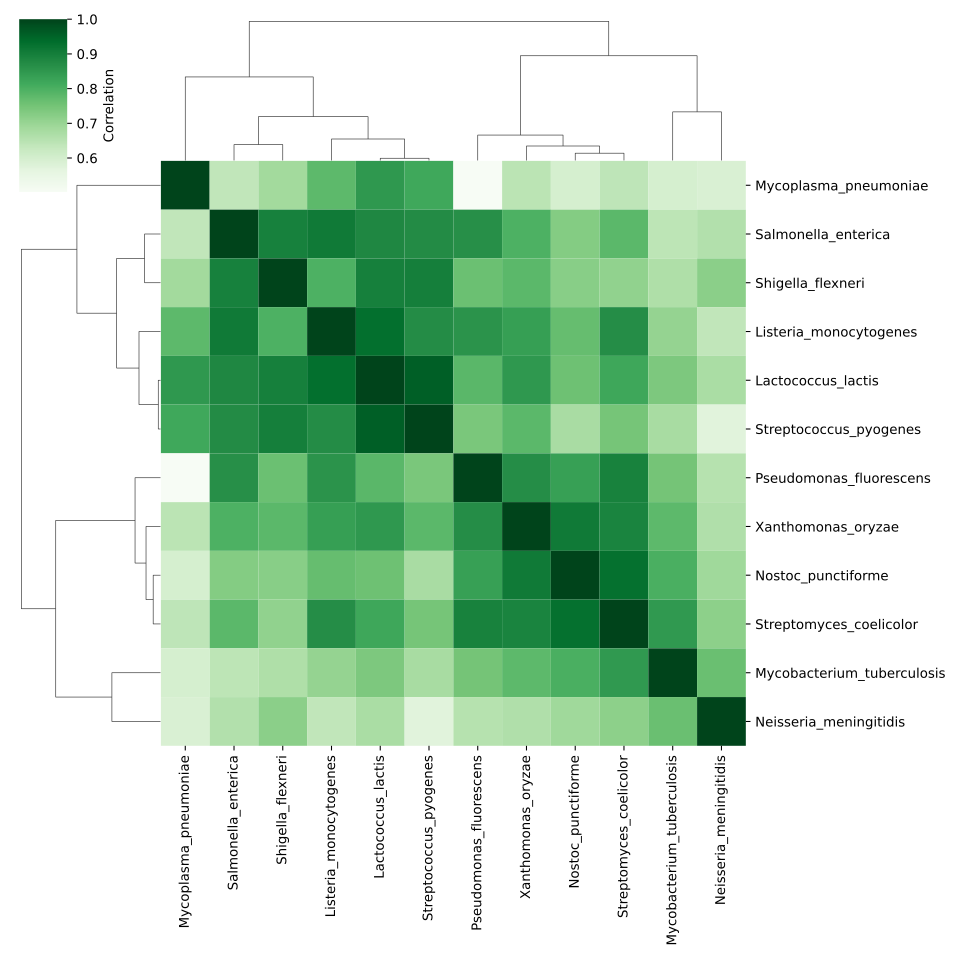
egger compare will calculate the correlation of COG category annotations across genomes and build a dendrogram-heatmap.
It will write this as .svg file along with the raw data in .tsv formats. It can perform Spearman's rank (-s) or Pearson's (-p) correlation.
It can also produce barcharts (-b). Use: egger compare -h for more information.
Here is an example using this repository's example_data/outputs/compare_outputs as the working directory:
$ egger compare -b barchart -s spearmans -p pearsons ../../inputs/annotations/*
compare output
These heatmaps can help identify relationships between genomes or other sequences.
window
window usage
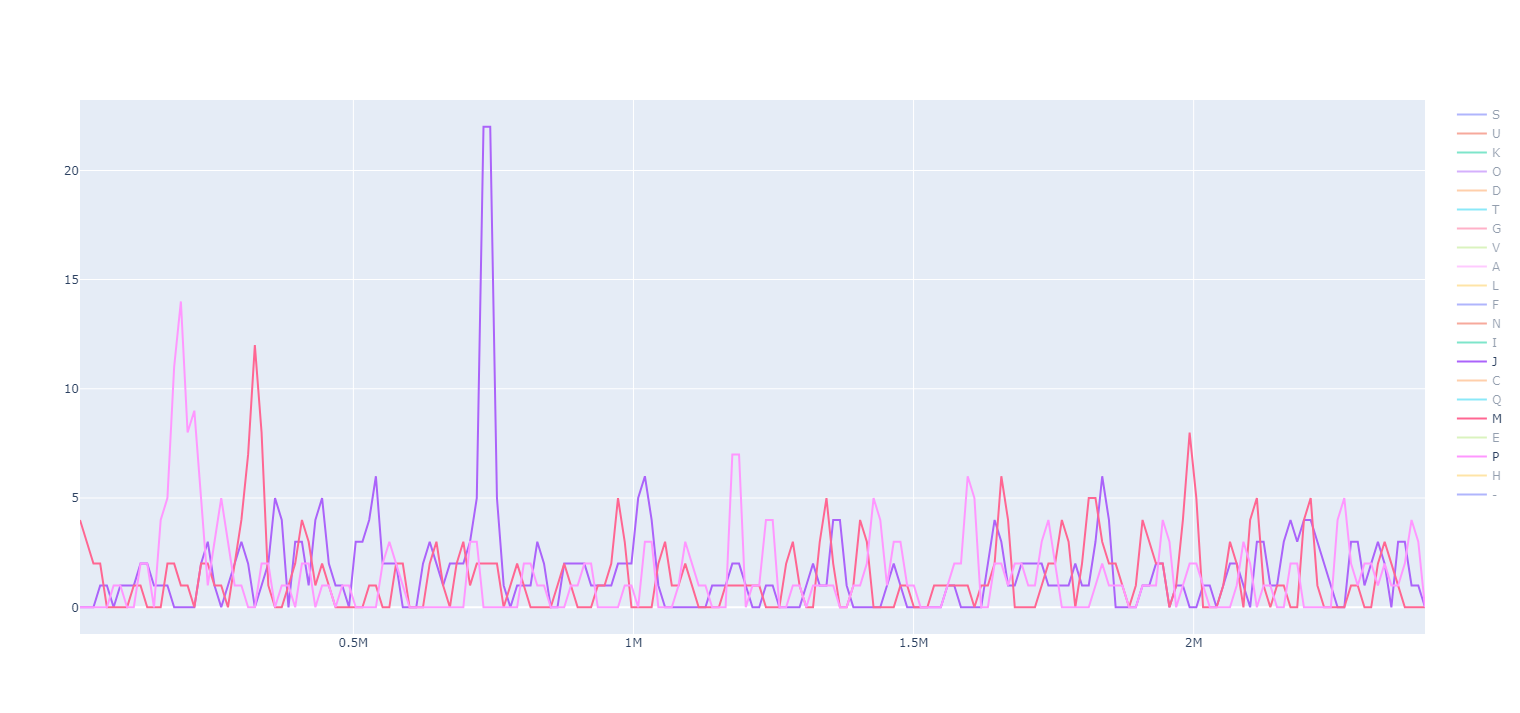
egger window will take eggnog-mapper annotations and plot them using a sliding window.
Please note, as eggnog-mapper annotations do not contain location data, the original genome used for the analysis is also required.
You will also need to define outputs with -swo or -swp. You can also modify the window and step size using. Use: egger window -h for more information.
Here is an example using this repository's example_data/outputs/window_outputs as the working directory:
egger window -a ../../inputs/annotations/Lactococcus_lactis.annotations -g ../../inputs/genomes/Lactococcus_lactis.gb -swo output_ -swp plot_
window output
This will produce two files:
-swowrites a .tsv file with the raw data used for plotting the sliding window.-swpwrites a .html file for an interactive plot of the sliding window data.
This analysis is particularly useful for finding regions of the genome that are dedicated to a specific function. In the example, Lactococcus lactis has three notable islands for the COG categories J, M and P (among others).
Citation
If you use egger, please cite:
Gomez-Escribano, J. P., Dorai-Raj, S., Baker, D., Lacey, E., Wilkinson, B. and Booth, T. J. Evidence supporting the first secondary chromosome in Actinobacteria as a hallmark of the Embleya genus. Microb Gen 12 (5): 001704 (2025). DOI: https://doi.org/10.1099/mgen.0.001704
Patch Notes
- v1.0.2
- Now writes values for barcharts to corresponding .csv files
- v1.0.1
- Updated parser text
- Upated input parsing to accept wildcards
- v1.0.0
- Initial version
1 maintainer

Release files for egger 1.0.2
For a detailed explanation of source distributions (sdists) and built distributions (wheels), please see the package formats documentation.
Source distribution (sdist)
| File | Size | Uploaded | |
|---|---|---|---|
| egger-1.0.2.tar.gz | 25.1 kB | Details |
Built distribution (wheel)
| File | Interpreter | ABI | Platform | Reset |
|---|---|---|---|---|
| egger-1.0.2-py3-none-any.whl | Python 3 | none | any | Details |
Total release size: 52.8 kB
Release files / egger-1.0.2.tar.gz
| Download URL | egger-1.0.2.tar.gz |
|---|---|
| Size | 25.1 kB |
| Tags | Source |
|
SHA-256 checksum How to use checksums |
f442ea5ee76c0f6fa54c113870b7a77f70182bc8b7b14050c1f0fa7b357cb86f
|
|
BLAKE2b-256 checksum How to use checksums |
fc5b5e50753b3fd8760360151d31edc6d64ef6b732c8a4b562dc3db9d44a7992
|
| Upload date | |
|
Uploaded using Trusted Publishing? What is trusted publishing? |
No |
| Uploaded via |
twine/6.2.0 CPython/3.14.4
|
Release files / egger-1.0.2-py3-none-any.whl
| Download URL | egger-1.0.2-py3-none-any.whl |
|---|---|
| Size | 27.7 kB |
| Tags | Python 3 |
|
SHA-256 checksum How to use checksums |
7572a9b6e2860ca2a115a605331c977881ac2f99d7b0de1fc0a1f08080398db6
|
|
BLAKE2b-256 checksum How to use checksums |
1ad7649097b1b7d89afff1a6a5d0c8037975f014075a2b0fd1577dbe4d12981c
|
| Upload date | |
|
Uploaded using Trusted Publishing? What is trusted publishing? |
No |
| Uploaded via |
twine/6.2.0 CPython/3.14.4
|














