
a10y
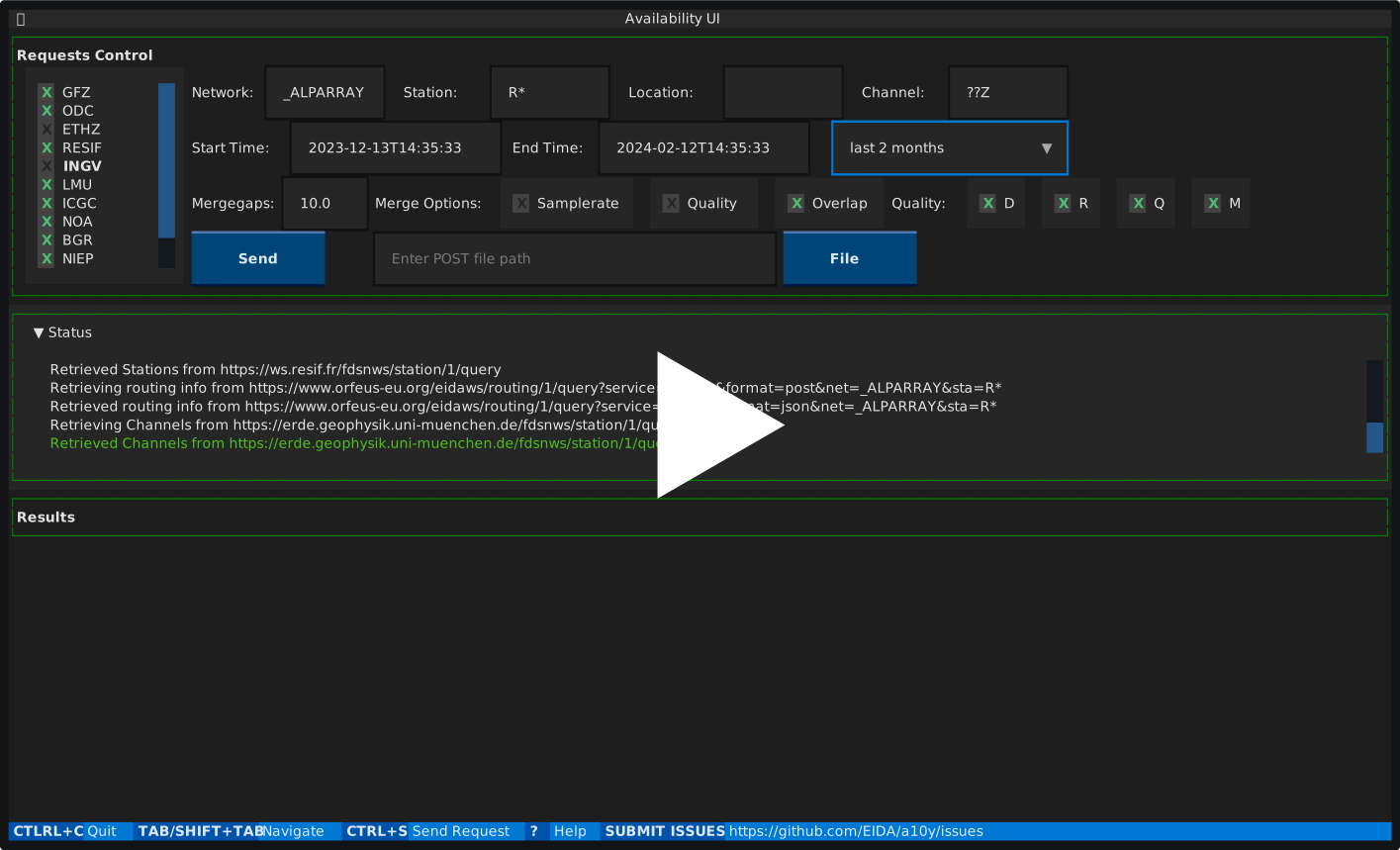
The current repository hosts a user interface terminal application for the Availability webservice.
The application is mainly built using textual library for making terminal applications.
Demo video
Installation
Using uv from PyPI
If uv is not already installed, you can follow those instructions.
Install EIDA a10y using uv
uvx eida-a10y
Run the application
eida-a10y
Using uv from the sources
Then follow those commands:
git clone https://github.com/EIDA/a10y.git
cd a10y
uv sync
uv run src/main.py
Docker container
git clone https://github.com/EIDA/a10y.git
cd a10y
buildah bud -t a10y
podman run -it a10y
In a python virtual environment
Clone the sources, create a virtual environment, install dependencies and run as a python script:
git clone https://github.com/EIDA/a10y.git
cd a10y
python -m venv venv
source venv/bin/activate
python -m pip install -r requirements.txt
python a10y.py
With conda
Supposing you have anaconda or miniconda installed in your system, follow the steps below.
Clone the sources, create a conda environment, install dependencies and run as a python script:
git clone https://github.com/EIDA/a10y.git
cd a10y
conda create --name a10yEnv python=3.8
conda activate a10yEnv
python -m pip install -r requirements.txt
python a10y.py
With pyinstaller
This method is intended to provide a portable standalone executable for the application.
The executable can be created on every system using pyinstaller.
It has been tested in an Ubuntu machine with pyinstaller version 6.3.0.
After having created a python or conda environment, activated it and installed dependencies as shown above, install pyinstaller and execute it as below:
python -m pip install pyinstaller
pyinstaller --onefile --add-data "a10y.css:." a10y.py
This will create:
- an
a10y.specfile - a
buildfolder - a
distfolder
Into dist folder you can find the final executable. By executing through terminal, as every other executable in your system, it opens the application:
cd dist
./a10y
The final executable can be redistributed and be used as a standalone executable to any system with similar operating system as the one in which it was created.
Options
The application can be executed with the following options:
-p or --postfollowed by path that points to a file to start the application using that file for making POST requests to availability webservice-c or --configfollowed by path that points to a configuration file to start the application using specific default values for requests
Configuration
A config.toml file with some default values for the parameters of the requests can be provided, so that the application starts with them as selected.
With the configuration file, you can set your default values for starttime, endtime, quality, mergegaps or merge policy.
The application looks for the configuration file in this order:
- with the
-cor--configcommand line option - in the
$XDG_CONFIG_DIR/a10ydirectory - in the directory of the application script
Customizing the layout
All the layout colors are described in a CSS file a10y.css that can be customized. This is not possible at the moment with the binary release, which embeds the CSS file.
1 maintainer

Metadata
1 maintainer
Release files for eida-a10y 1.0.6
For a detailed explanation of source distributions (sdists) and built distributions (wheels), please see the package formats documentation.
Source distribution (sdist)
| File | Size | Uploaded | |
|---|---|---|---|
| eida_a10y-1.0.6.tar.gz | 43.7 kB | Details |
Built distribution (wheel)
| File | Interpreter | ABI | Platform | Reset |
|---|---|---|---|---|
| eida_a10y-1.0.6-py3-none-any.whl | Python 3 | none | any | Details |
Total release size: 85.4 kB
Release files / eida_a10y-1.0.6.tar.gz
| Download URL | eida_a10y-1.0.6.tar.gz |
|---|---|
| Size | 43.7 kB |
| Tags | Source |
|
SHA-256 checksum How to use checksums |
e17f743ecdfdc790ee651950f48a0090842aa83eaa6f2a793b90c231bf63da0d
|
|
BLAKE2b-256 checksum How to use checksums |
7b5b09e3cf6984bc3535a718d97d7eab20bb47c0c9b9180176a9caffc0caeeae
|
| Upload date | |
|
Uploaded using Trusted Publishing? What is trusted publishing? |
Yes |
| Uploaded via |
twine/6.1.0 CPython/3.12.8
|
Provenance
Provenance describes where a file came from. On PyPI, provenance is shared via attestations, which provide a verifiable record of the build or publishing details. View details, limitations and caveats.


PyPI Publish Attestation
PyPI verified that this artifact, at this checksum, originated from the publisher listed below.
Signed by GitHub Actions, verified by PyPI on Mar 19, 2025.
Transparency logRelease files / eida_a10y-1.0.6-py3-none-any.whl
| Download URL | eida_a10y-1.0.6-py3-none-any.whl |
|---|---|
| Size | 41.6 kB |
| Tags | Python 3 |
|
SHA-256 checksum How to use checksums |
e089d86df3eb803b39efb5251b2f3ca417ee51f80d104c9ba9b2e8f9712e9725
|
|
BLAKE2b-256 checksum How to use checksums |
3bcde3aee592c0796508fab1dc7dbf4d7b810db550dc0ab5072c25989fc0d97f
|
| Upload date | |
|
Uploaded using Trusted Publishing? What is trusted publishing? |
Yes |
| Uploaded via |
twine/6.1.0 CPython/3.12.8
|
Provenance
Provenance describes where a file came from. On PyPI, provenance is shared via attestations, which provide a verifiable record of the build or publishing details. View details, limitations and caveats.
PyPI Publish Attestation
PyPI verified that this artifact, at this checksum, originated from the publisher listed below.
Signed by GitHub Actions, verified by PyPI on Mar 19, 2025.
Transparency log













