

Introduction
Product managers, business analysts, operations managers, and other non-technical personas often need to analyze data or complete repetitive tasks in the context of a business process.
This is often done in spreadsheets in a way that is not scalable or robust. To overcome challenges found in spreadsheets, many have learned basic coding.
But for these "semi-technical" users, the cognitive overhead of remembering code syntax is often too high, hampering their productivity.
Eigendata empowers "semi-technical" users with a Python low-code tool that makes manipulating data as easy as spreadsheets, without any of the limitations.
- You can easily do a quick and dirty analysis without having to deal with the overhead of remembering basic python syntax
- If you need to automate the process, you can leverage the underlying code generated using the tool to turn the transformations into a repeatable process.
- If the process needs to be "productionized" by an engineering they can start from a code-base based on standard python packages
Eigendata JupyerLab Extension
Eigendata renders a low-code interface below cells in a JupyterLab Notebook, providing fast access to common data transformations without needing to remember the syntax or the exact name of the method.
Open a JupyerLab notebook, and you will see
Besides these improvements, Eigendata provides options to simplify the JupyterLab experience for new users:
- Intuitive shortcuts for the sidebars
⌘ /⌘ \ - When you close a tab, the kernel is shut down
All of these configurations can also be disabled through the advanced settings ⌘ ,
Install
You can try a free cloud instance here or install with pip
pip install eigendata
Eigendata Core: Framework for declarative GUIs
Eigendata is built on top of an extensible framework to render Python methods as GUIs.
To use your own custom transformations:
- You can add the JSON code to user transformations in the settings of the eigendata extension.
- If you want to share transformations across a team (e.g. common features), you can also provide a transformation sever URL that serves a file with the transformations. This can be set up with the
transformationServerandtransformationAuthin eigendata settings.
You can learn more about the transformation UI spec and how to create your own transformations in our transformation documentation.
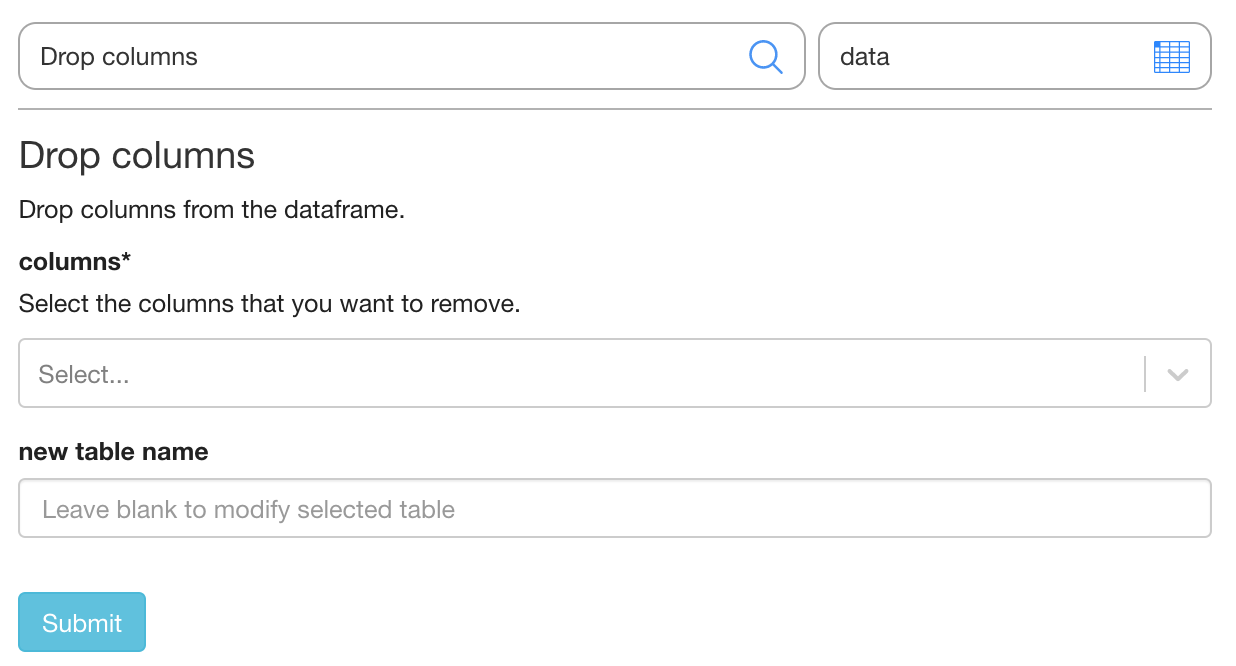
Example transformation UI from a JSON definition:
"pandas.DataFrame.drop" : {
  "form" : {
        "required" : [
          "columns"
        ],
        "definitions" : {
          "columns" : {
            "type" : "array",
            "uniqueItems" : true,
            "items" : {
              "type" : "string",
              "enum" : []
            }
          }
        },
        "properties" : {
          "columns" : {
            "$ref" : "#/definitions/columns",
            "description" : "Select the columns that you want to remove."
          }
        },
        "title" : "Drop columns",
        "description" : "Drop columns from the dataframe.",
        "type" : "object",
        "callerObject" : "DataFrame",
    		"returnType" : "DataFrame",
        "function" : "drop"
      }
}
And the UI rendered based on this definition:
Requirements
- JupyterLab >= 3.0
- Pandas, Numpy, Fastdata (our own library with pandas utilities)
Uninstall
pip uninstall eigendata
1 maintainer

Download files
Download the file for your platform. If you're not sure which to choose, learn more about installing packages.
Source Distribution
Built Distribution
Filter files by name, interpreter, ABI, and platform.
If you're not sure about the file name format, learn more about wheel file names.
Copy a direct link to the current filters
File details
Details for the file eigendata-0.3.9.tar.gz.
File metadata
- Download URL: eigendata-0.3.9.tar.gz
- Upload date:
- Size: 735.7 kB
- Tags: Source
- Uploaded using Trusted Publishing? No
- Uploaded via: twine/4.0.2 CPython/3.11.0
File hashes
| Algorithm | Hash digest | |
|---|---|---|
| SHA256 |
07cbdea7ad81bd03a9c38ae4f042ea32564fbc24b94d4040add959caa54a2a29
|
|
| MD5 |
195da5c1ebeb46ce081c84c05988a679
|
|
| BLAKE2b-256 |
3a92dc2f986259c8bebdc53c0734a89d3449573166610bc34eeaad1298df30bf
|
File details
Details for the file eigendata-0.3.9-py3-none-any.whl.
File metadata
- Download URL: eigendata-0.3.9-py3-none-any.whl
- Upload date:
- Size: 1.1 MB
- Tags: Python 3
- Uploaded using Trusted Publishing? No
- Uploaded via: twine/4.0.2 CPython/3.11.0
File hashes
| Algorithm | Hash digest | |
|---|---|---|
| SHA256 |
e5daf8904be5969e927ed3b93748c506121334c9b26b7be9d60b400c5a2621ca
|
|
| MD5 |
dd5cc405f82a5cffc3abd853f7316488
|
|
| BLAKE2b-256 |
7134a49bb0e04a8967afaf1875833f5a896dbb6dfef27611070415558234b22d
|







