
Eiko: the GPU-accelerated Eikonal equation solver
Verified details
These details have been verified by PyPIProject links
GitHub Statistics
Maintainers

Project description




Eiko is a GPU-accelerated Eikonal equation solver, enabling fast computation of the shortest time-of-flight through an arbitrary 2D or 3D medium.
Eiko takes a sound-speed map and initial time-of-flight values at a few points and returns the full time-of-flight map.
time_of_flight = eiko(initial_delays, slowness_map)

For example, if the initial delays describe a plane-wave:
Why use Eiko?
A few reasons to use Eiko:
- Eiko is fast - up to 100x faster than comparable libraries.
- Eiko is differentiable, allowing it to be used with PyTorch or JAX.
- Eiko supports advection, allowing it to compute apodizations through a lens.
Eiko also supports batch processing, allowing many time-of-flight maps to be computed efficiently in parallel.
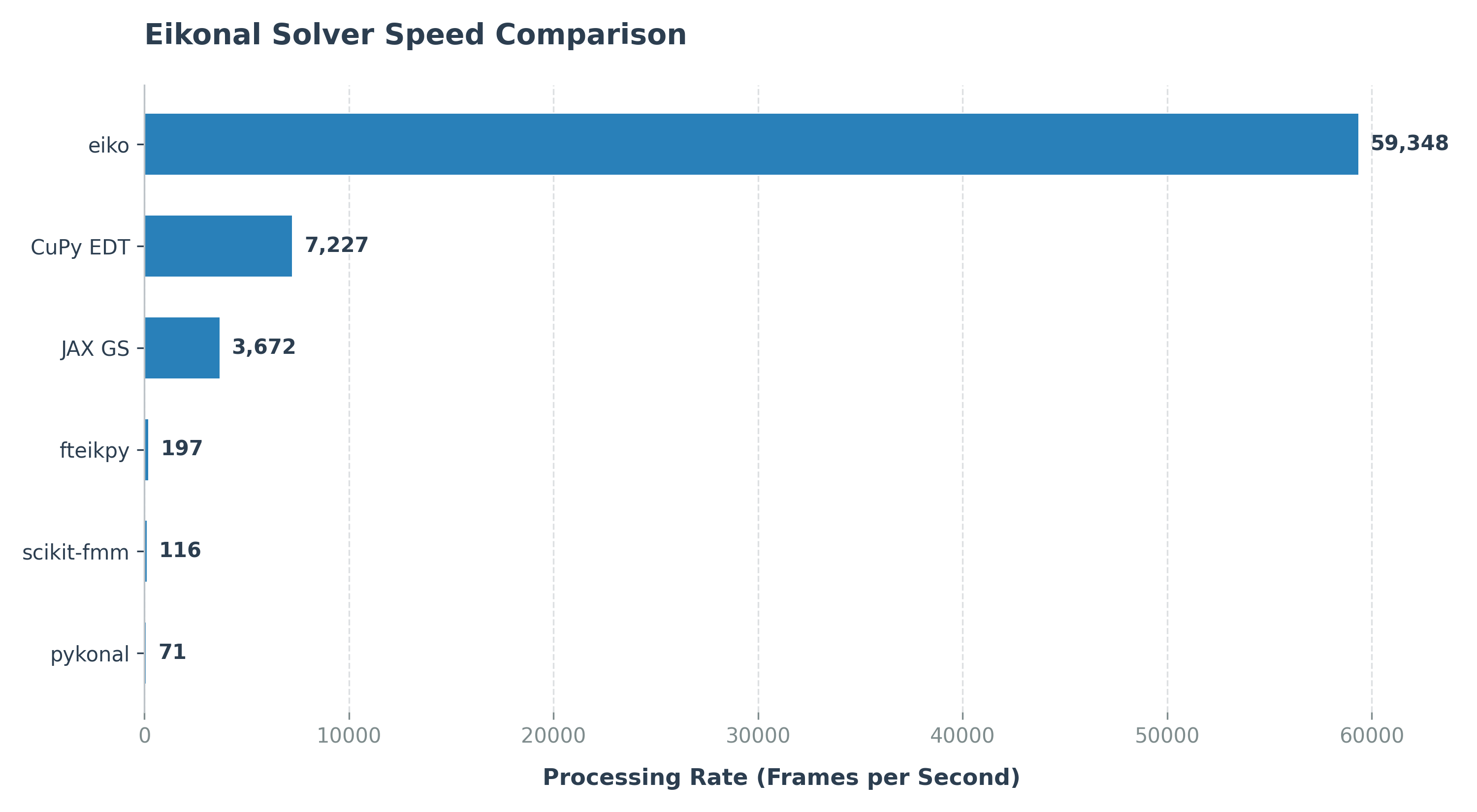
To learn more about how Eiko works, see THEORY.
Installation
This section describes how to install Eiko for MATLAB or Python.
Requirements
Because Eiko compiles custom CUDA kernels during installation, your system must have the following:
- OS: Windows or Linux
- Hardware: A NVIDIA GPU
- Compiler:
- A C++ compiler (e.g., MSVC for Windows, GCC for Linux)
- The CUDA Toolkit (provides
nvcc)
If you don't own a GPU, you can run Eiko for Python from Google Colab with zero installation here.
Installing for MATLAB
Run setup.m to install Eiko in MATLAB.
See also the Eiko MATLAB installation guide.
Installing for Python
Run the following command to install Eiko for Python.
pip install eiko
See also the Eiko Python installation guide.
Quick Start
An example of how to use Eiko is shown below.
MATLAB Example (Click to expand)
% 1. Setup grid parameters.
N = 101;            % Number of grid points (NxN grid)
dx = 0.001;         % Grid spacing in meters (1 mm, for example)
c = 1540;           % Speed of sound in m/s (uniform medium)

% 2. Create the slowness map (1/velocity).
f = ones(N, N, 'single', 'gpuArray') / c;

% 3. Initialize the time-of-flight field.
u_init = inf(N, N, 'single', 'gpuArray'); % Unknown points set to infinity.

% Set a point source at the center of the grid to time = 0.
center_idx = ceil(N/2);
u_init(center_idx, center_idx) = 0;

% 4. Compute the numerical solution using eiko.
u = eiko(u_init, f, dx);

% 5. Visualize the result.
% Create physical coordinate axes in millimeters using dx
axis_mm = ((1:N) - center_idx) * dx * 1000;

% Set up plot.
figure;
imagesc(axis_mm, axis_mm, u * 1e6);
axis image;

% Format axes and text size.
title('Time-of-Flight', 'FontSize', 14, 'FontWeight', 'bold');
xlabel('x (mm)', 'FontSize', 12, 'FontWeight', 'bold');
ylabel('y (mm)', 'FontSize', 12, 'FontWeight', 'bold');

% Format colorbar.
cb = colorbar;
cb.Label.String = 'Time (\mus)';
cb.Label.FontSize = 12;
The result should look something like this:
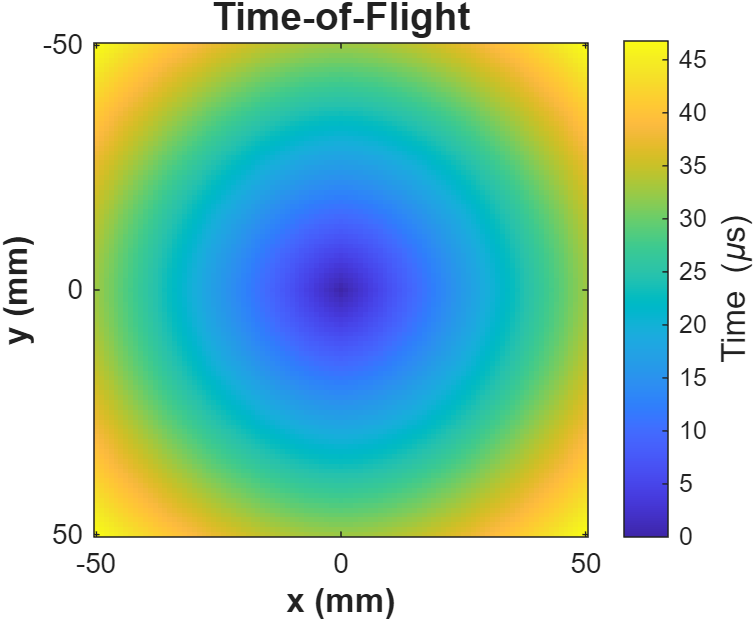
For 3D inputs, use eiko3d.
Python Example (Click to expand)
from eiko import eiko

# 1. Setup device and grid parameters.
device = torch.device("cuda")
N = 101
dx = 0.001  # Grid spacing in meters (1 mm)
c = 1540.0  # Speed of sound in m/s (uniform medium)

# 2. Create the slowness map (1/velocity) on the device.
f = torch.full((N, N), 1.0 / c, dtype=torch.float32, device=device)

# 3. Initialize the time-of-flight field.
# Unknown points are set to infinity
u_init = torch.full((N, N), float('inf'), dtype=torch.float32, device=device)

# Set a point source at the center of the grid to time = 0.
center_idx = N // 2
u_init[center_idx, center_idx] = 0.0

# 4. Compute the numerical solution.
u = eiko(u_init, f, dx=dx)

# 5. Visualize the result.
import matplotlib.pyplot as plt
import torch

# Create physical coordinate axes in millimeters using dx
axis_mm = (torch.arange(N) - center_idx) * dx * 1000

# Set up plot (equivalent to 'figure')
plt.figure(figsize=(6, 6))

# 'imagesc' equivalent with physical extents.
# 'extent' maps the data coordinates to the axes.
extent = [axis_mm[0], axis_mm[-1], axis_mm[0], axis_mm[-1]]
plt.imshow(u.cpu() * 1e6, extent=extent, origin='lower', cmap='viridis')

# 'axis image' equivalent (forces equal pixel aspect ratio)
plt.gca().set_aspect('equal', adjustable='box')

# Format axes and text size
plt.title('Time-of-Flight', fontsize=14, fontweight='bold')
plt.xlabel('x (mm)', fontsize=12, fontweight='bold')
plt.ylabel('y (mm)', fontsize=12, fontweight='bold')

# Format colorbar
cb = plt.colorbar()
cb.set_label(r'Time ($\mu$s)', fontsize=12)

# Display the plot
plt.show()
The result should look something like this:
For 3D inputs, use from eiko import eiko3d.
See EXAMPLES for many more examples.
Project Layout
The files are as follows:
Eiko/
├── examples/       # Example scripts (tomography, lens design, etc.).
│   ├── matlab/     #   MATLAB example scripts
│   └── python/     #   Python example scripts
├── matlab/         # MATLAB Eiko library
├── python/         # Python Eiko library
├── src/            # Core CUDA C++ Eiko implementation and interface
├── images/         # Various image assets
├── pyproject.toml  # Python package configuration (for pip install)
├── setup.m         # MATLAB compilation and setup script
├── THEORY.md       # Mathematical background and Eikonal algorithm details
└── README.md       # This file
Contributing
Feel free to contribute to the project. Bug reports and feature requests may be submitted on the "Issues" page.
Citing
You can cite Eiko as
@misc{eiko2026,
  author       = {Pr{\ae}sius, Sebastian Kazmarek},
  title        = {Eiko: the {GPU}-accelerated {E}ikonal equation solver},
  year         = {2026},
  publisher    = {GitHub},
  howpublished = {\url{https://github.com/sebftw/Eiko}},
  note         = {GitHub repository}
}
Trademarks
This project is an independent open-source software project and is not affiliated with, endorsed by, or sponsored by any of the companies mentioned.
- MATLAB is a registered trademark of The MathWorks, Inc.
- NVIDIA and CUDA are registered trademarks of NVIDIA Corporation.
- PyTorch is a trademark of the Linux Foundation.
- Ubuntu is a registered trademark of Canonical Ltd.
- Windows is a registered trademark of Microsoft Corporation.
All other trademarks, service marks, and company names are the property of their respective owners.
Project details
Verified details
These details have been verified by PyPIProject links
GitHub Statistics
Maintainers


Download files
Download the file for your platform. If you're not sure which to choose, learn more about installing packages.
Source Distributions
Built Distribution
Filter files by name, interpreter, ABI, and platform.
If you're not sure about the file name format, learn more about wheel file names.
Copy a direct link to the current filters
File details
Details for the file eiko-0.8.5-py3-none-any.whl.
File metadata
- Download URL: eiko-0.8.5-py3-none-any.whl
- Upload date:
- Size: 59.6 kB
- Tags: Python 3
- Uploaded using Trusted Publishing? Yes
- Uploaded via: twine/6.1.0 CPython/3.13.12
File hashes
| Algorithm | Hash digest | |
|---|---|---|
| SHA256 |
d40a31f7b7a74bb80c77a47ad272776d2854936cc4cf5eeb35178009bc1cc243
|
|
| MD5 |
16f7c397e1b59a8e3b453d09f41b5dea
|
|
| BLAKE2b-256 |
7d50d034752a6d0cee89826a7575a5e1a043245dc51e8cc90bf7ab6667a55a67
|
Provenance
The following attestation bundles were made for eiko-0.8.5-py3-none-any.whl:
Publisher:
publish.yml on sebftw/Eiko
-
Statement:
-
Statement type:
https://in-toto.io/Statement/v1 -
Predicate type:
https://docs.pypi.org/attestations/publish/v1 -
Subject name:
eiko-0.8.5-py3-none-any.whl -
Subject digest:
d40a31f7b7a74bb80c77a47ad272776d2854936cc4cf5eeb35178009bc1cc243 - Sigstore transparency entry: 1915277238
- Sigstore integration time:
-
Permalink:
sebftw/Eiko@3f3fee60c769130d7fa66bb2ef9961740f82fa1d -
Branch / Tag:
refs/heads/main - Owner: https://github.com/sebftw
-
Access:
public
-
Token Issuer:
https://token.actions.githubusercontent.com -
Runner Environment:
github-hosted -
Publication workflow:
publish.yml@3f3fee60c769130d7fa66bb2ef9961740f82fa1d -
Trigger Event:
workflow_run
-
Statement type:






