
Interact with the bionyx third party API of the ekey biometric systems.

Project description
API for the ekey bionyx system - Python



Overview
The ekey_bionyxpy library can be used to interact with the API of the ekey bionyx biometric systems. All the current functions of the API are mapped. The library is written to completely take advantage of async code in Python.
Features
- Get all systems attached to the user
- Get all webhooks added by the integration
- Add new webhooks
- Update existing webhooks
Enabling the API
The system must be setup in the online mode. In your app please enable the API by following the picture
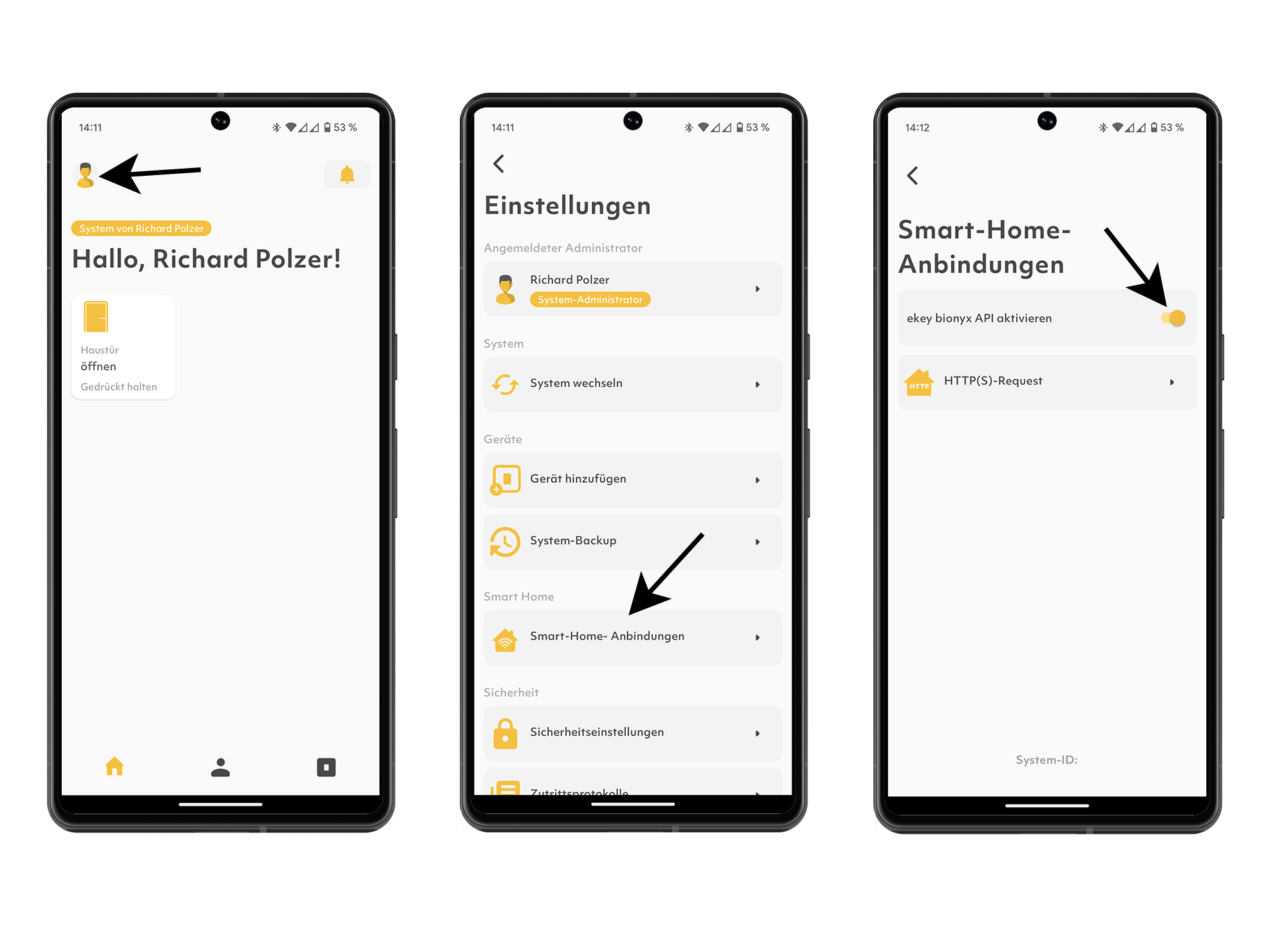
After the API is enabled you can use the library by first implementing AbstractAuth with your custom token handling.
In the example a token manager is used. You can however use any mechanism you like to retieve an access token.
from ekey_bionyxpy import AbstractAuth

class Auth(AbstractAuth):
    def __init__(self, websession: ClientSession, host: str, token_manager):
        """Initialize the auth."""
        super().__init__(websession, host)
        self.token_manager = token_manager

    async def async_get_access_token(self) -> str:
        """Return a valid access token."""
        if self.token_manager.is_token_valid():
            return self.token_manager.access_token

        await self.token_manager.fetch_access_token()
        await self.token_manager.save_access_token()

        return self.token_manager.access_token
Once the Authentication is dealt with you can use the lib like so:
async def main() -> None:
    async with aiohttp.ClientSession() as session:
        # Aquire token manager here
        auth = Auth(
            session,
            "https://api.bionyx.io/3rd-party/api",
            token_manager,
        )
        api = BionyxAPI(auth)
        systems = await api.get_systems()
        webhooks = await systems[0].get_webhooks()


asyncio.run(main())


Download files
Download the file for your platform. If you're not sure which to choose, learn more about installing packages.
Source Distribution
Built Distribution
Filter files by name, interpreter, ABI, and platform.
If you're not sure about the file name format, learn more about wheel file names.
Copy a direct link to the current filters
File details
Details for the file ekey_bionyxpy-1.0.0.tar.gz.
File metadata
- Download URL: ekey_bionyxpy-1.0.0.tar.gz
- Upload date:
- Size: 8.0 kB
- Tags: Source
- Uploaded using Trusted Publishing? No
- Uploaded via: twine/5.1.1 CPython/3.9.20
File hashes
| Algorithm | Hash digest | |
|---|---|---|
| SHA256 |
27a9c52f1eac3901c28015c5748ead5b5e0dced1ca5cd517a10dfaa48209b677
|
|
| MD5 |
d34a7a34e650a64a8ea5d1be8619e2dd
|
|
| BLAKE2b-256 |
f72436b3f37df32f29db90a39caf76a84693669084b9de472a6a82ea4373079a
|
File details
Details for the file ekey_bionyxpy-1.0.0-py3-none-any.whl.
File metadata
- Download URL: ekey_bionyxpy-1.0.0-py3-none-any.whl
- Upload date:
- Size: 6.3 kB
- Tags: Python 3
- Uploaded using Trusted Publishing? No
- Uploaded via: twine/5.1.1 CPython/3.9.20
File hashes
| Algorithm | Hash digest | |
|---|---|---|
| SHA256 |
29c42eefbfedbb764c2d17e7c4e26a98fcf7b2145476a4350bcb23a90f438056
|
|
| MD5 |
2585bddce058e5a34a0f8a965d0e4b99
|
|
| BLAKE2b-256 |
b40cb22b73dcbc74aad98f1a7114404900fda26f04289b07707caeb5a6663ceb
|






