
Turn Elasticsearch into a smart search engine in 5 minutes with ZeroEntropy's LLM-powered reranking.

Project description
🔁 ZeroEntropy Reranker for Elasticsearch
Boost your Elasticsearch results with LLM reranking in 5 minutes.
This open-source tool adds a smart reranking layer to your existing Elastic queries using ZeroEntropy's API.
🧠 Built for developers who want great search results without rebuilding their stack.







🖥️ Demo UI Preview
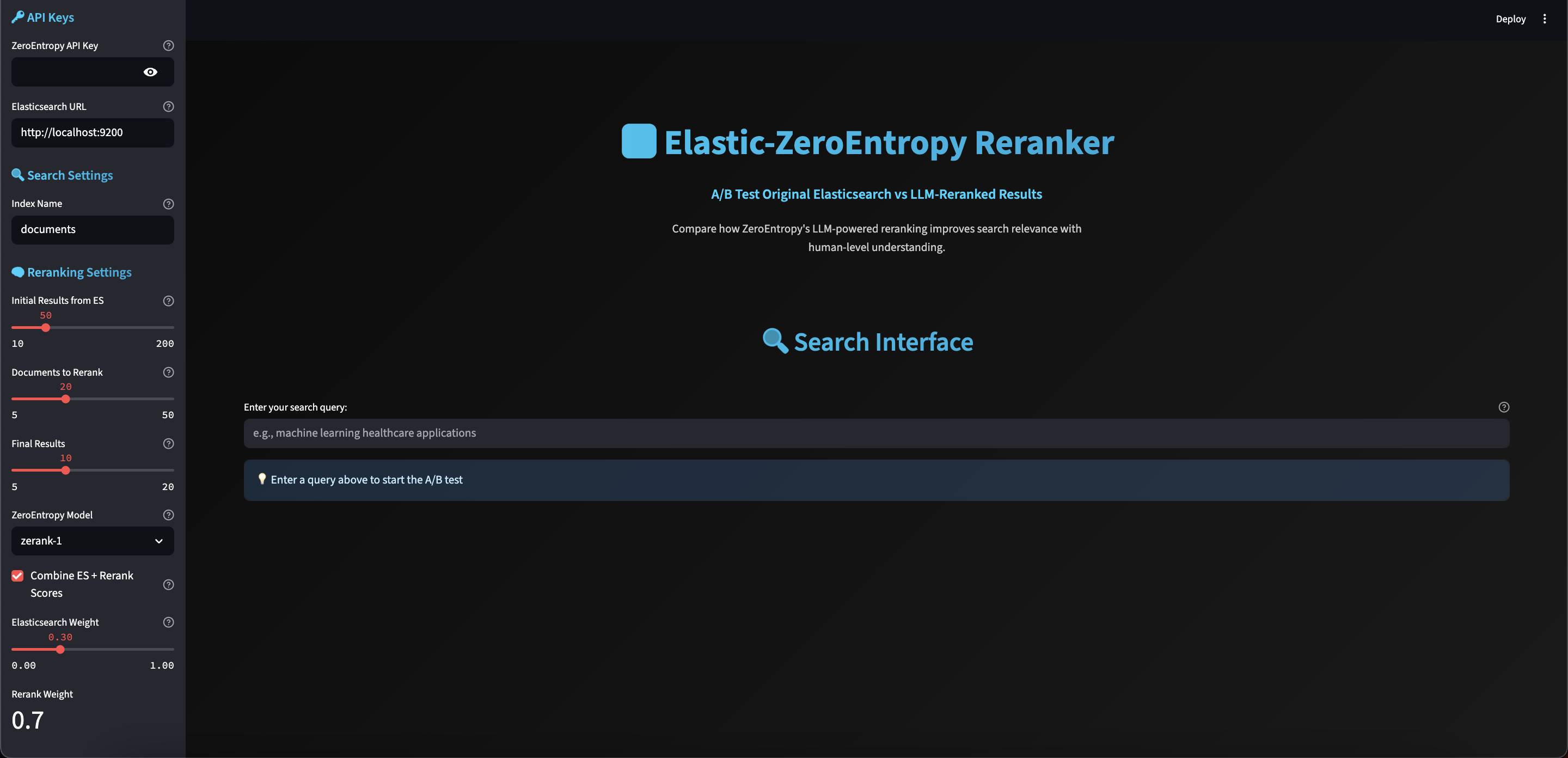
Interactive A/B testing interface comparing original Elasticsearch results with ZeroEntropy LLM-reranked results
🎯 The Problem
Most Elasticsearch users struggle with:
- Vague queries that return irrelevant results
- Complex search intent that BM25 can't understand
- Ambiguous terms that need contextual understanding
- No AI skills to implement vector search
Solution: Add LLM-powered reranking without changing your existing setup.
✨ Features
- 🔌 Plug-and-play: Drop-in proxy or client wrapper
- 🧠 LLM-powered relevance via ZeroEntropy API
- ⚡ Works with any Elasticsearch or OpenSearch backend
- 🔍 Hybrid-ready: Rerank BM25 + vector results
- 📊 Side-by-side comparison: Original vs reranked output
- 🚀 5-minute setup: No AI expertise required
- 💰 Cost-effective: Only rerank top N results
🚀 Quick Demo
🖥️ Interactive Demo UI
Try our live A/B testing interface to compare original vs reranked results:
# Quick start (recommended)
./run_demo.sh

# Or manual setup
cd examples
pip install -r requirements_demo.txt
streamlit run demo_ui.py
Features:
- 🔄 Side-by-side comparison
- ⚙️ Interactive parameter controls
- 📊 Real-time performance metrics
- 🎯 Demo mode (no API keys needed)
💻 Code Example
import asyncio
from elastic_zeroentropy import ElasticZeroEntropyReranker

async def main():
    async with ElasticZeroEntropyReranker() as reranker:
        response = await reranker.search(
            query="machine learning applications in healthcare",
            index="research_papers"
        )

        for result in response.results:
            print(f"🔍 {result.document.title}")
            print(f"   📊 Score: {result.score:.4f}")
            print(f"   📄 {result.document.text[:100]}...")

asyncio.run(main())
Before vs After:
| Query | Original Elastic | Reranked (ZeroEntropy) |
|---|---|---|
| "books about hope and war" | 🔻 Generic results | ✅ Contextually relevant |
| "machine learning healthcare" | 🔻 Broad matches | ✅ Domain-specific papers |
| "python async programming" | 🔻 Mixed relevance | ✅ Focused tutorials |
🖥️ Demo UI Guide
The Elastic-ZeroEntropy Demo UI is a powerful A/B testing interface that lets you compare original Elasticsearch results with ZeroEntropy reranked results in real-time.
🚀 Getting Started
-
Launch the Demo:
./run_demo.sh
This opens the UI at http://localhost:8501
-
Choose Your Mode:
- Demo Mode (default): Works without API keys using sample data
- Live Mode: Connect to your Elasticsearch + ZeroEntropy API
🎛️ UI Features
Main Interface
- 🔍 Search Bar: Enter your query to test
- 🚀 Run A/B Test: Execute the comparison
- 📊 Results Comparison: Side-by-side view of original vs reranked
Sidebar Configuration
🔑 API Configuration:
- ZeroEntropy API Key: Your API key from https://zeroentropy.dev
- Elasticsearch URL: Your ES instance (default: http://localhost:9200)
- Index Name: Target Elasticsearch index
🔍 Search Settings:
- Initial Results from ES: How many docs to retrieve (10-200)
- Documents to Rerank: How many to send for reranking (5-50)
- Final Results: How many to display (5-20)
🧠 Reranking Settings:
- ZeroEntropy Model: Choose
zerank-1orzerank-1-small - Combine Scores: Mix ES + rerank scores
- Score Weights: Adjust ES vs rerank importance (0.0-1.0)
📊 Demo Data:
- Use Demo Data: Enable for testing without real connections
📈 Understanding Results
Performance Metrics
- Query Time: Total search + reranking duration
- ES Time: Elasticsearch query time
- Reranking Time: ZeroEntropy API processing time
- Model Used: Which ZeroEntropy model was applied
Results Comparison
- Original Ranking: Elasticsearch BM25 results
- Reranked Results: ZeroEntropy LLM-enhanced results
- Score Breakdown: ES score vs rerank score vs combined score
- Relevance Improvement: Visual indicators of better matches
Visual Features
- 📊 Performance Charts: Real-time metrics visualization
- 🎯 Relevance Indicators: Color-coded relevance scores
- 📋 Detailed Metadata: Document info, timestamps, sources
- 🔄 A/B Comparison: Side-by-side result analysis
🎯 Use Cases
Testing Search Quality
- Enter a complex query like "machine learning healthcare applications"
- Compare original vs reranked results
- Notice how LLM reranking improves contextual relevance
Parameter Tuning
- Adjust
top_k_initialto control ES result pool - Modify
top_k_rerankto balance cost vs quality - Tune score weights for your use case
- Test different ZeroEntropy models
Performance Optimization
- Monitor query times for different configurations
- Balance speed vs accuracy with model selection
- Optimize for your specific workload
🔧 Advanced Features
Real-time Configuration
- Dynamic Parameter Updates: Change settings without restart
- Live API Testing: Test your ZeroEntropy API key
- Elasticsearch Connection: Verify ES connectivity
Demo Mode Benefits
- No API Keys Required: Test the interface immediately
- Sample Data: Realistic documents for testing
- Simulated Reranking: Understand the process flow
Production Mode
- Live Elasticsearch: Connect to your actual ES instance
- Real ZeroEntropy API: Use actual LLM reranking
- Performance Monitoring: Track real-world metrics
💡 Pro Tips
- Start with Demo Mode: Understand the interface before connecting APIs
- Test Complex Queries: Try ambiguous or multi-concept searches
- Compare Different Models: Test
zerank-1vszerank-1-small - Monitor Performance: Watch query times and adjust parameters
- Save Configurations: Note your best settings for production
🚨 Troubleshooting
Demo won't start:
# Check if port 8501 is free
lsof -i :8501
# Kill existing process if needed
pkill -f streamlit
API connection issues:
- Verify your ZeroEntropy API key
- Check Elasticsearch URL and connectivity
- Ensure index exists and is accessible
Performance problems:
- Reduce
top_k_initialfor faster queries - Use
zerank-1-smallfor lower latency - Adjust score weights for your use case
📦 Installation
pip install elastic-zeroentropy
Or with CLI tools:
pip install "elastic-zeroentropy[cli]"
⚡ 5-Minute Setup
1. Get ZeroEntropy API Key
# Sign up at https://zeroentropy.ai
export ZEROENTROPY_API_KEY="your_api_key_here"
2. Configure Elasticsearch
export ELASTICSEARCH_URL="http://localhost:9200"
3. Run Your First Search
from elastic_zeroentropy import ElasticZeroEntropyReranker

async with ElasticZeroEntropyReranker() as reranker:
    results = await reranker.search("your query", "your_index")
🎛️ Advanced Usage
Custom Reranking Configuration
from elastic_zeroentropy import RerankerConfig

config = RerankerConfig(
    top_k_initial=100,      # Get 100 docs from Elasticsearch
    top_k_rerank=20,        # Send top 20 to reranker
    top_k_final=10,         # Return top 10 final results
    model="zerank-1-small", # Use faster model
    combine_scores=True,    # Mix ES + rerank scores
    score_weights={
        "elasticsearch": 0.3,
        "rerank": 0.7
    }
)

response = await reranker.search(
    query="deep learning neural networks",
    index="ai_papers",
    reranker_config=config
)
Batch Processing
from elastic_zeroentropy import SearchRequest

requests = [
    SearchRequest(query="machine learning", index="papers"),
    SearchRequest(query="natural language processing", index="papers"),
    SearchRequest(query="computer vision", index="papers"),
]

responses = await reranker.search_batch(requests, max_concurrent=3)
Health Monitoring
health = await reranker.health_check()
print(f"Status: {health.status}")
print(f"Elasticsearch: {health.elasticsearch['status']}")
print(f"ZeroEntropy: {health.zeroentropy['status']}")
🖥️ Command Line Interface
Basic Search
elastic-zeroentropy search "machine learning" my_index --top-k 5
Advanced Search with Filters
elastic-zeroentropy search \
  "deep learning" \
  research_papers \
  --top-k-initial 100 \
  --top-k-rerank 20 \
  --top-k 10 \
  --model zerank-1-small \
  --filters '{"category": "AI", "year": {"gte": 2020}}' \
  --debug-info
Health Check
elastic-zeroentropy health
🏗️ Architecture
User Query → Elasticsearch → Top N Results → ZeroEntropy API → Reranked Results
- Elasticsearch Search: Get initial results using your existing queries
- Document Selection: Choose top N documents for reranking
- ZeroEntropy Reranking: Send to LLM for contextual relevance scoring
- Score Combination: Mix Elasticsearch and rerank scores (optional)
- Final Results: Return intelligently reranked results
🎯 Performance
Based on ZeroEntropy's benchmarks:
- Accuracy: Up to 28% improvement in NDCG@10
- Speed: ~150ms latency for small payloads
- Cost: $0.025 per million tokens (50% less than competitors)
- Throughput: High concurrent request support
🔧 Configuration
Environment Variables
# Required
ZEROENTROPY_API_KEY=your_api_key_here

# Optional
ZEROENTROPY_BASE_URL=https://api.zeroentropy.dev/v1
ZEROENTROPY_MODEL=zerank-1
ELASTICSEARCH_URL=http://localhost:9200
DEFAULT_TOP_K_INITIAL=100
DEFAULT_TOP_K_RERANK=20
DEFAULT_TOP_K_FINAL=10
Programmatic Configuration
from elastic_zeroentropy import ElasticZeroEntropyConfig

config = ElasticZeroEntropyConfig(
    zeroentropy_api_key="your_key",
    elasticsearch_url="http://localhost:9200",
    default_top_k_final=15
)
🧩 Coming Soon
- Smart Reranking: Only rerank when needed (query classifier)
- UI Toggle: Compare original vs reranked results ✅
- LangChain Integration: Plugin for LangChain workflows
- Streamlit App: Interactive demo and testing ✅
- More Models: Support for additional ZeroEntropy models
- Caching: Intelligent result caching for repeated queries
🤝 Contributing
We're building a better search UX together! PRs, feedback, and ideas welcome.
Development Setup
git clone https://github.com/vagabond11/elastic-zeroentropy.git
cd elastic-zeroentropy
pip install -e ".[dev]"
pytest
Areas to Contribute
- 🎨 UI/UX: Better demos and visualizations
- 🔧 Integrations: LangChain, Streamlit, FastAPI plugins
- 📊 Analytics: Search quality metrics and monitoring
- 🌐 Documentation: Examples, tutorials, case studies
📊 Community Stats



🏆 Why This Works
Most Elastic users struggle with vague, complex, or ambiguous queries.
This tool reranks the top N results using LLM-based contextual understanding via ZeroEntropy.
No vectors? No problem.
No AI skills needed.
Just drop in the reranker and get smarter search results instantly.
📄 License
MIT License - see LICENSE for details.
🔗 Links
- 📦 PyPI: https://pypi.org/project/elastic-zeroentropy/
- 🐙 GitHub: https://github.com/vagabond11/elastic-zeroentropy
- 🤖 ZeroEntropy: https://zeroentropy.ai
- 📋 Issues: https://github.com/vagabond11/elastic-zeroentropy/issues
- 💬 Discussions: https://github.com/vagabond11/elastic-zeroentropy/discussions
Made with ❤️ by houssam Ait O.
Keywords: elasticsearch, search, ai-search, reranking, llm, zeroentropy, semantic-search, bm25, relevance, hybrid-search, open-source-search
Release history Release notifications | RSS feed


Download files
Download the file for your platform. If you're not sure which to choose, learn more about installing packages.
Source Distribution
Built Distribution
Filter files by name, interpreter, ABI, and platform.
If you're not sure about the file name format, learn more about wheel file names.
Copy a direct link to the current filters
File details
Details for the file elastic_zeroentropy-0.1.1.tar.gz.
File metadata
- Download URL: elastic_zeroentropy-0.1.1.tar.gz
- Upload date:
- Size: 36.3 kB
- Tags: Source
- Uploaded using Trusted Publishing? No
- Uploaded via: twine/6.1.0 CPython/3.13.1
File hashes
| Algorithm | Hash digest | |
|---|---|---|
| SHA256 |
530c8014e7722326cb9f51bfa50f08417285e31099c872f064ea583478d49baa
|
|
| MD5 |
dd934f056ae87bb78ad0bcadc8241cb0
|
|
| BLAKE2b-256 |
64cf89944c6a76eb86e56eb8752302136367b99cbe98f4b0df3c93866f3cda31
|
File details
Details for the file elastic_zeroentropy-0.1.1-py3-none-any.whl.
File metadata
- Download URL: elastic_zeroentropy-0.1.1-py3-none-any.whl
- Upload date:
- Size: 31.7 kB
- Tags: Python 3
- Uploaded using Trusted Publishing? No
- Uploaded via: twine/6.1.0 CPython/3.13.1
File hashes
| Algorithm | Hash digest | |
|---|---|---|
| SHA256 |
03e534c1c45345b0b491dc2ee45c1faeeb569c071a95098e2513fc82fb5b5865
|
|
| MD5 |
d3450b81cfe293917c96ceccc8861fa0
|
|
| BLAKE2b-256 |
e3eaeb03b8c0b392546e1cd1016b8e5242aea8c03275caffd9edf9f6b7564ddd
|






